Internal AI Chatbot Costs 2026: A Budget Guide for SMBs
Internal AI chatbot costs vary by approach. Compares SaaS tools, RAG development, local LLM setups, cost drivers, a PoC rollout plan, and payback period math.
As of September 2026, internal AI chatbots (for internal help-desk and knowledge-search use) typically cost roughly ¥2,000-¥5,000 per user per month for SaaS-based tools, ¥300,000-¥1,500,000 upfront to configure an existing SaaS chatbot product, ¥1,500,000-¥6,000,000 upfront for custom development with internal data integration (RAG), and ¥30,000-¥150,000 per month for ongoing maintenance. Actual costs vary widely depending on scope, data volume, and security requirements, so this article breaks down the cost structure and a practical rollout approach.
What an internal AI chatbot actually does
An internal AI chatbot lets employees ask questions in a chat interface and receive summarized answers drawn from internal documents such as HR policies, expense rules, sales manuals, and past inquiry logs. Companies typically introduce one to reduce routine questions directed at general affairs or IT departments, and to prevent knowledge from being locked up with specific individuals. For the customer-facing equivalent, see the realities and limits of customer-support AI — internal chatbots tend to have a narrower, easier-to-define scope since the users and data are both limited to the company itself.
Breaking cost down into four approaches
Costs for an internal AI chatbot generally fall into one of four approaches, or a combination of them. For a broader view of AI adoption costs, see the AI adoption cost guide.
| Approach | Upfront cost (estimate) | Monthly cost (estimate) | Characteristics |
|---|---|---|---|
| 1. SaaS tools (Copilot, ChatGPT Enterprise, etc.) | ¥0-¥100,000 (setup only) | ¥2,000-¥5,000 per user | Fast to deploy, but internal data integration is separate |
| 2. Configuring a SaaS chatbot product | ¥300,000-¥1,500,000 | ¥30,000-¥100,000 | Registers FAQs and manuals into an existing product |
| 3. Custom development with data integration (RAG) | ¥1,500,000-¥6,000,000 | ¥50,000-¥150,000 | Enables search and answers across multiple systems |
| 4. On-premise server / local LLM setup | ¥3,000,000-¥10,000,000+ | ¥30,000-¥150,000 (maintenance) | Suited to reducing data-leak risk |
These are all rough estimates as of September 2026, and will move up or down depending on the number of departments involved, the systems being connected, and how granular the access controls need to be. None of these figures are a guaranteed quote.
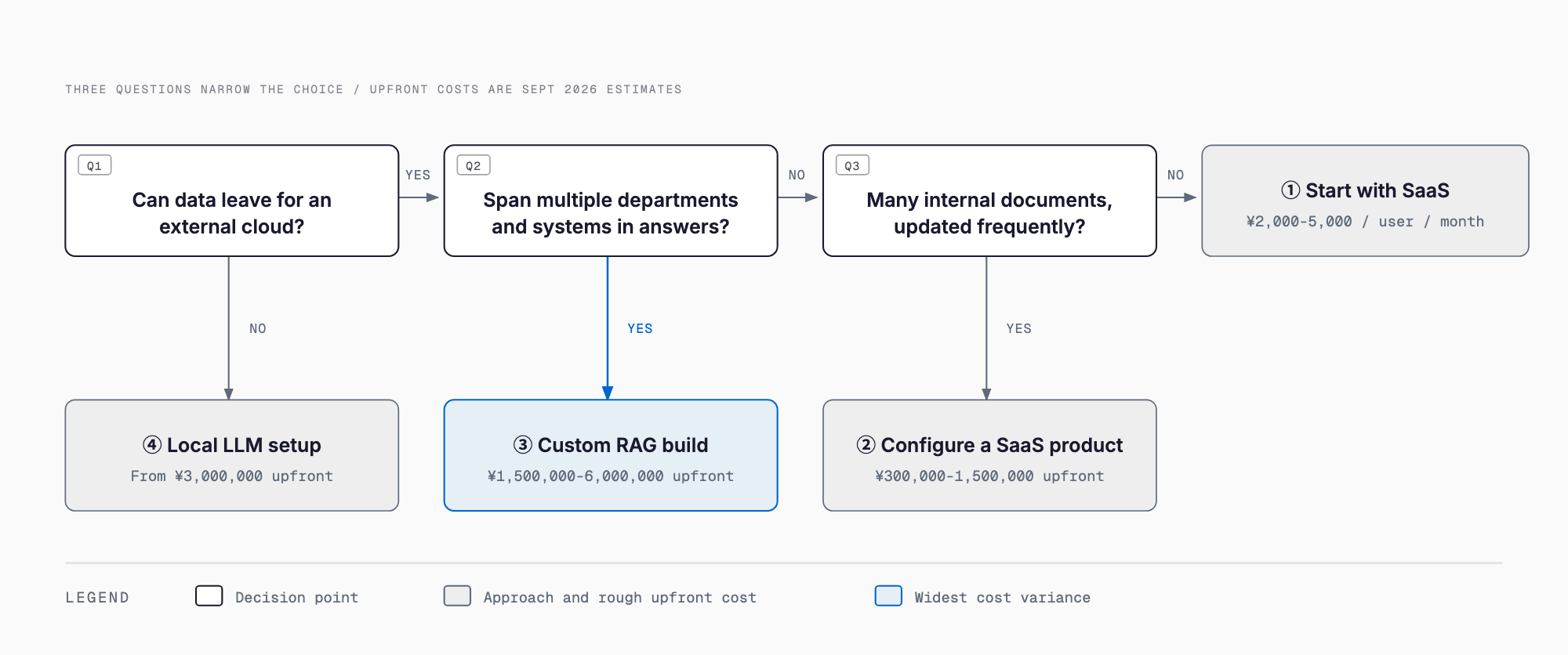
SaaS or custom development: which one fits?
As a rule of thumb, if the volume of internal documents is small (tens to a few hundred items) and updated infrequently, a SaaS tool or a configured SaaS product is often enough. If you need to search across multiple departments and systems, or want answers that reflect live data from core systems via API — such as inventory levels or approval status — custom RAG development is worth considering. Companies whose industry regulations or security policies prohibit sending data to external clouds may have no choice but to go with an on-premise or local LLM setup, even though the upfront cost is higher.
Why costs tend to balloon
・Data preparation: internal documents scattered across PDFs, spreadsheets, and paper require extra work to convert into a format the AI can process
・Access control: if visibility needs to differ by department or role, designing and building permission controls adds cost
・Integration with existing systems: connecting to attendance, HR, or expense systems via API requires development work for each connection
・Answer-accuracy tuning: if incorrect or off-target answers become noticeable after launch, additional question-answer training pairs need to be built
・Security requirements: some industries restrict sending data to external AI services altogether, forcing a local LLM setup
Starting small: PoC, then department rollout, then company-wide
Rolling out to the entire company at once tends to inflate costs, since requirements get misjudged and data preparation falls behind. A more realistic approach is to pick a single department — general affairs or IT, for example — run a PoC (proof of concept) with a few dozen existing FAQs and manuals, and check both answer accuracy and actual usage. If the PoC shows promise, expand to more departments, resolving operational issues found along the way (update frequency, who handles wrong answers, and so on) before rolling out company-wide. Many failed AI rollouts stem from skipping this staged approach and attempting a company-wide launch from day one — see common AI adoption failure patterns for more.
Measuring impact: thinking about payback period
A rough way to estimate impact is: number of inquiries reduced x time per inquiry x hourly labor cost. For example, if general affairs and IT handle 200 routine questions a month, each taking an average of 10 minutes, at an hourly labor cost of ¥3,000, the monthly handling cost is 200 x (10/60) x ¥3,000, or about ¥100,000. If the chatbot lets employees self-resolve half of those (100 questions), the monthly saving is about ¥50,000, or roughly ¥600,000 a year. For a RAG project with an upfront cost of ¥1,500,000, a simple calculation puts the payback period at about 2.5 years. This is only an illustrative example — actual reduction rates and labor costs vary by company, so it's worth running the numbers based on your own inquiry volume.
Pre-launch checklist
・Have you defined the scope up front (company-wide or a specific department, and which document types)?
・Do you know the state of your internal documents (formats, update frequency, duplicates or contradictions)?
・Have you decided how access permissions will be designed by department or role?
・Have you confirmed whether integration with existing systems is needed, and whether APIs exist for them?
・Have you checked internal policy and industry rules on sending data to the AI service you plan to use?
・Have you assigned an owner for post-launch operations (content updates, handling wrong answers)?
・Have you set success criteria for the PoC in advance (usage rate, answer accuracy, target reduction in inquiries)?
What is the difference between an internal AI chatbot and RAG?
RAG (Retrieval Augmented Generation) is a technical approach in which the AI searches external data, such as internal documents, and references it when generating an answer. An internal AI chatbot is generally the broader service or feature that uses RAG as one of its implementation methods.
Does it make sense for a small company (10-30 employees) to introduce one?
With a small headcount, contracting an existing SaaS AI tool on a per-seat basis is often more cost-effective than building custom RAG. A practical path is to start with a SaaS tool, then move to a configured product or custom development once inquiry volume and workload grow.
How long does it take to see results after launch?
It depends on the scope of the PoC, but the SaaS or configured-product approach, which simply feeds existing FAQs to the AI, can typically go live within a few weeks to a month. Custom RAG development, including requirements definition and data preparation, generally takes about two to four months.
Is a free AI chatbot tool good enough?
Free plans often limit the number of users or the scope of data integration, so if you need to search across multiple internal systems or manage permissions by department, a paid plan or custom development may be necessary. A reasonable approach is to first validate fit with a free plan, then consider a paid plan or custom development if it falls short.
Related free tools (no sign-up, instant results)
Feel free to contact us
Contact Us