How to Build and Publish a Grok Bot to the Marketplace
The Grok Bot Marketplace lists 69 public Bots from 43 creators in 9 categories. This guide covers building a Bot, skills, routines, and template publishing.
What Is the Grok Bot Marketplace
xAI is reported to have launched the "Bot Marketplace" on August 28, 2026, a place to build and share Grok Bot templates — just 17 days after Grok Bot's beta began on August 11. Its tagline is "Find your next AI teammate." As of September 9, 2026, the official site lists 69 Bots, 43 creators, and 9 categories. Grok Bot's own launch was covered in Grok Bot overview: explaining the August 11 announcement. This guide, based on xAI's official docs, walks through how to build a Bot, define skills and routines, publish it as a template, and the design patterns visible in the instructions written into published Bots.
From Building to Publishing: The Workflow
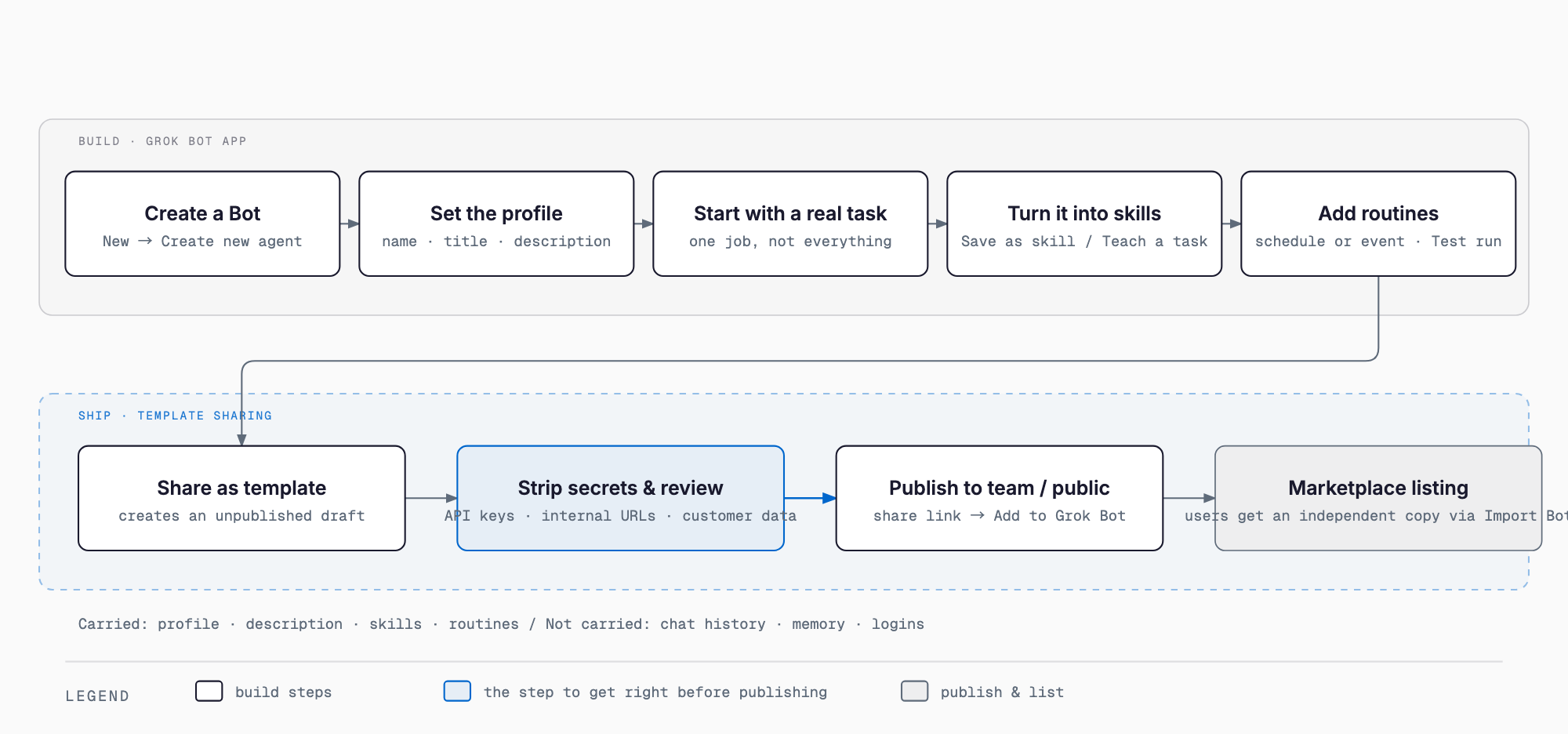
Before the step-by-step details, here is the big picture. Building a Bot broadly follows this path: create it → set its profile (name, title, description, avatar) → start a conversation around one specific task → save a process that worked as a skill → schedule recurring work as a routine → turn it into a template with Share as template → manually remove secrets such as API keys, internal URLs, and customer data → publish it, either to your team or publicly → and the recipient adds their own independent copy via Import Bot (or Add to Grok Bot). What carries over into a template is the profile, description, skills, routines, and identity — not conversation history or learned memories. The "Sharing and Publishing as a Template" section below covers this in more detail. The next section looks at where the marketplace stands today, then each step is covered in turn.
Where the Bot Marketplace Stands Today
As of September 9, 2026, here is what the Bot Marketplace looks like, and how a listing page is laid out.
| Item | Detail |
|---|---|
| Public Bots | 69 Bots |
| Creators | 43 creators |
| Categories | 9 categories |
| Category examples | From Grok Bot Team / Engineering / Sales / Marketing / Design / Personal / Recruiting & People / Operations / Product |
| Launch date (secondary source) | Reported as August 28, 2026 (17 days after Grok Bot's beta began on August 11) |
| Listing page layout | Description + Import Bot button, plus four tabs: Memories (Facts it already knows) / Skills (Playbooks it can run) / Routines (Jobs that run on their own) / Integrations (Apps it can use) |
Listed Bots include Outbound Prospecting, which researches leads and drafts first-touch emails (sending always requires approval); SEO & AEO Desk; Haggle Bot, which audits SaaS spend and drafts renegotiation asks; Recruiting Coordinator; Nightly Audit Engineer, which audits the codebase and opens a PR every night at 4 a.m.; Competitor Watch; and Copy Humanizer. On September 4, Elon Musk reportedly called Haggle Bot a "gamechanger." xAI's guide collection (x.ai/bot/guides) also publishes operational write-ups such as "How I run multiple teams of Grok Bots" (8/27).
Building a Bot
- From the sidebar, choose "New" (or Cmd/Ctrl+N) → "New chat" → "Create new agent"
- A Bot named "New Agent" is created
- Open "Bot actions → Edit Profile" to set its name, title, description, and avatar
- Start with one specific task rather than framing it as a do-anything assistant
Writing rule-like instructions into the Description field makes a Bot safer to operate. The official docs' own example is "Never send external messages without approval." Full steps are in the official docs at docs.x.ai/grok-bot/bots. Putting multiple Bots into the same group chat makes handoffs between them visible, so they can work together. The range of plans that can use Grok Bot has also been expanding in stages; see the follow-up on Grok Bot's expanding plan access for details.
Defining "The Job" with Skills and Routines
- A Skill is "a reusable set of instructions for how to do a task," including steps, decision rules, expected output, and safety boundaries
- There are two ways to create one: ask the Bot to "Save the process we just used as a skill" right after completing a task by hand, or use "Teach a task" to demonstrate a browser workflow for up to 10 minutes and then add decision rules and approval boundaries to the resulting draft
- Skills are reviewed and installed under "Settings → Plugins," and referenced by typing "/" in the desktop input box; private skills are enabled per Bot
- A skill should spell out six things: when to use it, the inputs and access it needs, the workflow itself, how to verify the result, what it returns, and which steps require approval
- A Routine "tells one Bot when to run a workflow — on a schedule or, where supported, after an event." Scheduled routines look like "Every weekday at 8:00 AM, run the Daily customer-risk skill," while event-based ones (triggered by a Slack message or GitHub notification, for example) need an extra connection
- Building a routine means deciding the owning Bot, the schedule or input source, the expected result, the approval boundary, and what happens when data is missing — then verifying it with a Test run before turning it on
- Limits: up to 50 routines per Bot, with the last 20 runs kept in history. Deletion is immediate and cannot be undone. Sending, purchasing, deleting, and changes to production systems always require approval, and it's recommended to avoid broad listeners
Sharing and Publishing as a Template
The official sharing steps are simple: open the Bot, copy its share link, and the recipient previews it on x.ai before choosing "Add to Grok Bot" in the Grok Bot app to confirm. For going public, the process is described as choosing "Share as template" from the Bot's settings, which generates an unpublished draft; after reviewing it, you choose either to publish it to your team or to publish it publicly and copy the link.
| What carries over | What does not |
|---|---|
| Profile, description, skills, routines, and identity | Conversation history, learned memories, chat attachments, and your computer or login credentials |
Before publishing, you need to manually remove secrets such as API keys, internal URLs, and customer data — these are not stripped out automatically, according to the official docs. Whether a publicly shared template is then automatically listed on the Bot Marketplace, or goes through some application or curation process, is not specified in the official docs as of this writing; the marketplace itself is best understood, within the facts available, simply as a listing of "public Bots" credited to their creators. Redistributing a template is also said to require the original creator's permission.
Design Patterns from Published Bots
- Define a "One job" in a single sentence, and spell out "Anti-jobs" to keep the Bot from overreaching
- Use "FIRST RUN" to fix the questions asked during initial setup, and "DAY TWO" to define how it behaves afterward
- Put a guardrail up front stating that sending, paying, or signing is never done without an explicit go-ahead
- Write down quality standards for output, such as backing up dollar figures and never fabricating numbers
Haggle Bot by Daniel Gartshein, for instance, audits SaaS spend and drafts renegotiation requests, but its description explicitly states that it never pays, signs, or sends on its own. Publishing this kind of "what it does and what it never does" directly in the Bot's own text is a pattern seen across many of the 69 public Bots.
A Safe Rollout Process for Installers
- Before adding a Bot, read its description, skills, and routines on the preview screen
- Keep connected accounts to the minimum needed
- Verify behavior with a safe test task before turning on any routine
- Adding a Bot requires agreeing that it "may perform actions on your behalf ... through your connected accounts," so approve only after understanding what that means
- Remember that every Bot in an account shares the same cloud computer
Implications for Small and Midsize Businesses
The idea of carving a routine task out into a single "one job" Bot is not specific to Grok Bot. When a piece of daily work has a fixed procedure and decision rules that can be written down, the same sequence — write it up as a skill, decide the approval boundary, then turn it into a routine — is a useful way to think about building internal templates. At the same time, sharing or publishing anything outside the company requires the same discipline of manually checking for and removing secrets such as API keys and customer data.
Frequently Asked Questions
Can anyone build a Bot?
According to the official docs, Grok Bot is available to subscribers on eligible plans, who can create one from the corresponding app via "New agent." The expanding range of eligible plans is covered in a separate article.
What does the other party get when I publish a Bot?
The profile, description, skills, routines, and identity carry over. Conversation history, learned memories, chat attachments, and your computer or login credentials do not, according to the official docs.
Is there a review process for publishing?
Whether a publicly shared template is automatically listed on the Bot Marketplace, or goes through an application or curation process, is not specified in the official docs as of this writing.
What are the risks when installing a Bot?
Adding one requires agreeing that it may perform actions on your behalf. It's recommended to review its contents in the preview, keep connected accounts to a minimum, and verify behavior with a safe test task before enabling any routine.
Summary
As of September 9, 2026, the Grok Bot Marketplace lists 69 public Bots from 43 creators across 9 categories. The official docs describe a consistent path for building one: start from a single concrete task, turn what works into a skill, turn recurring work into a routine, and manually strip out secrets before publishing. The instructions written into published Bots also share recurring patterns — a One job, Anti-jobs, a FIRST RUN/DAY TWO structure, approval guardrails, and explicit quality standards — that are worth borrowing when building your own.
Feel free to contact us
Contact Us