Microsoft 365 Migration Cost Guide for SMBs
Microsoft 365 for 5 users costs about $70/mo plus $700-1,400 setup. Covers plan tiers, mail/file migration, cost by size, DIY vs vendor, and pitfalls.
Microsoft 365 licensing typically runs $5-25 per user per month, and migration setup work adds roughly $700-5,600 upfront when a vendor does it, depending on headcount and migration scope. This guide walks through license tiers, what migration work actually involves, cost estimates by company size, and the mistakes that cause the most trouble. All figures are rough guidance as of September 2026 — Microsoft revises pricing frequently, so confirm current plans on the official site before signing.
License tiers and monthly cost
SMBs typically choose from three plans. Business Basic is browser-only Office plus Exchange mail, Teams, and OneDrive — no desktop Office apps. Business Standard adds desktop Word/Excel/PowerPoint and is the most commonly chosen tier. Business Premium adds device management (Intune) and stronger security (roughly Entra ID P1-equivalent), which helps companies with no dedicated IT staff maintain a reasonable security baseline. Annual commitment (paid monthly) is usually 20-30% cheaper per seat than a pure month-to-month plan; choose month-to-month if you need cancellation flexibility, annual if cost matters more. For a broader groupware comparison and how this stacks up against Google, see groupware cost comparison and Google Workspace vs Microsoft 365.
| Plan | Monthly cost (per user, annual) | Key features | Best for |
|---|---|---|---|
| Business Basic | ~$5-6 | Web Office, mail, Teams, OneDrive | Small teams needing only mail and chat |
| Business Standard | ~$12-15 | Adds desktop Office apps | Typical SMBs producing documents regularly (most common pick) |
| Business Premium | ~$20-24 | Adds Intune device management and advanced security | Companies with no IT staff and many mobile/BYOD devices |
What migration work actually costs
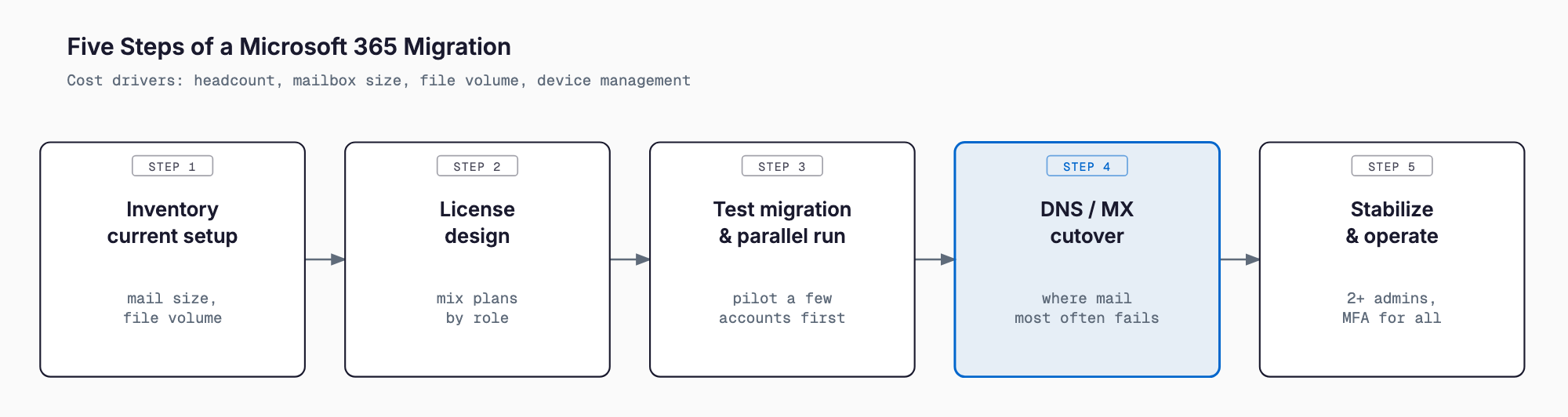
Beyond licensing, migration itself carries real cost. Key work items: initial setup (domain configuration, admin account, organizational structure); mail migration, moving inboxes and history from an existing rented mail server, Gmail, or on-prem Exchange into Microsoft 365 — PST-based export/import is especially prone to dropped messages or folders; file migration, moving files off an on-prem NAS into SharePoint/OneDrive (see NAS/file server cost guide and Azure file server migration for related context); Teams setup (team structure, external sharing permissions); Entra ID (formerly Azure AD) and multi-factor authentication setup — password-only protection is no longer sufficient, and account/password/MFA basics covers the fundamentals; and Intune device management, applying security policies to company laptops and phones. For the broader data migration picture, see data migration cost guide.
Total cost estimates by company size
Complexity and total cost scale with headcount. The estimates below assume annual Business Standard licensing; actual figures vary with mailbox history size and file volume.
| Employees | Monthly license cost | Migration setup cost (one-time) | Notes |
|---|---|---|---|
| 5 | ~$70 | $700-1,400 | Mainly mail migration; in-house handling is realistic |
| 20 | ~$280 | $1,400-2,800 | NAS migration and MFA setup add complexity; vendor help recommended |
| 50 | ~$700 | $2,800-5,600 | Department-level access design and Intune operation typically required |
DIY vs. vendor project vs. monthly managed support
There are three broad approaches. Doing it in-house saves money but demands staff time and carries risk, particularly around DNS changes and mail migration mistakes that directly disrupt operations — realistic for a 5-person company with a tech-comfortable staff member. Hiring a vendor for a one-time project costs more upfront but completes the migration on a fixed schedule with minimized disruption — better suited to companies above 20 employees or with a complex existing mail environment. Monthly managed support extends past the migration itself into ongoing help-desk response, account management, and security review — this is often where the real value is, since companies without in-house IT feel the gap most after go-live, not during it. See IT support outsourcing guide for how this works day-to-day.
- In-house: near-zero upfront cost, but high staff time cost and mistake risk
- Vendor project (one-time): roughly $700-5,600 upfront, best for a fast, reliable cutover
- Monthly managed support: roughly $200-700/month, covers ongoing help-desk and account management after migration
Common migration mistakes
Most Microsoft 365 migration problems trace back to insufficient planning, and most of them are preventable once you know the pattern.
- Mistiming the DNS/MX record cutover, causing mail to bounce for a period after switchover (usually caused by not running old and new mail servers in parallel long enough — also check SPF/DKIM/DMARC basics for gaps)
- Losing folders or attachments during PST-based mail export/import
- Buying more licenses than actual headcount needs, wasting money monthly (including forgetting to cancel seats for departed staff)
- Assigning Global Administrator rights to only one employee who later leaves the company, leaving nobody with admin access
- Skipping end-user training after migration, which drives up help-desk load more than expected
Pre-migration checklist
- Do you know your current mail server, retention period, and mailbox sizes?
- Do you have a rough estimate of the file volume to migrate (NAS and local PCs)?
- Are you sizing licenses to actual headcount, avoiding surplus seats?
- Do you plan to assign Global Administrator to at least two people?
- Have you set a DNS/MX cutover schedule with a parallel-run period for the old environment?
- Do you have end-user training and a support contact ready post-migration?
- Have you assigned ongoing responsibility for account management and security review after migration?
FAQ
How long does a Microsoft 365 migration take?
Roughly 1-2 weeks for a 5-person company, and 1-2 months for 20-50 employees with file migration involved. It depends heavily on mail/file volume and the complexity of the existing environment.
Can we keep using our existing email during migration?
Yes, with proper planning you can run the old server and new environment in parallel for a period to minimize disruption. Deciding the DNS cutover timing in advance is the key step.
Does the same approach apply when moving from Google Workspace to Microsoft 365?
The core steps (mail migration, file migration, account design) are similar, but feature and workflow differences are covered in detail in our Google Workspace vs Microsoft 365 comparison.
Do we need ongoing support after migration?
Companies without in-house IT often see a spike in help-desk requests in the first 1-2 months after go-live, which is why many pair the migration with monthly managed support.
Are there costs beyond the license fee?
Adding security features below what Business Premium includes, or exceeding storage limits, can incur extra costs. Listing required features before signing helps avoid surprises.
Summary
It helps to think of Microsoft 365 costs in two layers: licensing (headcount times monthly rate) and one-time migration work. A 5-person company should expect roughly $700-1,400 upfront, and a 50-person company roughly $2,800-5,600, though existing mail and file complexity will move these numbers. The failures worth avoiding most are the preventable ones — mail outages from a mistimed DNS cutover, and admin access concentrated in a single employee who later leaves. Work through the pre-migration checklist first, then choose your approach: in-house, vendor project, or ongoing managed support.
Related free tools (no sign-up, instant results)
Feel free to contact us
Contact Us