EDR & Antivirus Cost for Small Businesses (2026 Guide)
EDR for SMBs costs roughly $2-7 per device monthly, or $5-20 with managed MDR. Who needs it over antivirus, costs by size, and pitfalls before signing.
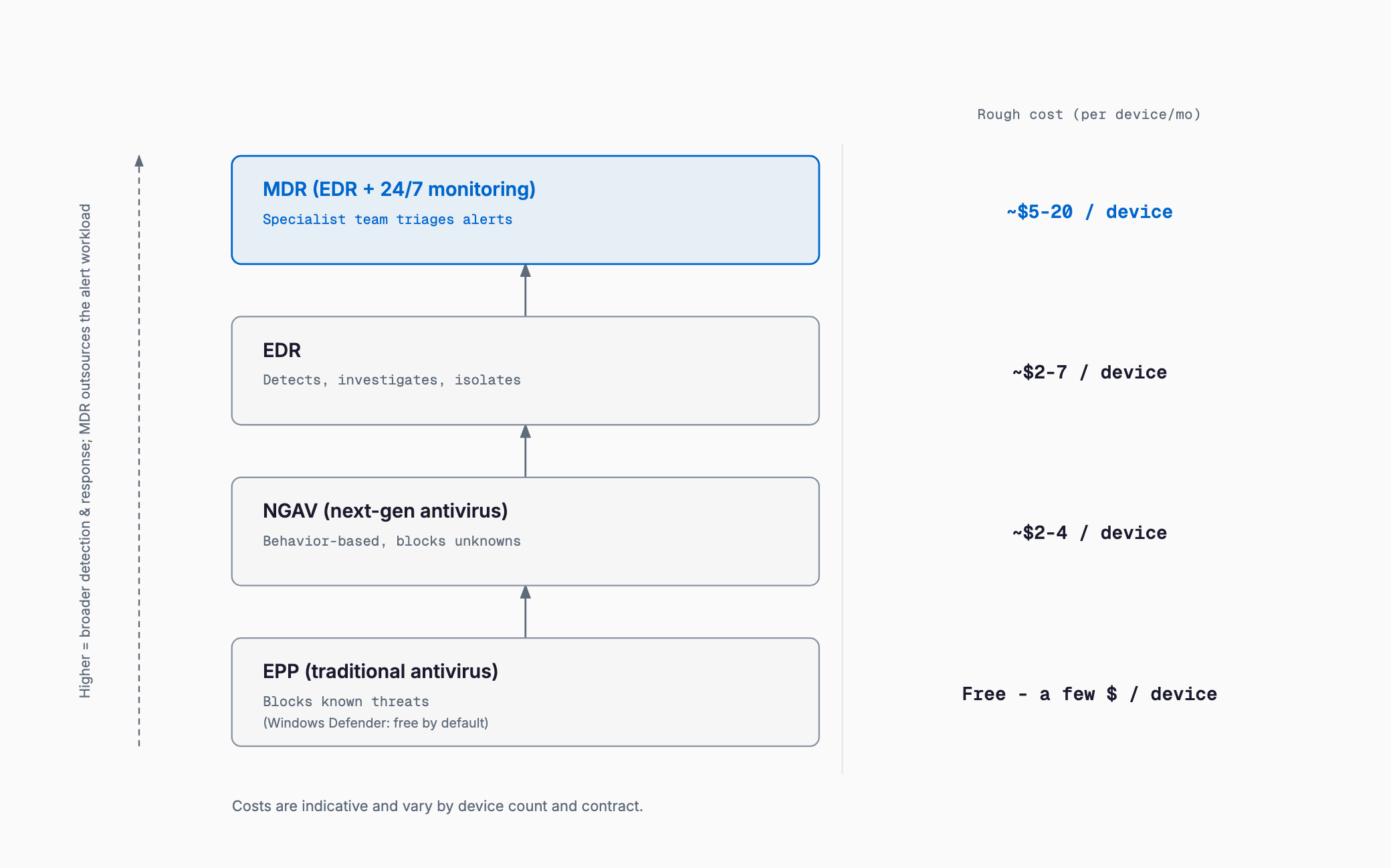
EDR (Endpoint Detection and Response) continuously monitors what happens inside a device — a PC, laptop, or server — to detect, investigate, and respond to suspicious activity after a threat gets past the front door. Typical cost runs roughly $2-7 per device per month if managed in-house, or $5-20 per device per month with MDR (Managed Detection and Response), where a dedicated team monitors alerts around the clock (these are general 2026 market ranges, not a quote). Many small businesses look into EDR because a business partner has requested it, or after reading about a ransomware incident — but without understanding how it differs from traditional antivirus, it's easy to end up signing an expensive contract based on a sales pitch alone. This article covers the difference between EPP (traditional antivirus), NGAV (next-gen antivirus), EDR, and MDR; what's actually included free in Microsoft Defender; how to judge whether your business really needs EDR; typical costs by company size; common pitfalls after deployment; and a checklist to run through before signing.
EPP, NGAV, EDR, and MDR: what's the difference
Products lumped together as "antivirus software" actually span several generations and approaches with meaningfully different protection models. Conflating them makes it easy to overpay for more than you need, or to miss a gap in coverage.
- EPP (Endpoint Protection Platform / traditional antivirus): Matches files against known virus signatures to detect and remove them. Strong against known threats, but new or unknown malware that doesn't match an existing signature can slip through
- NGAV (Next-Generation Antivirus): Adds AI-driven behavioral analysis and machine learning on top of signature matching to catch "suspicious behavior." Better at catching unknown threats than EPP, but its main job is still stopping intrusions at the door
- EDR (Endpoint Detection and Response): Doesn't assume it can block every intrusion. Instead it records and visualizes what happens inside a device after something gets in, alerts an administrator to suspicious activity, and can take response actions such as isolating the device from the network
- MDR (Managed Detection and Response): A service where an external team of specialists, not your own staff, monitors EDR alerts and handles initial response around the clock. Think of it as EDR (the tool) paired with the people who actually operate it
The key point is that EDR isn't a replacement for EPP/NGAV — most deployments run both together. NGAV stops as much as possible at the door, and EDR catches and responds to whatever slips through, following a "layered defense" approach. Dropping your existing antivirus after adding EDR alone can actually weaken protection against known threats, so when choosing a product, check whether both functions are included, or whether it's designed to run alongside your existing antivirus.
What's actually free in Microsoft Defender
One of the trickiest things for a small business to judge is how much security coverage is already included in software they're paying for anyway. Microsoft's lineup in particular has confusing tiers, so it's worth laying out clearly.
| Product / plan | Positioning | What's included |
|---|---|---|
| Built-in Microsoft Defender Antivirus | Built into Windows 10/11 at no extra cost | Basic NGAV-equivalent protection (real-time and behavioral detection) |
| Microsoft Defender for Business | Included in Microsoft 365 Business Premium, or available standalone | EDR-equivalent detection, investigation, and response; threat and vulnerability management |
| Microsoft 365 Business Premium | Monthly plan bundled with Office apps, email, etc. | Defender for Business plus device management (Intune) and conditional access |
| Microsoft Defender for Endpoint (Plan 2) | Enterprise-tier, aimed at mid-size to large organizations | Advanced threat hunting and deeper attack visibility |
In short, the built-in Windows Defender is free but doesn't include EDR functionality — getting EDR-level protection requires Microsoft Defender for Business, either bundled with Microsoft 365 Business Premium or contracted standalone. If your company already subscribes to Microsoft 365 Business Premium, you may already have EDR-equivalent capability at no extra cost, so it's worth checking your existing plan before signing up with another vendor and paying for overlapping coverage. That said, most Microsoft standard plans stop short of MDR (24/7 monitored response) — if you want monitoring outsourced, you'll need a separate MDR contract or a partner that monitors Defender alerts on your behalf.
Do you actually need EDR? A decision framework
Whether traditional antivirus (EPP/NGAV) alone is enough, or whether you need EDR, depends on your industry, the data you hold, and your internal capacity to respond. Priority is higher if any of the following apply.
- You run a business system handling personal or confidential client data on an in-house server or cloud platform
- A business partner (especially a larger company or government agency) requires proof of a documented security posture or audit compliance
- The kind of damage covered in Ransomware basics for small businesses — business shutdown, ransom demands — would be catastrophic for business continuity
- Many employees access internal systems remotely, making the security of devices outside the office network especially important
- There has been a past incident, suspicious activity, or you've heard of a peer company being hit
In cases like these, traditional antivirus — the built-in Windows Defender or a higher-tier NGAV product — is often sufficient for now.
- A very small company handling limited data, with nothing critical stored on an in-house server
- Operations run mainly on cloud SaaS, with little sensitive data actually stored on devices themselves
- Budget and staffing for security are extremely tight, and there's no one who could respond to EDR alerts even if it were deployed
That last point is easy to overlook but critical. EDR isn't a "set it and forget it" product — it only works when there's a process for someone to review and act on alerts as they come in. Deploying EDR with no one able to respond can be worse value than putting the same budget toward multi-factor authentication or a solid backup setup, as covered in Where to start with security for small businesses.
Also keep in mind that EDR protects endpoints (PCs and servers), while a UTM inspects traffic at the office gateway — they cover different ground. They complement rather than replace each other, so it's worth reading UTM firewall costs for small businesses alongside this guide: companies with many remote workers may weight their budget toward EDR, while those with many devices on-site may weight it toward a UTM. If you're about to replace PCs, adding the EDR agent to the setup work described in PC kitting costs and process helps avoid missed devices and extra labor charges.
Operational burden: the cost people forget
Judging EDR cost by license price alone is risky. EDR generates alerts continuously, and someone has to review each one, decide whether it's a false positive (a harmless action mistakenly flagged), and take action — isolating or investigating a device — when it's genuinely a threat. Not having anyone available to do this, or having that role buried under someone's other duties, is one of the most common reasons small businesses struggle after deploying EDR. MDR outsources exactly this burden: it costs more per month than EDR alone, but includes 24/7 monitoring and first-line response, making it a realistic option for companies without a dedicated IT staff. Conversely, deploying cheap standalone EDR with a "we'll look when an alert comes in" mentality often ends up delivering very little real protection for the money spent.
Rough cost by company size
The figures below are general market ranges only, and vary by product, vendor, and contract terms (annual prepay vs. monthly, for example). Vendors such as CrowdStrike, SentinelOne, Sophos, ESET, and Trend Micro all offer SMB-oriented plans with differing price points and feature sets.
| Device count | EDR only (monthly) | With MDR (monthly) | Annual estimate (EDR only) |
|---|---|---|---|
| 10 devices | $20-70 | $50-200 | $240-840 |
| 30 devices | $60-210 | $150-600 | $720-2,520 |
| 100 devices | $200-700 | $500-2,000+ (quoted individually at this scale) | $2,400-8,400 |
These figures simply multiply the general per-device range ($2-7 alone, or $5-20 with MDR) across device counts. In practice, larger deployments often get volume discounts, while integration with existing security tools or initial setup can add separate one-time costs. When comparing quotes, check carefully what's actually covered by the monthly fee — the maximum device count, whether alert response is included, and how often reports are provided.
What drives the cost
- Monitoring included or not (EDR alone vs. MDR): Whether your own staff can handle alert response determines whether EDR alone or an MDR bundle makes sense, and drives most of the cost difference
- OS and device coverage: Extending coverage beyond Windows to Mac, smartphones, and tablets increases license count and per-unit cost
- Log retention period: How many days or months of logs a product retains from intrusion to detection affects price and the depth of forensic investigation possible
- Integration and migration work: One-time setup cost to remove an existing antivirus product and configure the new one
- Contract volume and term: Annual prepay vs. monthly billing, and volume discounts at higher device counts, both shift the per-unit price
- Support level: Availability of local-language support, phone support, and after-hours incident response coverage
Common mistakes and pitfalls
There are a handful of recurring mistakes around EDR and antivirus deployment, on both the financial and operational side.
- Deployed and then ignored: Assuming EDR alone provides safety, with no one actually assigned to check alerts — so an intrusion isn't noticed for weeks even though it was flagged
- Running two products at once slows everything down: Adding a new EDR product without uninstalling the old antivirus first, causing the two security tools to conflict and making devices noticeably slower. Always fully uninstall the old product before switching
- Missed license renewals: An expired credit card or a forgotten renewal step leaves devices unprotected without anyone noticing
- Mac and mobile devices left uncovered: Contracting only for Windows PCs while the Mac or phone an executive or salesperson uses goes uncovered, becoming the entry point for an attack
- A gap between what was sold and what's actually covered: Signing up believing "monitoring" was included, only to discover the plan is "alerts only" and your own staff still has to review them. Get exactly what's covered — monitoring, detection, and response — spelled out in writing before signing
Checklist before signing
- Have you confirmed, using the decision framework above, whether your business genuinely needs EDR?
- Have you checked whether Microsoft 365 Business Premium or a similar existing plan already includes EDR-equivalent coverage?
- Is it decided internally who reviews and responds to alerts (and if no one can, have you considered an MDR-included plan instead)?
- Have you decided whether coverage needs to extend beyond Windows to Mac, smartphones, and tablets?
- Do you have a plan to fully uninstall the existing antivirus before deploying a new product?
- Does the quote spell out in writing exactly what's covered — monitoring, detection, and response (isolation/investigation)?
- Has someone been assigned to manage license renewal and billing?
- Have you gotten competing quotes from more than one vendor?
If we already have antivirus, do we still need EDR?
Not necessarily, but it depends on your risk profile. Traditional antivirus (EPP/NGAV) is mainly designed to block intrusions at the door, with limited ability to detect and investigate what happens after something gets past it. If you handle personal or confidential data, or a business partner requires a documented security posture, adding EDR is worth considering.
Isn't the built-in Windows Defender enough on its own?
The built-in Microsoft Defender Antivirus is free and provides basic protection, but it doesn't include EDR-level detection, investigation, and response. If you need EDR-equivalent functionality, you'd need to move to Microsoft Defender for Business, either bundled with Microsoft 365 Business Premium or as a standalone subscription.
Does deploying EDR mean we get 24/7 monitoring?
No, EDR alone doesn't automate monitoring. EDR is the tool that generates alerts; having those alerts reviewed and given first-line response around the clock is what MDR (Managed Detection and Response) provides as a separate service. If you don't have staff who can respond to alerts, consider an MDR-included plan rather than EDR alone.
Does a company with around 10 employees really need EDR?
Headcount alone doesn't determine the answer. If you run a business system handling personal data, or a partner requires a documented security posture, EDR is worth considering even at that size. Without those conditions, and without staff who could respond to alerts, starting with more basic measures and revisiting EDR once you have the capacity to operate it is also a reasonable choice.
Summary
EDR typically costs $2-7 per device per month managed in-house, or $5-20 per device per month with 24/7 MDR monitoring included. The key decision isn't picking the cheapest product — it's understanding the difference between traditional antivirus (EPP/NGAV) and EDR, confirming your business genuinely needs EDR, and planning who will respond to alerts, whether that's your own staff or an outsourced MDR team. Avoiding the common pitfalls — deploying and then ignoring alerts, running two conflicting products at once, and leaving Mac or mobile devices uncovered — starts with working through a checklist before signing and comparing quotes from more than one vendor.
Related free tools (no sign-up, instant results)
Feel free to contact us
Contact Us