Copier Lease Costs and Review — Counter Charges, Exit Terms
Copier lease costs = monthly lease fee plus per-page charges. Price ranges, early-termination traps, re-lease, data erasure and a review checklist for SMBs.
Copier (multifunction printer) leasing costs are made up of two parts: a fixed monthly lease fee and a counter charge that rises with the number of pages you print. For a typical A3 color multifunction printer used by a small business in Japan, the monthly lease fee is roughly 10,000 to 40,000 yen, and the counter charge is roughly 1 to 3 yen per black-and-white page and 10 to 20 yen per color page. Terms vary a lot by vendor and timing, so please treat the figures in this article as general guidelines only.
Copier contracts often run five or six years. Once signed, early termination is usually not allowed, and canceling can trigger a lump-sum demand for the remaining lease payments. Even so, many companies sign what a sales rep recommends without reading the contract closely. This article walks through the cost breakdown, typical price ranges, lease versus rental versus purchase, common problems, and how to review your contract, in plain terms for non-IT staff.
What determines the cost of a copier
A monthly copier bill may look like a single amount, but it is actually several items stacked together. Separating them makes it clear where the money goes and where you can cut.
- Monthly lease fee: The price of the machine, split over the contract period (often five to seven years). It depends on the machine class (A4 or A3, speed, color) and normally stays fixed during the contract.
- Counter charge: A fee based on the number of pages copied or printed. Black-and-white and color have different unit prices, and the bill is based on the monthly counter reading.
- Maintenance fee: Covers repairs, periodic inspections, and replacement of consumable parts. It is often included in the counter charge, but some vendors sell it as a separate contract.
- Toner and paper: Toner is often included in the maintenance or counter charge, while paper is usually extra. What counts as toner-included depends on each contract.
- Setup fees: Delivery, installation, network and scan-to-email setup, and printer driver configuration on PCs. These are sometimes free, and sometimes billed separately when you ask for the setup work.
The easiest item to overlook is what the counter charge actually covers. Even if a contract says maintenance and toner are included, the contract wording decides how far parts replacement and on-site visit fees are covered. We also explain how to check maintenance terms in maintenance contract checkpoints.
How counter charges work
The counter charge is based on the page counter built into the machine. The monthly reading, sent automatically or reported by staff, determines the usage, and the bill is black-and-white pages times the black-and-white rate plus color pages times the color rate.
Two points deserve attention. Some contracts count an A3 page as two A4 pages, and some include scans and received faxes in the count while others do not. With the same unit price, the monthly bill can differ depending on how pages are counted.
Some contracts also set a base charge or minimum page count that you pay regardless of use. For example, if a contract bills at least 1,000 pages a month, your cost will not drop even when printing falls. Companies that are going paperless are especially likely to lose out on this clause.
Typical price ranges
The table below shows commonly seen ranges by machine class for small and midsize businesses. Ranges vary by vendor, contract term, promotions, and page volume, so use it as a yardstick when comparing quotes.
| Machine class | Typical scale | Monthly lease fee (guide) | Counter rate (guide) |
|---|---|---|---|
| A4 compact (mono or color) | Up to 5 people, about 500 pages/month | About 5,000 to 15,000 yen | Mono about 1-3 yen / color about 10-20 yen |
| A3 mid-speed (about 35 ppm) | 10 to 30 people, 2,000 to 5,000 pages/month | About 15,000 to 30,000 yen | Mono about 1-3 yen / color about 10-20 yen |
| A3 high-speed (about 50 ppm) | 30+ people, 5,000+ pages/month | About 30,000 to 60,000 yen | Mono about 0.8-2 yen / color about 8-15 yen |
| Heavy printing / office-wide | Multiple units or sites | Depends on units and features | Tends to be cheaper with higher volume |
These are general guidelines, not figures from a specific survey. If you print a lot, there is room to negotiate a lower counter rate. If you print little but install a high-speed machine, only the monthly lease fee gets heavier. The starting point for choosing the right class is knowing your own monthly page volume, split into black-and-white and color.
A monthly cost example
Suppose an A3 mid-speed machine has a monthly lease fee of 20,000 yen, you print 3,000 black-and-white pages at 2 yen, and 500 color pages at 15 yen. The counter charge is 6,000 yen plus 7,500 yen, or 13,500 yen, so the total is 33,500 yen a month. That is about 400,000 yen a year and about 2 million yen over five years. Counter charges that build up with usage can matter more than the machine price itself.
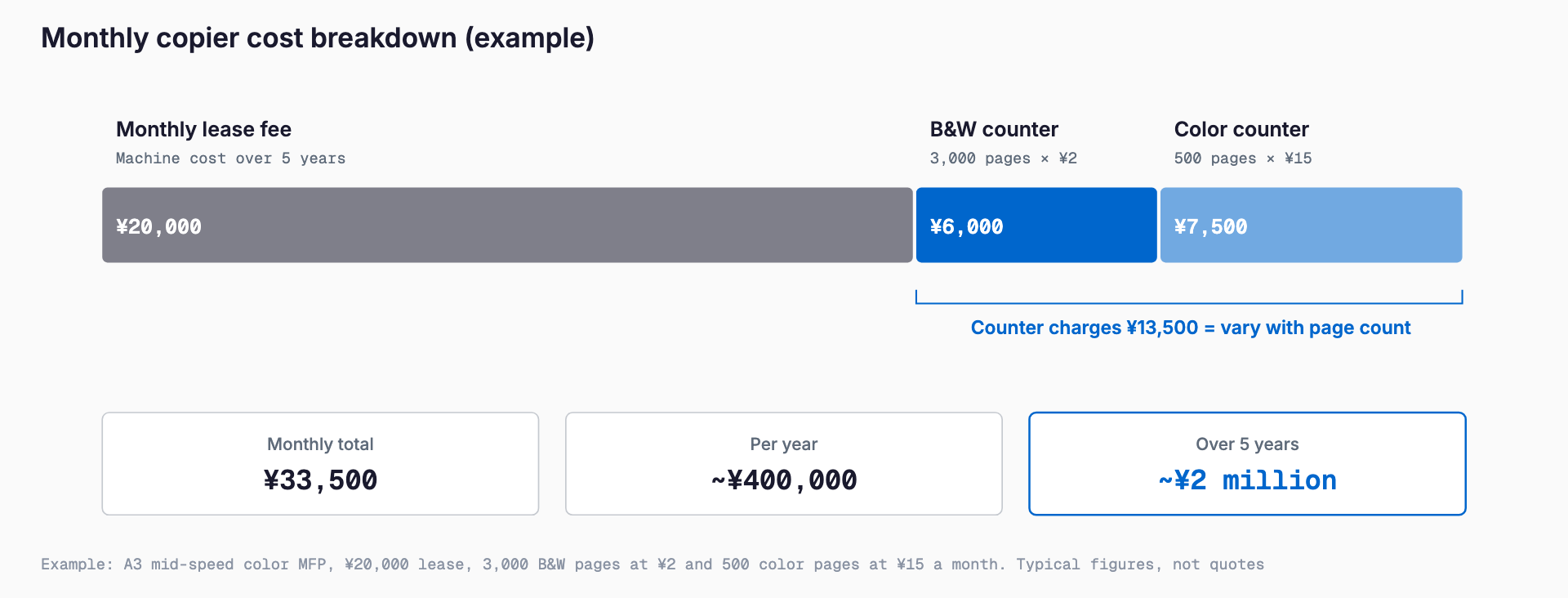
Color rates are five to ten times the black-and-white rate, so a small rise in color pages can change the bill noticeably. Simply setting black-and-white as the default for internal documents can cut tens of thousands of yen a year.
Choosing the right machine
The first decision in any quote is the machine class. Choosing a fast, feature-heavy model just in case raises the monthly fee and makes you pay for features you never use. Choosing one that is underpowered causes print queues and jams. Sort out your recent monthly page volume, the number of simultaneous users, how often you print A3, and how much color you need before narrowing down.
Also check scan destinations (email, shared folders, cloud) and printing from PCs and smartphones. A copier sits on your office network, and weak settings can lead to data leaks. Ask whether the installer will change the administrator password and disable unused functions as part of setup.
Lease vs. rental vs. purchase
There are three main ways to get a copier: lease, rental, or purchase. Each suits different situations.
| Item | Lease | Rental | Purchase |
|---|---|---|---|
| Contract term | Typically 5 to 7 years | One month to several years | None |
| Early termination | Generally not allowed (remaining payments due) | Often possible | Not applicable (resale is your own responsibility) |
| Monthly burden | Relatively low | Higher than lease | Large upfront cost, maintenance only afterward |
| Maintenance and repairs | Usually bundled with a maintenance contract | Often included in the fee | Separate maintenance contract needed |
| Accounting | Lease asset or expense, depending on type | Expensed | Fixed asset, depreciated |
| Best for | Long use with a low monthly cost | Short-term use or a trial period | Long use with few units |
The same thinking applies to PCs. The basics of lease versus purchase are covered in lease versus purchase for office PC replacement. Accounting and tax treatment changes with the type of lease, so confirm with your tax accountant.
Common mistakes and problems
You cannot cancel, and the remaining lease is billed at once
Five- or six-year leases generally cannot be canceled midway. If you want out because of an office move, downsizing, or a switch to another vendor, you are typically billed all or most of the remaining lease payments at once. If you assume that canceling simply ends the monthly fee, a payment of hundreds of thousands of yen can come as a shock.
Base charges and minimum pages make you pay for unused volume
As noted above, a contract with a minimum page count does not get cheaper when printing falls. Before signing, check whether there is a minimum and what the rate is for pages beyond it.
Expensive door-to-door sales and switching offers
Many consultations involve unfavorable contracts signed after a visit or call offering to take over your current lease or promising a big discount. In some cases the balance of the old contract is added into the new one, and the total ends up higher. Do not sign on the spot. Take the quote and contract home and review them.
Re-lease after the term and return costs
When the lease ends, some contracts automatically move to a re-lease, often billed yearly at about one month of the original lease fee. That is fine if you keep using the machine, but if you forget the paperwork it continues even when you do not need it. Some contracts also charge packing, shipping, and removal fees on return, which catches companies off guard at the end.
Forgetting to erase data before return
A copier has an internal hard disk or SSD, and data from copied or scanned documents may remain on it. Before returning or disposing of the machine, confirm that the data will be erased. Ask in advance how it will be erased and whether an erasure certificate is issued. For the approach for PCs and other devices, see data erasure when disposing of PCs.
Checklist before signing or when reviewing
- Monthly page volume: Have you checked black-and-white and color pages for the last six months?
- Counter rates: Have you confirmed the mono and color rates, how A3 is counted, and how scans and faxes are treated?
- Minimums and base charges: Have you confirmed whether they exist, the amount, and the rate beyond the minimum?
- Term and early termination: Have you confirmed the term, penalty, and how the remaining lease is calculated?
- Maintenance scope: Are toner, parts, on-site visits, and repair response times included?
- After the term: Have you checked for automatic re-lease and for return shipping and removal fees?
- Data erasure: Have you confirmed the erasure method on return and whether a certificate is issued?
- Multiple quotes: Have you obtained at least two or three quotes under the same conditions?
- Record keeping: Are the contract, lease application, and maintenance agreement kept in one place, with the end date logged?
How to carry out a review
1. Gather current contracts: Collect the lease contract, maintenance contract, and recent invoices, and list the model, end date, monthly fee, and counter rates.
2. Check actual usage: Look at monthly pages (mono and color) for the last six to twelve months, plus scan and fax use.
3. Check the cost of leaving: Confirm the early termination terms and remaining lease, and decide whether waiting for the end date is better.
4. Reconsider units and class: If printing has fallen, consider a smaller machine or fewer units; if capacity is short, consider adding units or a faster model.
5. Get multiple quotes: Compare under the same conditions for model, term, maintenance scope, and data erasure.
6. Reduce paper itself: Use e-contracts, cloud storage, and cloud fax to cut page counts.
7. Switch at the end date: Start preparing a few months before the end, and arrange return and data erasure.
If you keep a copier mainly for faxing, you can also rethink the phone and fax setup itself. See switching to a cloud PBX for reference.
Frequently asked questions
What is the typical lease fee for a copier?
As a general guide, an A3 mid-speed color machine has a monthly lease fee of about 15,000 to 30,000 yen, with counter charges of about 1 to 3 yen for black-and-white and 10 to 20 yen for color. Ranges vary by vendor, term, and volume, so compare quotes from several companies.
Can I cancel a lease midway?
Leases generally cannot be canceled early. If you must cancel, the remaining lease payments are usually billed in one lump sum. Check the early termination clause and the calculation method before signing.
How can I lower the counter charge?
If you print a lot, you may be able to negotiate a lower rate. You can also lower the bill by setting black-and-white as the default, using duplex and multi-page printing, and digitizing documents to print less.
What happens to the data on a copier after the lease ends?
A copier may still hold data from copied or scanned documents. Before returning it, confirm the erasure method and whether a certificate is issued, and ask the maker or maintenance company to initialize it if needed.
Summary
Copier costs come from a monthly lease fee and a counter charge, and the contract often runs five years or more. The key to avoiding regret is to know the typical price ranges and confirm minimum pages, early termination, re-lease, and data erasure on return before you sign.
Even for existing contracts, listing the end dates and conditions and comparing them with actual print volume often reveals room for improvement. A good first step is simply to gather all your contracts in one place.
Related free tools (no sign-up, instant results)
Feel free to contact us
Contact Us