LFM2.5-24B-A2B Requirements: VRAM, GPU & Mac Guide (2026)
LFM2.5-24B-A2B needs ~14-15GB at Q4; a 16GB VRAM GPU or 24GB+ Mac runs it. Updated Oct 2026: memory by quantization, GPU/Mac picks, speeds, benchmarks.
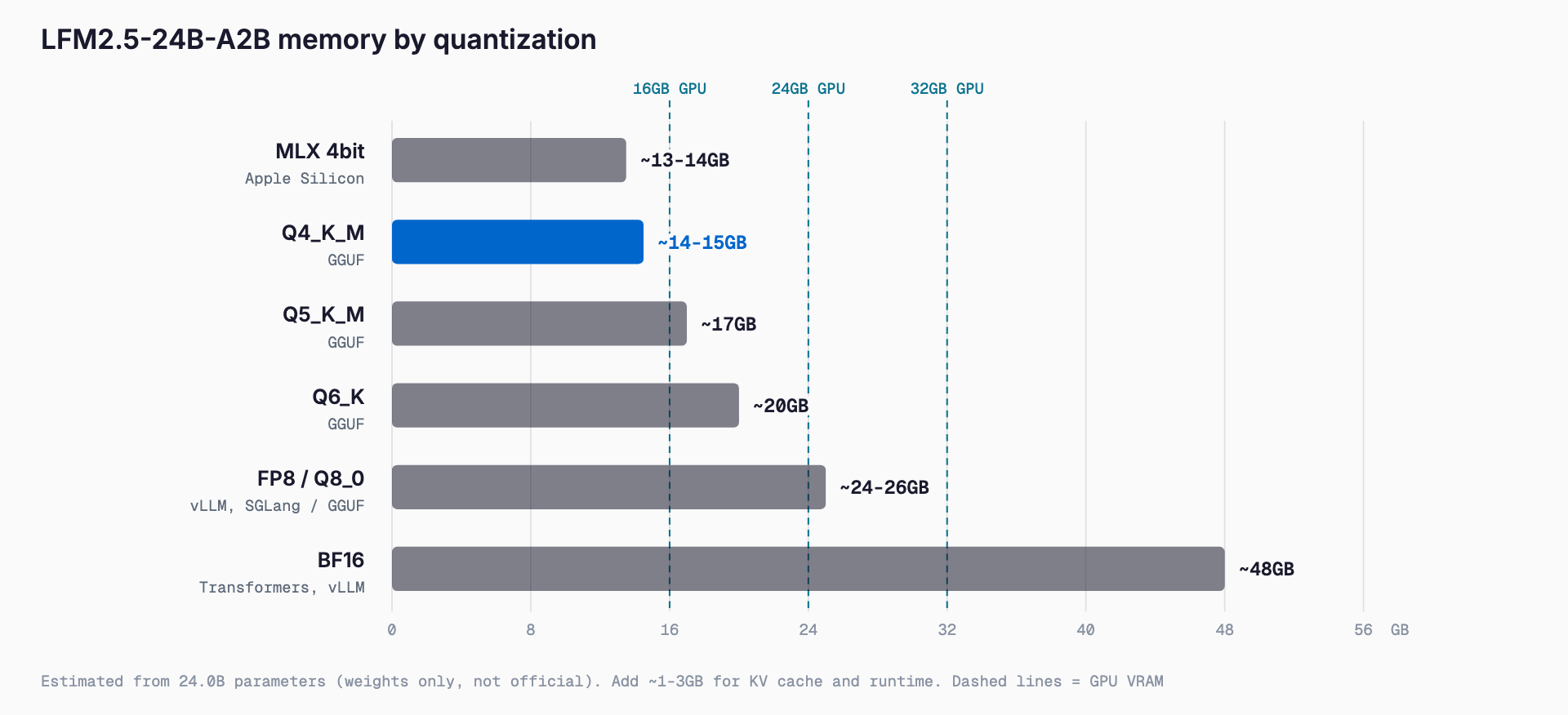
LFM2.5-24B-A2B is a Mixture-of-Experts model released as open weights on Hugging Face by Liquid AI on October 13, 2026, with 24.0B total parameters and about 2.45B active per token. At Q4_K_M it should fit in roughly 14-15GB, so it runs on a 16GB VRAM GPU or a Mac with 24GB or more of unified memory. The official model card gives no memory requirements, so every figure here is our own estimate computed from the parameter count. It succeeds LFM2-24B-A2B, and the context window grows from 32K to 131,072 tokens.
Requirements at a glance
| Precision / quantization | Weight memory (est.) | Suggested hardware |
|---|---|---|
| BF16 | ~48GB | 2x 24GB GPUs, RTX PRO 6000, or a Mac with 64GB+ |
| FP8 / Q8_0 | ~24-26GB | RTX 5090 (32GB), 64GB Mac |
| Q6_K | ~20GB | RTX 3090 / 4090 (24GB), 32GB Mac |
| Q5_K_M | ~17GB | 24GB GPU, 32GB Mac |
| Q4_K_M | ~14-15GB | RTX 4060 Ti 16GB / RTX 5060 Ti 16GB, Mac with 24GB+ |
| MLX 4-bit | ~13-14GB | Apple Silicon Mac with 24GB+ (32GB recommended) |
To check quickly whether your own GPU or Mac can run it, the VRAM calculator (free, no sign-up) estimates the required VRAM from the model, quantization, and context length you choose. LFM2.5-24B-A2B is available in its model list.
The table is an estimate derived from 24.0B parameters using standard quantization sizing, not an official figure. Actual usage depends on the inference engine, the quantization type, and the context length. On top of the weights you need KV cache and runtime overhead, but because the model has only 10 attention layers, its KV cache is smaller than that of a full-attention model of similar size. For long contexts, adding roughly 1-3GB to the weight figure is a safe rough guide (also our own estimate). For how the quantization levels differ in quality, see our GGUF quantization guide (Q4, Q5, Q8).
What LFM2.5-24B-A2B is: a short-convolution-heavy MoE
The "A2B" in the name means about 2.45B parameters are active when processing a token. Total parameters are 24.0B, but per-token compute is close to that of a dense 2-3B model. You still need memory for all 24B of weights, while generation speed depends strongly on the active parameter count. In short: memory of a 24B model, speed of a 2B model.
- Layers: 40 layers in total, 30 of them double-gated short-convolution blocks and 10 GQA (grouped query attention) blocks
- MoE: 64 experts per block, with top-4 routing for each token
- KV cache: with only 10 attention layers, the cache grows slowly even at long context
- Vocabulary: 128K (expanded from 65K)
- Context length: 131,072 tokens (up from 32K)
- Reasoning only: it always thinks; the chat template adds a <think> tag
- Languages: 16, including Japanese, English, Chinese, Korean, Arabic, Hindi, Russian, and Thai
Training used about 33T pretraining tokens (about 17T previously), followed by mid-training on 2T tokens at 32K and 300B tokens at 131K, then SFT, on-policy distillation, and agentic reinforcement learning. We covered Liquid AI's smaller models in our look at the two LFM2.5 Japanese models and the LFM2.5-2.6B requirements; this model extends that line to a 24B-scale MoE.
Changes from the previous LFM2-24B-A2B
| Item | LFM2-24B-A2B | LFM2.5-24B-A2B |
|---|---|---|
| Total / active parameters | 24B / ~2B (per the A2B name) | 24.0B / ~2.45B |
| Context length | 32K | 131,072 |
| Vocabulary | 65K | 128K |
| Pretraining tokens | ~17T | ~33T |
The biggest changes are a four-fold longer context and nearly double the training data. The larger vocabulary may improve token efficiency for multilingual text, including Japanese, but no official figures are given for Japanese specifically, so test on your own data before adopting it.
Benchmarks: strong on agentic tasks and instruction following
These are the benchmarks from the official model card, set against three open models of similar size. Higher is better.
| Benchmark | LFM2.5-24B-A2B | Qwen3.6-35B-A3B | Gemma-4-26B-A4B-it | Nemotron-3.5-Lightning 30B-A3B |
|---|---|---|---|---|
| AutomationBench | 27.69 | 8.72 | 5.46 | 2.61 |
| BFCLv4 | 65.01 | 65.00 | 57.09 | 53.78 |
| ToolSandbox | 80.71 | 75.02 | 72.09 | 75.13 |
| LiveClaw | 48.09 | 38.19 | 41.25 | 37.72 |
| PinchBench | 83.18 | 89.93 | 77.12 | 84.20 |
| WebArena Verified | 26.75 | 37.62 | 25.62 | 28.69 |
| GPQA Diamond | 74.42 | 83.69 | 74.90 | 72.42 |
| IFEval | 96.75 | 93.06 | 92.00 | 94.19 |
| IFBench | 74.69 | 64.21 | 47.44 | 71.67 |
| MATH-500 | 96.04 | 96.73 | 95.66 | 96.40 |
| SWE-Bench Verified (OpenCode) | 51.00 | 66.20 | 25.80 | 53.40 |
It leads on AutomationBench, ToolSandbox, LiveClaw, IFEval, and IFBench, while the larger Qwen3.6-35B-A3B still wins on GPQA Diamond, WebArena Verified, and SWE-Bench Verified. The pattern points to agent workloads built on tool calling and instruction following. Liquid AI also advises pairing the model with retrieval or web search for knowledge-heavy tasks; with 24B total parameters, expect less factual breadth than a much larger model.
Measured throughput
| Environment | Conditions | Speed |
|---|---|---|
| Apple M5 Max | llama.cpp, Q4_K_M, 4K input | 184 tok/s (decode) |
| AMD Ryzen AI Max+ 395 | llama.cpp, Q4_K_M, 4K input | 114 tok/s (decode) |
| Single NVIDIA B300 | SGLang, BF16, high concurrency | Over 21,000 output tok/s (aggregate) |
With only about 2.45B active parameters, the model reaches practical speeds without a dedicated GPU. The official 114 tok/s on an integrated-GPU machine such as the Ryzen AI Max+ 395 shows that GPU-less local use is a real option. Because the model always reasons before answering, perceived latency also depends on how many tokens it emits. The B300 figure is aggregate server throughput at high concurrency, not single-request speed.
Recommended setups by GPU and Mac
- 16GB VRAM (RTX 4060 Ti 16GB / RTX 5060 Ti 16GB): expected to work at Q4_K_M. Weights alone are about 14-15GB, so keep the context modest or offload some layers to the CPU
- 24GB VRAM (RTX 3090 / 4090): comfortable at Q4 to Q6, with room for longer contexts
- 32GB VRAM (RTX 5090): fits Q8_0 (about 24-26GB)
- BF16 (~48GB): two 24GB GPUs, an RTX PRO 6000, or a Mac with 64GB or more of unified memory
- Mac (Apple Silicon): 24GB or more for MLX 4-bit or Q4_K_M, 32GB or more recommended for headroom; around 64GB for Q8
- No GPU / integrated GPU: relatively fast thanks to the small active parameter count, but you still need memory for the 24B of weights (about 14-15GB free at Q4)
On a Mac, not all unified memory is available to the model, since the OS and other apps need their share. A 24GB machine running Q4 has little margin, so 32GB or more is safer in practice. The same reasoning applies as in our Gemma 4 hardware requirements guide.
How to run it: llama.cpp, Ollama, LM Studio, vLLM, MLX
Officially supported runtimes are Transformers (5.0.0 or later), vLLM, SGLang, llama.cpp, MLX, LM Studio, and Docker Model Runner. Published formats are BF16, FP8 (block-wise, for vLLM and SGLang), GGUF, ONNX, and MLX 4-bit.
- llama.cpp / Ollama / LM Studio: use the GGUF files. This is the easiest route on a personal PC or Mac; start with Q4_K_M
- vLLM: serve it as an API with vllm serve LiquidAI/LFM2.5-24B-A2B. The FP8 format is also available
- SGLang: suited to high-concurrency serving; the official B300 figure was measured with SGLang and BF16
- MLX: for Apple Silicon. The MLX 4-bit build runs efficiently in unified memory
- Transformers: version 5.0.0 or later is required. A good entry point for experiments and fine-tuning
The recommended sampling settings are temperature 0.1, top_k 50, and repetition_penalty 1.05. The very low temperature differs from typical chat models, so avoid copying existing client defaults. A DSpark draft model for speculative decoding is listed by Liquid AI as coming soon and is not available yet.
License and commercial use
The license is not Apache 2.0 but the custom LFM Open License v1.0 (lfm1.0). Companies with annual revenue under US$10M may use it commercially for free; companies at or above US$10M need a commercial license, with sales@liquid.ai as the contact. Research and nonprofit use is free. There is no obligation to open-source your fine-tunes, but you must include a copy of the license, keep the notices, and mark modified files. Before production use, check which side of the revenue threshold your company falls on and read the license text yourself.
Comparison with other models
| Model | Total / active params | Notes |
|---|---|---|
| LFM2.5-24B-A2B | 24.0B / ~2.45B | Short-convolution heavy, 131K context, strong instruction following and tool use |
| Qwen3.6-35B-A3B | 35B / ~3B | Ahead on GPQA Diamond and SWE-Bench Verified; needs more memory |
| Gemma 4 26B A4B | 26B / ~4B | Larger active size, so more compute per token than LFM |
| Nemotron 3.5 Lightning | 30B / ~3B | Comparable-size reference; see the separate article |
| LFM2.5-2.6B | ~2.69B | Small on-device agent model, under 2.5GB |
One reasonable split: Qwen3.6-35B-A3B for coding help and hard reasoning, and LFM2.5-24B-A2B for workflows built on tool calling and instruction following. For a peer comparison see our Nemotron 3.5 Lightning article, and for the smallest memory footprint see LFM2.5-2.6B.
Troubleshooting
- Out of memory: lower the quantization to Q4_K_M or below, shorten the context, then reduce the number of GPU layers and keep the rest on the CPU, in that order
- Thinking runs too long: the model always reasons in <think>, so cap the maximum output tokens and strip the reasoning from what you display
- Unstable or repetitive output: use the recommended temperature 0.1, top_k 50, and repetition_penalty 1.05
- Transformers fails to load it: confirm the version is 5.0.0 or later
- Factual errors on knowledge questions: pair it with retrieval or web search, as the official guidance advises
- File sizes differ from this article: our sizes are estimates, so check the figures on the download page
FAQ
How much memory does LFM2.5-24B-A2B need?
Weight memory is about 14-15GB at Q4_K_M, 24-26GB at Q8_0, and 48GB at BF16. These are estimates from the 24.0B parameter count, not official figures; add roughly 1-3GB for KV cache and overhead.
Does it run on a 16GB VRAM GPU?
At Q4_K_M the weights should fit in about 14-15GB, so an RTX 4060 Ti 16GB or RTX 5060 Ti 16GB can run it. Headroom is small, so keep the context short or offload some layers to the CPU.
Can I use it without a GPU?
Yes, relatively well. With only about 2.45B active parameters, CPUs and integrated GPUs are fast enough; Liquid AI reports 114 tok/s decode on an AMD Ryzen AI Max+ 395 with llama.cpp, Q4_K_M, and 4K input. You still need memory for the 24B of weights.
Is commercial use allowed?
Under the LFM Open License v1.0, companies with annual revenue under US$10M can use it commercially for free. Companies at or above US$10M need a commercial license from sales@liquid.ai. Always read the license text.
Does it support Japanese?
Yes, it is one of 16 supported languages. However, no Japanese-specific official benchmark is given, so validate it on your own business data before relying on it.
Summary
LFM2.5-24B-A2B has 24B-class weights that fit in about 14-15GB at Q4, yet only about 2.45B parameters are active, and Liquid AI reports 184 tok/s on an M5 Max and 114 tok/s on a Ryzen AI Max+ 395. A 16GB VRAM GPU or a Mac with 24GB or more (ideally 32GB+) is enough to try it. It is strong on tool use and instruction following, but its always-on reasoning and limited knowledge breadth mean you should pair it with retrieval and manage output length. To check your own setup, use the VRAM calculator.
Related free tools (no sign-up, instant results)
Feel free to contact us
Contact Us