Nursery School ICT Guide: Attendance to Billing, 2026
A practical guide to nursery ICT for owners: attendance, parent messaging, billing. Covers cost ranges, system types, subsidies, and a pre-adoption checklist.
Nursery school ICT refers to digitizing the daily operations of nurseries, kindergartens, and early childhood centers — attendance check-in, parent communication, care plan documentation, and fee billing — using dedicated systems or apps. It replaces paper sign-in sheets, handwritten communication notebooks, and manually calculated invoices with tablet or smartphone entry and viewing, reducing recording effort and transcription errors so staff can spend more time with children. With staffing shortages a persistent issue in early childhood education, redirecting limited staff time away from paperwork and toward direct care is both an operational efficiency and a factor in staff retention and hiring competitiveness. Framing the goal as not just time saved, but also maintaining parent trust and streamlining audit readiness, keeps the eventual system choice from drifting off course.
Structural problems with paper-based operations
- Attendance is handwritten on paper sign-in sheets, then re-transcribed into monthly ledgers, creating double entry
- Handwritten communication notebooks place a heavy burden on staff who cover multiple classes or children
- Photo sharing depends on paper newsletters or album vendors, making it hard to share daily moments in a timely way
- Care plans and daily logs are kept as paper files, making them slow to locate during audits or staff handovers
- Fee billing and direct-debit management run on spreadsheets or manual calculation, making extended-care surcharges easy to miss
- Staff attendance and shift management sit in a separate paper system disconnected from actual care hours
- Paper records risk being lost in a disaster, and backup arrangements are often absent
What nursery ICT can cover
| Task | Manual burden | What ICT changes |
|---|---|---|
| Attendance management | Handwritten sign-in and ledger transcription | IC card or QR check-in with automatic tallying |
| Parent communication | Handwritten notebooks, phone calls, paper notices | In-app notebook entries, broadcast messages, read receipts |
| Photo and video sharing | Paper newsletters or album vendor requests | Daily photo posting in-app, optional sales integration |
| Care plans and daily logs | Paper files created and stored manually | Template entry, searchable digital records |
| Billing and direct debit | Spreadsheet or manual invoice creation | Automatic calculation linked to attendance data, debit file export |
| Staff attendance and shifts | Paper time cards, separately managed shift sheets | Attendance management linked to actual care hours |
Three system types and who they suit
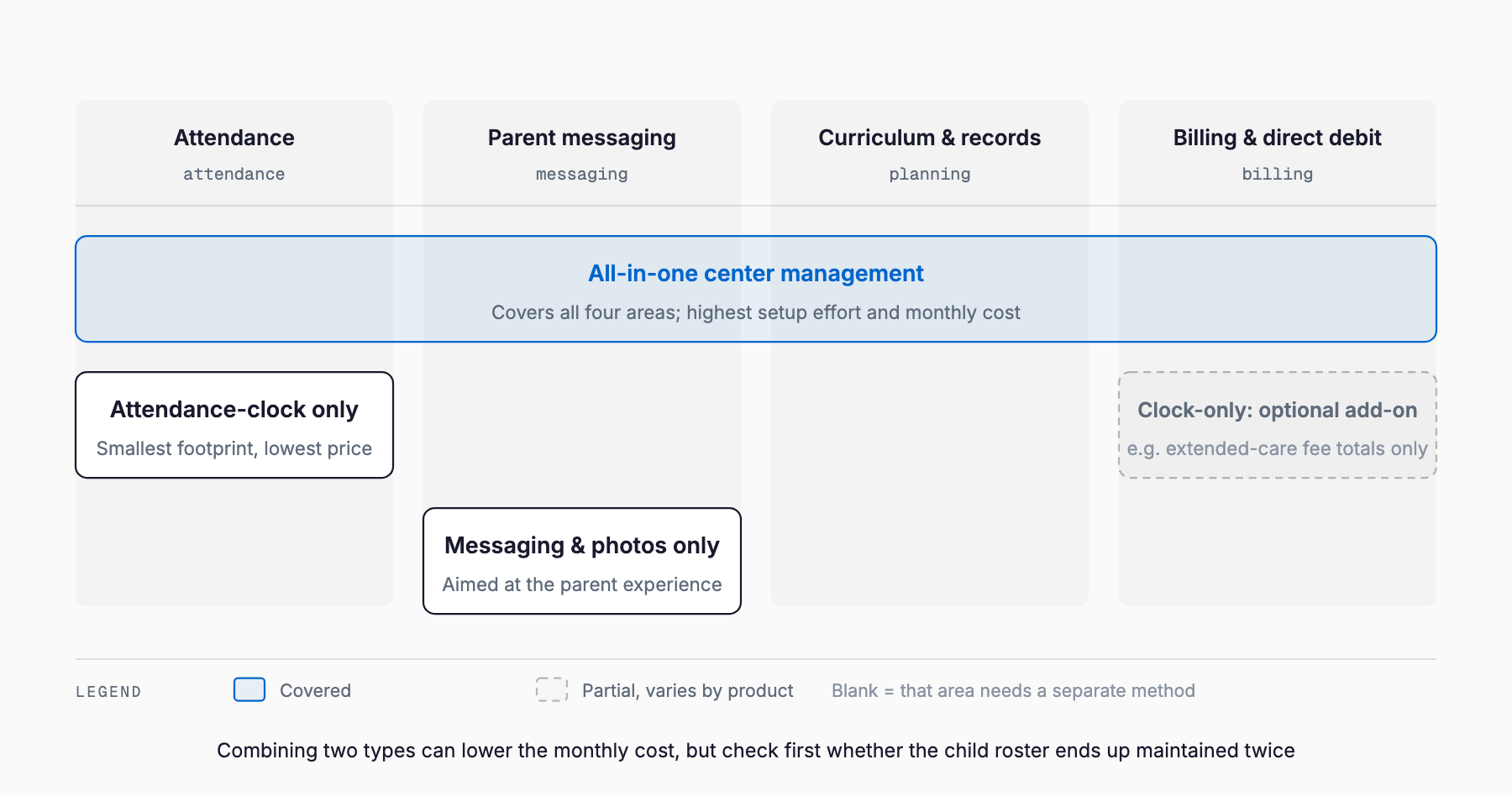
Nursery ICT systems generally fall into three types based on the breadth of their functions. Comparing them after identifying your center's single biggest pain point helps avoid overpaying for a system with more features than you need. A center that only needs check-in digitized will find the monthly cost of unused features in a comprehensive system piling up, along with the added burden of staff learning tools they never use. Conversely, a center with several paper tasks still unresolved that adopts only a check-in-only system may end up adding a second system within a few years. Deciding in advance, based on staff count, enrollment, and growth plans, whether you need to solve one task or several at once helps avoid that detour.
| Type | Main features | Cost impression | Best fit |
|---|---|---|---|
| Check-in-only type | IC card or QR check-in, attendance tallying only | Lower setup cost, relatively cheap monthly fee | Small centers wanting to eliminate handwritten check-in first |
| Comprehensive operations type | Attendance, notebooks, care plans, billing, and shifts in one system | Mid-to-high setup and monthly cost | Mid-sized or larger centers wanting to resolve multiple paper tasks at once |
| Notebook and photo-sharing type | Notebook entry, photo/video distribution, optional album sales | Lower setup cost; photo sales may carry a fee | Centers prioritizing better parent communication |
Cost ranges and breakdown
Costs vary with the scope of features, the number of children enrolled, and the number of check-in devices such as card readers or tablets. The figures below are only rough guides — actual quotes differ significantly between vendors, so plan to compare quotes from several companies. Beyond the initial setup fee, migrating data from existing paper ledgers and training staff on the new system can carry separate costs worth budgeting for. As also noted in our guide to student management systems for cram schools and other education businesses, a similar judgment applies across people-facing service businesses: monthly usability often matters more than the upfront price tag.
| Enrollment size | Setup cost range | Monthly cost range | Main components |
|---|---|---|---|
| Up to ~30 children | ¥0–150,000 | ¥10,000–20,000 | Check-in devices, initial setup, base feature usage |
| ~30–100 children | ¥50,000–300,000 | ¥20,000–40,000 | Multiple devices, added notebook/billing features, training |
| 100+ children or multiple centers | ¥200,000+ (varies by number of sites) | ¥30,000–50,000 per center | Multi-site management features, business support plan |
How to think about subsidies and grants
Subsidy programs for nursery ICT adoption do exist in Japan (such as the ICT promotion project for childcare facilities), but eligible expenses, subsidy rates, application windows, and caps vary by fiscal year and municipality, and some municipalities do not offer them at all. We cannot state specific amounts here — always confirm directly with your municipal childcare office or prefectural contact. When you do, ask about four things: which system scope qualifies (check-in-only versus comprehensive), the subsidy rate versus your own cost burden, the schedule from application to disbursement, and what happens if the annual budget cap is reached. Some vendors offer help preparing subsidy applications, but keep in mind the final decision always rests with the municipality.
Where parent-communication apps trip people up
More than feature selection, the details of day-to-day operation are often where centers run into trouble. Assuming every parent has read a message via its read receipt can lead to missed-communication incidents, so it is worth setting an internal rule to also use phone or verbal notice for anything important. Photo distribution needs a clear consent scope set at enrollment — whether sharing is limited to in-center viewing or extends to sharing among family members — or it can lead to complaints later. For sensitive fields like allergy information or health status, confirm during system selection whether viewing access can be restricted to the child's teacher and administrators only. It is also practical to keep a transition period with paper notices or phone calls alongside the app for parents who are less comfortable with smartphones.
Pre-adoption checklist
- Have you identified which current paper task creates the heaviest staff burden
- Have you considered which type fits your center: check-in-only, comprehensive, or notebook-focused
- Have you gotten quotes from multiple vendors and compared both setup and monthly costs
- Have you confirmed whether data migration and training costs are included in the quote
- Have you checked with your municipal office whether the system qualifies for a subsidy
- Have you confirmed the system can integrate with your existing accounting or payroll system
- Have you confirmed viewing access for sensitive information like allergies can be restricted
- Are briefing sessions and manuals ready for parents
- Is your network environment (Wi-Fi, device count) sufficient for your center's size
- Have you confirmed you can export your data if you cancel the contract
How to proceed with adoption
Adoption tends to go smoothly in four broad stages. First, inventory current paper tasks and interview staff to identify the heaviest burden. Second, narrow down which system type addresses it (check-in-only, comprehensive, or notebook-focused) and request materials and demos from several vendors. Third, run a trial with one class or a limited scope of tasks, check how both staff and parents respond, and only then roll it out center-wide. Fourth, once in full operation, keep collecting staff feedback on usability and adjust features or operating rules as needed. Switching every task at once tends to cause confusion; a staged rollout is the key to avoiding it. Record-keeping and billing at care facilities face a structurally similar challenge, and our guide on reducing the record and billing workload at care facilities offers a useful reference for the adoption process despite the different industry. When budgeting, it is also worth reviewing the general approach in IT subsidies for small and medium businesses.
Frequently asked questions
Is ICT adoption worthwhile for a small center
Even with few children enrolled, a check-in-only or notebook-focused system can be adopted at low setup cost by digitizing just attendance and billing. Starting with whichever single task burdens staff the most is a practical approach.
How should we migrate existing paper records
Many vendors offer data migration support, though scope and cost vary by company. You generally do not need to migrate everything, such as past care plans — switching to the new system from the current fiscal year while keeping older records on paper is often fine.
Can we always count on a subsidy
Whether a program exists and what it covers varies by fiscal year and municipality, so a subsidy is never guaranteed. When considering adoption, check eligible expenses and application timing with your municipal office, and build your budget without assuming subsidy funding.
What if parents cannot use a smartphone
Most systems can run alongside paper notices or phone calls. It is practical to keep a transition period at the start, offering individual support to parents who struggle with the app or keeping a paper channel available for a while.
Should multiple centers under one organization use the same system
If your organization runs multiple centers, using different systems at each makes centralized data management and head-office reporting difficult. Choosing a comprehensive system with multi-site management features and standardizing across centers tends to reduce operational burden in the long run.
Related free tools (no sign-up, instant results)
Feel free to contact us
Contact Us