NVIDIA NemoClaw's Ollama Setup Has a Hole
CVE-2026-65105 Explained
Oasis Security disclosed CVE-2026-65105: NemoClaw's Ollama setup lets DNS rebinding rewrite the chat template and inject persistent hidden instructions.
On August 25, 2026, Oasis Security disclosed CVE-2026-65105, a vulnerability rooted in how NVIDIA NemoClaw configures Ollama. Simply visiting a single attacker-controlled webpage triggers DNS rebinding that reaches a developer's local Ollama instance, letting the attacker rewrite the chat template the AI agent relies on and inject hidden instructions into every conversation from then on. macOS and Linux are patched in NemoClaw v0.0.35, but as of this writing Windows and WSL remain unfixed. If you run an affected platform, update NemoClaw now, verify what address Ollama is listening on, and block port 11434 at the firewall.
CVE-2026-65105 at a glance
| Item | Detail |
|---|---|
| CVE ID | CVE-2026-65105 |
| Affected product | NVIDIA NemoClaw (an OpenClaw-based AI agent that pairs with Ollama for local inference) |
| Fix status | macOS/Linux: fixed in v0.0.35 / Windows, WSL: unfixed as of this writing |
| Reported by | Oasis Security (Elad Luz, Ofek Itach) |
| Published | August 25, 2026 |
| Reported to | NVIDIA PSIRT (responsible disclosure) |
Why NemoClaw pairs with Ollama at all
NemoClaw is NVIDIA's wrapper for deploying the open-source OpenClaw agent framework inside its OpenShell sandbox. So the agent can reach a locally running LLM, NemoClaw automatically launches Ollama in the background — but instead of the default loopback address, it starts it with OLLAMA_HOST=0.0.0.0:11434, binding to every network interface on the machine. The install-time messaging says "localhost:11434," which makes it easy for users to assume the service is loopback-only when it isn't. For how enterprises should design a safer deployment of OpenClaw-style agents, see NemoClaw security architecture for enterprise AI agents; for adoption guidance aimed at smaller teams, see the SMB guide to NemoClaw.
What DNS rebinding actually does
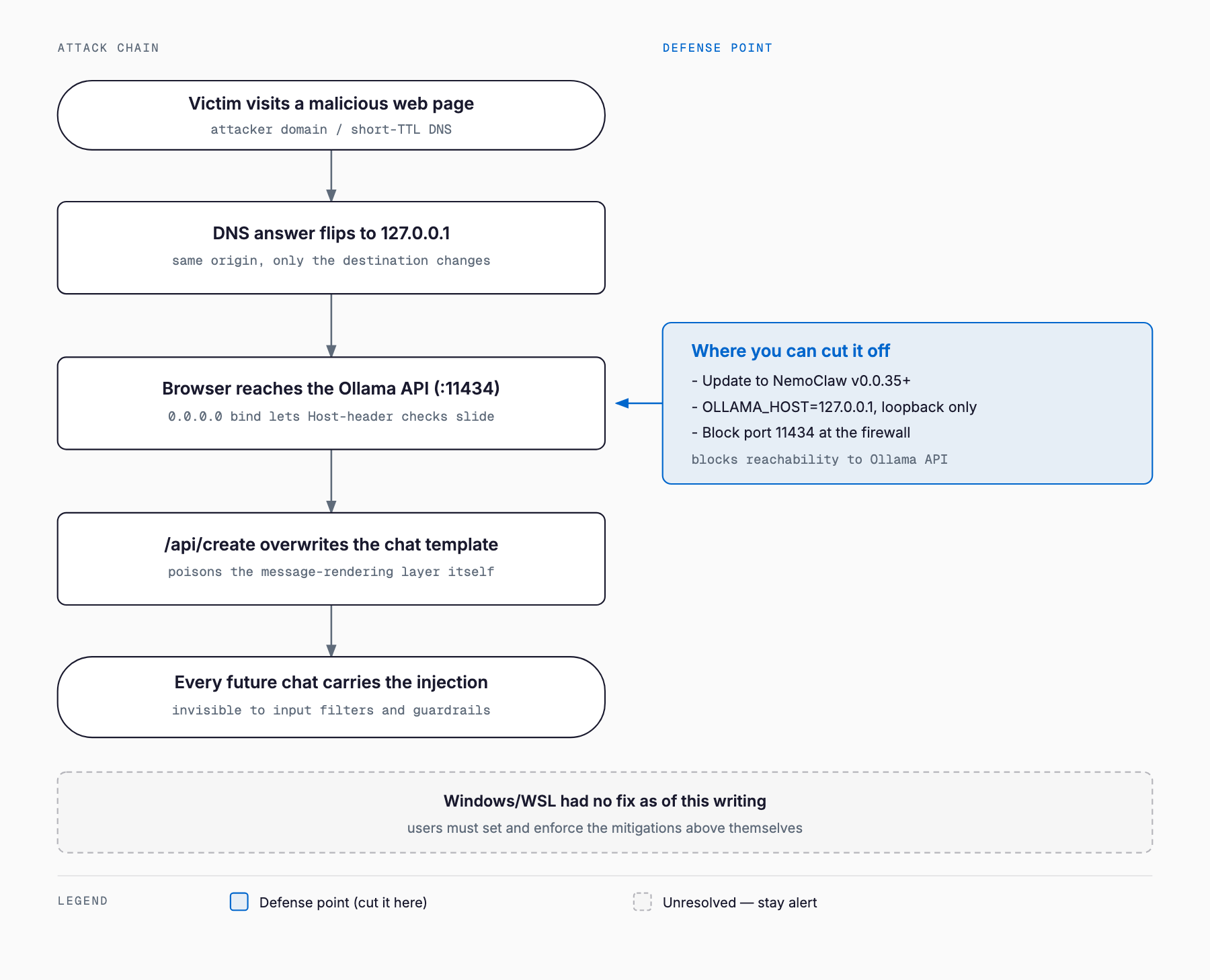
DNS rebinding lets an attacker who controls only their own domain trick a browser into treating requests to a different IP address — typically the victim's loopback address, 127.0.0.1 — as same-origin. The attacker first resolves their domain to their own server with a very short TTL and serves the malicious page; once it loads, they flip the DNS answer to 127.0.0.1. Because same-origin policy is keyed on hostname rather than the underlying IP, the browser continues to treat the request as going to the same origin even though it now lands on the victim's machine. No access to the victim's network or DNS infrastructure is required — a single page view is enough. Ollama itself patched a similar issue before (CVE-2024-28224, fixed in v0.1.29 in March 2024) by adding Host header validation, but that check only takes effect when Ollama is bound to a loopback address. When NemoClaw binds it to 0.0.0.0 instead, the check is skipped entirely, and whatever Host header the attacker supplies passes straight through. The assumption that "it's only bound locally, so it's safe" only holds once you have actually confirmed the bind address is loopback.
What gets rewritten: chat-template poisoning
Ollama's API has no authentication by default. Once an attacker can reach it, they first call /api/tags to enumerate installed models, then /api/show to fetch the target model's current Go template — the chat template that formats conversation history and system prompts into the text the model actually reads. They append their own instructions to that template and send it back through the /api/create endpoint, overwriting the model under the same name. Because the chat template is the rendering logic itself, this poisoning isn't a one-off event limited to a single conversation — every subsequent call to that model has the attacker's instructions silently appended after the system message, indefinitely. Nothing in the user's prompt or the developer's system prompt shows any sign of tampering. Because the layer that was rewritten sits outside the conversation itself, ordinary prompt-injection defenses — input filtering, guardrails — never see it, since they only inspect the final rendered text, not the template that produced it.
How to check if you're affected
# Check the installed NemoClaw version
nemoclaw --version

# Check what address Ollama is listening on (0.0.0.0 or :: is a red flag)
lsof -iTCP:11434 -sTCP:LISTEN
# or
netstat -an | grep 11434

# Check the OLLAMA_HOST environment variable
echo $OLLAMA_HOST

# Check a model's chat template for unexpected appended text
ollama show <model> --template
- NemoClaw version: macOS/Linux is fixed from v0.0.35 onward; anything earlier needs updating
- Windows/WSL users: no fix exists as of this writing, so prioritize the mitigations below
- Listening address: if Ollama is listening on 0.0.0.0 or ::, it is reachable from anywhere on the network
- Reachability from other devices: if another machine or phone browser on the same LAN can reach port 11434, a browser-based attack is possible
Mitigations
- Update NemoClaw: on macOS/Linux, update to v0.0.35 or later immediately
- Windows/WSL workaround: until a fix ships, don't let NemoClaw auto-start Ollama; start it manually with OLLAMA_HOST=127.0.0.1 set explicitly
- Bind to loopback only: leave OLLAMA_HOST unset, or set it explicitly to 127.0.0.1:11434, and avoid 0.0.0.0
- Allowlist origins with OLLAMA_ORIGINS: if external exposure is genuinely needed, allow only the specific origins you use rather than a wildcard (*)
- Block the port at the firewall: deny external access to port 11434 at the OS or network firewall
- Periodically audit chat templates: check ollama show <model> --template (or /api/show) regularly for unexpected additions
A note on version numbers: NemoClaw's local Ollama proxy now refuses to start against a backend that is not bound to loopback, a default introduced in v0.0.106 on August 10, 2026. That protection does not reach the Windows/WSL installation path where the 0.0.0.0 binding is set, so "we are on v0.0.106 or later" is not by itself proof of safety — check the actual listening address on each platform.
Design principles for running local LLMs in-house
This isn't really a NemoClaw-specific bug so much as an instance of a broader design pattern: exposing a local inference server across the whole network for developer convenience, while underestimating how reachable it is from a browser. The same class of risk applies to other local inference servers run in-house, such as LM Studio or vLLM, not just Ollama. Treating each endpoint on its own merits instead of assuming "it's on the corporate network, so it's safe" is the same principle laid out in the zero trust security guide.
| Consideration | What to check |
|---|---|
| Bind address | Restrict the inference server to loopback (127.0.0.1); expose it only through a reverse proxy that adds authentication |
| Authentication | Assume the inference server itself has no auth, and put an API-key check or mTLS in front of it |
| Origin control | Assume browsers can reach it, and never allowlist origins with a wildcard |
| Change detection | Monitor and version-control model definitions, system prompts, and chat templates |
| Agent permission scope | Minimize the source-control and cloud credentials an AI agent can reach, so poisoned instructions have fewer paths to real damage |
FAQ
Does this CVE affect anything beyond NVIDIA products?
CVE-2026-65105 itself is rooted in how NVIDIA NemoClaw configures Ollama to bind to 0.0.0.0 — it is not a vulnerability in Ollama on its own. That said, any local inference server bound to a non-loopback address without proper Host header validation and origin control is exposed to the same class of DNS rebinding attack.
How can I tell if I've already been attacked?
Pull the chat template for the models you use with ollama show <model> --template and check whether the end of the system prompt or the template structure contains any instructions you don't recognize. If you have nothing to compare against, the safer move is to delete the suspect model and re-pull it from the official source.
Is it safe to keep using NemoClaw on Windows/WSL right now?
No fix for Windows/WSL has been published as of this writing. If you continue using it, don't let NemoClaw auto-configure Ollama; start Ollama yourself with OLLAMA_HOST=127.0.0.1 set explicitly, and repeatedly verify it isn't reachable from outside the machine, applying every other mitigation as well.
Would prompt-injection guardrails have stopped this?
Probably not. This attack doesn't poison the user's input or the developer's system prompt — it rewrites the template that renders messages before either of those even reaches the model. Input-side filtering and guardrails only see the final rendered text the poisoned template produces, so they can't distinguish the injected instructions from a normal prompt.
What's the general defense against DNS rebinding?
The baseline fix is server-side: validate the Host header and reject requests carrying a hostname you don't expect. Beyond that, the deeper fix is not binding a loopback-only service to a network interface a browser can reach in the first place.
Summary
CVE-2026-65105 combines two design weaknesses — NemoClaw binding Ollama to 0.0.0.0, and Ollama's Host header validation only working when the bind address is loopback — into a single DNS rebinding attack. With nothing more than a single page view, an attacker can rewrite the chat template, a layer that sits outside the conversation itself, and permanently inject invisible instructions into every exchange from then on. macOS and Linux are fixed in NemoClaw v0.0.35, but Windows and WSL remain unfixed as of this writing, so affected users need to pin down Ollama's listening address themselves and block port 11434 at the firewall. Whatever tool you use to run a local LLM, the lesson here is the same: never leave the inference server reachable from a browser.
Related free tools (no sign-up, instant results)
Feel free to contact us
Contact Us