OmniDiff Explained: A Syntax-Aware Git difftool in Rust
Install, Usage, and How It Differs from hunk, difftastic and delta (2026)
OmniDiff is a Rust Git difftool (AGPL-3.0-only) that parses code with tree-sitter and shows only what changed. Install, git difftool setup, comparison with hunk, difftastic and delta, author-reported metrics and caveats. Updated Nov 2026.
OmniDiff is a Rust-based Git difftool that reads code as a syntax tree and shows only the parts that actually changed. Where a classic diff marks whole lines as deleted and inserted, it narrows changes down to expressions and even code inside strings. In short, it is worth trying for large refactors and generated-code diffs, but it is an early 0.x release, licensed AGPL-3.0-only, and the author is not accepting outside contributions. Treat it as something to run alongside your current tools, not a new default.
The latest release, v0.3.0, shipped on November 1, 2026, the same day a Show HN post about it collected 143 points on Hacker News. The GitHub repository had 383 stars as of November 2, 2026. Some of the performance and accuracy figures the author publishes still fall short of the stated goals (details below).
What is OmniDiff?
OmniDiff builds syntax trees with tree-sitter and highlights only the changed parts. It can be used as an interactive TUI viewer, as plain-text batch output, or as JSON output. The author is Marko Ivankovic, and commit trailers disclose that development uses AI assistance, currently Claude Code. The tool was renamed from CodeDiff to OmniDiff in v0.2.0 on October 1, 2026.
| Item | Details (from the README and Releases) |
|---|---|
| Author | Marko Ivankovic (individual developer) |
| License | AGPL-3.0-only (a commercial license is offered as a monthly GitHub Sponsors subscription) |
| Language | Rust |
| Latest version | v0.3.0 (November 1, 2026) |
| Languages | 25 parsed with tree-sitter (6 more recognized but diffed as plain text) |
| Distribution | Homebrew, cargo, Nix, apt, and prebuilt binaries on Releases (Linux / macOS / Windows) |
| External contributions | Not accepted at this time (to keep development speed high) |
What it can do
| Feature | Details |
|---|---|
| Syntax-level diff | Marks only the changed parts instead of whole lines. v0.2.0 improved detection of copied code, moved comments and aligned runs of changed statements |
| Code inside strings | Diffs embedded code as code, such as TSX inside JSON or shell inside YAML (v0.3.0). CSS class lists are compared class by class |
| Images, archives, fonts, PDFs | Pictures are compared by pixels (animated GIF/PNG/WebP frame by frame); zip, tar, gzip, xz, bzip2, fonts, message catalogs and PDFs are compared by their contents. Other binaries show a one-line "Binary file differs" |
| TUI | Interactive viewer. Press ? for the key list and o to pick files |
| Headless / JSON | --headless prints plain text and --mode json emits JSON (the JSON Schema is in the repo). Output switches to text automatically when stdout is not a terminal |
| Git, jj and editors | Works with Git difftool, Jujutsu (jj), a VS Code extension and a Neovim plugin |
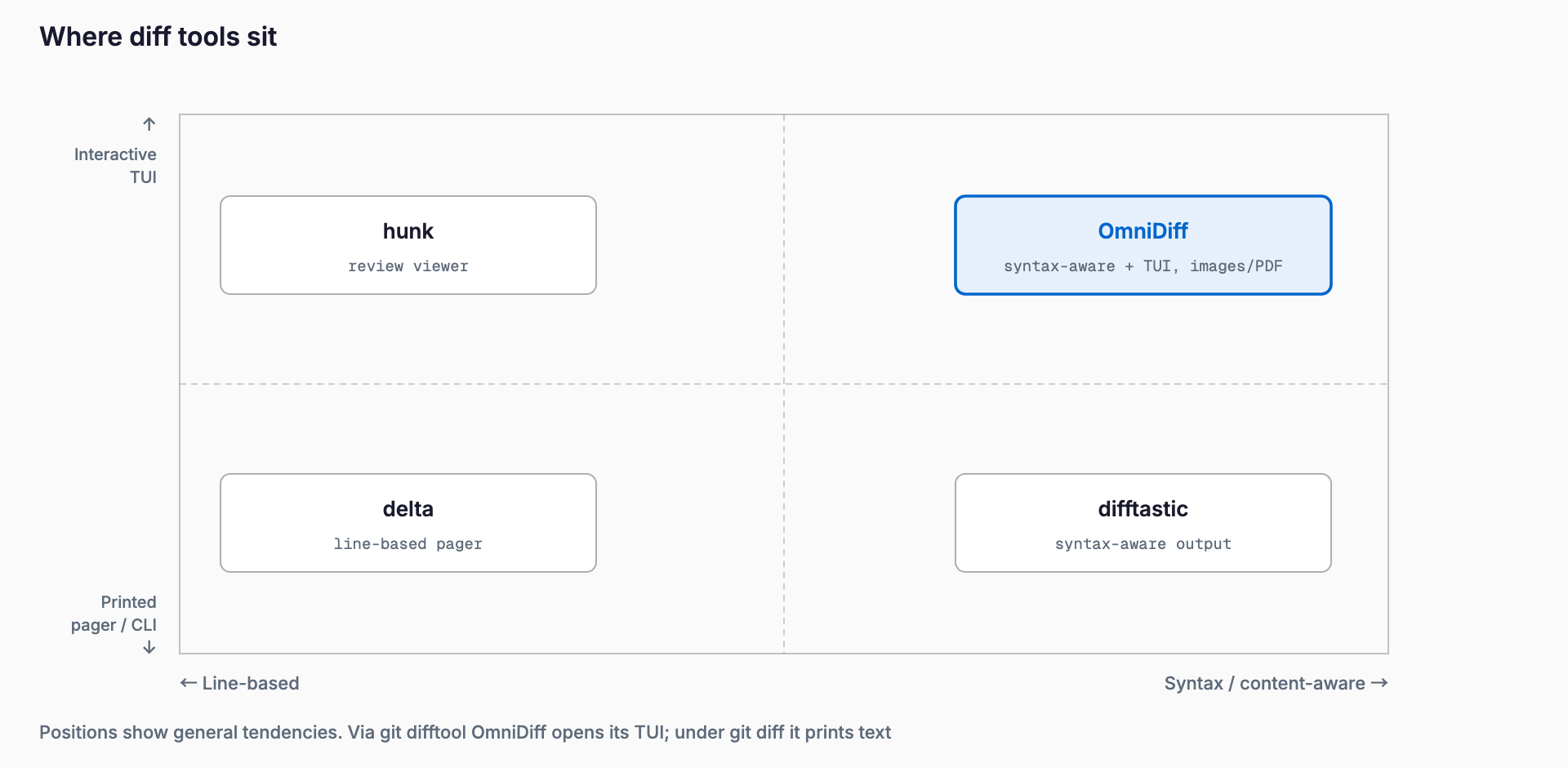
The map above places the tools on two axes. Horizontally, the left is line-based diffing and the right is content (syntax) aware diffing. Vertically, the top is an interactive TUI and the bottom is printed output (a pager or CLI). delta is a line-based pager that makes git's diff easier to read, difftastic is syntax-aware and prints its result to the terminal, hunk is an interactive review viewer built on git's own diff, and OmniDiff combines syntax-aware diffing with an interactive TUI.
Install and pricing
The main ways to install are below. Releases also carries prebuilt binaries for Linux, macOS (Intel and Apple Silicon) and Windows. Installing with cargo compiles every tree-sitter grammar from C, so expect a few minutes.
# Homebrew (macOS / Linux)
brew install ivankovic/omnidiff/omnidiff

# Cargo (builds from source; needs a C compiler and Rust 1.92+)
cargo install --locked omnidiff

# Nix (run without installing)
nix run github:ivankovic/omnidiff
Debian and Ubuntu (amd64 and arm64) have a signed apt repository. Recipes for Arch and Gentoo live in the repository's packaging/ directory.
sudo install -d -m 0755 /etc/apt/keyrings
curl -fsSL https://ivankovic.github.io/omnidiff/apt/omnidiff-archive-keyring.gpg | sudo tee /etc/apt/keyrings/omnidiff-archive-keyring.gpg > /dev/null
echo "deb [signed-by=/etc/apt/keyrings/omnidiff-archive-keyring.gpg] https://ivankovic.github.io/omnidiff/apt stable main" | sudo tee /etc/apt/sources.list.d/omnidiff.list > /dev/null
sudo apt update && sudo apt install omnidiff
It is free under AGPL-3.0-only. For internal use inside organizations, a commercial license is available as a monthly GitHub Sponsors subscription; we have not confirmed the amount, so none is listed. Running it as a local tool on your own machine is generally not a problem. If you modify it and distribute it, or offer it over a network, AGPL obligations apply. Before embedding it in a company product, read the LICENSE and consult a professional if needed.
Quick start
1. Install it (any of the methods above)
2. Register it with Git using omnidiff git configure (choose global or the current repo)
3. Open the interactive TUI with git difftool --tool=omnidiff
4. To look at just two files, run omnidiff before.rs after.rs
# Interactive wizard (choose global or the current repo)
omnidiff git configure

# Or configure manually
git config difftool.omnidiff.cmd 'omnidiff "$LOCAL" "$REMOTE"'

# View the diff in the TUI
git difftool --tool=omnidiff

# Plug into git diff without difftool config (plain-text output)
GIT_EXTERNAL_DIFF=omnidiff git diff

# Compare two files directly
omnidiff before.rs after.rs
One thing to remember: the TUI opens only through git difftool. git diff and git log -p just print plain text and never open the TUI. Inside the TUI, ? lists the keys, o picks files (in the empty viewer you get when launching with no arguments), b toggles half-block and graphics picture rendering, g shows every changed glyph or picture at once, and Enter opens a text member of an archive in a full diff view. For CI, use --headless, --mode json and --exit-code (adds 1 to the exit code when files differ). Exit codes are 0 for success and 2 for an error. Disable color with --color never or NO_COLOR=1; truecolor needs COLORTERM=truecolor.
For Jujutsu (jj), run omnidiff jj configure. Manual setup adds a merge-tools.omnidiff entry and requires diff-invocation-mode set to file-by-file. jj diff renders plain text; to get the full TUI, run omnidiff BEFORE AFTER directly. On the editor side there is a VS Code extension (omnidiff-vscode, also on Open VSX) and omnidiff.nvim for Neovim, but the README says VS Code's built-in diff view cannot be replaced yet.
How it differs from hunk, difftastic and delta
| Tool | How it computes the diff | Display | Implementation / license | Best for |
|---|---|---|---|---|
| OmniDiff | Syntax tree (tree-sitter) pinpoints changes | Interactive TUI plus text / JSON | Rust, AGPL-3.0-only | Large refactors, and diffs that include images, archives and the like |
| hunk | Displays git's diff | Interactive viewer (multi-file sidebar, AI annotations) | Node.js 18+, MIT | Reviewing changes made by AI agents |
| difftastic | Structural diff via tree-sitter | Side-by-side printed output (not an interactive viewer) | Rust, MIT | Quickly viewing syntax-aware diffs in the terminal |
| delta | git's line-based diff | Pager (word-level highlighting, side-by-side) | Rust, MIT | Making everyday git diff and git log -p easier to read |
| git diff (standard) | Line-based | Plain text | Ships with git | Quick checks with no setup; binaries show only "Binary files differ" |
A practical split: keep delta as the pager for everyday git diff, and open OmniDiff through git difftool only for large refactors. If you want to review AI agent changes with annotations, hunk fits better. difftastic suits people who want syntax-aware results printed to the terminal. Each tool has a different strength, so there is no need to pick just one.
Performance and accuracy (author-reported)
The numbers below are published by the author in the README and were measured on the author's laptop. They are not independently verified.
| Item | Author-reported value |
|---|---|
| Speed goal | Median under 100 ms, p99 under 1000 ms |
| Measured speed (2,302 fixtures) | p50 4.2 ms, p90 35.1 ms, p99 177 ms, slowest 482 ms. Archives miss the p99 goal |
| Robustness | 442,322 of 442,530 code file pairs (99.95%) finished within the 120 s budget and 6 GB memory cap |
| Content-specific algorithms | Used for 98.8% of changes |
| Accuracy (byte level) | 60.0% of test cases have zero mismatched bytes with --full, 69.6% with --minimal. The README states the accuracy targets are not yet met |
Caveats and poor fits
- Early 0.x software, renamed from CodeDiff at v0.2.0. If you installed under the old name, reinstall and reconfigure
- AGPL-3.0-only: modifying and distributing it, or offering it over a network, carries obligations
- External contributions are closed, so it is effectively a one-person project and its long-term continuity is uncertain
- git diff and git log -p never open the TUI; it opens only via git difftool or a direct run
- VS Code's built-in diff view cannot be replaced yet
- cargo install needs a C compiler and Rust 1.92+, and takes a few minutes to build
- Accuracy goals are unmet, and archives also miss the p99 speed goal
- Markdown, SQL, Protocol Buffers and similar formats are compared as plain text
If you are thinking about reviewing AI agent changes, see Whiteboard and worktrunk, which gives each agent its own worktree. We cover the agent side in the Claude Code complete guide. Note that the author discloses that OmniDiff itself is developed with Claude Code assistance.
FAQ
Is OmniDiff free? Can I use it commercially?
It is free, under AGPL-3.0-only. Running it as a local tool on your own machine is generally not a problem, but modifying and distributing it or offering it over a network brings AGPL obligations. If you plan to embed it in a company product, read the LICENSE and consult a professional if needed. A commercial license for internal organizational use is available as a monthly GitHub Sponsors subscription.
Can I use it with plain git diff?
You can plug it in with GIT_EXTERNAL_DIFF=omnidiff git diff, but the output is plain text and the TUI does not open. For the interactive TUI, configure it (for example with omnidiff git configure) and run git difftool --tool=omnidiff.
How is it different from difftastic?
Both are Rust tools that use tree-sitter for structural diffs. difftastic prints side-by-side results to the terminal and is not an interactive viewer. OmniDiff adds an interactive TUI, diffing of code inside strings, images, archives and PDFs, and JSON output. difftastic is MIT-licensed; OmniDiff is AGPL-3.0-only.
Which languages are supported?
25 languages are parsed, including C, C++, C#, Go, Java, JavaScript, TypeScript, Python, Rust, Ruby, PHP, Kotlin, Swift, Shell, YAML and JSON. Markdown, SQL, Protocol Buffers, Bazel, Dart and Emacs Lisp are recognized but diffed as plain text. UTF-16 and UTF-32 text were added in v0.2.1.
Does it work on Windows?
Releases includes a prebuilt Windows binary. We have not verified how well Git and editor integrations work on Windows, so check the README and Issues before relying on it.
References
Related free tools (no sign-up, instant results)
Feel free to contact us
Contact Us