Backdoored Claude Code Extension 2.1.312 and 2.1.313 on the Cursor Marketplace
How to Check Exposure and Remove the SSH Backdoor (October 2026)
Tampered Claude Code extension builds 2.1.312 and 2.1.313 were distributed through the Cursor marketplace with an SSH backdoor. Who is affected, the one-line check, removal steps, credential rotation and IOCs. Updated Nov 2026.
If you installed or auto-updated the Claude Code extension (ID: anthropic.claude-code) from Cursor's marketplace between 18:27 on October 29 and 05:35 on October 30, 2026 (JST), you may have received the tampered version 2.1.312 or 2.1.313. The affected builds are for macOS (Apple Silicon) and Windows. The backdoor adds an SSH key, opens a reverse SSH tunnel and installs persistence on the OS. Uninstalling the extension does not remove it, so please run the one-line check below first.
Microsoft says this version was never published on the Visual Studio Marketplace or in the npm CLI (@anthropic-ai/claude-code), so VS Code users on Microsoft's marketplace and users of the CLI are, per the reports so far, not affected. Cursor states that the malicious version was not developed by Anthropic. This article summarizes what was confirmed as of November 2, 2026, based mainly on Cursor's official notice and the analysis by Phorion, which discovered the issue.
What happened
Tampered builds of the Claude Code extension were distributed for about 11 hours through the VS Code extension marketplace operated by Cursor. Because extensions update automatically, users may have received it without doing anything. The key facts are below.
| Item | Details |
|---|---|
| Affected | Claude Code extension (anthropic.claude-code) 2.1.312 and 2.1.313; macOS Apple Silicon (darwin-arm64) and Windows (win32-x64) builds |
| Distribution channel | Cursor's VS Code extension marketplace |
| Period | About 2:27 to 13:35 PT on October 29, 2026 (18:27 on October 29 to 05:35 on October 30 JST), roughly 11 hours |
| Scale | Up to about 5,000 Cursor users (Cursor's estimate, as cited by press). Cursor says it will contact affected users |
| Discovery | Analyzed and published by the security firm Phorion (October 30, 2026) |
| Correction of the source | Early reports blamed Open VSX; Phorion later corrected this to Cursor's marketplace, not Open VSX |
| Status and fixed version | Cursor removed the versions, blocked distribution, temporarily shut down the marketplace, audited access (no other tampered extensions found), rotated keys, and worked to take the attacker's server offline. Anthropic is reported (secondary sources) to have issued 2.1.314, so we recommend updating to 2.1.314 or later |
Are you affected? A 30-second check
- Do you use Cursor? (Other editors such as VS Code are covered below.)
- Is the Claude Code extension installed? (Look for anthropic.claude-code in Cursor's extension list.)
- Did you install or update it between 18:27 on October 29 and 05:35 on October 30 (JST)? Auto-updates count.
- Is your OS macOS (Apple Silicon) or Windows?
- Does the extension folder name contain 2.1.312 or 2.1.313? (Example: ~/.cursor/extensions/anthropic.claude-code-2.1.312-darwin-arm64)
According to the reports so far, the following are not affected: VS Code extensions installed from Microsoft's Visual Studio Marketplace, the Claude Code CLI installed via npm, Cursor users who did not install or update during the period, and Linux environments, for which no affected build is listed. If you are unsure whether you are covered, running the check commands below does no harm.
What the backdoor does
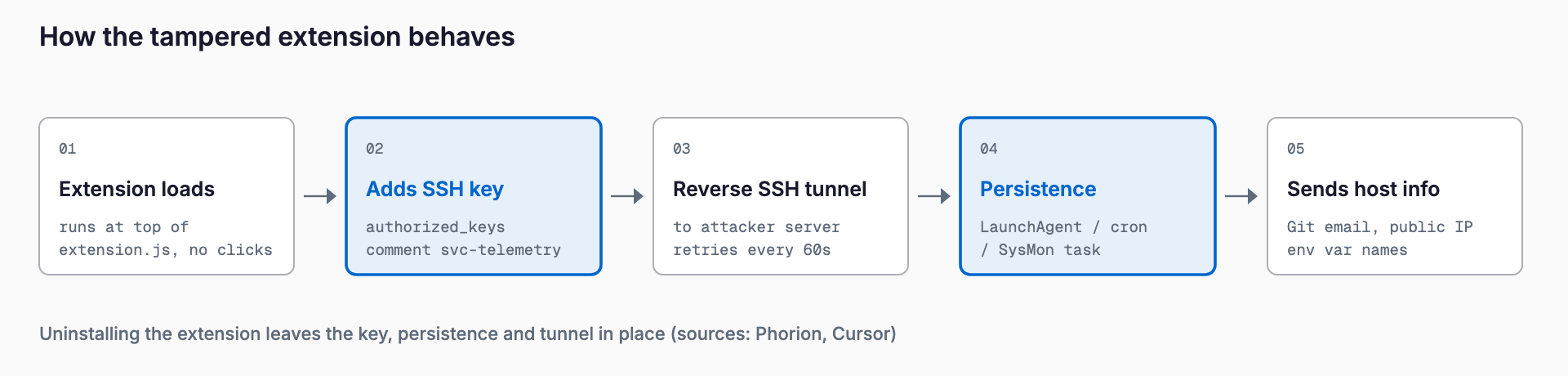
1. Adds a key: Code injected at the top of the extension's extension.js runs as soon as the file is loaded (before activate, with no user action). It appends the attacker's public key (comment svc-telemetry) to ~/.ssh/authorized_keys and tries to enable an SSH server
2. Reverse tunnel: It opens a reverse SSH tunnel to the attacker's server as user tunnel with -R *:0:localhost:22, retrying every 60 seconds and continuing to run after the editor is closed
3. Persistence: It registers itself per OS so it survives reboots (a LaunchAgent with a fake Apple-style name on macOS, a scheduled task and similar on Windows)
4. Sends host information: It sends the hostname, user name, OS, global Git email and public IP, plus up to 40 environment variable names (not values) matching KEY, TOKEN, SECRET, PASS, AWS or GCP, to the attacker's server
According to Phorion's analysis, a bug on macOS prevents the step that enables the SSH server (Remote Login) from running. Cursor also says enabling SSH requires administrator rights the extension does not have, so on many Mac and Windows machines the attacker probably could not log in. However, Phorion points out that this is no defense: if Remote Login is already on, or is turned on later, access works, and the key, persistence and tunnel remain installed either way. Please do not assume that the attacker could not log in; remove everything.
What to do right now
1. List the machines that use Cursor with the Claude Code extension
2. Run Cursor's official check command below on each machine
3. If it prints svc-telemetry key found, treat the machine as compromised and follow the next section
4. Even if nothing is found, Cursor recommends running the remediation script (machines where the SSH setup step failed may still be affected)
5. Update the extension to 2.1.314 or later
On macOS, run this in Terminal.
grep -qs svc-telemetry ~/.ssh/authorized_keys && echo "svc-telemetry key found" || echo "No key found; machine not impacted"On Windows, run this in PowerShell.
$files = "$HOME\.ssh\authorized_keys", "C:\ProgramData\ssh\administrators_authorized_keys" | Where-Object { Test-Path $_ }
if ($files -and (Select-String svc-telemetry $files)) { "svc-telemetry key found" } else { "No key found; machine not impacted" }
Cursor distributes remediation scripts from its official notice. On macOS, use remediate-macos.sh, run as the affected user rather than root: bash remediate-macos.sh. On Windows, use remediate-windows.ps1, run from a PowerShell opened as Administrator: powershell -ExecutionPolicy Bypass -File .\remediate-windows.ps1. Both remove the extension, the persistence settings, the tunnel processes and the attacker's key. Always download the scripts from Cursor's official notice (see Sources), not from search results or copies on other sites.
If the machine was compromised
- Isolate it: Disconnect the machine from the network to cut off access to internal networks and cloud services
- Remove persistence: On macOS, ~/Library/LaunchAgents/com.apple.sysmond.plist, ~/.config/.smt, ~/.config/.smtk and $TMPDIR/.stk_*. On Windows, the scheduled task SysMon, ~/.config/smt.cmd, ~/.config/smtk, sysmon.cmd in the Startup folder and .stk_* in the temp folder. The remediation script is the most reliable way
- Remove the key: Delete the lines containing svc-telemetry and svc-telemetry-tun from authorized_keys (on Windows, also C:\ProgramData\ssh\administrators_authorized_keys)
- Stop the tunnel processes: Terminate any ssh or autossh process with -R *:0:localhost:22 in its arguments
- Consider rebuilding: Uninstalling the extension leaves the key, persistence and tunnel in place. If the attacker may have actually logged in, consider reinstalling the OS
- Rotate credentials: From a separate, trusted machine, revoke and reissue every credential that machine could reach (tokens such as GitHub, cloud keys, SSH keys, API keys and sessions). Because the attacker received the names of environment variables, assume they know which secrets exist on the machine, and prioritize names matching KEY, TOKEN, SECRET, PASS, AWS and GCP
- Update the extension: If you reinstall it, use 2.1.314 or later
Indicators of compromise (IOCs)
These are the indicators published by Phorion. IP addresses and domains are defanged with [.] to prevent accidental clicks.
| Type | Value | Notes |
|---|---|---|
| SHA-256 | ecb58cb29078d9646ad1dcdbe51526f2d9cfea06be5fb2ab183e8ecc3ab6bf15 | Backdoored extension.js |
| Key comment | svc-telemetry | Login key appended to authorized_keys |
| Key comment | svc-telemetry-tun | Tunnel key |
| IP and port | 134.209.82[.]225 TCP 22 (user tunnel) | Destination of the reverse SSH tunnel |
| IP and port | 134.209.82[.]225:8099 (POST /beacon) | Destination of host information |
| Domains | ifconfig[.]me, api[.]ipify[.]org | Public IP lookups |
| Extension | ~/.cursor/extensions/anthropic.claude-code-2.1.312-darwin-arm64, ...-2.1.313-darwin-arm64 | Phorion writes ~/.<IDE name>/extensions/ |
| macOS | ~/.config/.smt, ~/.config/.smtk, $TMPDIR/.stk_<10 hex> | Script, key, temporary key |
| macOS | ~/Library/LaunchAgents/com.apple.sysmond.plist | Label com.apple.sysmond; runs /bin/sh ~/.config/.smt with RunAtLoad and KeepAlive. Fake Apple-style name |
| Windows | ~/.config/smt.cmd, ~/.config/smtk, temporary .stk_* | Script and keys |
| Windows | Scheduled task SysMon | Runs as SYSTEM if creation succeeded |
| Windows | %APPDATA%\Microsoft\Windows\Start Menu\Programs\Startup\sysmon.cmd | Fallback if the task cannot be created |
| Linux | ~/.config/.smt, ~/.config/.smtk, @reboot crontab entry, /tmp/.stk_* | Logic exists in the payload, but Cursor lists only macOS and Windows builds as affected |
| Process | ssh or autossh with -R *:0:localhost:22 and an identity from .stk_* or .smtk | Resident tunnel |
| Logs | SSH logins from 127.0.0.1 / ::1 using the svc-telemetry key | Logins through the reverse tunnel |
What organizations should review
- Extension allowlists and version pinning: Make extensions used for work allowlisted, and for critical machines turn off auto-update and update only after checking official notices
- EDR and log monitoring: Detect writes to authorized_keys by IDE helper processes and creation of com.apple.* plists by non-Apple processes. Also search past logs for connections to 134.209.82[.]225 (ports 22 and 8099)
- Know which marketplace each editor uses: VS Code uses Microsoft's marketplace and Cursor uses its own, for example. Exposure in this incident depended on the distribution channel
- Keep secrets out of environment variables: Even the names of environment variables are a lead for attackers. Store secrets in a tool such as a password manager to reduce the secrets that sit on each machine
For managers at companies without dedicated IT staff: if you have in-house programmers or outsource development, please ask them whether they use Cursor or have the Claude Code extension installed. Ask the people concerned to run the check command above and report the result. Developer machines often hold cloud and GitHub keys, so damage can reach the whole business. For overall preparation, see the IT risk guide; for a similar incident where a development tool's distribution was tampered with, see the LiteLLM compromise.
FAQ
I use the Claude Code extension in VS Code. Am I affected?
According to Microsoft, this version was never published on the Visual Studio Marketplace. Per the reports so far, VS Code installed from Microsoft's marketplace is not affected. If your VS Code is configured to use a different marketplace, the source differs, so running the check command is a sensible precaution.
Is the npm Claude Code CLI affected?
Microsoft says this version was not published to npm (@anthropic-ai/claude-code) either. Per the reports so far, the CLI is not affected.
What about Cursor on Linux?
Cursor lists only the macOS Apple Silicon and Windows builds as affected, and no Linux build is named. However, the payload contained Linux logic, so if you updated on Linux during the period, it is worth checking authorized_keys.
Is uninstalling the extension enough?
No. The backdoor leaves behind an SSH key, a reverse tunnel and OS persistence, and these keep working after the extension is removed. You need to remove them with Cursor's remediation script or manually, following the steps above.
If the check finds nothing, am I safe?
If no key is found, the login key is not present. However, Cursor recommends running the remediation script even if nothing is found, because machines where the SSH setup step failed may still carry other traces. On machines where you may have installed 2.1.312 or 2.1.313, running it is the safe choice.
Sources
- Cursor: Security notice — malicious version of Anthropic.claude-code (2.1.312 and 2.1.313) (published October 29, 2026; updated October 30)
- Phorion: Official Claude Code VSX compromise
- Help Net Security: Claude Code extension SSH backdoor
- Sophos: Malicious Claude Code extension distributed through Cursor marketplace
- oss-security: 2026/10/30/7
Related free tools (no sign-up, instant results)
Feel free to contact us
Contact Us