OpenAI dots Explained: Always-On Agent, Safety, Pricing
OpenAI dots is an always-on GPT-6 Astra agent announced Sep 29, 2026. One dot is included in Pro and Business Premium. Features, safety, pricing, vs Grok Bot.
dots is an always-on personal agent that OpenAI announced on September 29, 2026 at DevDay 2026. It runs on GPT-6 Astra and comes with its own cloud computer. The first dot is included in Pro and Business Premium at no extra charge, and you can reach the same dot from ChatGPT (web, mobile, desktop), text messages, Slack, Teams, and voice calls.
This article is based on OpenAI's official announcements as of September 30, 2026 (the "Introducing dots" post, the post on how safety, security, and privacy are built into dots, and the business pricing page) plus press coverage. It covers what dots can do, its safety design, pricing, how it differs from Grok Bot and Muse, and what small teams should weigh. The list of supported regions is in OpenAI's Help Center, and we could not confirm whether Japan is included at the time of writing. Where the official sources are silent, we say "not stated officially".
What dots is — an always-on agent that works on your behalf
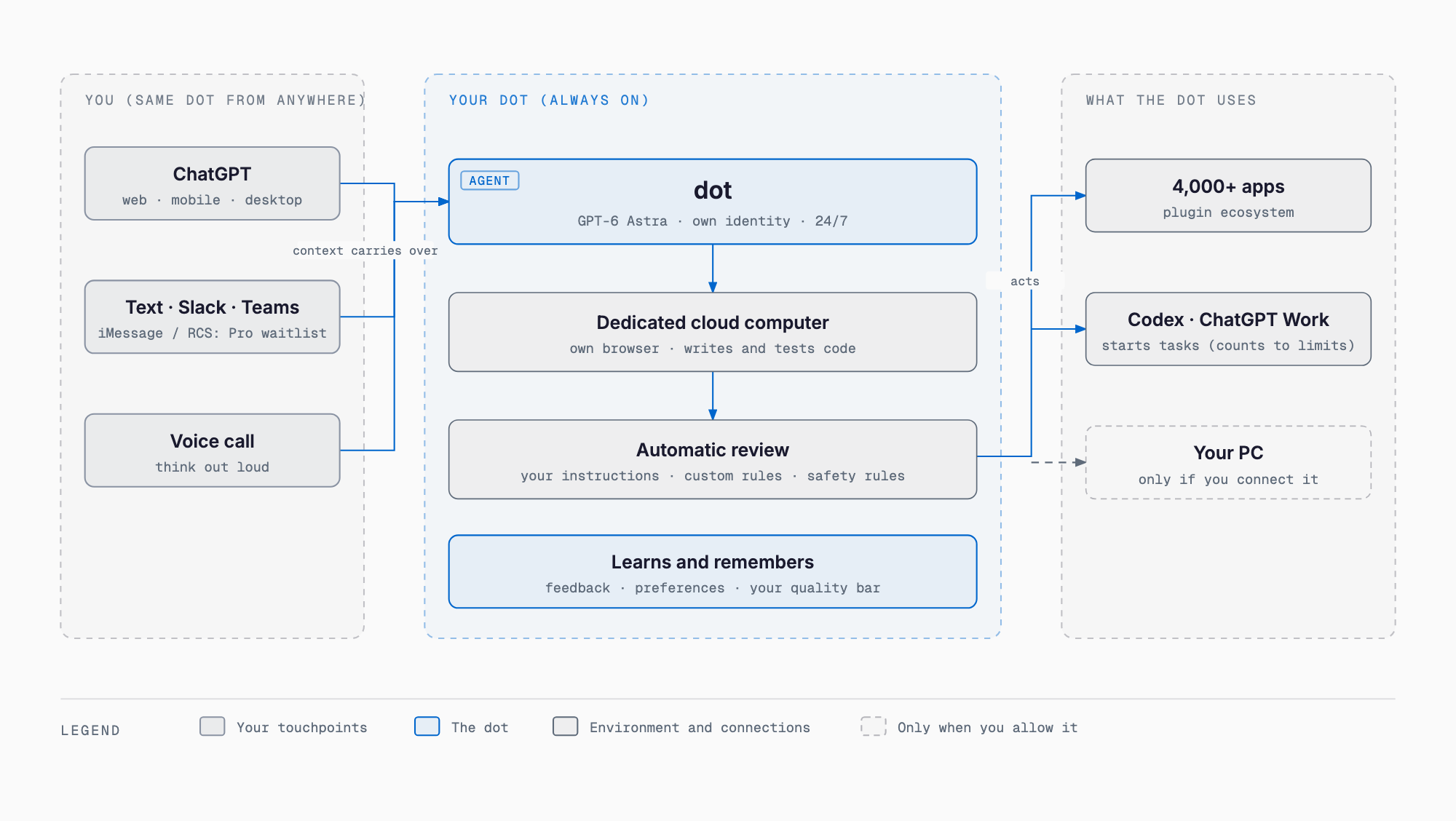
OpenAI's own definition is "a highly capable, always-on agent designed to handle anything," one that understands what you care about, works for you at all times, and takes on important work. The structure is easiest to read in three layers. First, the touchpoints: ChatGPT, text messages, Slack, Teams, and voice calls, with context carried across every channel. At the center is the dot itself, which runs GPT-6 Astra, has a dedicated identity for access and permissions, a dedicated cloud computer and browser, and keeps learning from feedback. Before a dot actually does something, an auto review (an independent safety system) steps in. Beyond that, the dot operates more than 4,000 apps (plugins), your own PC if you allow it, and Codex or ChatGPT Work tasks.
| Item | Details |
|---|---|
| Announced | 2026-09-29, OpenAI DevDay 2026 |
| Model | GPT-6 Astra |
| Positioning | An always-on personal agent that works toward goals around the clock on a dedicated cloud computer |
| Environment | Dedicated identity, cloud computer, and browser. It writes and tests code when needed |
| Connections | More than 4,000 apps through the plugin ecosystem. You can also allow it to connect to your own devices such as a laptop |
| Contact channels | ChatGPT (web, mobile, desktop), text messages, Slack, Teams, and voice calls. iMessage / RCS is a limited waitlist for Pro users |
| Availability | Rolling out to Pro and Business Premium in supported regions. Enterprise (including Edu and Healthcare) gets a beta once a workspace admin enables it |
| Supported regions | See the Help Center. Whether Japan is included was not confirmed at the time of writing |
According to OpenAI, a dot starts work in "roughly the same setup you would give a new hire": a dedicated identity for access and permissions, a cloud computer, and a dedicated browser, plus the ability to write and test code when needed. You can open the dot's computer at any time to check its work. It can run several projects at once on its own, so you do not need to manage threads or give step-by-step instructions.
The dot messages you with progress updates, questions, and matters that need your decision. The longer you work together, the more it learns your preferences, way of thinking, and the quality of work you expect. Context is shared across channels: you might start a request in ChatGPT, add details by text, share background in Slack, and talk it through by voice.
Looking ahead, OpenAI describes a vision in which dots team up and coordinate. It also plans to add more dots, increase working speed, and expand the total amount of work per month, but timing and specifics are not stated officially.
For organizations there are also specialized dots. Each handles a specific job inside an organization and has its own identity and credentials. Inside OpenAI, they are in early testing for procurement, invoice processing, email marketing, customer support, and commercial contract work. They start with a limited, targeted enterprise pilot (limited preview), and OpenAI says it is working with Microsoft to integrate with the governance and security controls of Microsoft Agent 365.
What it does — five use cases from the official announcement
The official page lists five use cases by role. The common pattern is that the dot does the groundwork and the execution, while a person makes the final call.
| Role | What the dot does | What you do (our reading) |
|---|---|---|
| Developer | Finds recurring requests in customer feedback, implements and tests small improvements and bug fixes, and delivers a reviewable PR with a video of the changes | Review the PR and decide whether to merge it |
| Product launch lead | Prepares proposed changes to launch materials and assets to match a spec change | Review the proposals and pick what to adopt |
| Scientist | Reruns the analysis on new data, investigates unexpected results, and updates the figures | Check the results and decide on interpretation and conclusions |
| Sales lead | Checks customer requirements against product documentation, identifies unverified items, builds a proof of concept for an integration, and recommends a suitable solutions engineer | Decide how to handle the unverified items and whether to accept the recommendation |
| Content creator | Prepares clip candidates, summaries, and draft social posts from an interview transcript, ready for approval | Approve or edit the drafts and publish |
The rightmost column is not from the official text. It is our own reading of a design that assumes approval.
Examples from inside OpenAI include a dot starting to investigate when a bug is reported in Slack, turning a new design into a working app, and helping with planning.
An outside early tester's example is also given. One dot noticed that the tester had forgotten to bill a publication, created the invoice, and sent it only after the tester approved. The point is the sequence: the dot noticed, drafted, and waited for approval before sending, which ties directly into the three-tier action rules in the next section.
You stay in control — auto review and the three-tier action rules
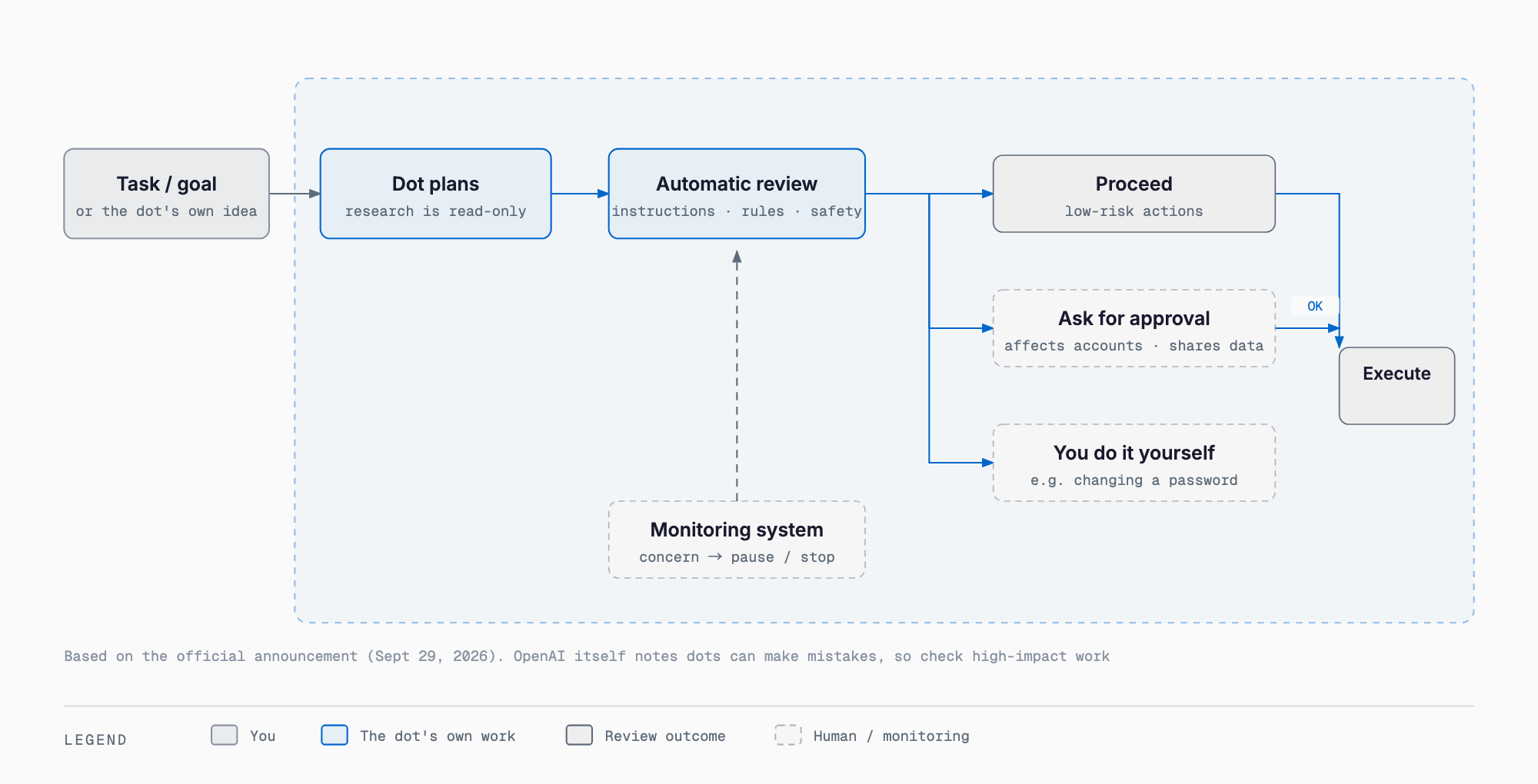
The core of the dots safety design is the pre-execution check flow. The dot first plans its work. Before it does something like sending an email or changing a file, an auto review compares the planned steps against your instructions, your custom rules, and the safety requirements. Each action is then sorted into one of three outcomes: proceed as is, ask for confirmation (approval), or hand off to you. Proactive research, where the dot looks for useful things in the background while you are not chatting, is limited to read-only tools (enforced in code). It cannot send messages, change content in connected apps, or operate the browser or computer. Anything it does afterward based on its findings follows the normal rules and checks.
Here is how the official action rules break down by type of operation.
| Example operation | Treatment |
|---|---|
| Reading, analysis, drafts within the conversation | Can be done freely |
| Sending messages, sharing files | Requires permission that covers what information is shared and the type of recipient. The more sensitive the data, the more specifically the recipient must be named |
| Purchases with a saved card | Possible, but requires your approval |
| Permanently deleting data, installing or running software from an unknown source, granting new security-related access | Confirmed every time |
| Changing passwords, transferring money between financial accounts | Handed off to you (the dot only does the surrounding work) |
How specific the recipient must be depends on how sensitive the information is. Highly sensitive information such as health data requires naming the recipient. Less sensitive personal data such as an email address can be permitted by recipient category, for example "any airline is fine." Custom rules can widen the scope of what is allowed.
Auto review. Before the dot carries out something like sending an email or changing a file, an independent safety system compares the planned steps with your instructions, custom rules, and safety requirements. For an email, it checks the recipient and the body. If an action is blocked, the reason is returned to the dot, which decides whether to resubmit with more information or approval, try another permitted approach, hand off to you, or stop. This control mechanism sits outside the environment the dot can modify.
Custom rules. You can set specific operations to allow, require approval, or block, such as "never send email." The dot can help draft the rules, but changing them requires your approval. Mandatory confirmations and baseline safety requirements cannot be removed with custom rules. According to the Help Center, custom rules also cannot change the limits on auto review (Autoreview) or proactive research.
Pre-approval and hand-off. You can pre-approve recurring actions such as scheduled message sending, but approving one message does not become a standing permission. Entering verification codes and passing security checks may also be handed to you (Help Center).
Monitoring. Prompt injection defense combines protections in the model, tool restrictions, pre-execution checks, and monitoring. When the monitoring system detects a concern, it can pause the work and show a warning asking you to confirm.
Secure sign-in. On supported sites, the model pauses while you type into a secure login form. Credentials go directly to the browser environment and are never exposed in the model's context. Saved passwords can also be used through an encrypted credential service without being passed to the model. However, secrets written inside documents or messages the dot can read may be visible to the model.
Activity view. The activity view in the desktop app shows tasks in progress and tasks that have been delegated. From there you can add background information, correct, redirect, or stop them.
Safeguards in the model. The underlying model, GPT-6 Astra, is trained to understand the user's intent, stay within the scope of the request, and ask focused questions when needed. It refuses harmful requests, including misuse in biology and cybersecurity. OpenAI says it used human and automated red teaming to test how the system handles changed instructions, ambiguous requests, and attempts to push it beyond its permissions.
OpenAI itself states that dots can make mistakes and that you should always check work with significant consequences. Details are in the System Card and the Help Center.
Dedicated cloud computer and sandbox — how your own PC is handled
An isolated, dedicated workspace. Each dot has its own cloud computer. OpenAI maintains the Linux and Chrome environment, a sandbox limits which code and tools it can reach, and each user's environment is isolated. The code execution environment is separated from the safety systems, so a dot cannot change or disable required checks.
Your own PC. Unless you choose to connect it, your PC stays disconnected from the dot. If you do connect a laptop or similar device, the local sandbox and action checks still apply. The microphone and camera need separate device-level permissions.
Managing connected apps. Connected apps are managed in ChatGPT's existing app management (the "Plugins" section in settings), which is shared across ChatGPT, ChatGPT Work, and Codex. Note that even after you disconnect an app, information the dot has already obtained stays in its context. You can reset each dot's context at any time.
How training data is handled. Business, Enterprise, and Edu are not used for training by default. On personal plans, this is managed through the "Improve the model for everyone" setting. Proactive research threads and notes are not used directly for training, but if they are pulled into a conversation that is eligible for training, they may be used depending on your settings. Even with model improvement turned off, the Help Center says human review may occur in limited cases such as safety-related ones.
Memory and context (per the Help Center). A dot and ChatGPT memory are shared in both directions. Turning off ChatGPT memory stops the sharing, but information already received is not erased. At present you cannot view, selectively delete, or edit an individual memory of a dot. Deleting a dot removes that dot's context, while the files it created, Codex threads, and ChatGPT conversations remain separately. A dot's context does not retain credentials, images, or screenshots.
Age limit. People under 18 cannot use dots (Help Center).
Pricing and availability — one dot included with Pro and Business Premium
According to OpenAI, dots is rolling out starting today to Pro and Business Premium in supported regions. Enterprise (including Edu and Healthcare) gets a beta once a workspace admin enables it. The first dot is included in Pro and Business Premium at no extra charge. The plans include a usage allowance for more advanced work, and limits are expanded for the first month after launch, but the specific allowance is not stated officially.
| Plan | dots availability | Price guide | Notes |
|---|---|---|---|
| Pro | One dot included at no extra charge (official) | Pro 500 at $500/month (official). The existing Pro 200 at $200/month (press) | According to OpenAI, the new Pro 500 adds the highest usage limit plus limited access to Astra Ultrafast (up to 8x faster than standard Astra in ChatGPT Work and Codex, at 300 tokens per second in Codex). (Per Engadget and other reports) Pro 200 gets half the Work and Codex allowance from 2026-10-30. Every Pro subscriber gets one dot |
| Business Premium | One dot included at no extra charge (official) | Premium seat $100/month (annual billing), $125/month (monthly billing) | 5x the usage of a standard seat, with no 5-hour limit |
| Business standard seat | No mention of dots on the official page | $20/month (annual billing), $25/month (monthly billing) | Whether dots is available is not stated officially |
| Enterprise, Edu, Healthcare | Beta once a workspace admin enables it | Enterprise is contact sales. Edu and Healthcare not stated officially | Specialized dots start with a limited preview |
Here is how usage limits work. Conversations with a dot do not count toward your ChatGPT usage limits. If you have a dot start or manage Codex or ChatGPT Work tasks, those tasks count toward limits as usual. In short, chatting is cheap, while handing off heavy work uses up your allowance.
In the table, the $500/month Pro 500 and Ultrafast come from OpenAI's official DevDay 2026 recap (2026-09-29), which also says dots is available in Pro, Business Premium, and Enterprise. The halving of the existing Pro 200 allowance from 2026-10-30, however, comes from press coverage such as Engadget, so treat it separately. Business seat prices are based on the official business pricing page as of September 30, 2026. Check the latest official page before you subscribe.
To get started, create your first dot in the ChatGPT desktop app or in a PC browser, give it a name, connect your apps, and listen to its self-introduction. Once the initial setup is done, you can also message it from the mobile app.
The same day's announcements also included GPT-6.1 Sol (intelligence approaching Astra at one-fifth of the standard token price), Living Pages (a new kind of document where you can tag a dot to request revisions), and @ChatGPT in Slack and Teams. They are worth checking alongside dots.
How it differs from Grok Bot and Muse
Always-on personal agents have also been announced by xAI (Grok Bot) and Meta (Muse). They share a design built around a dedicated cloud computer, contact through multiple channels, approval for important actions, and background continuity. What sets dots apart is GPT-6 Astra, more than 4,000 plugins, inclusion in ChatGPT plans, support for Slack, Teams, text, and voice, specialized dots with Microsoft Agent 365 integration, read-only proactive research, and an independent auto review.
| Aspect | dots (OpenAI) | Grok Bot (xAI) | Muse (Meta) |
|---|---|---|---|
| Model | GPT-6 Astra | Grok (xAI) | Muse Spark (Meta) |
| Environment | Dedicated cloud computer (Linux, Chrome), dedicated browser, dedicated identity | An always-on AI teammate with its own computer | Secure VM |
| Contact channels | ChatGPT, text, Slack, Teams, voice calls | chat requests (see official docs) | iPhone / Android / Mac apps, web, WhatsApp |
| Pricing approach | One dot included in ChatGPT Pro / Business Premium | offered to SuperGrok and Cursor Pro subscribers (as of Aug 2026) | Power $20 / Max $100 plans (free tier available) |
| Approval mechanism | Auto review, three-tier action rules, custom rules | returns to a human only when approval is needed (see official docs) | approval before key actions (once / always / deny), Secure VM and Sentinel |
| Enterprise | Specialized dots, Microsoft Agent 365 integration in progress, Enterprise beta | see official docs | see official docs |
We cover each product in existing articles on this site: What is Grok Bot — xAI's always-on agents and Meta Muse app explained. For the underlying model, see GPT-6 Astra explained. For the developer-side foundation, see OpenAI Agents API, and for the tasks a dot can launch, see ChatGPT Work. Specs in this area change quickly, so check each vendor's official information for the latest before comparing.
Points for small businesses and small teams in Japan
If you are a sole proprietor or a small team considering dots, here are points worth sorting out beforehand.
- Check regional availability. The list of supported regions is in OpenAI's Help Center, and we could not confirm whether Japan is included at the time of writing. Check the latest information before you subscribe
- Check your training settings. On personal plans, review the "Improve the model for everyone" setting. Business, Enterprise, and Edu are not used for training by default. If you handle client information, the plan you are on changes the assumptions
- Start with minimal permissions for connected apps. You can choose from more than 4,000 apps, but connect mostly read-oriented ones first and widen the scope once you have a track record. Also remember that information a dot already obtained stays in its context after you disconnect an app
- Start with custom rules that require approval for email sending and file sharing. The design already requires permission to send, but right after rollout it is safer to narrow this to approval-required and reduce the risk of a misdirected message
- Design workflows on the assumption that money-related actions go through approval or hand-off. Purchases with a saved card need approval, and password changes or transfers between financial accounts are handed back to you. A good pattern is to let the dot draft the invoice while a person sends it and makes the payment
- Look at how well the touchpoints fit. Companies that work mainly in Slack or Teams have many points of contact with a dot and can get results more easily. For work centered on phone calls, fax, or paper, the range where a dot can help is narrow and the effect tends to be limited
Frequently asked questions
Is dots free to use?
The first dot is included in Pro and Business Premium at no extra charge (official). Availability on other plans such as Plus or Go is not stated officially at the time of writing. Enterprise gets a beta once a workspace admin enables it.
Will it send emails on its own?
Sending messages or sharing files requires permission that covers what information is shared and the type of recipient. An independent auto review checks before execution, and custom rules let you block actions such as "never send email." That said, OpenAI also states that dots can make mistakes, so check important work.
Can it see what is on my PC?
Unless you choose to connect it, your PC stays disconnected from the dot. Even when connected, the local sandbox and action checks apply, and the microphone and camera need separate device-level permissions.
Are my conversations used for training?
It depends on the plan. Business, Enterprise, and Edu are not used for training by default. Personal plans are managed through the "Improve the model for everyone" setting. Proactive research threads and notes are not used directly for training, but if they are pulled into a conversation eligible for training, they may be used depending on your settings. Even with model improvement turned off, human review may occur in limited cases such as safety-related ones (Help Center).
Can I view or delete what a dot remembers?
A dot and ChatGPT memory are shared in both directions. Turning off ChatGPT memory stops the sharing, but information already received is not erased. At present you cannot view, selectively delete, or edit an individual memory of a dot; deleting a dot removes that dot's context, while the files it created, Codex threads, and ChatGPT conversations remain (Help Center). People under 18 cannot use dots.
How is it different from Grok Bot and Muse?
They share a dedicated cloud computer, contact through multiple channels, and approval for important actions. dots is distinguished by GPT-6 Astra, more than 4,000 plugins, inclusion in ChatGPT plans, Slack / Teams / text / voice, specialized dots with Microsoft Agent 365 integration, read-only proactive research, and an independent auto review. Check each vendor's official information for the latest specs.
Can I use it in Japan?
dots is rolling out to Pro and Business Premium in supported regions. The list of supported regions is in OpenAI's Help Center, and we could not confirm whether Japan is included at the time of writing. Check the latest Help Center before you use it.
Summary
dots is an always-on personal agent that runs on GPT-6 Astra and has its own identity and cloud computer. You can reach the same dot from ChatGPT, text, Slack, Teams, or voice, and it gets real work done through more than 4,000 apps. The first one is included in Pro and Business Premium at no extra charge, and conversations with a dot do not count toward ChatGPT usage limits.
The heart of the design is keeping control with people through the pre-execution auto review and the three-tier action rules. Reading and drafting are free, sending and purchasing need approval, and password changes and transfers are handed back to you. Japan availability and press-reported points such as the Pro 200 allowance change still need checking at the time of writing. If you start using it, begin with minimal permissions and approval-required custom rules.
References (primary sources)
Feel free to contact us
Contact Us