claude-code-templates: Install & Monitor Claude Code
claude-code-templates is a free, open-source (MIT) CLI that installs Claude Code agents, commands, MCPs, hooks, and settings with a single command, and ships a built-in usage-monitoring dashboard. This guide covers its features, installation, usage, and how it compares to Claude Code's built-in plugin system, based only on the official README and repository. Updated Sep 2026.
claude-code-templates is a free, open-source CLI that installs Claude Code configuration — agents, commands, MCPs, hooks, and settings — into a project with a single command. Its GitHub README describes it as "a CLI tool for configuring and monitoring Claude Code": beyond picking and installing templates, the same CLI ships a monitoring dashboard for tracking usage after installation.
It's built by developer davila7 (the repository was created on July 4, 2025) under the MIT License. As of this writing (September 28, 2026), it has roughly 32,048 stars and 3,649 forks, and ranked #5 on GitHub's weekly trending list with +1,154 stars in a single week. The latest release is v1.29.6 (published 2026-09-17), which added "Claude Mods" — a --mod flag for installing Anthropic-layout plugins. A browsable companion site is available at aitmpl.com, with documentation at docs.aitmpl.com. This article covers the main features, installation, usage, and how it compares to existing options, based only on the official README and GitHub repository. Updated Sep 2026.
What It Does — One Catalog Spanning Five Template Types
According to the README, claude-code-templates provides "ready-to-use configurations for Anthropic's Claude Code," organized into five broad categories.
| Template type | What it covers |
|---|---|
| Agents | Role-specific subagent configs (e.g. frontend developer, code reviewer) |
| Commands | Custom slash commands for specific tasks (e.g. generate tests, optimize bundle) |
| MCP | MCP server configs for external integrations (GitHub, Slack, PostgreSQL, etc.) |
| Hooks | Scripts that run automatically on events such as a git pre-commit |
| Settings | Claude Code behavior settings, such as MCP timeouts |
The catalog aggregates templates from multiple sources beyond community submissions, including 139 scientific skills and 21 official Anthropic skills. Templates can be searched and previewed in the browser at aitmpl.com before installing them from the CLI, and they're organized by category (development, testing, performance, databases, and more).
Installation and Pricing
| Item | Detail |
|---|---|
| Maintainer | davila7 (individual GitHub account, community project) |
| License / price | Open source under the MIT License, free |
| Implementation | Python-based CLI, distributed as an npx package |
| Official site | aitmpl.com (docs at docs.aitmpl.com) |
| Install | No permanent install needed — run npx claude-code-templates@latest each time |
No permanent installation is required — it's fetched and run fresh via npx each time. Running it with no arguments starts an interactive setup where you pick templates on screen.
npx claude-code-templates@latestTo target a specific template directly, pass its catalog path to the flag for that template type (--agent, --command, --mcp, --setting, --hook). Adding --yes skips the confirmation prompt for an immediate install.
npx claude-code-templates@latest --agent development-tools/code-reviewer --yes
npx claude-code-templates@latest --command performance/optimize-bundle --yes
npx claude-code-templates@latest --mcp database/postgresql-integration --yes
npx claude-code-templates@latest --hook git/pre-commit-validation --yes
npx claude-code-templates@latest --setting performance/mcp-timeouts --yes
Multiple template types can also be combined into a single install.
npx claude-code-templates@latest --agent development-team/frontend-developer --command testing/generate-tests --mcp development/github-integration --yesHow to Use It — The Shortest Path
- Browse aitmpl.com first: search and preview templates in the browser, and note the catalog path for the agent, command, MCP, hook, or setting you want
- Install via the CLI: run npx claude-code-templates@latest at your project root, either interactively or by passing a path directly with a flag
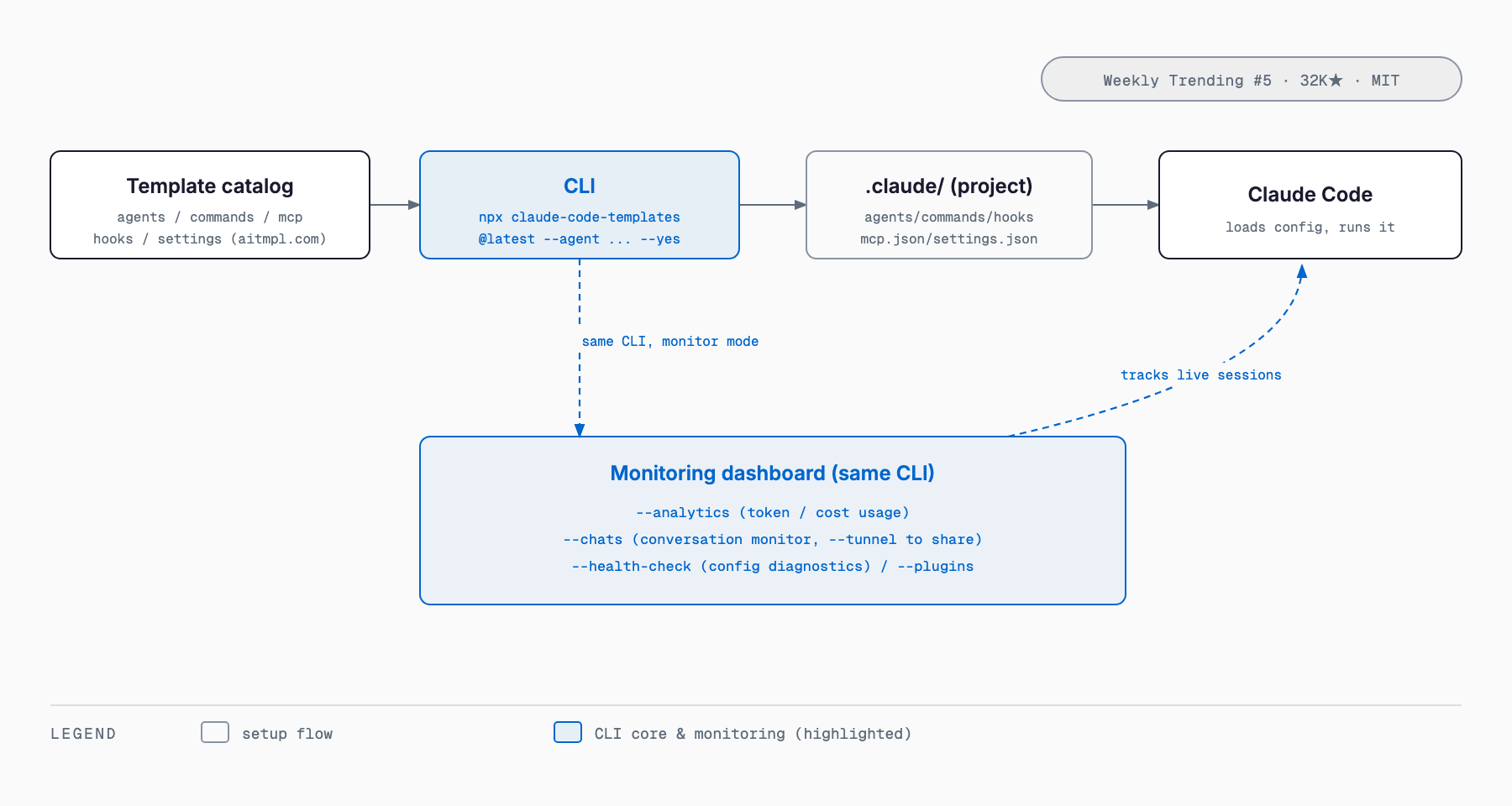
- It lands in .claude/: installed templates are written into the project's .claude/ directory (agents, commands, hooks, mcp.json, settings.json, etc.), and Claude Code picks them up the next time it starts
- Turn on monitoring if you want it: use --analytics, --chats, and --health-check to check usage, conversations, and configuration health after installing
The monitoring commands come from the same CLI. Token and cost usage shows up under --analytics, an in-progress conversation monitor is available with --chats (add --tunnel to get a URL viewable from outside your machine), configuration diagnostics run with --health-check, and installed plugins are listed with --plugins.
npx claude-code-templates@latest --analytics
npx claude-code-templates@latest --chats --tunnel
npx claude-code-templates@latest --health-check
npx claude-code-templates@latest --plugins
Before hand-writing MCP configuration, it helps to first understand how MCP servers work with the Claude Code MCP integration guide — that makes it easier to judge which MCP template in the catalog you actually need. If you're considering automation via hooks, the Claude Code Hooks guide is worth reading alongside this one.
How It Differs From Existing Options
| claude-code-templates | Claude Code's built-in plugin system | Manual .claude/ configuration | Curated lists (e.g. awesome-claude-code) | |
|---|---|---|---|---|
| What it is | A CLI + monitoring dashboard that installs agents, commands, MCPs, hooks, and settings from one catalog | Claude Code's own mechanism for installing plugins | Hand-writing agents, commands, mcp.json, etc. in an editor | A curated list of links to useful templates and repositories |
| How you install | One command, e.g. npx claude-code-templates@latest --agent ... --yes | Via Claude Code's plugin command / marketplace | Manually creating and copying files | Opening a GitHub page and copying entries individually |
| Monitoring | Bundled --analytics, --chats, --health-check, --plugins | No dedicated dashboard (basic usage checks via built-in commands) | None | None |
| Catalog size | 100+ agents/commands/settings/hooks/MCPs, plus 139 scientific skills and 21 official Anthropic skills | Anthropic-official and third-party plugin catalog | 0 (only what you write yourself) | Varies by repository (no execution mechanism) |
| Price / license | MIT License, free | Built into Claude Code, free | Free (your own time cost) | Free (a list of links) |
Claude Code's own plugin system is a stable, official distribution channel, but claude-code-templates spans five template types — agents, commands, MCPs, hooks, and settings — and bundles usage monitoring into the same CLI. Compared to hand-writing .claude/ from scratch, picking from already-working templates can save trial and error. For the bigger picture on Claude Code itself, see the Claude Code complete guide; for building custom agents, see the Claude Code Agent SDK guide.
Caveats (Including Security) and Who It's For
- It's not an official Anthropic tool — understand that it's a community project maintained by an individual developer
- Hooks can run shell commands and MCPs can gain network or file access, so before skipping the confirmation prompt with --yes, it's safer to review what a template's script does and where it connects
- The catalog mixes multiple sources (community submissions, scientific skills, official Anthropic skills, etc.), so check a template's origin before installing it
- Because it fetches the latest version via npx each run, confirm npm registry access is allowed if you plan to use it on a corporate network or in CI
- It suits teams that want to reuse the same agent/MCP/hook setup across multiple projects, or that want visibility into Claude Code usage (token spend, conversation logs) across a team
- If you'd rather fully understand and control every line of configuration for a small, single-project setup, hand-writing .claude/ while referring to the Claude Code MCP integration guide may give you a clearer picture
FAQ
Is claude-code-templates free to use?
Yes. The repository is open source under the MIT License, and the CLI, templates, and monitoring dashboard are all free. It runs via npx, so no permanent installation is required.
Is this an official Anthropic tool?
No. It's an independent, community project built by developer davila7. The README describes it as a CLI for configuring and monitoring Claude Code, not an Anthropic product.
How do I install it?
Run npx claude-code-templates@latest for an interactive setup, or target a specific template directly with flags like --agent or --mcp. Add --yes to skip confirmation prompts.
Are third-party templates safe to install?
Hooks can run shell commands and MCPs can access networks or files, so it's worth reviewing what a template does before installing it. The catalog includes community-submitted entries, so check whether a given template is Anthropic-official or third-party before adopting it.
How is this different from Claude Code's built-in plugin/marketplace feature?
Claude Code itself has a mechanism for installing plugins, but claude-code-templates adds a single CLI that spans agents, commands, MCPs, hooks, and settings in one catalog, plus a built-in usage-monitoring dashboard (--analytics, --chats, --health-check) that the built-in plugin system doesn't provide.
What can the monitoring dashboard show me?
--analytics shows token and cost usage, --chats monitors conversation history (with --tunnel for external sharing), and --health-check diagnoses your configuration — all locally, with no extra SaaS sign-up.
Summary
claude-code-templates is a free, MIT-licensed CLI that installs five types of Claude Code configuration — agents, commands, MCPs, hooks, and settings — with a single command. Beyond its catalog of 100+ templates, it bundles a monitoring dashboard (--analytics, --chats, and more) into the same CLI, which is what sets it apart from Claude Code's built-in plugin system, manual configuration, or a plain list of links.
That said, it's a community project rather than an official Anthropic tool, and the execution permissions that hooks and MCPs carry are worth reviewing before you install. A reasonable way to start is trying npx claude-code-templates@latest on a single project and installing only the agents, MCPs, or hooks you actually need. Teams considering a broader rollout should also check the Claude Code enterprise adoption guide.
References (Primary Sources)
Related free tools (no sign-up, instant results)
Feel free to contact us
Contact Us