Perplexity Hybrid Compute Explained
How PPLX Qwen 3.8 27B Splits AI Tasks Between Cloud and Mac
As of Sep 2026, Perplexity's Hybrid Compute feature for the Mac Computer agent starts tasks in the cloud and hands off only the steps involving sensitive data to a local model (PPLX Qwen 3.8 27B) on Apple Silicon. This article explains, based on primary sources, how the local/cloud boundary is decided, the hardware requirements, and how it differs from Apple's Private Cloud Compute and fully local setups.
Bottom line: tasks start in the cloud, and only the sensitive steps move local
Hybrid Compute is a feature Perplexity announced on September 1, 2026 for the Mac version of its Computer agent. A task itself is started and planned by a cloud-based frontier model, but when a step involves private files or personal information, that specific step is handed off to a local model running on Apple Silicon — PPLX Qwen 3.8 27B. Rather than an all-cloud or all-local choice, the defining trait is that responsibility switches mid-task, at the step level.
What's new: a third option beyond "all cloud" or "all local"
Until now, AI agent options mostly fell into two camps: send everything to the cloud for maximum capability, or keep everything local for maximum privacy. Hybrid Compute instead splits work at the step level — web search, planning, and long chains of reasoning that don't touch sensitive data stay with the cloud frontier model, while only the steps that touch personal information or private files get routed to the local model. Another departure from typical cloud AI agents: work completed locally doesn't consume cloud credits.
How it works: what goes to the cloud, what stays local, and who decides
A task is first picked up by the cloud frontier model, which handles web search, planning, and overall orchestration. When the workflow reaches a step that touches private files or personal data, an on-device classifier running continuously on the Mac detects it. MarkTechPost's coverage refers to this classifier as "PII-Tracer," describing it as a small model that detects multiple categories of personal information such as names, addresses, and account numbers — but this name and its technical details could not be verified against Perplexity's own blog post, which returned an access error at the time of writing, so that detail should be treated with some caution.
According to multiple outlets, once sensitive content is flagged, several outcomes are available: continue processing locally, mask the sensitive spans before sending to the cloud, refuse the action, or ask the user for explicit consent. The final call on whether to keep processing in the cloud or switch to local appears to remain with the user rather than being fully automated. Once the local step finishes, the task resumes in the cloud with context preserved.
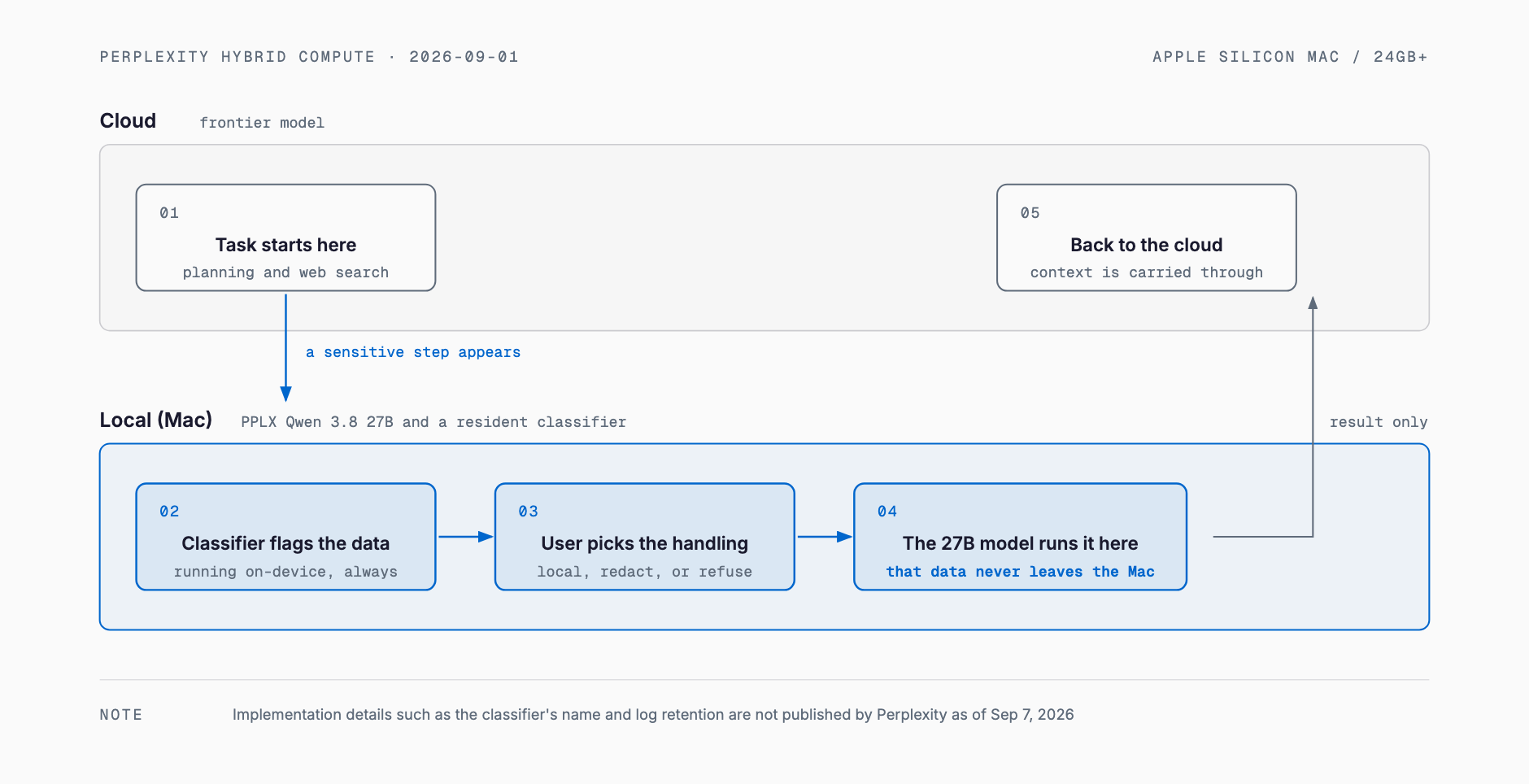
System requirements: supported hardware, memory, and plans
| Item | Detail |
|---|---|
| Supported chip | Apple Silicon Macs only (Intel Macs not supported) |
| Supported OS | macOS 15 or later |
| Memory | 24GB unified memory minimum, 32GB recommended |
| Setup | One-click download inside the Mac Perplexity app (no terminal, no Ollama, no API key needed) |
| Eligible plans | Pro, Max, and Enterprise (not available on the free plan) |
| Billing for local work | No cloud credits consumed (billing applies only to frontier cloud model usage) |
Reports indicate the feature simply cannot run on Macs with 8GB or 16GB of unified memory, effectively requiring an M1-generation or later Mac with memory headroom to spare. Tasks started from an iPhone or iPad can reportedly still have their sensitive steps routed to a local model, as long as a Mac running Perplexity is powered on and reachable.
What actually changes on the privacy side
What changes is narrower than it might sound: only whether sensitive information reaches Perplexity's cloud. Most interactions — web searches, general planning, non-sensitive instructions — continue to be handled by the cloud frontier model as before. What's different is that, for steps where the on-device classifier flags private file contents or personal information, that content itself can be kept off the cloud and processed entirely by the local model on the Mac.
- What may not be sent: personal information or private file contents in steps the classifier flags as sensitive, when local processing or masking is chosen
- What is still sent as before: general task content, web search queries, and planning instructions that the classifier doesn't flag as sensitive
- What's unclear: the classifier's real-world accuracy (false positive/negative rates), and exactly how much of the local-processing execution log is retained or transmitted to Perplexity — none of this has been published as of September 7, 2026
How it compares to existing similar approaches
| Approach | Where inference runs | Flow of sensitive data | Hardware needed | Speed |
|---|---|---|---|---|
| Perplexity Hybrid Compute | Starts in the cloud, sensitive steps switch to local | Only flagged sensitive steps stay local (cloud-first direction) | Apple Silicon Mac, 24GB+ unified memory | Mostly cloud speed, drops to local speed only during the switch |
| Apple Intelligence Private Cloud Compute | Starts on-device, only overflow tasks go to the cloud | Content is only sent to the cloud in a verifiably encrypted form when local capacity is exceeded (opposite direction from Perplexity) | Any Apple Silicon device | Fast on-device processing, latency only when overflowing to the cloud |
| Typical cloud LLM | Entirely cloud | All data is sent to the vendor's servers | A thin client is enough locally | Network-dependent, but ample compute available |
| Fully local (e.g. Ollama) | Entirely local | No data ever leaves the device | A GPU or Mac with adequate VRAM/memory | Entirely dependent on local hardware |
The detail worth highlighting is that Hybrid Compute and Apple's Private Cloud Compute (PCC) run in opposite directions. PCC starts from on-device processing and only offloads the heavier tasks it can't handle locally to a verifiable cloud environment. Hybrid Compute starts from the cloud frontier model and pulls only the sensitive steps back to the local Mac. Both designs revolve around how to handle sensitive processing, but their starting points are reversed — easy to conflate when comparing the two. The broader theme of splitting work between cloud and local models for cost reasons is covered in our piece on hybrid cloud/local LLM operations; for choosing a local inference engine, see our comparison of local inference engines.
What this means for small and midsize businesses
Businesses that handle customer records, contracts, or other non-public internal data have long faced a tradeoff: cloud AI offers better accuracy, but some data simply can't leave the building. If Hybrid Compute works as described, it adds a middle option — keeping only the sensitive portion of a workflow on a local Mac while letting the cloud handle everything else, like research or drafting. That said, it currently requires a Pro, Max, or Enterprise subscription, and there's no indication it's designed for Windows environments or on-premises servers.
- Accounting or admin work involving customer lists, invoices, or other personal information
- Reviewing or summarizing documents that contain confidential contract terms
- Drafting customer support responses that reference sensitive inquiry details
- Small teams that want more caution around sensitive data but can't justify the investment a fully local setup requires
Current limitations and open questions
- Only macOS is supported; no timeline for Windows or Linux support has been published as of September 7, 2026
- No official accuracy or false-positive-rate figures for the classifier (reported as "PII-Tracer") have been published by Perplexity itself
- Coverage of which local models are actually bundled (PPLX Qwen 3.8 27B alone, versus a lineup that also includes Gemma- and Qwen3.6-based models) is inconsistent across outlets; since Perplexity's own blog post could not be accessed directly for this article, no definitive claim is made here
- It's not published in detail how much of the local-processing execution log is retained or transmitted back to Perplexity
- Beyond secondary media coverage, no primary documentation could be confirmed for the specific configuration options or audit-log format available to Enterprise customers for org-wide data-handling rules
FAQ
Is Hybrid Compute free to use?
No. As of September 2026 it's reported to require a Pro, Max, or Enterprise subscription; it isn't available on the free plan.
Does it work on Windows or Linux?
No. It requires an Apple Silicon Mac running macOS 15 or later; no timeline for other operating systems has been published as of September 7, 2026.
How much memory does local processing need?
24GB of unified memory is reported as the minimum, with 32GB recommended. Macs with 8GB or 16GB of memory reportedly cannot use the feature at all.
Does local processing cost extra?
No. Work completed locally is reported not to consume cloud credits; billing applies only to usage of the cloud frontier model.
What is guaranteed to never reach the cloud?
Content that the on-device classifier flags as sensitive and that the user routes to local processing is designed to avoid the cloud, according to media coverage. However, the exact detection criteria and the verified scope of that guarantee could not be confirmed against Perplexity's own technical documentation at the time of writing.
Related free tools (no sign-up, instant results)
Feel free to contact us
Contact Us