Magnitude, the Local Inference Server
A 2026 Guide to Hardware-Matched Local Models
Magnitude is an open-source local inference server that profiles your hardware, then recommends, downloads, tunes, and runs the best model for your machine. This guide covers setup, how it plugs into Claude Code and other agents, and how it differs from Ollama, LM Studio, llama.cpp, and vLLM, as of September 2026.
Magnitude Is a Local Inference Server Built to Stop You From Picking a Model
Magnitude (magnitudedev/magnitude) is an open-source local inference server. It profiles your machine's hardware, recommends the best models that fit, downloads and tunes them, and plugs directly into the coding agent you already use, such as Claude Code. It is licensed under the Apache License 2.0, and its GitHub repository describes it as "Run your agent on local models. Free, private, and offline."
What It Does
The following capabilities come directly from the official README and the magnitude.dev site.
- Free to run: no token costs, API keys, or rate limits
- Fully private and offline: models, prompts, and files stay on your machine
- Knows your hardware: it profiles your chip, memory, and bandwidth
- Models on demand: loaded when your agent needs them, unloaded when idle or when memory fills
- Tuned end to end: it applies tuning such as speculative decoding and concurrency settings automatically for your machine, per its own description
- Works beyond the catalog: compatible GGUF models can be downloaded from Hugging Face and used as well
What's New: Automatic Model Selection From a Hardware Profile
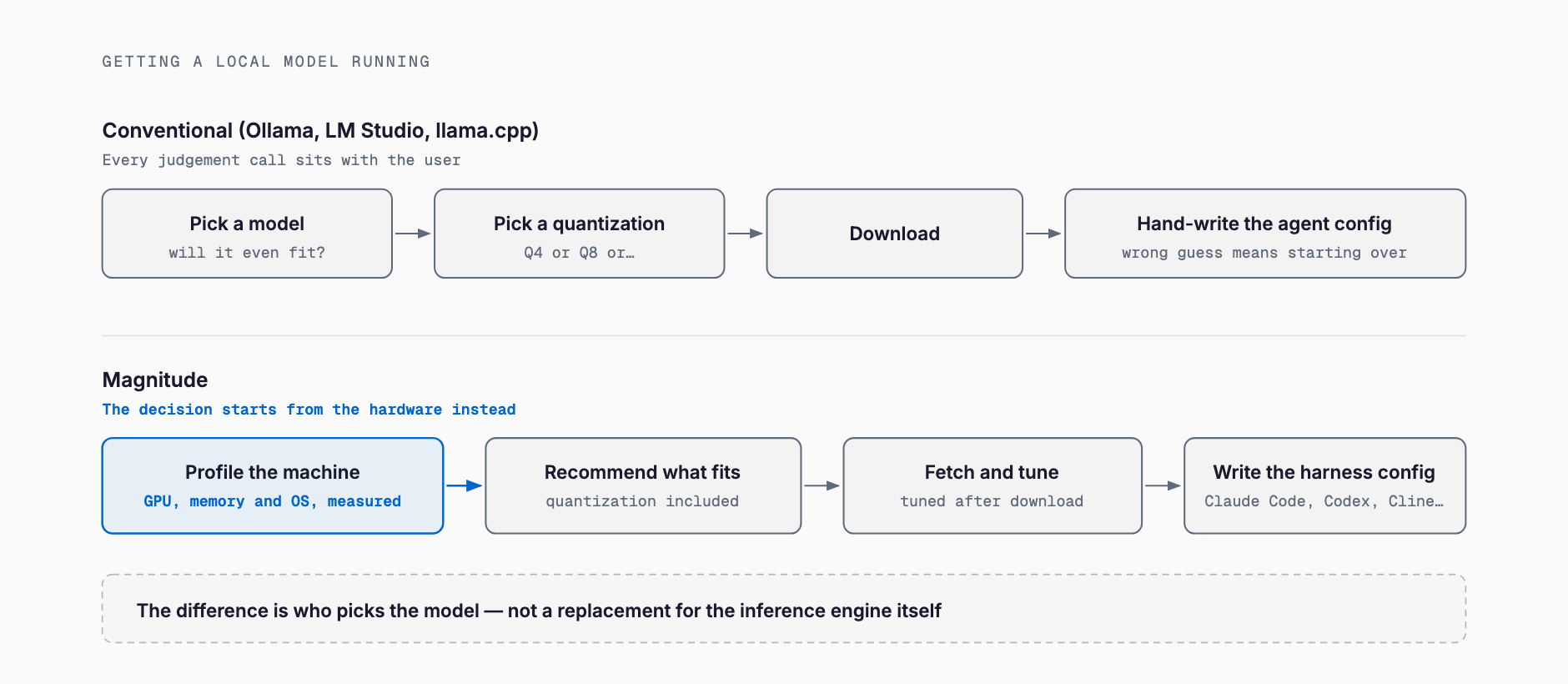
The core idea behind Magnitude is that it picks the model for your hardware instead of asking you to pick one. Most existing local-inference tools assume you already know which model and which quantization level to run. Magnitude's own FAQ addresses this directly under "Why not just have my agent set up Ollama?", answering (paraphrased from the README) that your agent would otherwise be guessing about your hardware, which quantization fits, and how fast it will run — whereas Magnitude gives it a catalog of recommendations computed for your specific machine, plus an onboarding flow that writes your harness configuration for you. That hardware-driven automatic recommendation is the clearest differentiator versus tools like Ollama.
Install, Run, and Pricing
Magnitude itself is open source and free to use — there is no token billing or subscription, though you still pay for the electricity and disk space that running local models consumes. The official README gives this manual install path.
npm i -g @magnitudedev/cli
magnitude setup
Running magnitude setup walks you through an interactive flow that profiles your hardware, lets you pick from the recommended models, downloads your selection, and connects it to your harness. As of the official README checked on September 7, 2026, Magnitude supports macOS and Linux natively, with Windows supported through WSL.
Connecting It to an Existing Coding Agent, the Fastest Way
The harnesses Magnitude officially lists support for are Pi, OpenCode, Hermes, OpenClaw, Codex, Claude Code, Oh My Pi, and Cline — or you can use Magnitude's own built-in harness. The officially recommended shortcut is not to run commands yourself, but to hand your agent a prompt and let it do the setup.
- Send your agent (for example, Claude Code) this instruction: "Set up local models for me with the Magnitude CLI. Install it with npm i -g @magnitudedev/cli (or my package manager), then run magnitude docs onboarding and follow the instructions."
- The agent profiles your hardware and presents local model candidates that fit your machine
- You pick a model, it gets downloaded, and the agent switches its own configuration over to it
- After that, Magnitude runs in the background on its own, loading and unloading models as needed
As of the official README and homepage checked on September 7, 2026, neither document spells out a manual step for pointing an agent at Magnitude as a plain OpenAI-compatible endpoint URL; the connection is instead described as something the CLI's onboarding flow writes into each harness's own configuration automatically. Anyone who needs the exact API surface should check the official docs at docs.magnitude.dev.
How It Differs From Ollama, LM Studio, llama.cpp, vLLM, and LocalAI
Magnitude is not the only way to run LLMs locally. The well-known alternatives are Ollama, LM Studio, llama.cpp, vLLM, and LocalAI. All of them run models locally, but what sets Magnitude apart is that it decides which model to run based on your hardware, whereas the others assume you'll choose the model and quantization yourself.
| Tool | Automatic model selection | Target user | Server-ready | GUI | Quantization handling | License |
|---|---|---|---|---|---|---|
| Magnitude | Automatic, based on a hardware profile | Individual developers using coding agents | Mainly personal machines | None (CLI plus agent integration) | Selected and tuned automatically | Apache 2.0 |
| Ollama | None (you name the model) | Individual developers to small teams | Personal machine to lightweight server | Minimal (CLI-first, small menu-bar app) | You pick a GGUF quant tag | MIT |
| LM Studio | None (you browse and pick in the GUI) | GUI-first individual users | Personal machine focused | Yes (desktop app) | You pick a quant variant in the GUI | Vendor's own license (free for personal and commercial use; inference engine itself is not open source) |
| llama.cpp | None | Developers, and other tools embedding it | Can be embedded in servers as a low-level engine | None | You specify the GGUF quantization | MIT |
| vLLM | None | Infrastructure and ML engineers | Built for production, large-scale serving | None | You specify AWQ/GPTQ, etc. | Apache 2.0 |
| LocalAI | None | Developers self-hosting an API | Built for serving (OpenAI/Anthropic-compatible API) | Yes (integrated WebUI) | You specify it per backend | MIT |
In short: Ollama is a lightweight CLI where you name the model yourself; LM Studio is for individuals who'd rather browse and try models through a GUI; llama.cpp is the low-level engine many other tools are built on; vLLM is for production-scale, throughput-focused serving; and LocalAI is for developers who want to stand up their own OpenAI/Anthropic-compatible API. Magnitude doesn't so much compete with these as sit in front of the decision they all leave to the user.
How to Think About Required Specs
Magnitude officially states there's no fixed minimum hardware requirement — it profiles your machine and recommends the best models that fit, with more memory letting you run larger models. If you want a concrete sense of how much VRAM a specific model, quantization, and context length actually needs before Magnitude even makes a recommendation, we've also built a free VRAM calculator (free, no signup required) where you pick the model, quantization, and context length to estimate the VRAM footprint. It's a useful way to sanity-check what class of model your GPU or Mac can realistically run. When it comes to choosing what to actually load, the K2 Horizon requirements guide and the split-by-step approach of Perplexity Hybrid Compute are both worth reading alongside this.
Where It Fits, and Where It Doesn't
- Good fit: individual developers who want to switch an existing coding agent like Claude Code or Codex to a local model without API billing
- Good fit: anyone who'd rather not research GGUF quantization levels and context-length tradeoffs themselves and would prefer a recommendation
- Good fit: individuals or small teams who don't want prompts or proprietary code leaving the machine and going to a cloud API
- Poor fit: production backends that need to serve many concurrent requests at scale (vLLM is a better match there)
- Poor fit: anyone wanting a native Windows setup outside WSL
- Poor fit: advanced users who want full manual control over tuning a model outside the catalog (using llama.cpp directly offers more freedom)
Current Limitations
- Official support covers macOS and Linux only; Windows is supported through WSL, per the README checked on September 7, 2026
- The design targets connecting a personal development machine's agent to a local model, not explicitly large-scale concurrent serving in production
- Neither the official README nor the homepage, as checked on September 7, 2026, states an explicit development stage such as alpha or beta
- The exact manual steps for using Magnitude as a plain OpenAI-compatible endpoint are not spelled out in the primary sources checked; that detail depends on the separate official documentation site (docs.magnitude.dev)
- GitHub star counts had climbed into the high 3,000s by early September 2026 and the project has appeared on GitHub Trending, though the exact figure varies by source (reported anywhere from just over 3,300 to around 3,700) and changes daily
FAQ
Is Magnitude free to use?
Yes. Magnitude itself is open source under the Apache License 2.0, and its own site states there are no token costs, API keys, or rate limits. You still pay for the electricity and disk space used by the models you run.
Which coding agents does it work with?
As of the official README checked on September 7, 2026, it officially supports Pi, OpenCode, Hermes, OpenClaw, Codex, Claude Code, Oh My Pi, and Cline, or you can use its own built-in harness.
How is it different from Ollama or LM Studio?
Ollama and LM Studio both expect you to pick the model and quantization yourself. Magnitude instead profiles your machine's hardware and automatically recommends, downloads, and tunes the model that best fits it.
Does it run on Windows?
It officially supports macOS and Linux, with Windows supported through WSL.
Does it work without an internet connection?
Once Magnitude and a model have been downloaded, it's designed to run fully offline, per the official documentation.
Can I use a model that isn't in its catalog?
Yes. The official docs describe downloading compatible GGUF models from Hugging Face and using them within Magnitude.
Related free tools (no sign-up, instant results)
Feel free to contact us
Contact Us