POS Register System Costs for Small Businesses (2026)
POS register system costs compared across tablet POS, packaged POS, and custom builds, plus hardware, feature cost drivers, and running costs for SMBs.
A POS (point-of-sale) register system records and aggregates sales in real time while handling checkout and integrating inventory and sales data in one place. As a general 2026 market range rather than a specific quote, costs vary widely by approach: a tablet POS running on an iPad-style device typically costs 0-300,000 yen upfront and 0-15,000 yen monthly, a packaged industry-specific POS runs about 500,000-3,000,000 yen upfront, and a fully custom build with core-system integration and centralized multi-store management runs 5,000,000 yen or more. Many small business owners in retail, food service, and other service industries struggle with an aging register that requires manual inventory tracking, or with no way to aggregate sales across multiple stores at headquarters — but choosing on price alone often leads to missing features or hardware compatibility problems that force a costly second purchase. This article breaks down POS system costs, peripheral hardware costs, how individual features affect price, running costs that are easy to overlook, and how to choose by business type, in plain terms for non-IT staff.
Cost by approach
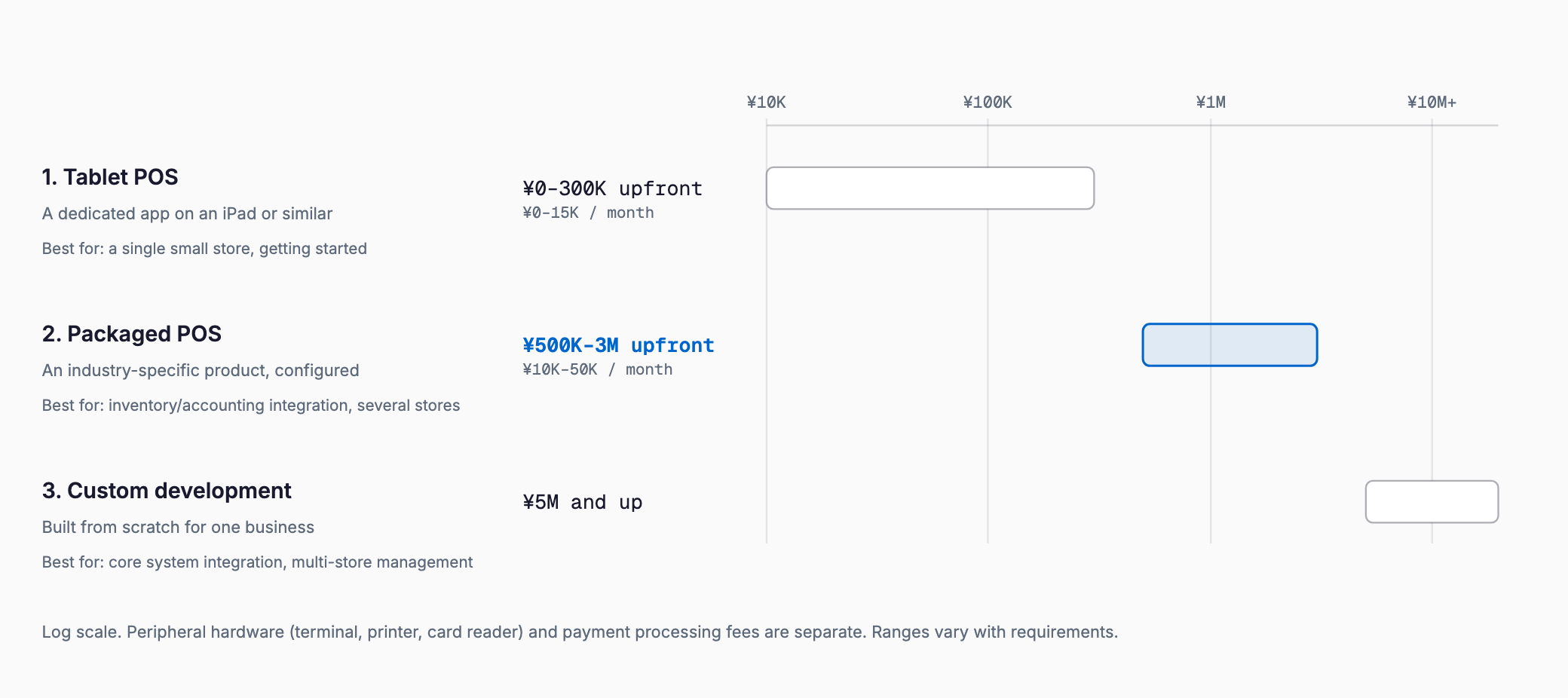
| Approach | Overview | Upfront cost (approx.) | Monthly cost (approx.) |
|---|---|---|---|
| 1. Tablet POS | Runs a dedicated app on a general-purpose tablet such as an iPad, managed via the cloud | 0-300,000 yen (including the device) | 0-15,000 yen (many services offer a free tier) |
| 2. Packaged POS | An industry-specific POS package configured to your business | 500,000-3,000,000 yen | Maintenance at roughly 10-15% of upfront cost per year |
| 3. Full custom development | Built from scratch including integration with core systems or an e-commerce site and proprietary inventory logic | 5,000,000 yen or more, potentially much higher at scale | Maintenance at roughly 15% of upfront cost per year |
For a small independent shop or a single-store operation, a tablet POS usually covers everything needed. The case for a packaged or fully custom build grows stronger as requirements shift toward inventory management, accounting software integration, or centralized management across multiple stores, and the upfront investment decision deserves more scrutiny at that point.
Peripheral hardware costs
| Hardware | Overview | Typical cost |
|---|---|---|
| Register terminal (tablet or dedicated unit) | The device used for checkout; tablet POS uses a general-purpose device, packaged POS often uses a dedicated terminal | About 30,000-100,000 yen for a general-purpose tablet, 150,000-400,000 yen for a dedicated terminal |
| Cash drawer | Stores cash and opens automatically in sync with the register | About 10,000-30,000 yen |
| Receipt printer | Issues a receipt after checkout; thermal printers are standard | About 15,000-50,000 yen |
| Barcode scanner | Reads product barcodes into sales and inventory data | About 5,000-30,000 yen |
| Cashless payment terminal | Handles credit cards, e-money, and QR code payments | Free to about 50,000 yen (some payment processors provide the device for free) |
| Automatic change dispenser | Automates receiving cash and dispensing change | About 150,000-500,000 yen (helps reduce staffing needs and closing-time work) |
Peripheral hardware is billed separately from the POS system itself, so looking only at the software subscription fee can make a quote look cheaper than what it actually costs to get running. Cashless payment terminal terms vary a lot by payment processor, including whether the device is provided free of charge, so it's worth confirming before signing a contract.
How individual features affect cost
| Feature | Overview | Cost impact |
|---|---|---|
| Inventory integration | Automatically adjusts inventory counts based on sales | Basic inventory tracking is often standard even on a tablet POS, but reorder-point management or supplier integration typically requires a dedicated inventory management system, raising cost |
| Accounting software integration | Automatically imports daily sales data into accounting software | Choosing a POS that supports API integration with mainstream cloud accounting software keeps added cost low; an unsupported combination requires custom integration work |
| Multi-store management | Lets headquarters manage sales and inventory across stores centrally | Cost impact grows with the number of stores due to permission design and aggregation work |
| Customer and loyalty integration | Links with a membership card or loyalty app to accumulate purchase data | Some POS systems include this as standard, but a proprietary point design requires custom development |
| Reduced tax rate / invoice system support | Displays multiple tax rates on receipts and issues qualified invoices | Most mainstream POS services support this as standard, but older models or custom builds may need extra work |
| Offline operation | Keeps checkout functioning during a network outage | Support varies by cloud POS provider; without it, checkout can stop completely during a network outage |
What drives cost most is not the number of features itself, but which external services need to connect to the POS. Choosing a POS that already supports your inventory system or accounting software keeps integration cost low, while an unsupported combination requires custom integration work. It's worth confirming compatibility with your existing inventory and accounting tools before signing a contract.
Running costs that are easy to overlook
- Payment processing fees: credit card, e-money, and QR code payments typically carry a fee of around 3% of the transaction, which adds up for stores with a high share of cashless payments
- Monthly support fees: phone support or remote assistance during an outage is sometimes a paid option, and coverage varies by contract plan
- Hardware replacement costs: a failed register terminal or printer directly affects the ability to operate, so it's worth confirming replacement lead time and loaner-device availability in advance
- OS and app updates: a tablet POS can stop working correctly after an operating system update, so periodic testing is needed
- Network connectivity costs: cloud POS assumes a constant internet connection, so factor in your store's line cost and a backup connection such as a mobile router
- Replacement cycle: budgeting for hardware replacement roughly every 3-5 years helps avoid an unplanned shutdown from sudden failure
Choosing by business type
- Restaurants: a packaged POS fits well if table-side ordering or reservation-POS integration matters, though a small restaurant can often get by with a tablet POS that already supports Japan's reduced tax rate
- Retail stores: barcode-based inventory tracking and integration accuracy matter most, so look for a POS with strong built-in inventory management
- Salons: an industry-specific packaged POS tends to fit better when reservation system integration and customer record management are priorities
- Multi-store chains: centralized headquarters management and accurate sales aggregation matter most, making a packaged POS with multi-store features or a fully custom build the standard choice
Selection checklist
- Does it support every payment method you currently accept — credit cards, e-money, and QR code payments?
- Can it integrate with your inventory management system or accounting software, or would double data entry be required?
- If you operate, or plan to operate, multiple stores, does it offer centralized headquarters management?
- Can checkout continue offline during a network outage?
- Does it support Japan's reduced tax rate and invoice system as standard?
- What is the total cost of payment processing fees plus any other fees, such as monthly or transfer fees?
- What support is available for hardware failures, and what is the replacement lead time?
- Do you plan to integrate with a customer management system such as a loyalty card app?
- Is there a minimum contract term, and are there cancellation penalties?
- Will the vendor help migrate existing product and customer data during setup?
What does a POS register system typically cost?
A tablet POS running on a general-purpose device like an iPad typically runs 0-300,000 yen upfront and 0-15,000 yen monthly. A packaged, industry-specific POS runs roughly 500,000-3,000,000 yen upfront. A fully custom build with core-system integration runs 5,000,000 yen or more. These are general 2026 market ranges, not a specific quote.
Should I choose a tablet POS or a packaged POS?
For a single-store operation with simple inventory and accounting needs, a tablet POS is often enough. If you need multi-store management or a proprietary inventory or customer management setup, a packaged or fully custom build is worth considering.
What POS costs are easy to overlook?
Payment processing fees are the most commonly overlooked cost, typically around 3% of each transaction, which adds up quickly for stores with a high share of cashless payments. Hardware replacement costs and network connectivity costs are also worth budgeting for separately.
Does supporting Japan's reduced tax rate or invoice system add extra cost?
Most mainstream POS services support this as a standard feature at no extra cost. However, older hardware or a custom-built POS may require additional development work, so it's worth confirming before signing a contract.
Summary
POS register system costs typically run 0-300,000 yen upfront and 0-15,000 yen monthly for a tablet POS, 500,000-3,000,000 yen upfront for a packaged POS, and 5,000,000 yen or more for a fully custom build. What matters most isn't choosing the cheapest option, but comparing the features your business actually needs — inventory integration, accounting software integration, multi-store management — alongside running costs such as payment processing fees and hardware failure support. Getting a full quote that includes peripheral hardware, and choosing the approach that fits your business type, helps avoid investing in a system that ends up unused after rollout.
Related free tools (no sign-up, instant results)
Feel free to contact us
Contact Us