Quote Management System Cost Guide for SMBs (2026)
Quote management costs run from a few thousand yen monthly for cloud SaaS to millions for custom builds, covering cost drivers and how to pick an approach.
A quote management system centralizes quote creation, past-quote search, approval workflows, and cost calculation, and its cost typically runs 1,000-5,000 yen per user per month for cloud tools, 300,000-1,500,000 yen upfront for packaged software, 500,000-3,000,000 yen for a kintone-style low-code build, and 3,000,000 yen or more for full custom development. Small and mid-sized businesses that create quotes in Excel or Word often run into inconsistent templates, no way to search past quotes, and approvals handled loosely by phone or email. This guide breaks down quote management system costs and how to choose the right approach for a non-technical decision maker. For related billing workflows, see Invoice System Development Costs.
What Is a Quote Management System?
A quote management system is not just a tool for formatting quotes. It typically combines history management that lets you search past quotes by project or customer, approval workflows that route quotes above a certain amount or discount rate to a manager, integration with sales management systems so a finalized quote flows straight into an order and invoice, and automatic cost and gross-margin calculation. The category spans everything from a simple quote-formatting tool to an integrated platform covering sales management, cost tracking, and CRM, so the right product and price depend heavily on how much of that scope you want to cover.
Cost Ranges by Approach
Quote management can be implemented in roughly four ways. The figures below are general guidance and vary with user count, whether cost integration is needed, and how much existing systems must be connected.
| Approach | Overview | Typical initial cost | Typical monthly cost |
|---|---|---|---|
| 1. Cloud SaaS (per-user billing) | Contract a quote-creation SaaS and run it on standard features | 0-100,000 yen | 1,000-5,000 yen per user |
| 2. Packaged software (on-premise) | Deploy an industry package on your own server | 300,000-1,500,000 yen | 50,000-150,000 yen/year in maintenance |
| 3. Low-code customization (e.g. kintone) | Build quote and approval flows on a no-code/low-code platform | 500,000-3,000,000 yen | 20,000-100,000 yen for platform fees and maintenance |
| 4. Full custom development | Built with a unique cost-calculation engine, integrated with core systems | 3,000,000-10,000,000 yen, sometimes more | Maintenance around 10-15% of initial cost per year |
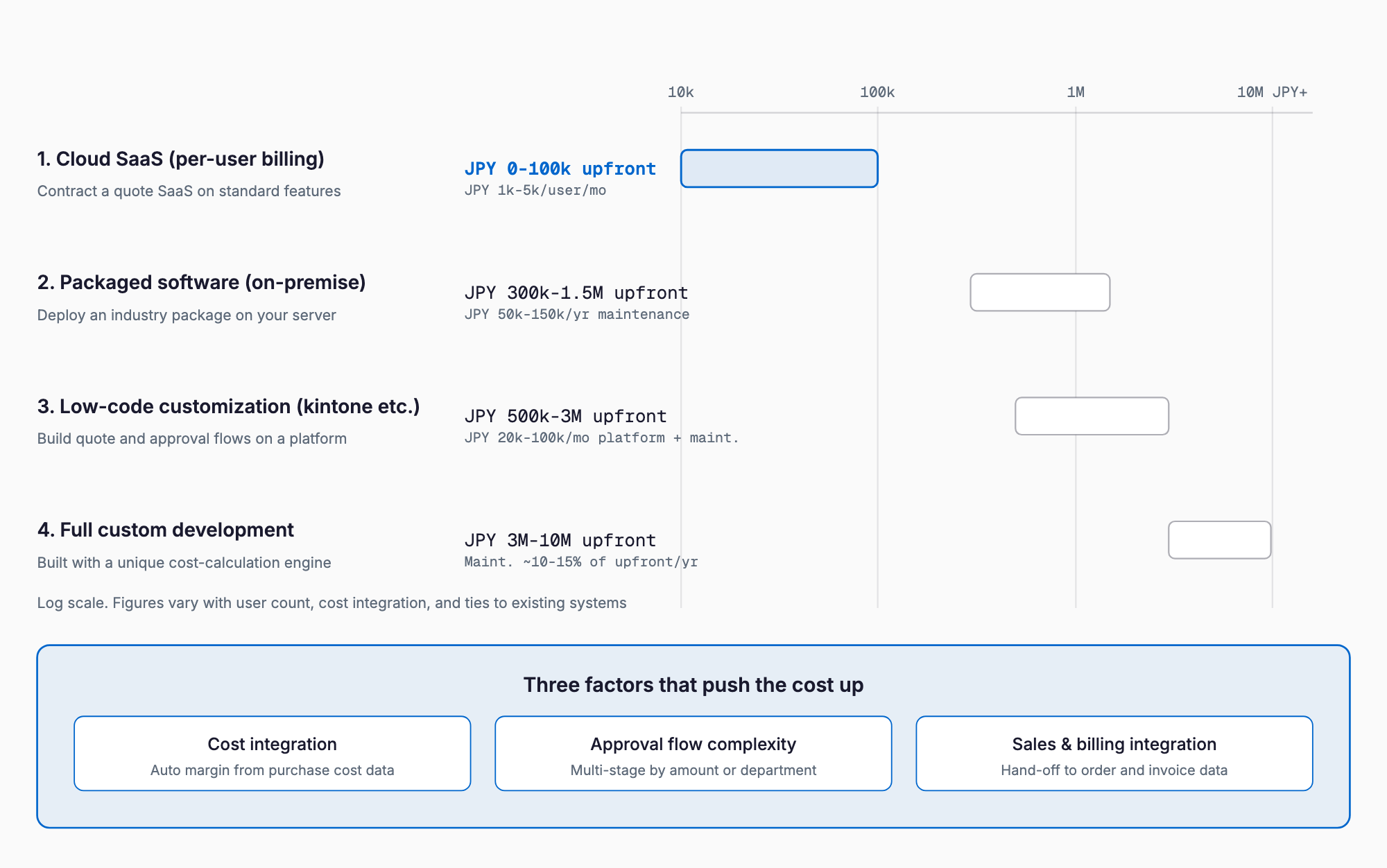
If standard quote templates and a simple approval flow are enough, cloud SaaS is usually sufficient. The more complex the cost-calculation logic or the tighter the integration needed with core systems, the more customization or custom development becomes necessary.
What Drives the Cost
- Cost integration: Linking purchase or material cost masters to calculate gross margin at quote time adds work
- Approval workflow complexity: Branching approvers by amount tier or department, or adding multi-stage approval, increases design effort
- Integration with sales and billing systems: Passing a finalized quote straight into order and invoice data adds effort per connected system
- Number of quote templates: More formats and conditions per product category or client add work
- Searchability of past quotes: Cross-searching by project, customer, and product name requires more data design and search functionality
- Scope of gross-margin automation: Real-time margin display that accounts for cost, discounts, and fees takes more effort to build accurately
Industry-Specific Considerations
Requirements for quote management differ by industry. In manufacturing, accuracy in cost estimation that builds up material, processing, and subcontracting costs matters most, often requiring integration with a parts master and unit pricing by process. In construction, quotes need itemized breakdowns by category — scaffolding, structure, interior finishing — rather than a single lump sum, and it should be easy to re-quote when work scope or quantities change. In wholesale, different discount rates or price lists per client are common, so whether the system can automatically apply a customer's price list when creating a quote significantly affects operational efficiency. Mapping which features are essential for your industry before comparing products helps avoid choosing something with the wrong fit.
Checklist Before Choosing a System
- How are quotes currently created (Excel, Word, paper), and how many quotes are issued per month?
- Is cost calculation and margin display required, and if so at what granularity (per product, per process)?
- How many approval stages are needed, and should approvers branch by amount or department?
- How much automatic hand-off to sales, billing, or accounting systems is wanted after a quote is finalized?
- What search conditions (customer name, product name, date range) are needed for past quotes?
- Does client-specific pricing or discount data need to be managed as a master?
- How many users will use the system, and what is the sales team's comfort level with new software?
- How many quote templates or formats are needed?
Common Failure Patterns
A few patterns recur in quote management rollouts. First, choosing a tool based only on its quote-creation feature, then trying to add cost integration or approval workflows later, only to find the platform cannot support them and having to re-select. It helps to anticipate future needs during the initial comparison. Second, neglecting to explain the change to sales staff, who resist having their free-form Excel quotes turned into rigid templates, resulting in incomplete adoption and Excel running alongside the new system indefinitely. Third, underestimating the effort of migrating price lists and past quote data, leading to complaints that past quotes cannot be found right after go-live. Fourth, budgeting only from general system development cost benchmarks without accounting for the work of cleaning up cost masters and testing integrations with existing systems, causing costs and timelines to run over expectations.
Choosing Between SaaS and Custom Development
One useful dividing line is whether standard quote creation and a simple approval flow are enough for your operations. Use the comparison below to see which side your requirements fall on.
| Factor | Cloud SaaS fits when | Customization or custom development fits when |
|---|---|---|
| Cost calculation | A simple cost or margin ratio is enough | Complex estimation by process or component is required |
| Approval flow | One or two simple approval steps are enough | Multi-stage branching by amount or department is needed |
| System integration | No integration needed, or standard APIs suffice | Tight coupling with core systems is required |
| Time to launch | Want to start within weeks to a month | Willing to spend months to a year for unique requirements |
| Budget | Want to keep it to a few thousand yen a month | Can allocate millions of yen upfront |
Frequently Asked Questions
How much better is a quote management system compared to using Excel?
Expected benefits include less time spent searching for past quotes, fewer errors from unified templates, and visibility into approval history. Companies issuing a high volume of quotes per month tend to see the largest time savings from improved search and approval efficiency.
What does it typically cost to build a quote management system on kintone?
A simple quote-creation and approval flow typically costs 500,000-1,500,000 yen, while adding cost integration and a link to a sales management system typically runs 1,500,000-3,000,000 yen. Costs vary with requirements, so get an individual quote to confirm.
Is cost-calculation functionality always necessary?
It is valuable for companies that want to see gross margin at the time of quoting, but if a separate cost management sheet or system is already in use, it can be left out of the quote system and connected via integration instead. Decide upfront where cost data will be managed as the single source of truth to avoid duplicate management.
How long does implementation usually take?
For a cloud SaaS, selection through template setup typically takes a few weeks to a month. Projects involving integration with existing systems or customization typically take a few months, and full custom development typically takes six months to a year.
Summary
Quote management system costs range from a few thousand yen a month for cloud SaaS to several million yen for custom development with cost integration and complex approval workflows, with the right choice depending heavily on the approach. A practical way to control cost is to first map out your monthly quote volume, whether cost integration is needed, and how complex your approval flow must be, confirm what standard features already cover, and limit customization or development to the gaps that remain.
Related free tools (no sign-up, instant results)
Feel free to contact us
Contact Us