What Is Raycast in 2026? Agentic AI Chat, Credit-Based Prici
ng, and the Windows/iOS Apps
Raycast is a free extensible launcher for macOS, Windows and iOS. This overview covers v2.3's agentic AI Chat, new AI Credits pricing, and Windows/iOS status.
Raycast is an extensible launcher app for macOS, Windows, and iOS (iPadOS). Its official tagline is "Your shortcut to everything," and personal use starts free on the Free plan.
This article is a snapshot as of September 13, 2026 — a moment when Raycast is going through two major shifts at once. Version 2.3 for macOS rebuilt AI Chat into an agentic system, and the pricing model just moved from rate limits to usage-based "AI Credits."
Here we cover the free built-in features, the technical makeup of the cross-platform "Raycast 2.0" rewrite (Swift, C#, React, Node, and Rust working together), v2.3's agentic features, the new pricing table, where the Windows and iOS apps stand, and how Raycast compares to Alfred and Spotlight.
What Raycast Is — A Free, Extensible Launcher
Raycast is meant to replace macOS's built-in Spotlight or Windows's built-in search. A single hotkey brings it up for app launching and command search, and everything can be driven from the keyboard. Even the Free plan gives you a fairly complete feature set.
| Feature | What it does | Free/Pro |
|---|---|---|
| App & command launcher | Core hotkey-driven launcher | Free |
| File search | Fast local file search | Free |
| Clipboard history | Recall and reuse past copies | Free (3 months) / Pro (unlimited) |
| Snippets & quicklinks | Trigger boilerplate text or URLs in one action | Free |
| Natural-language calculator | Time zones, units, dates, currency conversion | Free |
| Emoji picker & window management | Emoji input and screen tiling | Free |
| Raycast Notes | Lightweight notes | Free (up to 5 notes) / Pro (unlimited) |
| Calendar, Focus, script commands | Schedule view, focus mode, custom scripts | Free |
On top of that sits the extension store, which Raycast officially describes as having thousands of extensions. Extensions are written in React, TypeScript, and Node, and any that don't use native code run as-is on both macOS and Windows. Popular extensions cover tools teams already use — Linear, Notion, Slack, 1Password, Spotify, Google Translate, Obsidian, Todoist, Google Chrome, VS Code, Jira, and Zoom. Teams plans can also distribute internal-only extensions through a Private Store. Community size sits at 37,000 Slack members and 90,000 X followers, and Raycast advertises a 99.8% crash-free rate.
Raycast 2.0 — Inside the Cross-Platform Rewrite
On May 14, 2026, Raycast shipped a public macOS beta of a ground-up cross-platform rewrite it calls "Raycast 2.0" (internally "The New Raycast"). Per the official technical write-up (A technical deep dive into the new Raycast), the macOS host app is written in Swift plus AppKit, and the Windows host app in C# plus .NET 8 and WPF. On top of both sits a shared React and TypeScript web frontend, with business logic handled by a single, long-running Node process. Rust handles the parts that need raw performance or portability. In other words, macOS and Windows differ in host-app language but share most of their UI and logic layer — extensions run on that same React/TypeScript/Node stack, so authors barely need to think about the platform difference.
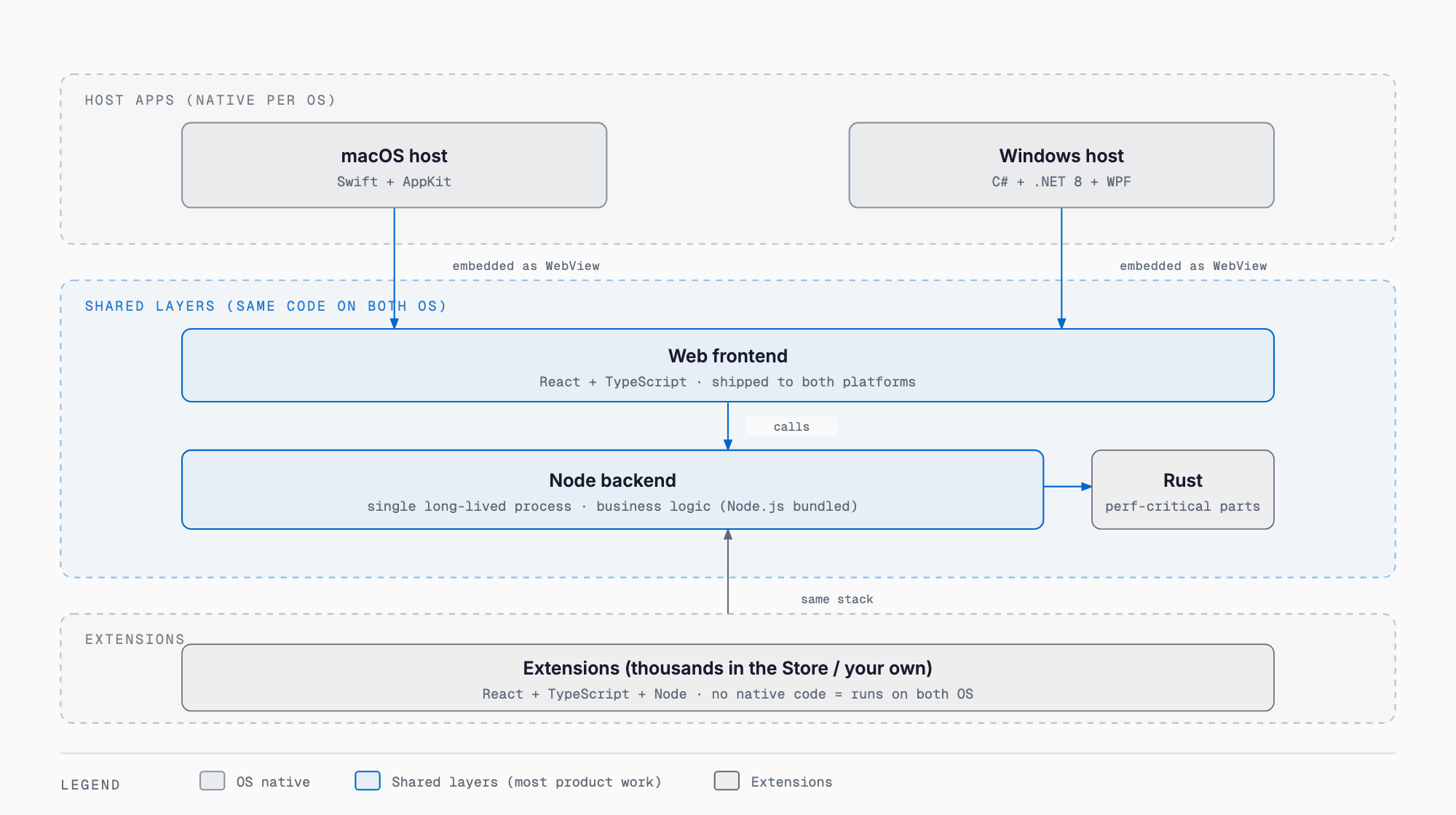
| Layer | Technology | Role |
|---|---|---|
| Host app (macOS) | Swift + AppKit | OS integration, window control, native API calls |
| Host app (Windows) | C# + .NET 8 + WPF | OS integration, window control, native API calls |
| UI frontend | React + TypeScript | Shared interface rendering (extensions run on this too) |
| Backend | A single long-running Node process | Extension execution, business logic |
| High-performance layer | Rust | Parts that need speed or portability |
Node.js ships bundled with Raycast itself, so installing an extension for the first time doesn't require a separate runtime download. The reasons Raycast gives for the rewrite are cross-platform support, AppKit's constraints plus growing compile times, and the difficulty of hiring deep macOS-native talent. File search was also replaced with a custom indexer that no longer relies on Spotlight and can scan an entire disk in seconds, and the design adopted Liquid Glass. There's a real trade-off worth stating plainly, too: Raycast's own numbers show memory usage rising from 200–300MB on v1 to 350–450MB on v2, broken down as roughly 120–200MB for the WebView, 150–200MB for Node, and about 40MB for the native shell — a direct consequence of going cross-platform with a web-based UI.
v2.3 Made AI Chat Agentic — Plan, Execute, Confirm, Repeat
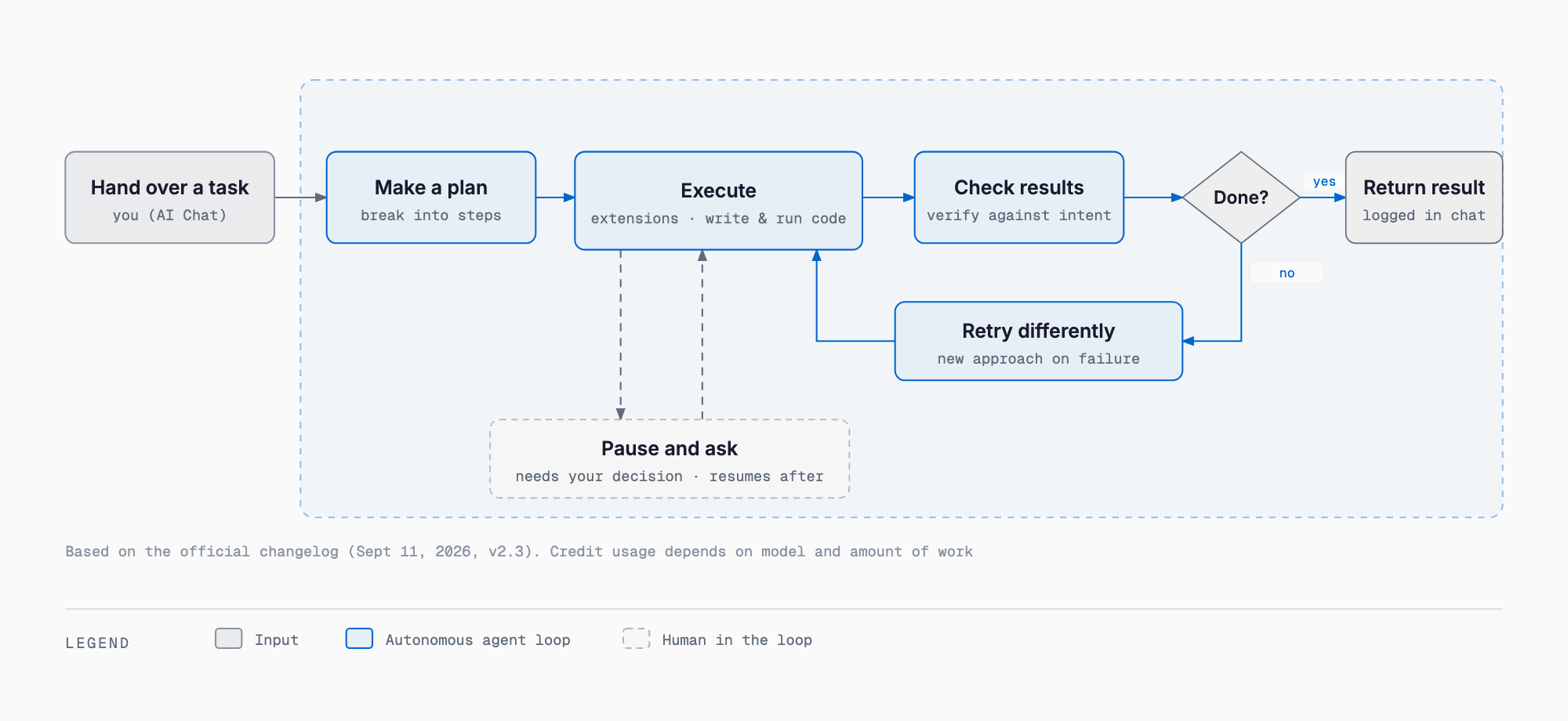
According to the September 11, 2026 macOS changelog, v2.3 "rebuilt the core of Raycast AI." Hand AI Chat a task and it now plans, uses whatever extensions it needs, writes and runs code, checks the result, and keeps going until it's done. If a step fails it tries a different approach, and when it needs a judgment call from you it stops, asks, and resumes once you answer.
Bring Your Own Subscriptions — If you already pay for Claude or ChatGPT, you can now connect that account to Raycast and use it inside AI Chat, Quick AI, and AI Commands. Support for other providers is planned. The setting lives under Settings → AI → Models & Providers.
Projects — Groups related conversations around a theme and gives them dedicated memory. You can point a project at a working directory, such as an Obsidian vault or a folder of invoices.
Automations — Runs a prompt on a schedule in the background and adds the result to your chat. Internally, Raycast cites examples like a morning inbox triage, hourly PR monitoring, and updating memory from nightly meeting notes.
AI Chat also connects to MCP servers, the same kind covered in our Claude Code MCP integration guide, and combined with AI Extensions' @-mention tool calling, that extends how deeply it can plug into internal systems and dev tools. v2.3 also adds Mermaid diagram rendering, review rules for Auto mode, a 60-day recovery window for deleted chats, and a fix for Ollama connections.
The Pricing Change — From Rate Limits to AI Credits
On September 10, 2026, a blog post under CEO Thomas Paul Mann's name (Why We're Changing How Raycast AI Is Priced) announced a change to how AI features are billed. The old rate-limit model — a cap on usage per period — is replaced by usage-based "AI Credits," and a new Max plan was added. Subscription prices themselves stay the same; how many credits you burn depends on the model and how much work is done, so cheaper models stretch a given credit balance further. If you run out, you can buy a top-up with no expiration or upgrade your plan.
According to Raycast, rate limits were originally designed around one-question-one-answer usage, but agentic tasks like the ones v2.3 introduced call a model many times per request, which the old model didn't fit well. Raycast frames the shift to usage-based pricing bluntly: it says it "can't subsidize AI the way the big model labs can." Existing Pro subscribers stay on Pro as-is, and former Advanced AI subscribers automatically move to Pro+ on their next billing cycle. Everyone on an existing paid plan also gets one month of bonus credits as part of the transition.
| Plan | Monthly | Annual (per month) | Monthly credits | Highlights |
|---|---|---|---|---|
| Free | $0 | — | None (no AI) | Built-in features, extensions, custom extensions, 5 Notes, 3-month clipboard history |
| Pro | $10 | $8 ($96/yr) | 500 | Full Raycast AI, fast/capable models (e.g. Claude Sonnet 5, GPT-5.6 Terra), BYOK, cloud sync, dictation, translation, unlimited Notes/clipboard |
| Pro+ (formerly Advanced AI) | $20 | $16 ($192/yr) | 3,000 | Pro plus top-tier models (e.g. Claude Fable 5.1, GPT-6 Astra) |
| Max (new) | $50 | $40 ($480/yr) | 7,500 | Same features as Pro+ with a larger cap |
| Teams Pro | $15/seat | $12/seat ($144/yr) | 500/seat (Plus 3,000, Max 7,500/seat) | Pro plus shared commands/snippets/quicklinks, Private Store |
| Enterprise | Custom (annual contract only) | — | Custom | SOC2 Type II, annual pentest, AI Control Center, SAML/SCIM, domain capture, enforced MDM sign-in, enforced 2FA, extension allowlist, IP allowlist |
Full pricing detail lives on the official pricing page, updated as it changes. A few extras: students get 50% off Pro. You can't subscribe to Pro without AI, though you can turn AI off entirely in settings. The free trial covers Pro-tier models (500 credits worth); Pro+/Max's top-tier models are excluded from the trial. AI models come from Anthropic (e.g. Claude Opus 5), OpenAI, Google (Gemini 3.1 Pro), and Perplexity, and Raycast also supports connecting local models via Ollama and BYOK (bringing your own OpenAI, Anthropic, or Google API key).
- Don't use AI at all, and the built-in features and snippets cover you → Free
- Use AI Chat/Quick AI regularly → Pro (500 credits/month)
- Lean heavily on top-tier models or agentic tasks → Pro+ (3,000 credits), or Max (7,500 credits) for even heavier use
- Already pay for Claude or ChatGPT → Pro plus Bring Your Own Subscriptions, to use your existing model while conserving Raycast's own credits
Where Windows and iOS Stand Today
The Windows app entered public beta on November 20, 2025. At launch only Quick AI was free during the beta, while AI Chat and Notes weren't yet supported; as of September 2026 the official Windows page lists version 2.3.1.0 as generally available. It supports Windows 10 (21H2 or later) and Windows 11, and installs via the Microsoft Store or winget.
winget install raycastWindows has one feature macOS doesn't: a game launcher covering Steam, Epic, Battle.net, and GeForce Now. The iOS app launched April 30, 2025, and requires iOS 18 or later. It packs mobile-first features — AI Chat/Commands, Notes, snippets, quicklinks, voice input in 50-plus languages, a custom keyboard, share sheet integration, widgets, and Lock Screen/Control Center/Action Button support (see the official iOS page for details). Cloud sync with Mac/Windows (AI chat, Notes, snippets, quicklinks) requires Pro, though, and per Raycast's own FAQ there's no Android app.
| Platform | Status | Requirements | Key differences |
|---|---|---|---|
| macOS | Raycast 2.0 beta since May 2026; v2.3 (Sept 11, 2026) is current | — | Custom high-speed file indexer, Liquid Glass design |
| Windows | Beta since 2025-11-20, v2.3.1.0 generally available as of 2026-09 | Windows 10 (21H2+) / Windows 11 | Game launcher (Steam/Epic/Battle.net/GeForce Now), distributed via Microsoft Store or winget |
| iOS (iPadOS) | Launched 2025-04-30 | iOS 18+ | Voice input, widgets, Action Button support; cloud sync needs Pro |
| Android | Not available | — | Explicitly unsupported per official FAQ |
How It Compares to Alfred, Spotlight, and PowerToys Run
On macOS, the natural comparisons are the built-in Spotlight and the long-running third-party tool Alfred. On Windows, the built-in search and Microsoft's PowerToys Run play the same role.
| Aspect | Raycast | Alfred | Spotlight / PowerToys Run |
|---|---|---|---|
| Platforms | macOS, Windows, iOS | macOS only | Built into macOS / part of PowerToys on Windows |
| Pricing model | Broad free tier, AI on a monthly subscription (Free/Pro/Pro+/Max) | Free tier covers basics; Powerpack is a one-time purchase unlocking clipboard history, snippets, and workflows | Free, bundled with the OS |
| Extensibility | React/TypeScript/Node extension store (officially "thousands") | Its own workflow system (see Alfred's site for details) | Limited |
| AI features | AI Chat/Quick AI/AI Commands/MCP on a credit system | See Alfred's official site | Not built in |
| Calculator | Natural-language calculator for time zones, units, dates, currency | Mostly simple arithmetic | Basic arithmetic only |
The short version: Alfred keeps the basics free and unlocks advanced features through a one-time Powerpack license, while Raycast puts relatively advanced features in its free tier and isolates only AI behind a subscription. Which is the better fit depends on how you work — check Alfred's own site directly for its latest feature set and pricing.
Where It Fits for SMBs and Small Teams
- Teams Free already includes 30 shared snippets, 30 shared quicklinks, and up to 5 shared commands at no cost and with no expiration, making it an easy way for a small team to try shared boilerplate and links
- A Private Store lets you distribute internally built extensions to your own team without publishing them to the public store
- Organizations that need tighter control can use Enterprise's AI Control Center to manage org-wide AI on/off, BYOK, provider allowlists, and custom providers in one place
- Automations can take over routine work like morning triage or recurring checks on a schedule; if you also want to pair this with a local model, tools covered in Ollama vs LM Studio are worth a look, and as a standing desktop agent it's also worth weighing against what's covered in Hermes Desktop, fully explained
Frequently Asked Questions
Is Raycast free to use?
The core launcher, extensions, custom extensions, up to 5 Notes, and 3 months of clipboard history are all free on the Free plan. Using AI features such as AI Chat requires a paid Pro plan ($10/month, or $8/month billed annually) or above.
Does the Windows app have the same features as macOS?
Since Raycast 2.0, macOS and Windows share the same UI and extension stack (React/TypeScript/Node), so the overall feature set is close. Windows adds a game launcher that macOS doesn't have, while some features that shipped on macOS first may still be missing on Windows.
What are AI Credits?
Introduced in the September 10, 2026 pricing change, AI Credits are consumed based on AI usage. How many credits are used depends on the model and the amount of work; cheaper models stretch further. If you run out, you can buy a top-up (no expiration) or upgrade your plan.
If I already pay for Claude or ChatGPT, can I use Raycast AI for free?
The Bring Your Own Subscriptions feature added in v2.3 lets you connect an existing paid Claude or ChatGPT account and use it in AI Chat and elsewhere. You still need a Raycast Pro plan or above; connecting your own subscription is a way to reduce Raycast's own credit consumption, not a way to skip paying Raycast.
Is it worth switching from Alfred?
If broad free-tier features, Windows/iOS support, and AI agent capabilities matter to you, Raycast has an edge. If you're invested in Alfred's one-time Powerpack license and years of accumulated workflows, switching has real friction. Which is right depends on your use case — check Alfred's official site for its latest features before deciding.
Summary
Raycast built its foundation on being a launcher with advanced features available for free, and on top of that it has layered two major shifts: going cross-platform in May 2026, and turning agentic with a pricing overhaul in September 2026. The shared stack spanning macOS, Windows, and iOS, and the move to usage-based AI Credits, both follow from the same underlying assumption — that agentic AI use is now the default.
With Free, Pro, Pro+, and Max now in the mix, picking the right plan for how you or your team actually work matters more than before. As a rough guide: stay on Free if you barely touch AI, go Pro for everyday use, step up to Pro+ or Max if you lean on agentic tasks, and pair Pro with Bring Your Own Subscriptions if you're already paying for Claude or ChatGPT.
Related free tools (no sign-up, instant results)
Feel free to contact us
Contact Us