Qwen-Image-2.1 Requirements, VRAM & How to Use (7B Unified G
eneration + Editing, Sep 2026)
Qwen-Image-2.1, Alibaba's open model (Sep 20, 2026), unifies 7B gen and editing with transparent PNG, 10-image edits. 8-step Turbo added Oct 9. VRAM unofficial; non-commercial.
Qwen-Image-2.1 is an open-weight image model released by Alibaba's Qwen team on September 20, 2026, pairing a 7B visual generator with an 8B Qwen3-VL text encoder to unify text-to-image generation and image editing in a single model. Short version: no official VRAM requirements table exists; community reports cite around 15.6GB in one configuration, while a rough calculation from parameter sizes puts a full bf16 load at roughly 30GB. The license, the Qwen Research License Agreement, restricts use to non-commercial research and evaluation, with commercial use requiring a separate agreement — an important caveat for businesses. Native transparent PNG output and editing with up to 10 reference images make it feel less like a pure generator and more like a combined generation-and-editing tool. Below are the requirements and setup details. Update: an 8-step fast variant, Qwen-Image-2.1-Turbo, was released on October 9, 2026; see the added section below.
Requirements Quick Reference
| Configuration | VRAM estimate | RAM estimate | Speed estimate | Typical use |
|---|---|---|---|---|
| Full bf16 load (calculated estimate) | ~30GB (7B ≈14GB + 8B text encoder ≈16GB) | 32GB+ recommended | ~5s per 1MP image on RTX 4090 (community report) | Single GPU with 24GB+ VRAM |
bf16 + CPU offload (enable_model_cpu_offload()) | Community reports around 15.6GB in one setup | 32-64GB recommended | Slower than full load due to offload transfers | Consumer GPUs with 24GB or less |
| FP8 quantization (vLLM-Omni) | Roughly half of bf16, ~15GB estimated | 32GB+ recommended | Not officially measured; FP8/TensorRT optimizations may speed this up | Constrained VRAM, multi-request serving |
| CPU only | No VRAM needed | 32GB+ required | Community report: ~3 min per image on a laptop CPU | Verification/testing without a GPU |
These 'calculated estimates' come from a simple bf16 (2 bytes/parameter) calculation based on the 7B generator and 8B text encoder parameter counts, and do not include activation memory or the VAE. For a similar approach to estimating requirements when official VRAM figures are missing, see our MiniMax H3 requirements guide — a very different model (video+audio) in scale, but the same estimation logic applies.
What Is Qwen-Image-2.1 (Architecture)
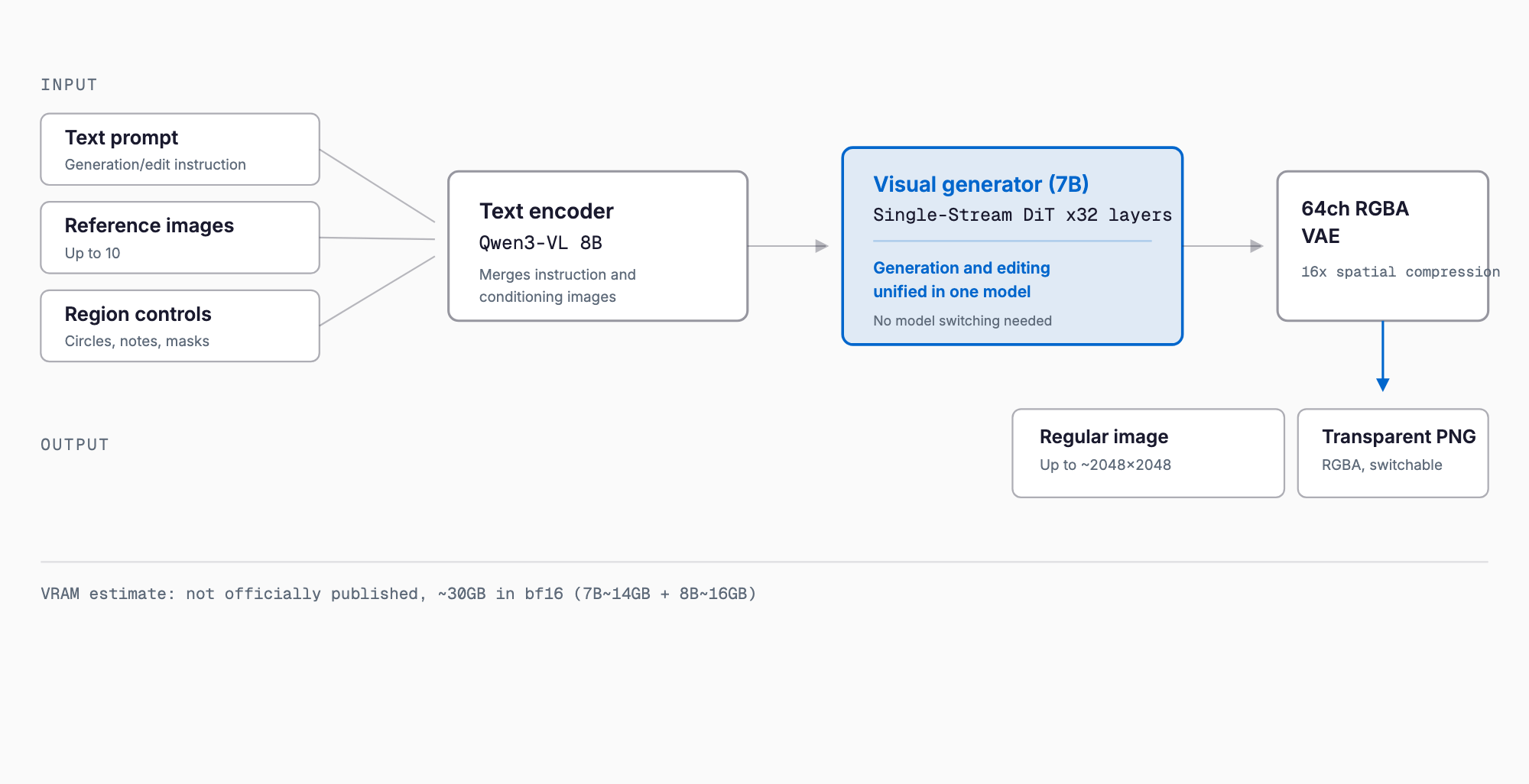
Qwen-Image-2.1 is built from two components: a visual generator and a text encoder. The visual generator has 7B parameters across 32 Single-Stream DiT (Diffusion Transformer) layers, using mixed-granularity attention. The text encoder is Qwen3-VL at 8B parameters, which encodes not just text instructions but also the condition images used for editing — a key difference from a pure text-to-image model. Image encoding/decoding uses a 64-channel RGBA VAE with 16x spatial compression; the RGBA channel support is what allows native transparent-background output. The predecessor, the original Qwen-Image, was a roughly 20B-parameter generation-only model — 2.1 shrinks the generator to 7B while adding unified editing, a notable shift in parameter efficiency.
What It Can Do
- Unified text-to-image generation and editing: one model handles both new generation and editing existing images.
- Native transparent PNG output: the 64-channel RGBA VAE lets the model output a transparent-background image directly when the prompt implies it.
- Editing with up to 10 reference images: multiple reference images can be passed as conditions and combined in an edit.
- Subject extraction from photos: can isolate a specific subject from a source image.
- Region-specified editing via circles, annotations, or masks: editable regions can be explicitly marked by circling, annotating, or masking areas of an image.
Supported Resolutions
| Aspect ratio | Resolution |
|---|---|
| 1:1 | 2048×2048 |
| 4:3 | 2400×1792 |
| 3:4 | 1792×2400 |
| 3:2 | 2528×1696 |
| 2:3 | 1696×2528 |
| 16:9 | 2752×1536 |
| 9:16 | 1536×2752 |
Benchmarks
The scores below come from Qwen's own Qwen-Image-Bench, as reported by the vendor. Independent reproduction has not yet been confirmed.
| Model | Qwen-Image-Bench score | Availability | Parameters |
|---|---|---|---|
| GPT Image 2.5 Sunburst | 67.01 (#1) | Closed | Undisclosed |
| Qwen-Image-2.1 | 60.28 | Open weights | 7B (generator) |
| Nano Banana 2.0 | 59.82 | Closed | Undisclosed |
| FLUX 2 Max | 55.33 | Open weights | 32B |
Installation and Basic Usage
The fastest path is via Diffusers. You need torch>=2.4.0, transformers>=5.17, the GitHub-latest diffusers (pip install git+https://github.com/huggingface/diffusers), plus accelerate and pillow. After that, a short script generates an image.
- pip install torch>=2.4.0 to install PyTorch
- pip install transformers>=5.17 to install transformers
- pip install git+https://github.com/huggingface/diffusers to install the latest Diffusers (as of September 2026, QwenImage21Pipeline is only in the GitHub version)
- pip install accelerate pillow for the remaining dependencies
- In Python, load the pipeline with from diffusers import QwenImage21Pipeline, load Qwen/Qwen-Image-2.1 with torch_dtype=torch.bfloat16 and .to("cuda"), then generate with pipe(prompt="...", num_inference_steps=40).images[0]
- If VRAM is tight, call pipe.enable_model_cpu_offload() before loading to reduce GPU memory use (at the cost of speed)
Running It on ComfyUI / vLLM-Omni / SGLang
Qwen-Image-2.1 shipped with day-0 support across multiple inference frameworks. ComfyUI has native support with official example workflows. Beyond Diffusers, the following options exist for production use.
- ComfyUI: Native support; load the official example workflow for node-based generation and editing.
- Diffusers: The most direct way to use the model from Python via QwenImage21Pipeline.
- vLLM-Omni: Supports prefix KV cache, tensor parallelism, and FP8 quantization — suited to server-style deployments handling multiple requests.
- SGLang: Documented for multi-GPU, high-throughput inference.
Qwen-Image-2.1-Turbo (October 2026): The 8-Step Fast Variant
On October 9, 2026, the Qwen team published Qwen-Image-2.1-Turbo on Hugging Face, an accelerated checkpoint of the standard model. The visual generator is the same 7B architecture, but sampling drops from 40 steps to just 8 steps. The 8-step sigma schedule is stored in the checkpoint and loaded automatically, so setting num_inference_steps alone does not override it - a departure from the usual Diffusers convention. CFG defaults to 1, and use_kv_cache=True reuses the text and reference-image context (prefix) across steps. The model card does not name the distillation technique.
| Item | Qwen-Image-2.1 (standard) | Qwen-Image-2.1-Turbo |
|---|---|---|
| Inference steps | 40 (as in this article's sample code) | 8 (fixed schedule) |
| Speed estimate | Baseline; ~5s per 1MP on an RTX 4090 class GPU (community report) | One fifth of the steps, but no official timings; the text encoder and VAE still run once per image, so real-world gains are below 5x |
| Quality | 60.28 on Qwen-Image-Bench (vendor-reported) | No benchmarks published; only showcase images, difference from standard unverified |
| CFG | Normal guidance settings | Defaults to 1 |
| License | Qwen Research License (non-commercial research/evaluation) | Same Qwen Research License |
| Best for | Quality-first final output, precise editing | Composition iteration, prompt testing, bulk draft generation |
On memory, the repository has the same layout as the standard model (7B generator plus Qwen3-VL 8B text encoder), with total weights reported at about 32.4GB (secondary source). Fewer steps do not change how much has to be loaded, so VRAM needs should be about the same as the standard model. No official VRAM requirement exists for Turbo; on GPUs with 24GB or less, expect to rely on enable_model_cpu_offload() or quantization. What gets faster is compute time per image, not memory.
To use it, load Qwen/Qwen-Image-2.1-Turbo with QwenImage21Pipeline in torch.bfloat16 and call something like pipe(prompt=..., width=1696, height=2528, use_kv_cache=True) - no step count needed. You need a recent GitHub build of Diffusers that supports pipeline-configured sampling sigmas, plus transformers>=5.17. ComfyUI support is not mentioned on the model card and we could not confirm it at the time of writing; test whether the standard workflow can be reused.
The license is the same Qwen Research License as the standard model, so commercial use is not permitted without a separate agreement with Alibaba; speed does not change that. Turbo and Pro APIs were reportedly announced the same day, but we could not confirm pricing, rate limits or regions. For commercial use, check the license text and the latest Alibaba Cloud Model Studio information.
License and Commercial Use
Qwen-Image-2.1 is released under the Qwen Research License Agreement, limiting use to non-commercial research and evaluation. Commercial use requires a separate license agreement with Alibaba, and no public pricing plan exists as of the September 2026 release. Alibaba Cloud has not announced official API pricing either; the predecessor Qwen-Image 2.0 API charged $0.035-$0.075 per image, which offers only a rough reference point. Free access within mainland China is available via wuli.art. Businesses considering adoption should review the license terms carefully and may want to compare against models with clearer commercial terms, such as GPT Image 2.5.
How It Compares to Other Models
| Model | Availability | Parameters | Editing | Transparency | License |
|---|---|---|---|---|---|
| Qwen-Image-2.1 | Open weights | 7B (gen) + 8B (text encoder) | Unified (up to 10 refs) | Native | Non-commercial research only |
| Original Qwen-Image | Open weights | ~20B (generation only) | No | Undisclosed | Undisclosed |
| FLUX 2 Max | Open weights | 32B | Partial | Undisclosed | Undisclosed |
| Nano Banana 2.0 | Closed | Undisclosed | Yes | Undisclosed | Undisclosed (API) |
| GPT Image 2.5 Sunburst | Closed | Undisclosed | Yes | Undisclosed | Undisclosed (API) |
Troubleshooting
- Out of VRAM during load: Enable pipe.enable_model_cpu_offload() first; if that's still not enough, consider FP8 quantization via vLLM-Omni.
- QwenImage21Pipeline not found: It may not be in the PyPI release yet. Switch to pip install git+https://github.com/huggingface/diffusers.
- transformers version mismatch errors: Confirm transformers>=5.17 is installed and check pip list for conflicting older versions.
- Generation is extremely slow: Check whether it's running on CPU only; verify GPU availability with torch.cuda.is_available() and confirm .to("cuda") took effect.
- PNG output isn't transparent: Check whether the prompt implies a transparent background; an explicit background description may cause the model to output an opaque image instead.
FAQ
Has Alibaba published official VRAM requirements for Qwen-Image-2.1?
No. As of the September 20, 2026 release, the Qwen team has not published an explicit VRAM requirements table. The estimates in this article combine rough calculations from the model's parameter sizes (7B visual generator, 8B text encoder) with community reports, including one tester citing about 15.6GB VRAM in one configuration and roughly 5 seconds per 1MP image on an RTX 4090.
Can Qwen-Image-2.1 be used commercially?
At release it is distributed under the Qwen Research License Agreement, which restricts use to non-commercial research and evaluation. Commercial use requires a separate agreement with Alibaba, and no public pricing has been announced as of September 2026. Check the license terms carefully before any business use.
How does Qwen-Image-2.1 differ from the original Qwen-Image?
The original Qwen-Image was a roughly 20B-parameter generation-only model. Qwen-Image-2.1 shrinks the visual generator to 7B and pairs it with an 8B Qwen3-VL text encoder, unifying text-to-image generation and image editing (with up to 10 reference images) in a single model.
How do I get transparent PNG output?
No special flag is needed — the model automatically outputs an RGBA transparent PNG when the prompt implies a transparent background, thanks to its 64-channel RGBA VAE. Simply prompt for an icon, logo, or asset that calls for a transparent background.
Does it run on Apple Silicon / Mac?
As of September 2026, there is no official MLX support or documented Apple Silicon guidance. CPU offloading likely allows it to run, but community reports cite around 3 minutes per image on a laptop CPU alone. For practical speed, an NVIDIA GPU setup is recommended until community ports appear.
What is Qwen-Image-2.1-Turbo and how does it differ from the standard model?
It is an accelerated checkpoint of Qwen-Image-2.1 released on October 9, 2026. The 7B generator is the same, but inference drops from 40 to 8 steps, CFG defaults to 1, and prefix KV caching is supported. VRAM needs should be similar to the standard model, and the license is the same non-commercial Qwen Research License. No official quality benchmarks have been published.
Related free tools (no sign-up, instant results)
Feel free to contact us
Contact Us