Server & System Monitoring Cost Guide (2026)
A 2026 guide to server and site monitoring costs: free tools, cloud monitoring, and staffed 24/7 services, plus setup fees, cost drivers, and SLA basics.
System monitoring is the practice of continuously checking whether servers, websites, and business systems are running normally, and alerting someone when something goes wrong. Cost ranges from close to free with a self-managed setup, up to roughly $200–$2,000+ per month for a staffed 24/7 monitoring service (these are general 2026 market ranges, not a quote). Many small and mid-sized businesses only find out their site is down after a customer complains, or don't notice a server has stopped responding until much later — but the right level of monitoring, and its cost, depends heavily on scope and whether a human is watching around the clock. This article breaks down the types of monitoring, typical costs by approach, what drives the price, how to read an SLA, and how to choose based on company size.
Types of system monitoring
"System monitoring" covers several distinct types depending on what is being watched and why. Knowing which ones you actually need helps avoid paying for coverage you don't.
- Uptime monitoring (ping checks): The most basic check — confirming at regular intervals that a server or network device is responding
- Resource monitoring: Tracking CPU usage, memory, and disk space so problems are caught before a server hits its limits
- Log monitoring: Watching error logs and unusual access patterns to catch early signs of failure or a security incident
- External/synthetic monitoring: Checking a site or API from the outside for response time, page content, and SSL certificate expiry
- Security monitoring: Watching for intrusion attempts, tampering, or signs of malware across the network and servers
Cost by monitoring approach
| Approach | Description | Typical setup cost | Typical monthly cost |
|---|---|---|---|
| 1. Free/low-cost SaaS, self-managed | Setting up a tool like UptimeRobot for external monitoring in-house | $0 (in-house setup) | $0–tens of dollars (many free tiers) |
| 2. Cloud-native monitoring | Using the monitoring built into your cloud, such as AWS CloudWatch or Azure Monitor | $0–a few hundred dollars in setup work | A few tens to a few hundred dollars, usage-based |
| 3. Staffed monitoring service (24/7) | A monitoring center watches around the clock and handles first-line response | Roughly $300–$1,500 | Roughly $200–$2,000+, depending on scope and device count |
| 4. Bundled into a maintenance contract | Monitoring is included as part of a broader maintenance agreement | Often folded into the maintenance setup fee | Added to or included in the maintenance fee |
If monitoring is bundled into a maintenance contract, the cost structure of maintenance itself is covered in System maintenance cost benchmarks, which is worth checking alongside this article for an overall budget picture.
Typical setup costs
Setting up external monitoring for one or two servers can often be done for $0 to a few hundred dollars. Adding more servers and network devices, integrating with existing systems, building a dashboard, and designing notification routing pushes setup into the low thousands of dollars. When a staffed service also handles first-line response, setup tends to cost more, since inventorying every monitored system and documenting recovery steps takes real time.
Four factors that drive the cost
- Number and type of monitored assets: One server versus dozens of servers plus network gear means a very different number of things to check, and cost scales roughly with that count
- Staffed or unstaffed: Automated alerts alone are cheap; having a person watching and making first-line judgment calls 24/7 adds real labor cost
- Whether first response/recovery is included: "Detect and notify" is very different in scope and price from "detect, then also restart the server and take first-line action"
- Notification and escalation design: The more complex the after-hours contact chain and multi-person escalation path, the more setup and ongoing management it takes
How to read SLA and response-time terms
When comparing monitoring services, price is only part of the picture — the SLA (service level agreement) terms matter just as much. In particular, a "detection guarantee" and a "recovery guarantee" are not the same thing.
- Time to detect: How long from an incident occurring to a notification going out (e.g., within 5 minutes)
- Time to first response: How long after notification until someone actually starts working the issue (often spelled out in staffed services)
- Hours of coverage: Business hours only, or genuinely 24/7/365
- What's actually guaranteed: Many contracts guarantee detection, not recovery — actual recovery time is frequently a separate agreement, sometimes at extra cost
What monitoring alone doesn't solve — who actually fixes it
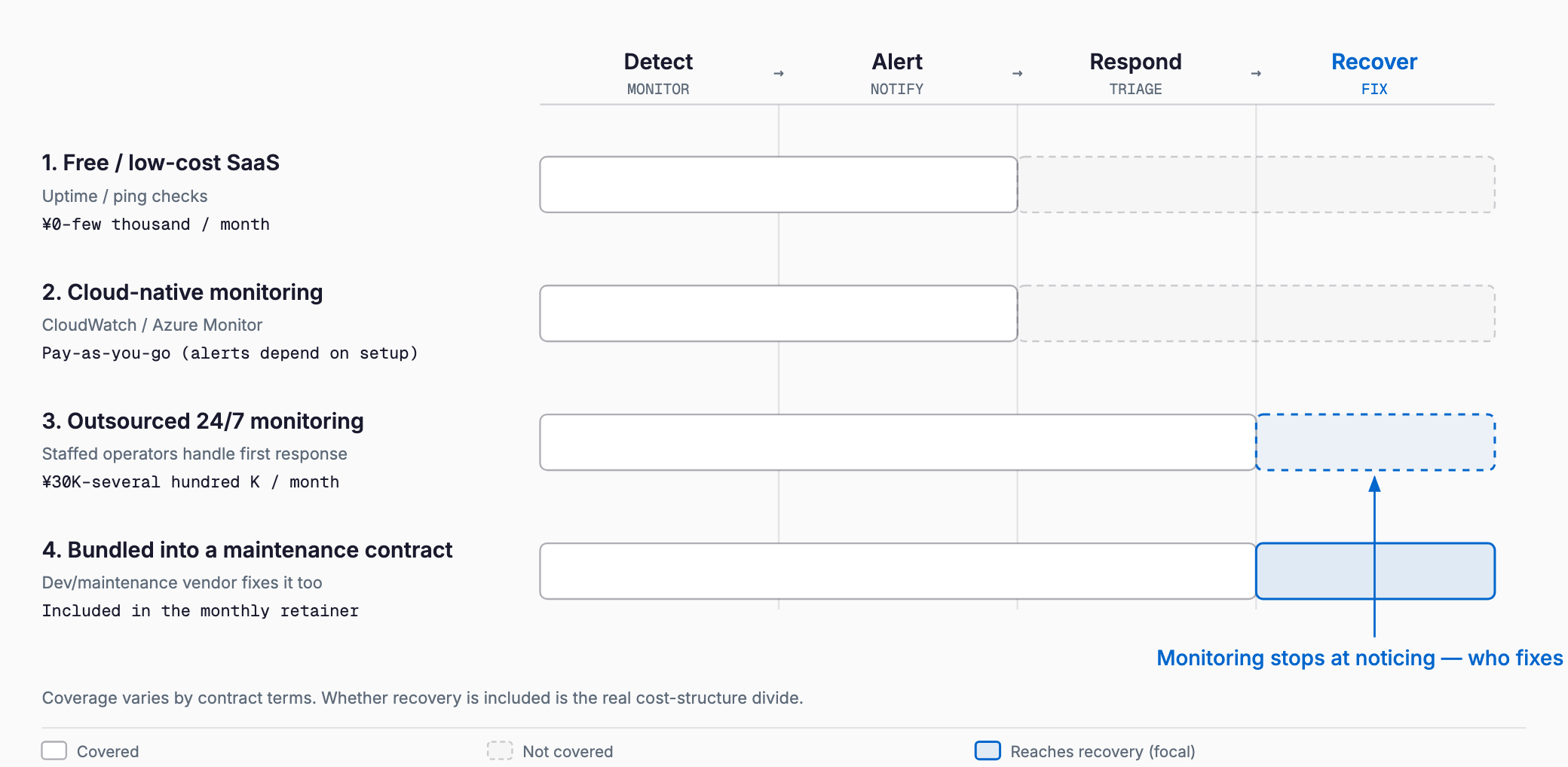
Most monitoring services only cover detecting a problem and sending an alert; actually restarting a server or diagnosing and fixing the underlying issue is often a separate task. Getting an alert at 2 a.m. is useless if there's no one, and no plan, to act on it. For how to think through the first response when a system actually goes down, see First response when a system goes down, which pairs well with getting monitoring in place first.
Choosing an approach by company size
- Website only (corporate site, e-commerce, etc.): External monitoring — is the site up, is the SSL certificate about to expire — is often enough, and a free or low-cost SaaS tool can handle it
- A handful of in-house servers: Combining uptime and resource monitoring through cloud-native tools or a low-cost monitoring product usually covers this case
- Business systems that run continuously, where downtime stops the business: Worth considering a staffed monitoring service or building monitoring into a maintenance contract, with first response and recovery included in scope
When monitoring is folded into a maintenance contract, Checkpoints for a maintenance contract lays out what to check in the agreement before signing.
Checklist before signing up
- Have you listed out every server, site, and network device that needs monitoring, and how many?
- Have you decided whether uptime monitoring alone is enough, or whether you also need resource and log monitoring?
- Is it clear who handles first response and recovery once an alert fires?
- Have you designed the notification routing and after-hours escalation path?
- Have you confirmed whether the SLA guarantees detection only, or recovery too?
- Does the contract let you adjust the number of monitored assets at renewal?
Is a free monitoring tool enough on its own?
For something like a corporate website, where downtime doesn't immediately halt business operations, a free or low-cost SaaS tool doing external monitoring is often sufficient. For business-critical systems, though, detection alone isn't enough if no one is assigned to respond and recover once an alert comes in.
Is a staffed monitoring service cheaper than bundling monitoring into a maintenance contract?
There's no simple answer. A standalone staffed monitoring service typically runs $200–$2,000+ per month, while monitoring bundled into a maintenance contract can look cheaper because it's folded into a broader fee. But whether that bundled contract actually includes first response or 24/7 coverage varies, so you need to compare scope, not just price.
Do I need monitoring if I only have one server?
If that one server going down means your site or business stops entirely, at minimum uptime and external monitoring is worth having. Since low-cost or free SaaS tools can cover this, skipping monitoring entirely to save money carries outsized risk.
How much does cost go up as I add more monitored assets?
Most monitoring tools and services price by the number of assets or checks, so cost tends to rise roughly in proportion. This effect is stronger with staffed monitoring services, since more assets directly means more human attention, so cost can climb faster than with automated tools.
Summary
Monitoring costs vary widely by approach: nearly free with a self-managed SaaS tool, usage-based pricing of a few tens to a few hundred dollars a month with cloud-native tools, and roughly $200–$2,000+ a month for a staffed 24/7 service. The key decision isn't picking the cheapest option — it's mapping out how many assets need watching, whether staffed coverage is warranted, whether first response and recovery are in scope, and understanding that an SLA's "detection guarantee" is not the same as a "recovery guarantee," before choosing the approach that matches your business's size and tolerance for downtime.
Related free tools (no sign-up, instant results)
Feel free to contact us
Contact Us