Security Camera & Access Control Costs for SMBs (2026)
Analog cameras cost $350-1,000/unit installed; cloud cameras add $7-20/month. Access control runs $700-3,500 per door. Covers costs, mistakes, checklist.
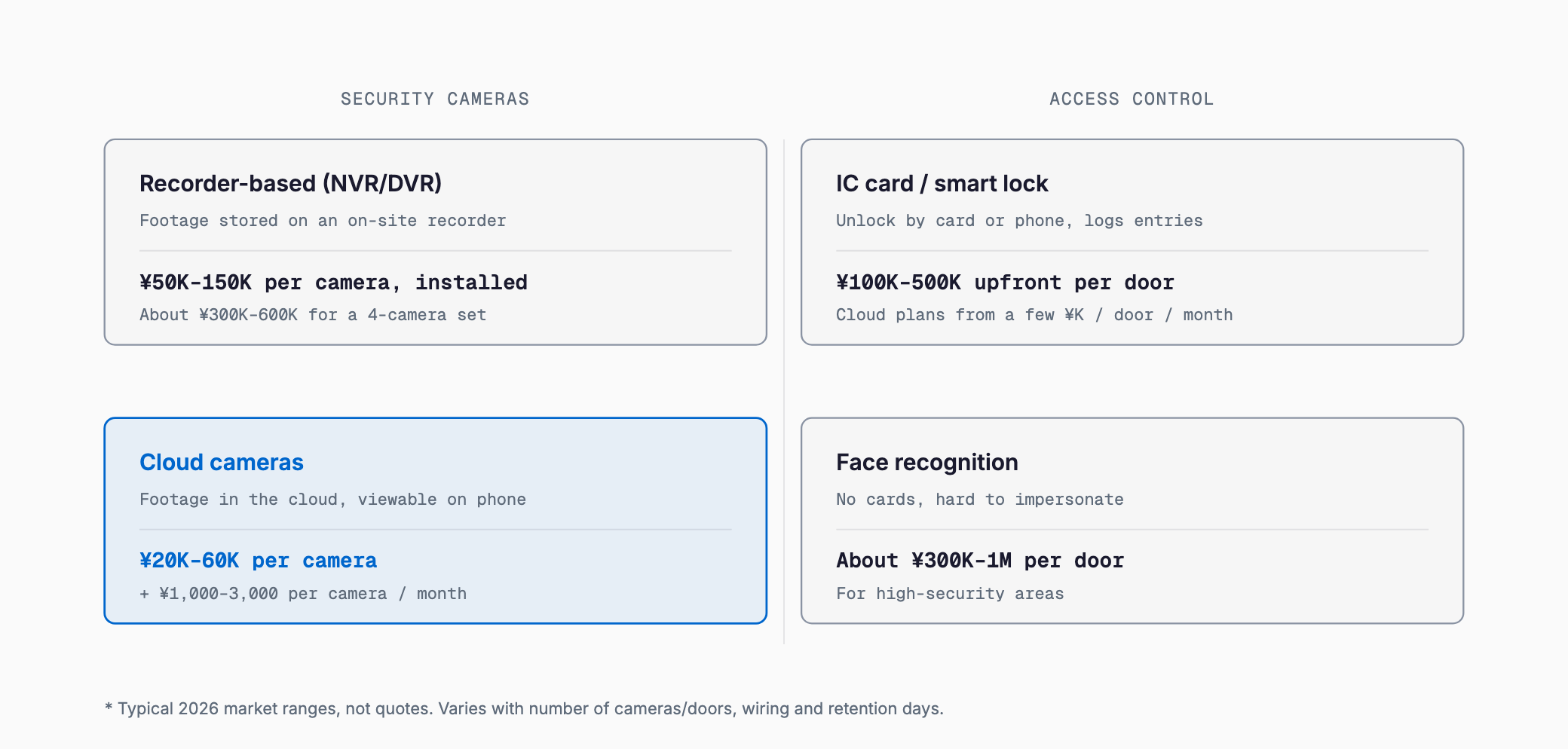
The cost of security cameras and access control systems depends heavily on the type you choose. Traditional recorder-based camera systems (cameras wired to an on-site DVR/NVR) run about $350-1,000 per unit installed, with a typical 4-camera set for a small shop costing around $2,000-4,000. Cloud cameras, which store footage online instead of on a local recorder, cost about $150-400 per unit up front plus a monthly cloud-storage fee of roughly $7-20 per camera (varying by retention period and camera count). For access control, a standard IC-card or electric-lock system typically costs $700-3,500 per door up front, with some cloud-based systems billing just a few dollars per door per month. Face-recognition systems offer higher accuracy but cost more, typically $2,000-7,000 per door. These are general 2026 market ranges, not a substitute for an actual quote.
Recorder-based vs. cloud cameras; electric locks, smart locks, and face recognition
Security cameras come in two broad types. The first is recorder-based: cameras record to a hard-disk recorder (DVR/NVR) kept on-site. Because it doesn't depend on the network, there are no ongoing data fees, but the recorder itself is a single point of failure — theft or damage to the unit can wipe out all footage. The second is cloud-based: footage streams over the internet to cloud storage. This lets you check live or recorded footage from your phone anywhere, and skips the recorder hardware, but it comes with an ongoing monthly fee and depends on your internet bandwidth.
Access control systems also split into a few types. "Electric lock + IC card" is the most common setup — an electric lock is added to an existing door, opened with an employee badge or transit card. "Smart lock" systems attach a device to an existing lock without construction work, making them faster and cheaper to install, though somewhat less secure than a dedicated electric lock. "Face recognition" systems let people in without carrying a card and are hard to spoof, but the hardware costs considerably more.
| Type | Typical setup cost | Typical monthly cost | Notes |
|---|---|---|---|
| Camera (recorder-based) | $350-1,000/unit | None (maintenance separate) | No data fees; recorder is a failure point |
| Camera (cloud-based) | $150-400/unit | $7-20/unit | Remote viewing; depends on bandwidth |
| Access (electric lock + IC card) | $700-3,500/door | A few dollars up | Most common; requires installation |
| Access (smart lock) | $200-1,000/door | A few dollars | No construction; fast to install |
| Access (face recognition) | $2,000-7,000/door | A few dollars up | Strong anti-spoofing, costly |
Cost breakdown: hardware, installation, wiring, recorder, licensing, and maintenance
- Camera hardware: Price scales with resolution and low-light performance; outdoor units cost more due to weatherproofing needs
- Installation and wiring: Ceiling/wall mounting, power wiring, and LAN cabling. Cost varies a lot depending on whether existing wiring can be reused
- Recorder (DVR/NVR): Only applies to recorder-based systems. Longer retention (30/60/90 days) requires larger storage and raises cost
- Cloud fees (monthly): Apply to cloud cameras and some access-control systems, scaling with camera/door count and retention period
- Licensing fees: Access-control systems often charge per-seat or per-user licensing for the management software
- Maintenance and support: Covers repairs and configuration changes, billed monthly or annually depending on the contract
- If your office network doesn't have enough bandwidth, cloud camera footage can drop or stutter. It's worth reviewing the cost of building an office network and Wi-Fi before adding cameras
Cost guide by business size and type
| Business type/size | Camera cost | Access control cost | Key point |
|---|---|---|---|
| Small shop (1-5 staff) | 2-4 units, $1,000-2,700 | Often none; $700+ per door if added | Prioritize register and entrance |
| 10-30 person office | 4-8 units, $2,000-5,300 | 1-2 doors, $1,300-6,700 | Separate visitor and staff entrances |
| Warehouse/factory | 8-16 units, $5,300-13,300 | Multiple doors, $3,300-20,000 | Wider coverage means more units and rugged hardware |
| Clinic | 4-8 units, $2,700-6,700 | 1 door on records room, $1,300-4,000 | Be careful about privacy in recorded areas |
Deciding criteria: what is the system actually for?
Clarifying your goal before you buy is what determines whether the cost is worth it. There are roughly four purposes. First, crime prevention and deterrence — if the goal is stopping shoplifting or break-ins, covering entrances and the register/safe area is often enough. Second, evidence and record-keeping — if you need to verify what happened after an incident, you'll want a longer retention period. Third, entry/exit logging and attendance — if you need a record of who entered and when, pairing an access-control system with cameras adds real value. Fourth, remote monitoring — if you run multiple locations and want to check on them from head office, cloud cameras earn their keep. Many businesses buy expensive, feature-rich equipment without a clear purpose in mind; decide what you're trying to prevent and who will use the footage or records before choosing hardware.
Common mistakes
- Overpaying on a long-term lease: Camera leases often run 5-7 years, and early cancellation triggers a lump-sum charge for the remaining balance. Total cost can end up 2-3x an outright purchase, so always compare leasing against buying outright
- Footage drops from insufficient bandwidth: Adding multiple cloud cameras can overload existing Wi-Fi or internet capacity, causing dropped footage or gaps in recording. Line capacity often needs a review before scaling up camera count
- Cameras hijacked because passwords were never changed: Network cameras left on default passwords and connected to the internet can be viewed remotely by outsiders, or used as a stepping stone into your network. Always change the default password, and consider reviewing your overall network defenses — see UTM firewall costs for SMBs
- Forgetting privacy notices: When recording footage, it's good practice to clearly post the recording area and purpose, especially near clinics or changing areas
- Retention period set too short: Cutting costs by shortening retention can mean footage is already gone by the time an incident is discovered. Decide the retention period you actually need in advance
- Not explaining the system to staff: Installing access control or cameras without explaining the purpose can be mistaken for surveillance and cause internal pushback. Explain the purpose and operating rules beforehand — and if you're organizing your equipment inventory generally, see the basics of IT asset management
Pre-contract checklist
- Lease vs. purchase: Have you compared contract length, cancellation terms, and total cost against buying outright?
- Monthly fee breakdown: Are cloud fees, maintenance fees, and licensing fees itemized separately?
- Retention period: Is the retention period (30/60/90 days) long enough for your purpose?
- Network bandwidth: Can your existing Wi-Fi/internet handle the traffic from all the cameras?
- Security settings: Is there a plan to change default passwords and keep firmware updated?
- Power outage/failure behavior: Have you confirmed how the recorder or smart lock behaves during an outage?
- Maintenance scope: Does the contract cover on-site repair response and loaner equipment, and how fast?
- Personal data handling: Have you decided who can view footage and posted the recording area notice?
- Staff communication: Is there a plan to explain the purpose and rules to employees beforehand?
Should I lease or buy outright?
Leasing lowers the upfront cost but usually locks you into a 5-7 year contract, and the total cost often ends up higher than buying outright. If budget allows, buying outright or a short 3-year lease is usually the better deal.
Can I use a subsidy for this?
Depending on the country and program, security cameras and access control systems can sometimes qualify for small-business IT or equipment subsidies. Eligibility and covered equipment change year to year, so check the latest program guidelines before you commit to a purchase.
Can I use cameras to monitor employees?
If cameras are used for labor management rather than just security, you should explain the purpose to employees and document it in workplace rules. Using cameras for undisclosed monitoring tends to cause disputes.
Will my existing Wi-Fi be enough?
Adding several cloud cameras increases data usage, and depending on your current Wi-Fi setup and plan, that may not be enough. If you're adding many cameras, it's worth reviewing your internet line capacity first.
Related free tools (no sign-up, instant results)
Feel free to contact us
Contact Us