Reladraw: Relative-Placement Diagrams vs Mermaid, D2
Reladraw is a diagram language that places nodes using relative words like right of and below, between Mermaid automatic layout and draw.io fixed coordinates.
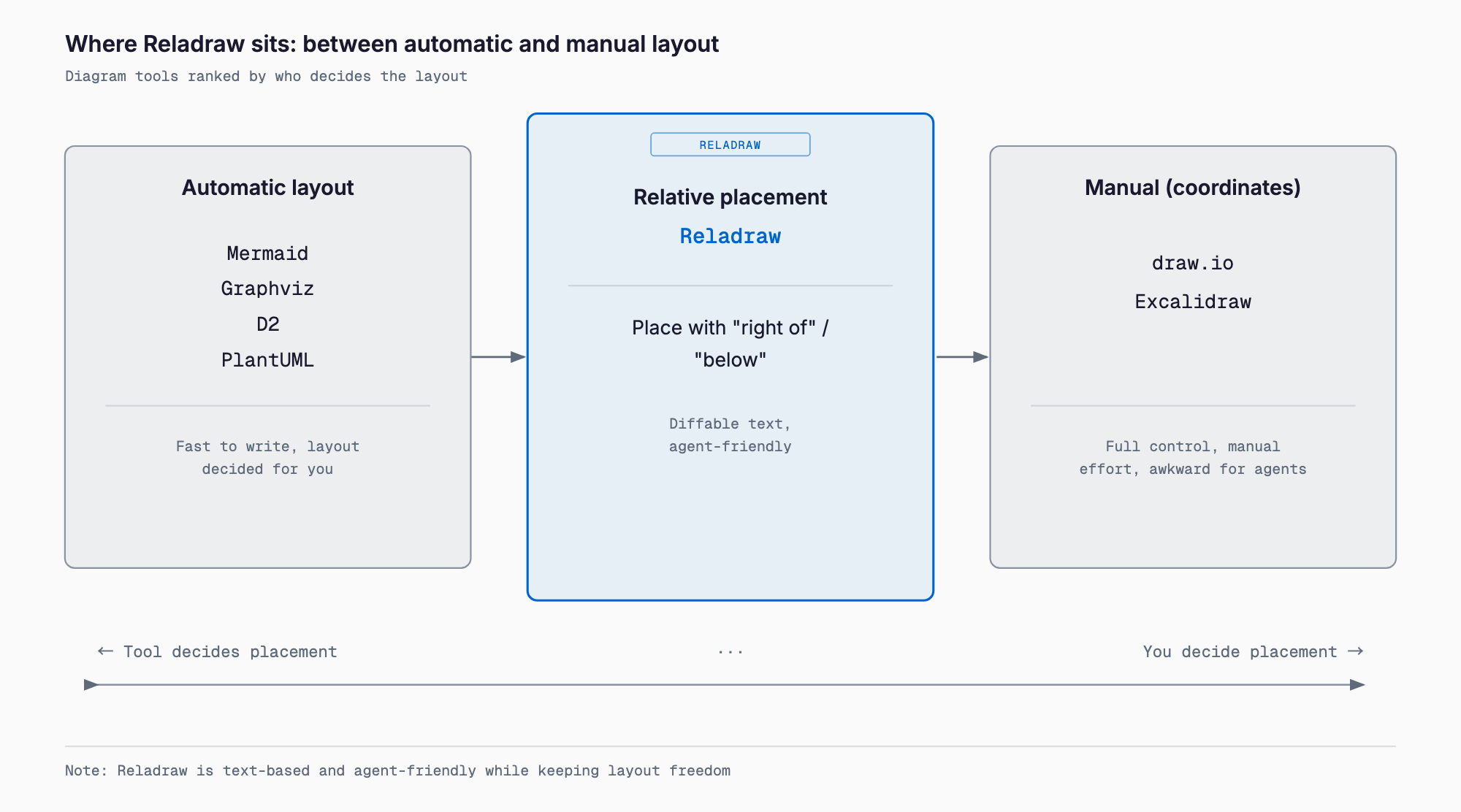
Reladraw is a text-based diagram language that positions nodes using relative statements — right of, below, level with — instead of absolute coordinates. The developer describes it as sitting between automatic-layout tools like Mermaid and Graphviz and manual-placement tools like draw.io and Excalidraw. It appeared on Hacker News on September 26, 2026 as "Show HN: Reladraw – A diagram language where you decide where to place things," reaching 310 points and 83 comments within about 16 hours.
In short, Reladraw addresses a gap between two existing camps of diagramming tools: automatic layout tools that don't let you decide the final look, and manual tools that are slow to write and poorly suited to AI agents. It never asks you to write a single coordinate, yet placement intent — which node sits to the right, which two are level with each other — stays explicit in the text, aiming for a format that's easy for humans to read and write and easy for AI agents to review as a diff. The repository is published at reladraw/reladraw; as of this writing it has 549 stars, is written in TypeScript, is licensed under Apache-2.0 (code only — the name and logo are excluded), and sits at v0.8.0, an early stage where the syntax is still expected to change.
Basic information
| Item | Detail |
|---|---|
| Developer | reladraw (open-source project) |
| Repository | github.com/reladraw/reladraw |
| Language | TypeScript (zero runtime dependencies) |
| License | Apache-2.0 (code only; name and logo excluded) |
| Version | v0.8.0 (as of this writing; syntax unstable) |
| Stars | 549 (as of this writing) |
| Output format | SVG |
| Hacker News | "Show HN" on September 26, 2026; 310 points, 83 comments (~16 hours after posting) |
What it does
In Reladraw's syntax, node declares a node, and keywords like below, right of, and level with position it relative to an existing node. Chaining node names with dots (app.ui) expresses nested groups, and edge draws an arrow between nodes, with from: and to: specifying which side it leaves from and arrives at.
```text
node app "Web app"
node app.ui  "Interface"
node app.api "API"  below app.ui

node store "Database"  right of app  level with app

edge app.api -> store  "queries"  from: right  to: left
```
When positioning statements conflict — for example, telling the same node to sit both right of and left of another — Reladraw raises an error instead of silently resolving it the way automatic-layout tools tend to. Edges are routed around other nodes automatically and drawn with right-angle corners. Multiple themes (color and line-style presets) were also added recently, letting you switch the look without hand-tuning CSS-like settings.
Installation and pricing
Reladraw is free, open-source software with no paid tier. Install it standalone via npm, or build it from source.
```bash
# Install globally via npm
npm install -g reladraw
reladraw diagram.reladraw -o diagram.svg

# Or build from source
npm install && npm run build
```
For coding agents such as Claude Code, Codex, Cursor, and GitHub Copilot, a dedicated skill is available. Adding it globally with npx skills add reladraw/reladraw -g lets an agent understand Reladraw's syntax on the spot and generate or edit diagrams directly.
How to use it
The shortest workflow is to write the syntax into a .reladraw text file, convert it to SVG with the CLI, and embed the result directly into Markdown or documentation.
```bash
reladraw architecture.reladraw -o architecture.svg
```
The generated SVG can be dropped in as an image, and because the text source (the .reladraw file) itself is version-controlled in Git, reviewers can read diffs the same way they would for code. Used through an agent, adding the skill above lets you simply ask in natural language — "draw the architecture for this API" — and the agent generates the node/edge syntax and, if needed, runs the CLI to produce the SVG in one pass. Compared with the diagram-design skill for Claude Code, which has an agent generate brand-styled diagrams, Reladraw takes a different, lighter-weight approach that prioritizes locking down intended placement in text over decoration.
How it compares to existing tools
Diagramming tools broadly fall into three camps: automatic layout, manual placement, and relative placement (Reladraw).
| Tool | Placement model | Primary use | Output |
|---|---|---|---|
| Mermaid | Automatic layout | Lightweight diagrams: flowcharts, sequence diagrams | SVG/PNG |
| Graphviz | Automatic layout (selectable algorithms) | Graph structures, dependency diagrams | SVG/PNG/PDF, etc. |
| D2 | Automatic layout + some manual tuning | System architecture diagrams | SVG/PNG |
| PlantUML | Automatic layout | UML diagrams (class, sequence, etc.) | PNG/SVG |
| draw.io | Manual placement (absolute coordinates) | General-purpose diagrams | XML/PNG/SVG |
| Excalidraw | Manual placement (absolute coordinates) | Hand-drawn-style whiteboard diagrams | PNG/SVG |
| TikZ | Manual placement (absolute coordinates, LaTeX) | Paper figures; narrow scope of boxes and arrows | |
| Reladraw | Relative placement (right of / below / level with) | Architecture and relationship diagrams positioned as intended, in text | SVG |
Mermaid, Graphviz, D2, and PlantUML compute node positions with an automatic layout engine, which means less writing but sometimes an unwanted layout with limited or no room to fine-tune it. draw.io and Excalidraw go the other way, offering free drag-and-drop placement at the cost of a text representation, which makes them awkward for Git-based review or automated editing by an AI agent. TikZ assumes LaTeX, carries a steep learning curve, and stays narrowly scoped to boxes and arrows. This same automatic-vs-manual framing is central to the Hacker News discussion of Reladraw, where the author explains the motivation as: automatic placement doesn't let you decide the look, and manual placement is slow to write and poorly suited to AI agents. Related agent-oriented diagram tools in this space include archify, which specializes in generating architecture diagrams, and Whiteboard, which reviews an agent's code changes on a canvas — each tool carving out its own niche.
Caveats and who it fits
- Fits people who want to lock down placement intent in text without hand-computing coordinates — a candidate if Mermaid or D2 keep producing layouts you didn't intend
- Fits workflows where an AI agent generates or edits diagrams: it can be installed as a skill via npx skills add, and its simple syntax is easy for an agent to generate
- Still early at v0.8.0, and the syntax is expected to change. Budget for keeping up with version changes if embedding it into a production documentation pipeline
- With 549 stars and 6 forks, its community is still much smaller than Mermaid's or D2's, and official Obsidian or VS Code extensions were not yet available as of the Hacker News discussion (users have requested them)
- Output is SVG only; converting to PDF or PNG requires a separate tool
- For complex automatic graph layout — cleanly auto-arranging large numbers of nodes — Graphviz or D2 remain a better fit. Because Reladraw makes placement explicit, the amount you write grows with the number of nodes
- Licensed under Apache-2.0, but the Reladraw name and logo are excluded, so forks or redistributions need to handle naming carefully
FAQ
Is Reladraw free to use?
Yes. It is open-source software licensed under Apache-2.0 (code only; the name and logo are excluded), and no paid tier is offered.
What's the main difference from Mermaid or D2?
Mermaid and D2 compute layout automatically, which makes fine-grained control over placement difficult. Reladraw lets you decide node placement yourself using relative statements like right of, below, and level with — without ever computing coordinates yourself.
Can it replace draw.io or Excalidraw?
It depends on the use case. draw.io and Excalidraw offer free drag-and-drop placement but aren't well suited to text management, while Reladraw is a plain text file, so it works well with diff-based review and AI agents. For fine hand-drawn or freehand diagrams, Excalidraw still fits better.
Does it work with agents other than Claude Code?
Yes. The skill added via npx skills add reladraw/reladraw -g supports Claude Code, Codex, Cursor, and GitHub Copilot.
Is the syntax stable?
No. As of this writing it's at the early v0.8.0 stage, and the developer has said the syntax may still change. Keep the original .reladraw source alongside any generated SVG in case of breaking changes.
Conclusion
Reladraw is a diagram language that fills the gap between automatic layout (Mermaid, Graphviz, D2, PlantUML) and manual placement (draw.io, Excalidraw, TikZ) with a relative-placement approach. By leaving coordinate math to the tool while keeping placement intent explicit in text, it's designed with AI agent compatibility in mind. It's still early at v0.8.0 and the syntax may change, but the ease of dropping it into an agent via npx skills add places it, alongside tools like archify and Whiteboard, among the emerging directions for diagramming in the age of AI agents.
Related free tools (no sign-up, instant results)
Feel free to contact us
Contact Us