SSO for Small Businesses
Cost, Options and Rollout Steps (2026)
SSO cost and options for small firms: official 2026 prices for Entra ID, Google Workspace, HENNGE and Okta, 10- and 30-person estimates, 5-step rollout.
Single sign-on (SSO) lets employees log in to many company cloud services with one set of credentials, and lets an administrator switch off a leaver's access from one place. It suits companies of 10 to 50 people that use around ten cloud services. The cost starts at zero extra if you use features already included in Microsoft 365 or Google Workspace, and runs from a few hundred to around a thousand yen per user per month for a dedicated IDaaS (cloud identity service), based on official prices as of November 2026 (details in the tables below). Some IDaaS products set a minimum number of users, so a few are not available to a 10-person company. This article explains what SSO can and cannot do, compares the options, estimates costs by company size, and covers a five-step rollout and common failure patterns, written for companies without a dedicated IT person.
What SSO is and who needs it
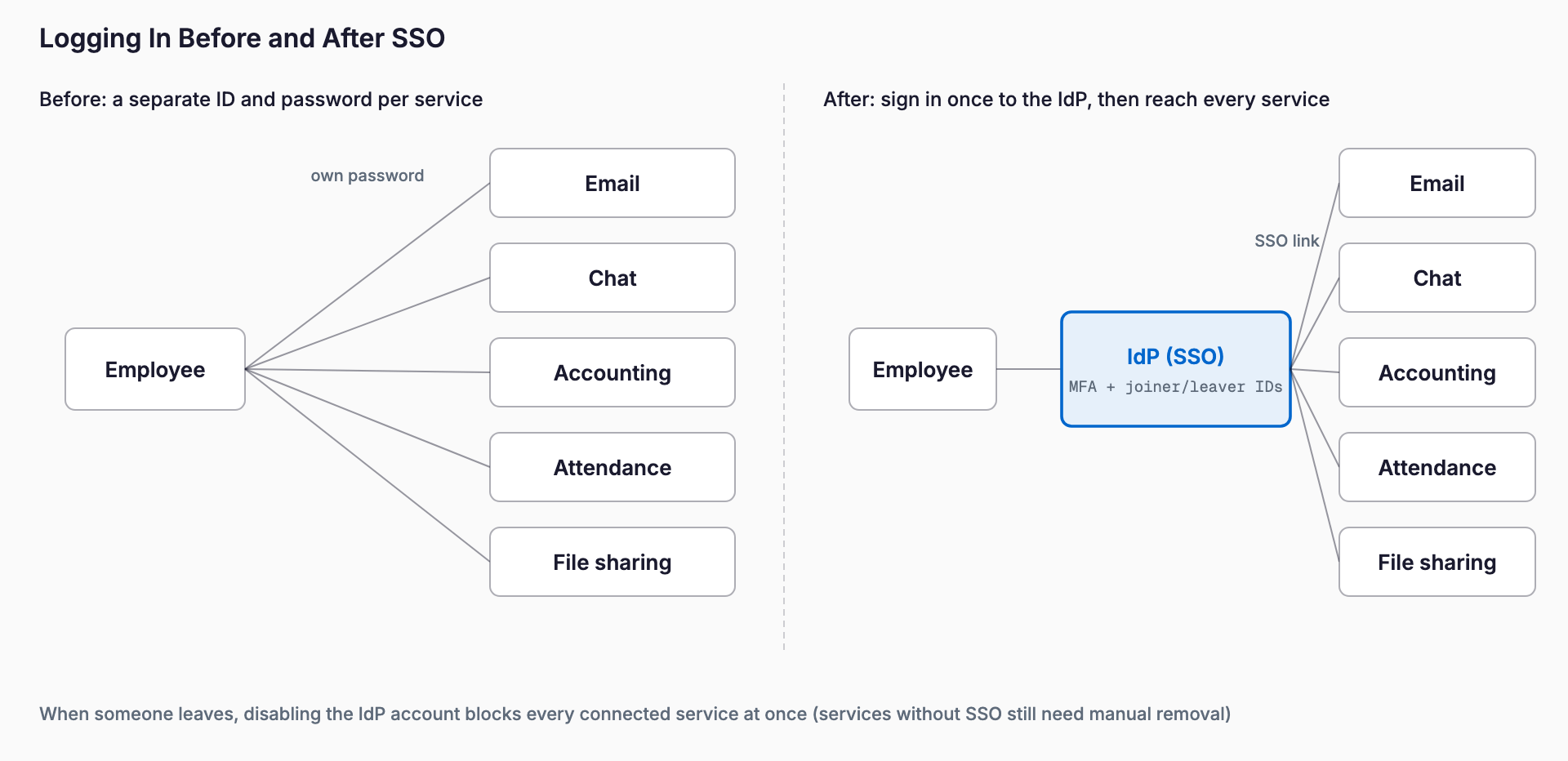
SSO designates one place that issues company identities, and each cloud service trusts that place's confirmation when it lets someone in. That place is called the IdP (identity provider). An employee logs in to the IdP once in the morning and then reaches accounting, time tracking, chat and business systems without typing another password.
The need is highest in companies like these.
- About ten cloud services, each managed with a separate login
- A leaver's account has been left active at least once
- Some staff reuse the same password across services
- Business partners increasingly ask about access control and MFA (multi-factor authentication)
- No dedicated IT person; account management falls to general affairs or the owner as a side duty
On the other hand, with three or four services and five or fewer staff, a password manager and consistent MFA are often enough before SSO. SSO is not a cure-all; the order of measures depends on company size and the problems you actually have.
What SSO can and cannot do
| Item | What SSO can do | What SSO alone cannot do |
|---|---|---|
| Login | One login opens multiple services | Services that do not support SSO keep their own ID and password |
| Leavers | Disabling the IdP account closes the entrance to every connected service at once | Accounts on unconnected services and shared-account passwords need separate handling |
| Passwords | Fewer passwords to remember, less reuse | Does not prevent device loss or leakage of the IdP password itself |
| MFA | Requiring MFA at the IdP covers every connected service | Does not help if a service still allows direct login that bypasses SSO |
| Administration | See in one place who can use which service | Fine-grained permissions inside each service (for example read-only) must still be set in that service |
Three problems most companies share
The first is missed deletion of leavers' accounts. When each service has its own administrator and you must stop ten services one by one at exit, forgetting a single one leaves a path into company information after the person has left. The full exit procedure is in the offboarding IT checklist. With SSO, services connected to it can be cut off with one action at the IdP, but unconnected services still have to be stopped individually.
The second is password reuse. The more passwords people must remember, the more they reuse one. A password leaked from one service being used to break into others is a typical incident. If SSO reduces the passwords used for work to effectively one, the motivation to reuse them shrinks.
The third is inconsistent MFA across services. Each service has its own setup screen and method, and making everyone configure all of them is a heavy burden. If MFA is required at the IdP, there is one place to configure. The thinking behind MFA is covered in account, password and MFA management for small businesses.
Four kinds of options: official prices as of November 2026
There are four realistic kinds of options for a small business. Prices below were checked on each vendor's official page and are per user per month unless noted. Dollar-priced products are shown in dollars without conversion.
1. Microsoft Entra ID (for companies on Microsoft 365). A Microsoft 365 subscription comes with Entra ID as the IdP. Business Basic and Standard include the free tier, and Microsoft's US page lists MFA, unlimited SSO and password self-service for it. If you need Conditional Access (controls such as blocking sign-in from unknown devices outside the company), the paid P1 is the candidate, and Business Premium includes P1. Standalone, Microsoft's Japanese page shows the equivalent of 1,049 yen per month (annual billing, excluding tax) and the US page shows $7 (annual billing). For the differences between Microsoft 365 plans, see this article.
2. Google Workspace sign-in integration (for companies on Google Workspace). The Google Workspace admin console can connect SAML-compatible apps. Google's official help for Cloud Identity says that using Google as the IdP for SAML apps is available in both the free and paid editions, while automatic user provisioning and deprovisioning is Premium only. As of November 2026, Google's official page lists Workspace at 800 yen (Business Starter), 1,600 yen (Standard) and 2,500 yen (Plus) per user per month, excluding tax. The range of integrations available at no extra charge may vary by Workspace edition, so check Google's help before adopting. We could not confirm a standalone Cloud Identity price, so treat it as a matter to ask Google about. For choosing between the two suites, see Google Workspace vs Microsoft 365.
3. Japanese IDaaS (HENNGE One, GMO Trust Login and others). These suit companies whose mail platform is not limited to Microsoft 365 or Google, or that want Japanese-language screens and support. HENNGE One's official new plans from October 2026 price the Identity Edition at 400 yen (IdP), 600 yen (IdP Pro) and 1,000 yen (IdP Ultra) per ID per month, excluding tax. However, the minimum for new contracts is stated as 200 IDs, so companies of 50 or fewer are likely to fall outside the conditions. GMO Trust Login's official pricing page lists SSO Pro at 300 yen and SSO Pro plus SaaS management at 500 yen (yen, excluding tax, 12-month contract), with a minimum of 30 users. The page did not make clear whether the unit is per user or per ID, so confirm that in a quote.
4. Okta (a leading overseas IDaaS). On its official page, the Workforce Identity Starter suite is $6 per user per month (SSO included, annual billing) and Essentials is $17; Professional and above are quote-based. The annual contract minimum is stated as $1,500. Because it is an overseas product, the admin console and support are mainly in English, which is worth weighing alongside cost.
| Option | Price (official, Nov 2026) | Minimum | Role of SSO | Fits |
|---|---|---|---|---|
| Microsoft Entra ID | Free: no extra cost (bundled with M365) / P1: about 1,049 yen (annual, excl. tax); $7 on the US page | Not stated | SSO and MFA in the free tier; Conditional Access needs P1 | Microsoft-centric companies |
| Google Workspace | Starter 800 / Standard 1,600 / Plus 2,500 yen (excl. tax); integration scope to be confirmed | Not stated | SAML app integration; automatic user management needs Cloud Identity Premium | Google-centric companies |
| HENNGE One (Identity) | IdP 400 / Pro 600 / Ultra 1,000 yen (excl. tax) | From 200 IDs | IDaaS built around SSO and MFA | Companies of 200+ |
| GMO Trust Login | SSO Pro 300 / plus SaaS management 500 yen (excl. tax, 12-month contract) | From 30 users | SSO is the core feature; SaaS management is the higher tier | 30+ people wanting a Japanese vendor |
| Okta Starter | $6 (annual) | From $1,500 per year | SSO included; many integrations | English UI acceptable, many connected apps |
Monthly cost estimates for 10 and 30 people
The table below simply multiplies the official unit prices. It excludes the fee for Microsoft 365 or Google Workspace itself and shows only the extra amount needed for SSO. Amounts exclude tax and are not converted; Okta stays in dollars.
| Setup | 10 people | 30 people |
|---|---|---|
| Entra ID Free (bundled with M365) | No extra cost | No extra cost |
| Entra ID P1 (for everyone) | 10,490 yen/month | 31,470 yen/month |
| Google Workspace integration features | No extra cost (to be confirmed) | No extra cost (to be confirmed) |
| HENNGE One IdP (400 yen) | Does not meet the 200-ID minimum | Does not meet the 200-ID minimum |
| GMO Trust Login SSO Pro (300 yen) | Below the 30-user minimum; ask the vendor | 9,000 yen/month (if the unit is per user) |
| GMO Trust Login SSO Pro plus SaaS management (500 yen) | Below the 30-user minimum; ask the vendor | 15,000 yen/month (same assumption) |
| Okta Starter ($6) | $1,500 per year (60 x 12 = $720, so the minimum applies) | $180/month ($2,160 per year) |
Three points follow from the table. First, if you already use Microsoft 365 or Google, you can probably start SSO at no extra cost. Second, dedicated IDaaS looks cheap at a few hundred yen per user per month, but minimum contract sizes or annual minimums make some products impractical or relatively expensive for a 10-person company. Third, adding features such as Conditional Access for everyone pushes even a 10-person company past 10,000 yen a month; giving them only to the people who need them keeps the cost down.
How to choose: start from your existing groupware
The approach with the fewest failures is to start from the mail and groupware platform you already use. If you are on Microsoft 365, try Entra ID first; if you are on Google Workspace, try Google's sign-in integration. Before adding a new contract, find out how far you can get within what you already pay for.
- Microsoft-centric and concerned about lost devices or off-site access: set up SSO and MFA with Entra ID Free and give P1 (or Business Premium) only to those who need it
- Google-centric: connect SAML apps from the Workspace admin console and cover gaps with other measures
- Using both, or unwilling to tie to one platform: consider an IDaaS, but check the minimum contract size first
- Many of your SaaS products do not support SAML: first check each service's SSO support and the plan required; this is where cost changes most (see failure patterns)
Five steps to roll out SSO
Step 1: Inventory the services you use
List the cloud services the company subscribes to. Put the service name, administrator, number of users, current login method, whether it supports SSO (SAML), and the plan required for SSO into one table. Support is usually documented in each service's help or pricing page. This table is the basis for every later decision.
Step 2: Decide on the IdP
Choose one IdP using the thinking above. Running several IdPs brings back multiple places to switch off at exit. Once chosen, appoint at least two administrators and prepare a separate emergency administrator account (a break-glass account) for getting into the IdP, stored apart from daily operations.
Step 3: Turn on MFA first
Because SSO makes the entrance single, a break-in there has a bigger effect. Before adding integrations, require MFA for everyone at the IdP. Choose an authenticator app or, where possible, a device-bound passkey, and avoid relying only on SMS codes.
Step 4: Connect services in order of importance
Do not connect everything at once. Try one or two services with administrators only, then expand to widely used services such as accounting, time tracking and chat. After connecting, disable direct ID and password login wherever the service allows it; otherwise an entrance that bypasses SSO remains and MFA does not apply.
Step 5: Build it into joining and leaving procedures
At joining, create the account in the IdP and grant access to services by department. At leaving, disable the IdP account and include in the procedure the accounts on unconnected services and the changing of shared-account passwords. For concrete items, see the offboarding IT checklist.
Common failure patterns
- A higher plan was required for SSO (the so-called SSO tax): some SaaS products offer SAML SSO only on upper plans or as paid options. Raising several services' plans just to enable SSO can cost more than the IdP itself. Before signing, check the required plan and price difference for each service in the Step 1 table
- Everything depends on one administrator account: with a single IdP administrator, that person leaving, being absent or having the account hijacked stops or endangers everything. Appoint at least two administrators and use especially strong MFA on admin accounts
- Direct login remains after connecting: if the old password still works after SSO is in place, reuse and a leaver's path in both remain
- Choosing a product without checking the minimum contract size: you build the comparison table and only then find you cannot sign at your headcount
Pre-rollout checklist
- Have you listed your cloud services and the administrator of each?
- Have you checked whether each service supports SSO (SAML), and the required plan and price difference?
- Have you first confirmed whether your current groupware (Microsoft 365 or Google Workspace) is enough?
- If considering an IDaaS, have you confirmed the minimum contract size, annual minimum, term and pricing unit?
- Have you confirmed prices from official pages or quotes and compared them on the same tax basis?
- Have you appointed at least two IdP administrators and stored an emergency admin account separately?
- Have you decided to require MFA for everyone at the IdP, and the method (authenticator app or passkey)?
- Have you decided to disable direct ID and password login after connecting?
- Have you written the exit procedure for services outside SSO and for shared accounts?
- Have you built IdP account creation and disabling into joining and leaving procedures?
Frequently asked questions
Does a company of around 10 people need SSO?
If you use few cloud services and have little staff turnover, a password manager and consistent MFA are often enough to start. A good time to consider SSO is when you reach around ten cloud services and worry about missed account removal at exit or password reuse. If you use Microsoft 365 or Google Workspace, part of it can be tried at no extra cost.
Should we introduce SSO or a password manager first?
If you have many shared accounts and mostly services without SSO support, start with a password manager. If most services support SAML and accounts are mostly individual, start with SSO. They play different roles, and many companies end up using both.
If we adopt SSO, are a leaver's accounts all stopped automatically?
Disabling the IdP account closes the entrance to connected services. However, credentials already issued inside a service, unconnected services and shared-account passwords need separate action. For some services, automatic account synchronization with the IdP (provisioning) is limited to higher plans.
How should services that do not support SSO be handled?
Leave them outside SSO and manage them with a password manager. For services that need a higher plan to support SSO, compare the added cost with your reason for wanting SSO. If it is not essential, choosing not to connect is also an option.
If the IdP goes down, can we no longer work?
An IdP outage can affect login to connected services. Mitigations are having multiple administrators, keeping an emergency admin account, and deciding where to check each vendor's status information. Major IdPs publish their operating status, so check it before you sign.
Related free tools (no sign-up, instant results)
Feel free to contact us
Contact Us