Lightpanda Explained: A Zig Headless Browser for AI Agents
Install, Puppeteer, MCP, and How It Differs from Headless Chrome (2026)
Lightpanda is a Zig-built headless browser for AI agents (AGPL-3.0, no Chromium). Install, CLI, Puppeteer, MCP, and how it differs from Chrome. Updated 2026.
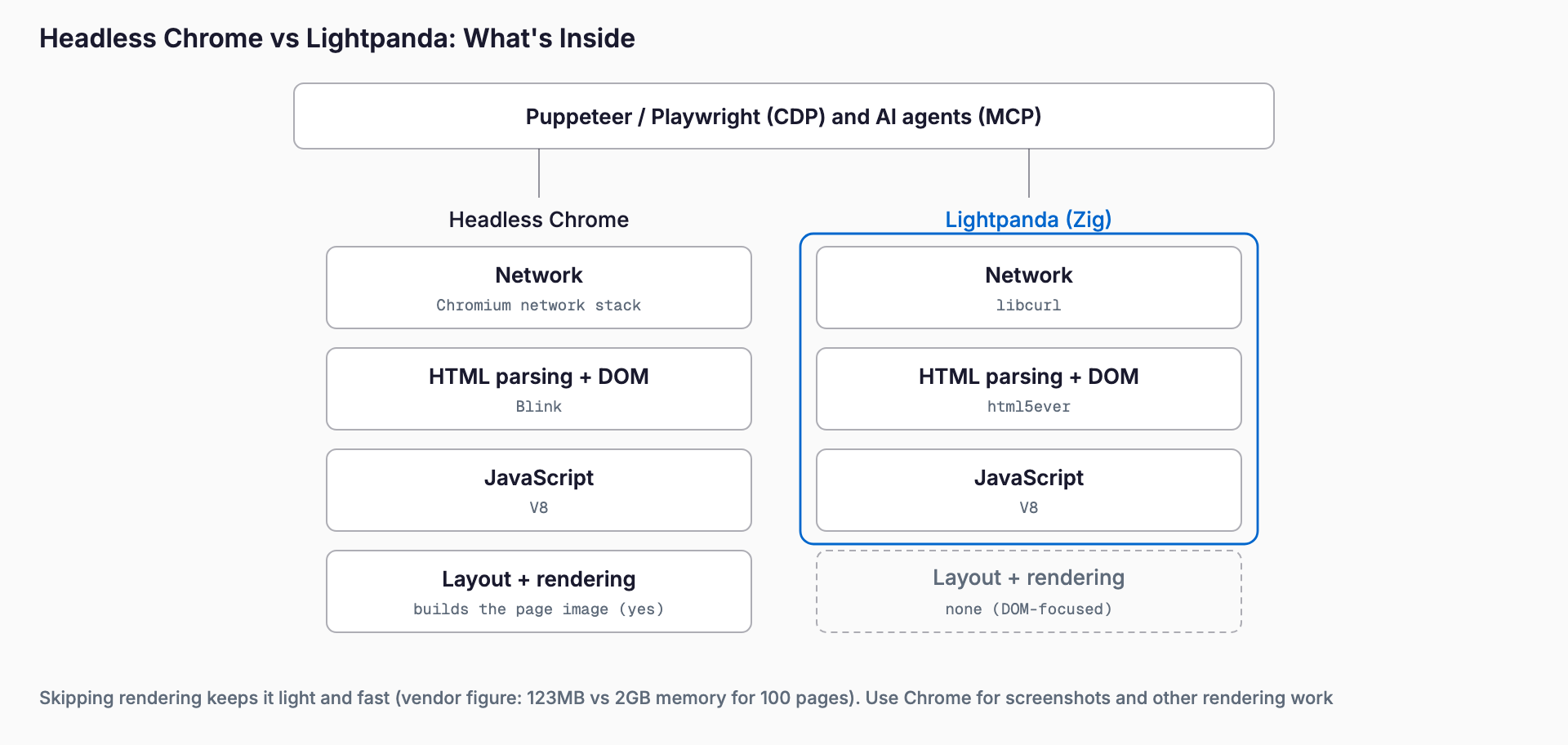
Lightpanda is a headless browser built from scratch in Zig for AI agents and automation, with no Chromium underneath. It has no graphical rendering; instead it runs JavaScript and returns the page DOM. The project reports 123MB of memory against 2GB, and 5 seconds against 46 seconds, for 100 pages compared with headless Chrome. In short, it is worth trying when you crawl or let agents browse at volume and in parallel. It is weak wherever rendering matters, such as screenshots, and it does not fully replace Chrome.
Version 1.0 shipped on October 2, 2026, leaving beta, and the latest release as of November 2, 2026 is 1.0.2 (October 23). The GitHub repository has passed 40,000 stars, and a third-party digest for the same day shows more than 800 added in a single day. This article covers what it does, how to install it, how to drive it from Puppeteer and MCP, how it differs from Chrome, Playwright and other agent-oriented browsers, and where it does not fit, based on the official docs and GitHub.
What is Lightpanda?
Lightpanda calls itself a headless browser built from scratch for AI agents and automation. It is not a fork of Chromium or WebKit. It uses html5ever to parse HTML, V8 to run JavaScript and libcurl for networking, and the core is written in Zig. Because there is no graphical rendering engine, it starts fast and uses little memory per page.
| Item | Details (confirmed on GitHub and official docs) |
|---|---|
| Publisher | Lightpanda (lightpanda-io) |
| License | AGPL-3.0 |
| Implementation | Zig (Zig 0.17.0 required to build); uses V8, libcurl and html5ever |
| Latest version | 1.0.2 (October 23, 2026); 1.0 left beta on October 2 |
| Platforms | Linux (x86_64 / aarch64), macOS (x86_64 / aarch64), Windows via WSL2; Docker images (amd64 / arm64) |
| Protocols | CDP (Puppeteer, Playwright, chromedp), WebDriver BiDi and classic WebDriver (Selenium), MCP, HTTP API |
| Rendering | None (no graphical rendering engine) |
| Telemetry | On by default; disable with LIGHTPANDA_DISABLE_TELEMETRY=true |
When the beta appeared in November 2024, many sites failed to load because Web API coverage was thin. For 1.0 the project says its passing Web Platform Tests (WPT) subtests grew from 2,645 to 1,739,845. In the same September 2026 runs Chrome passes 2,184,491 and Firefox 2,137,997, which puts Lightpanda at roughly 80% of Chrome. These figures come from the project's own blog and have not been independently verified.
What it can do
A single binary bundles several commands. It can be used from hand-written scripts as well as from AI agents.
| Command | What it does |
|---|---|
lightpanda fetch | Loads a URL, runs JavaScript and prints the rendered result to stdout. --dump selects html, markdown, structured_data and more |
lightpanda serve | Starts a CDP server (127.0.0.1:9222 by default). --protocol webdriver serves WebDriver, and both can share one port |
lightpanda mcp | Runs as an MCP server over stdio; add --port for HTTP |
lightpanda agent | A REPL that takes natural-language instructions; --task runs one task, --save writes a replayable script |
lightpanda run | Replays a saved PandaScript with no LLM calls and no API key |
Not rendering is also a limitation. According to the 1.0 announcement, --dump png and --dump pdf render the page's Markdown rather than the page as it looks. If you need an image of the actual screen, you still need a Chrome-based browser alongside.
Installation
The fastest route is the one-liner installer, which works on Linux and macOS and needs curl, jq and sha256sum. To pin a version, append -s "1.0.0" or similar.
- One-liner (Linux / macOS): curl -fsSL https://pkg.lightpanda.io/install.sh | bash
- Homebrew: brew install lightpanda-io/browser/lightpanda (nightly, per GitHub)
- Docker: docker run -d --name lightpanda -p 127.0.0.1:9222:9222 lightpanda/browser:latest
- Packages: the 1.0 announcement also lists pip install lightpanda and npm install @lightpanda/browser
- Nix: nix run github:lightpanda-io/browser -- --help
- Windows: no native build; use the Linux build under WSL2
- From source: make build or zig build run (needs Zig 0.17.0)
Run ./lightpanda version to confirm the install. Linux release binaries assume glibc (2.35 on x86_64, 2.38 on arm64) and do not run on musl-based distributions such as Alpine. The Docker image avoids that issue.
How to use it (shortest path)
Start with fetch to get HTML or Markdown after JavaScript has run. The official example uses a demo page. --obey-robots makes it follow robots.txt, which is a sensible default for any bulk fetching, alongside checking the target site's terms.
- Get HTML: lightpanda fetch --obey-robots --dump html https://demo-browser.lightpanda.io/campfire-commerce/
- Get Markdown: switch to --dump markdown, which is convenient as preprocessing before an LLM
- Structured data: --dump structured_data
To run existing automation scripts, start a CDP server with serve. lightpanda serve --obey-robots --host 127.0.0.1 --port 9222 listens on 127.0.0.1:9222. From Puppeteer, connect to that WebSocket endpoint instead of launching Chrome with puppeteer.connect({ browserWSEndpoint: "ws://127.0.0.1:9222" }), then use browser.newPage() and page.goto() as usual. The docs also cover Playwright and chromedp over CDP; in Playwright you point chromium.connectOverCDP at the same endpoint. WebDriver support was announced on October 6, 2026 so Selenium scripts work too, and the project reports up to 4.4x faster runs with 7x less memory in Selenium.
For AI agents, MCP is the easiest route. Register lightpanda mcp as the command in your client's MCP configuration (Claude Desktop, Cursor, Windsurf and so on). The official MCP docs name tools including goto, markdown, evaluate, search, links, fill and press, plus session_new, session_list and session_close for switching between pages. It also exposes read-only resources for the current page's HTML and Markdown. To make it obey robots.txt, add --obey-robots to the args in your config. For registering MCP servers with Claude Code, see our Claude Code MCP integration guide.
How it differs from Chrome and other agent browsers
The comparisons people search for most are headless Chrome and Playwright. A wave of agent-oriented browsers has also appeared. We have covered Vercel Agent Browser and Cloudflare's Kitesurf, which attack the same problem of agents reading the web from different angles. The table summarizes the differences.
| Aspect | Lightpanda | Headless Chrome (Puppeteer / Playwright) | Kitesurf (Cloudflare) |
|---|---|---|---|
| Positioning | A lightweight browser engine built from scratch | A full browser driven by an automation library | An agent-oriented browser on Workers (cloud only) |
| Rendering / screenshots | No | Yes | Not confirmed in the sources we checked |
| Memory and speed | 123MB and 5s for 100 pages (Chrome: 2GB and 46s), per the project | Baseline | Cloudflare reports 37MB per page (Chrome-based: 266MB) |
| Web standards coverage | About 80% of Chrome on WPT | 100% (baseline) | About 30% of WPT test files, per Lightpanda's comparison |
| Where it runs | Local, Docker, your own servers | Local, Docker, many clouds | Cloudflare cloud only |
| License | AGPL-3.0 | Chromium is BSD-style and others | Closed source |
| Protocols | CDP, WebDriver, MCP, HTTP API | CDP, WebDriver | CDP (via Browser Run) |
The Kitesurf column includes numbers taken from Lightpanda's own comparison post. It was written by the project itself, and Kitesurf is closed source, so the figures could not be reproduced. In an October 19, 2026 post the project published a 940-page crawl with 25 tabs: Lightpanda took 4.5 seconds in total with 109MB peak memory, against 11.5 seconds and 201MB for Obscura, and 17.4 seconds and 230MB for Moli. That is a single demo site, so reliability on real sites is a separate question. Treat it as a vendor's numbers about its own product.
Where it fits
- Crawling many pages, converting them to Markdown and feeding LLMs or RAG pipelines
- A "read the web" tool for AI agents over MCP, with light page handling and cheap parallel sessions
- Running existing Puppeteer or Playwright scraping scripts on memory-constrained servers or low-cost containers
- Lightweight E2E checks in CI, or tests that only verify DOM behavior and do not depend on rendering
The 1.0 announcement cites companies processing more than 30 million pages a day and a report from Keenable of 4x faster and 6x more cost-efficient than Chromium. Both are self-reported by users or the vendor, so measure on your own target sites.
Caveats and poor fits
- No real screenshots or PDFs, so it cannot do visual regression tests or appearance checks
- Web API coverage is still growing. The biggest WPT gaps are in CSS, editing and SVG, which concern layout and painting. The CORS suite passes 371 of 463 subtests (80%), leaving 92 failing, according to the project
- CORS is enforced by default since 1.0, with --disable-features cors suggested only as a temporary workaround. Iframes, workers and external stylesheets load only with --load-resources, so defaults are conservative
- The license is AGPL-3.0. If you modify it and offer it over a network, obligations apply. Check the LICENSE and consult a professional before embedding it commercially
- No native Windows build, and the binaries do not run on musl-based distributions such as Alpine
- Telemetry is on by default. Set LIGHTPANDA_DISABLE_TELEMETRY=true in sensitive environments
- Automated crawling must respect the target site's terms and robots.txt; --obey-robots alone does not settle terms-of-service questions
How to adopt it
Avoid a wholesale switch. First, use fetch on a few sites you care about and check that HTML and Markdown match what Chrome returns. Next, start serve and change only the connection target of an existing Puppeteer or Playwright script. Design a fallback to Chrome for pages that do not work. The project's own description of Hermes Agent notes it falls back to Chrome for unsupported actions such as screenshots. Finally, measure memory and per-page time in your own environment and decide how much to move.
FAQ
Is Lightpanda free? Can I use it commercially?
The open-source version you run locally is free. The license is AGPL-3.0. Using it in your own environment for scraping or testing is generally unproblematic, but modifying and distributing it, or offering it as a network service, triggers AGPL obligations. If you embed it in a product, check the LICENSE and consult a professional if needed. The docs also describe a cloud offering, but we did not verify its pricing.
Can I use it as a drop-in replacement for Chrome?
Because it speaks CDP, swapping the connection target in a Puppeteer or Playwright script often works. However, Web API coverage is about 80% of Chrome on WPT, and it cannot render screenshots or PDFs. A practical setup tests your target sites and falls back to Chrome for pages that fail.
How do I use it from an AI agent?
Register lightpanda mcp as a command in your MCP client configuration. Tools such as goto, markdown, evaluate, search, links, fill and press become available. For HTTP, start it with something like lightpanda mcp --port 8000.
Does it run on Windows?
There is no native build. Run the Linux build under WSL2, or use the Docker image. The release binaries do not run on musl-based Linux such as Alpine.
Does it send data externally?
According to GitHub, telemetry is enabled by default. Set the environment variable LIGHTPANDA_DISABLE_TELEMETRY to true to turn it off. We did not verify whether page content itself is transmitted, so in sensitive environments disable telemetry and check outbound connections yourself.
References
Related free tools (no sign-up, instant results)
Feel free to contact us
Contact Us