System Integration Costs 2026: API and CSV for SMBs
A cost guide to system integration for SMBs: CSV, RPA, iPaaS, and API options compared, plus what drives quotes up, a project checklist, and failure patterns.
The Bottom Line: Typical Integration Costs
The cost of connecting systems (API integration or CSV-based data transfer) varies widely depending on the method and requirements. As a rough guide, CSV integration typically runs ¥300,000–¥800,000, standard API integration runs ¥500,000–¥1,500,000, and custom two-way, real-time integration runs ¥1,500,000–¥5,000,000, with monthly maintenance fees of a few thousand to several tens of thousands of yen on top. Many business owners and one-person IT departments who ask, "we want to connect our sales management system with accounting," or "we want attendance and payroll to sync automatically," are surprised when the quote comes back higher than expected. Whether a quote is reasonable depends heavily on the method, data volume, and synchronization requirements, so having a sense of the going rate matters before you evaluate any single number. If you are also weighing a full system replacement, the cost guide for system development is a useful reference as well.
Comparing Integration Methods
System integration methods broadly fall into four categories: manual CSV file handoffs, RPA-based screen automation, standard connectors such as iPaaS platforms, and custom API development. Each differs in upfront cost, monthly cost, ideal use case, and weaknesses, so the right choice depends on your data volume, update frequency, and budget.
| Method | Upfront cost | Monthly cost | Best fit | Weakness |
|---|---|---|---|---|
| Manual CSV transfer | ¥0–100,000 | ¥0 (labor only) | Low update frequency, small data volume | Human error, tribal knowledge, time-consuming |
| RPA (screen automation) | ¥200,000–600,000 | ¥10,000–30,000 | Automating existing manual screen operations | Breaks easily when the underlying system changes |
| Standard connectors / iPaaS | ¥300,000–1,000,000 | ¥10,000–50,000 | Standardized integration between supported systems | Weak for complex conditional logic or custom specs |
| Custom API development | ¥1,000,000–5,000,000 | ¥20,000–100,000 | Real-time, two-way, or highly custom requirements | Long development time and higher cost |
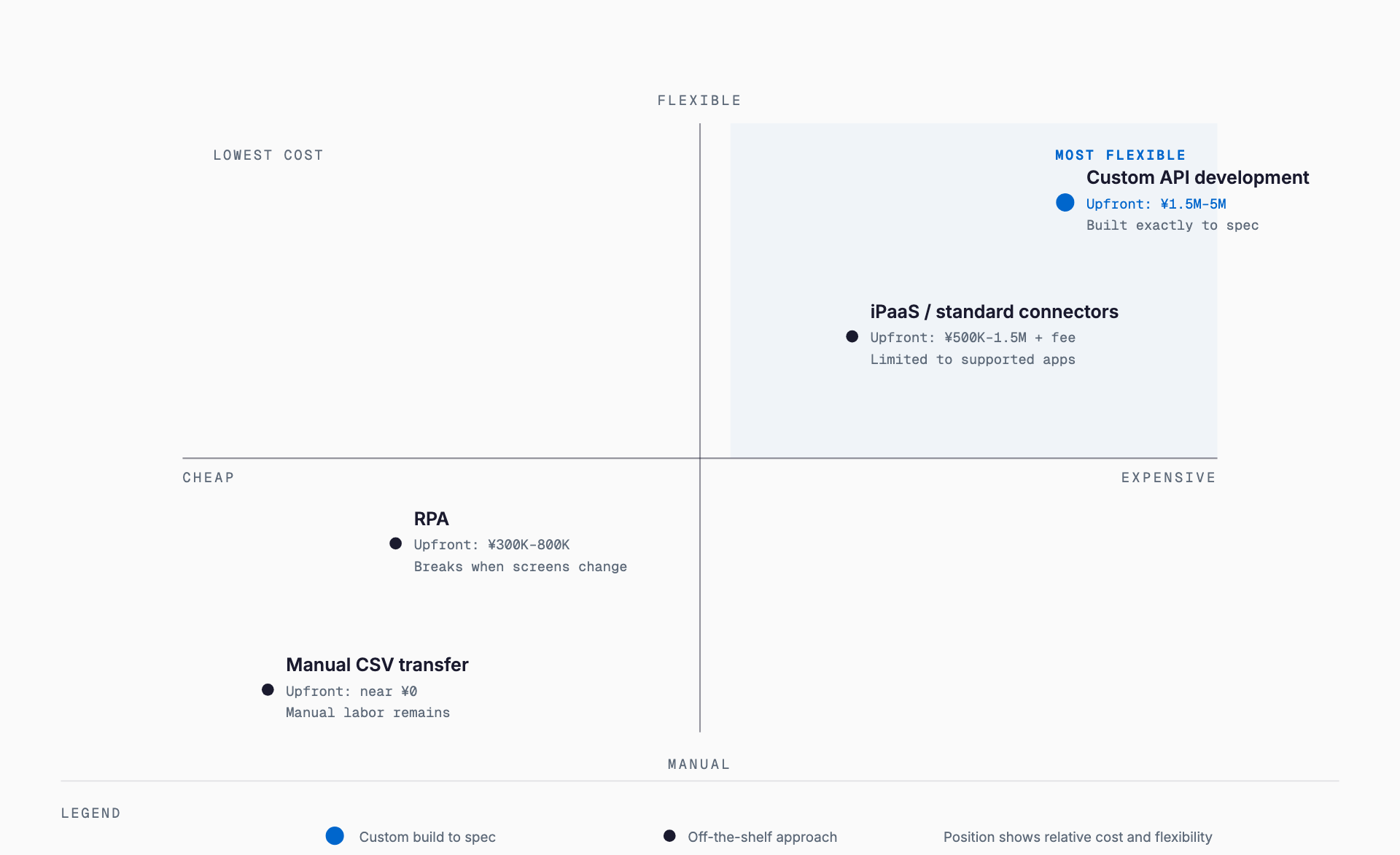
As the table shows, cost and flexibility are roughly a trade-off. It is usually worth checking whether manual CSV handoffs or an iPaaS connector can meet the need before committing to custom development, since that ordering avoids overspending on flexibility you may not use. That said, if you expect the number of partners or stores to grow, or expect data volume to increase sharply, it can make sense to invest upfront in a more scalable API integration from the start.
What Drives the Cost Up
The word "integration" covers a wide range of complexity, and a quote can vary several times over depending on the requirements. If you are trying to avoid replacing an existing system and rely on integration alone, it helps to understand how this differs from the cost of data migration before setting a budget. Integration means connecting two live systems without breaking either one, which is a different kind of work than migration, where data is physically moved from one system to another. The main cost drivers are as follows.
- Two-way synchronization is required (roughly doubles the design and testing effort compared to one-way)
- Real-time requirements (immediate reflection rather than a daily batch process)
- Either system lacks an API (requires custom middleware or screen-automation workarounds)
- Data field mapping and conversion (matching code systems, units, or character encodings that differ between platforms)
- Error recovery design (retry, alerting, and manual-fix workflows for failed transfers)
- Large data volumes or high-frequency integration (handling processing limits or API call rate limits)
- Security requirements (implementing authentication, encrypting communication, preserving access logs)
How to Approach an Integration Project
Integration projects go more smoothly when you start by organizing internally rather than requesting a quote from a developer right away. A rough sequence looks like this: first, map out your current workflow and identify exactly where double entry or manual work is happening. Next, define requirements — which data, at what frequency, and in which direction it needs to flow. Only once requirements are settled should you compare manual CSV, RPA, iPaaS, and custom API development, and get quotes from multiple vendors. Where possible, run a small-scale proof of concept with a limited data set to confirm the integration behaves as expected before committing to a full rollout — this significantly reduces the risk of costly rework later. It is easy to overlook the ongoing operational phase once the integration goes live: rather than treating the project as finished at launch, budget on the assumption that the design will need periodic review as data volume grows or connected systems change their specifications, so you are not scrambling to find additional funds later. If a single IT generalist manages the integration, make sure the specifications and operating procedures are written down, so operations do not stall when that person changes roles or leaves the company.
A Checklist Before You Order
- Have you confirmed both systems actually offer an API?
- Have you defined the integration frequency (real-time, daily, or weekly)?
- Have you listed out the data fields and rough data volume involved?
- Have you decided whether the integration is one-way or two-way?
- Have you defined operational rules for when errors occur (who handles them, and how)?
- Have you confirmed what the monthly maintenance fee actually covers (monitoring, incident response, minor spec changes)?
- Have you confirmed the terms for additional charges if requirements change after the contract is signed?
- Have you confirmed what support looks like when the connected system is upgraded?
Common Failure Patterns
Many companies eventually consider replacing the core system itself once they hit the limits of integration. In that case, it is worth also checking the cost of core system / ERP renewal to inform the decision. Common failure patterns in integration projects include the following.
- Integration is implemented, but some manual data entry remains and double entry is never fully eliminated
- The integration suddenly breaks after one system is upgraded or its specifications change
- Data format mismatches not anticipated at the quoting stage surface later, triggering additional costs
- No maintenance contract is in place, so there is no one to call when something breaks
- Only one staff member understands how the integration works, and operations stall when they leave or change roles
- The team prioritizes "just getting it connected" and skips building error detection and alerting, so data mismatches go unnoticed for too long
Frequently Asked Questions
Is a standard iPaaS connector enough on its own?
For standardized integration between already-supported systems, an iPaaS connector is often sufficient. But if your business rules involve a lot of custom logic or complex conditional branching, you will likely need to supplement it with custom development. Start by checking whether the systems you use are already supported by an iPaaS platform.
What should I check if an integration quote seems too high?
Check where the quote's weight falls: initial build, testing, or ongoing maintenance. Simply revisiting whether requirements like two-way sync or real-time updates are truly necessary can bring the cost down significantly. It also helps to get a second opinion after reviewing which requirements can realistically be trimmed.
How do you integrate an old system that has no API?
When no API is available, the common workaround is automated CSV file exchange or RPA-based screen automation. If a system replacement is on the horizon, it is also worth weighing the timing of that replacement before investing heavily in integration work.
What is the typical monthly maintenance cost after integration?
It depends on the method, but a rough guide is ¥10,000–100,000 per month. Plans range from minimal monitoring-only coverage to full plans that include incident response and minor spec changes, so it is important to clarify the scope of coverage before signing a contract.
Can integration work be handled in-house?
Relatively simple methods like CSV transfer or RPA can often be handled in-house. Custom API development, however, requires specialized expertise, so companies with only a single IT generalist on staff often find it more cost-effective in the long run to work with an outside development partner.
What should I prepare before getting quotes from multiple vendors?
Lay out the data fields to be integrated, expected record volume, update frequency, whether it is one-way or two-way, and whether the existing systems have an API and documentation. Preparing these four points in advance makes it much easier to compare quotes on equal footing — without them, vendors may be pricing different assumptions, and a simple price comparison can be misleading.
Related free tools (no sign-up, instant results)
Feel free to contact us
Contact Us