What Is colibri? The Pure-C Engine That Runs a 744B MoE Mode
l on 25GB RAM
A guide to JustVugg/colibri, a pure-C engine that hit GitHub Trending by running the 744B GLM-5.2 MoE model on consumer hardware via on-demand expert streaming from disk. Covers how it works, supported models, build/usage, hardware requirements, and how it differs from llama.cpp, Ollama, Edge0, and turbo-fieldfare.
What Is colibri? An Engine That Treats Disk as Part of the Memory Hierarchy
colibri (JustVugg/colibri) is a local inference engine written entirely in pure C, with no GPU or Python runtime dependency, that treats VRAM, RAM, and storage as one unified memory hierarchy so that 744B-parameter-class MoE (Mixture of Experts) models can run on ordinary consumer PCs. It's Apache 2.0 licensed, was released around July 10-11, 2026, and was posted to Hacker News as "Show HN: Getting GLM 5.2 running on my slow computer," gathering over 900 points and surfacing on GitHub Trending. As of September 14, 2026, its GitHub star count is roughly 30,000.
The short answer up front: colibri isn't optimized for speed — its goal is to make a model that shouldn't fit in memory run anyway, without changing its outputs. It can run GLM-5.2 (744B parameters, roughly 40-55B active) on 25GB of RAM, but throughput on a cold disk cache is only 0.05-0.1 tokens/sec, well below anything usable interactively. With a warm cache or more capable hardware, that climbs to a few tokens/sec.
How It Works: On-Demand Expert Loading
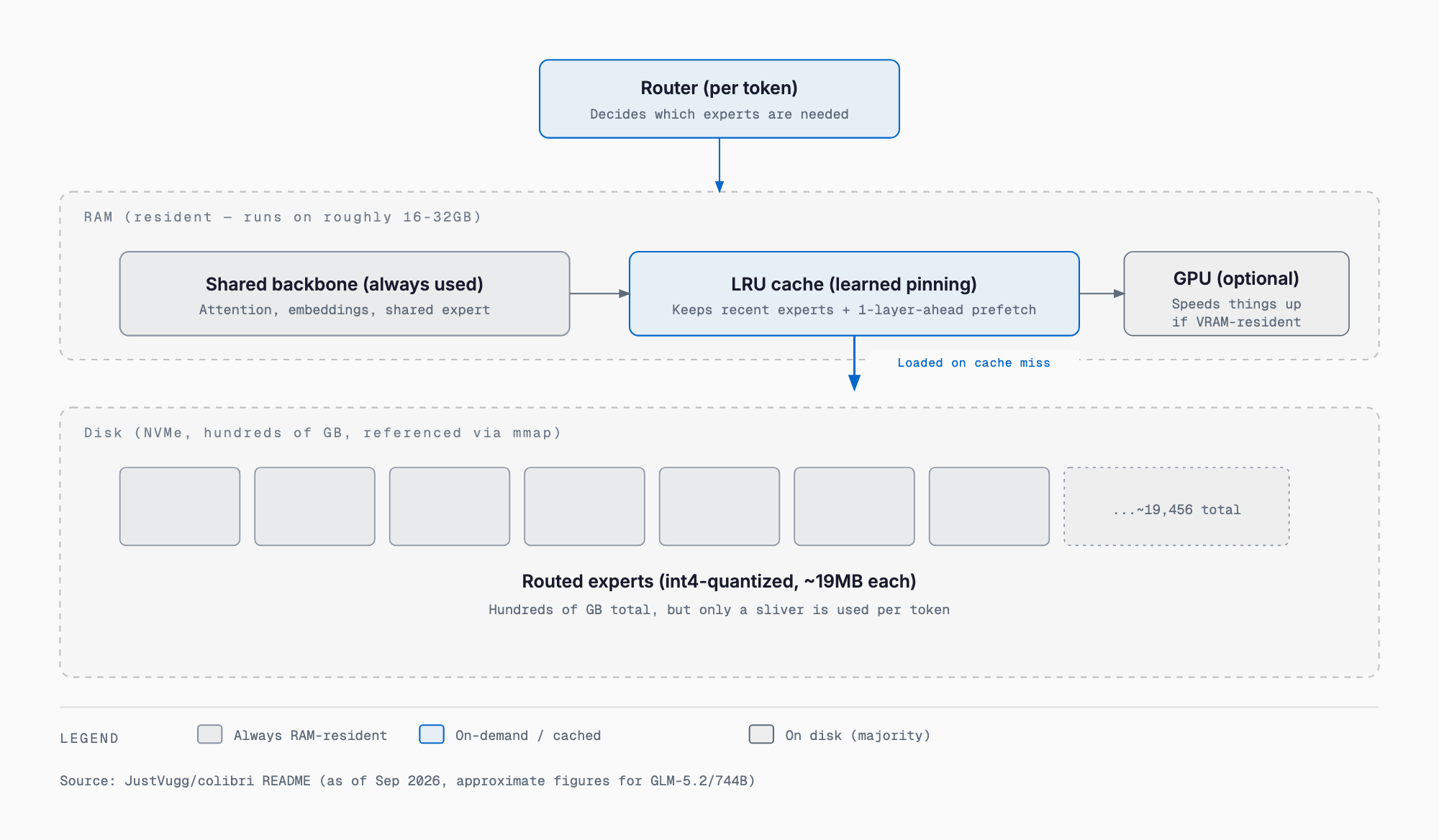
MoE models have a defining property: only a small fraction of total parameters (the active parameters) are actually used per token. For GLM-5.2, only about 40B of its 744B parameters are active per token, and only around 11GB worth of state actually changes between tokens. colibri exploits this by splitting the model in two:
- Always RAM-resident: the shared backbone used by every token — attention, embeddings, shared expert (about 17B parameters for GLM-5.2, roughly 9.9GB at int4)
- Disk-resident, loaded on demand: the routed experts (roughly 19,456 of them for GLM-5.2, about 19MB each at int4, ~370GB total), memory-mapped on disk and pulled in only when the router selects them
Loading uses a per-layer LRU cache with learned pinning (keeping frequently used experts resident) and one-layer-ahead prefetching to cut disk I/O. The developer describes this behavior as "a JIT compiler, but for weights" — the router watches actual execution patterns and dynamically stages hot experts into faster tiers. A GPU, if present, acts as an additional fast tier via VRAM residency, but it's optional; the CPU-only path is a complete execution path on its own.
The project frames its design philosophy as "correctness over speed": to make sure quantization and tier placement never change model outputs, it validates against Hugging Face's transformers with token-exact oracle checks. The operating principle is that insufficient fast memory only reduces speed — it never changes the model's semantic behavior.
Supported Models
colibri has one dedicated C file per model family (e.g., c/glm.c is roughly 2,400 lines), all driven by a shared CLI. As of September 2026, it supports the following model families (figures are approximate, per the README).
| Model | Total / Active Params | Approx. Disk | Min RAM | Notes |
|---|---|---|---|---|
| GLM-5.2 / 5.3 | 744B / ~40B | ~372GB | 16GB | Reference model; int8 MTP head needed for speed gains |
| GLM-5.3-Flash | 321B / 40B | ~195GB | 25GB | Includes vision support |
| Inkling | 975B / 41B | ~469GB | 25GB | Has thinking capability |
| Kimi K3 | 2.8T / 104B | ~1.6TB | 32GB | Streamed from the native MXFP4 checkpoint |
| DeepSeek V4 Flash | 284B / 13B | ~137GB | 16GB | CUDA optional; a REAP-pruned 150B variant also exists |
| DeepSeek V4.1 Flash | 552B / 16B | ~203GB | 32GB | Vision and tool-calling enabled |
| Qwen3.8-Flash-Next | 125B + 51B n-gram / 6B | ~185.5GB | 16GB | CPU-only, no GPU support |
| Qwen3.6 | 35B / 3B | ~20GB | 24GB | With CUDA: 1.44 to 10.05 tok/s on two GPU cards |
| OLMoE | 7B / 1B | ~7GB | 8GB | Smallest option in the lineup |
The supported-model list updates frequently, and more additions are likely. Check the GitHub repository for the current state.
Build and Usage
colibri distributes prebuilt binaries for Linux, macOS, and Windows, so it can be tried without a compiler.
# Using a prebuilt release
tar xzf colibri-v1.11.0-linux-x86_64.tar.gz
python3 coli info

# Building from source (needs gcc/clang with OpenMP)
git clone https://github.com/JustVugg/colibri && cd colibri/c
./setup.sh
make glm        # separate make target per model family
# other examples: make inkling / make kimi_k3, etc.
After building or extracting, everything runs through the shared coli CLI.
./coli chat --model /path/to/model    # Interactive terminal
./coli serve --model /path/to/model   # API server (headless)
./coli web --model /path/to/model     # API + dashboard (opens in browser)
./coli plan --model /path/to/model    # Inspect VRAM/RAM/disk placement plan
./coli doctor --model /path/to/model  # Readiness check
./coli tune --model /path/to/model    # Measure and save a performance profile
Notable environment variables include COLI_MODEL for the model path, CUDA_EXPERT_GB=auto for automatic VRAM tier sizing, PIN_GB=all to pin all experts in RAM, COLI_MODEL_MIRROR for dual-SSD striping (roughly a 33% decode speedup by splitting reads across two drives), DRAFT=0 to disable speculative decoding, and COLI_NUMA=1 for multi-socket NUMA interleaving.
Hardware Requirements at a Glance
Minimum requirements vary a lot by model. Rough guidance as of September 2026, per the README's measured/estimated figures:
| Configuration | Measured throughput |
|---|---|
| 25GB device, cold disk (GLM-5.2) | 0.05-0.1 tok/s |
| Single NVMe, warm cache | 1-2 tok/s |
| CPU-only, 128GB RAM desktop | ~1.8 tok/s (warm) |
| RTX 5070 Ti (GPU-resident pipeline) | 1.07 tok/s |
| 6x RTX 5090 (all experts resident) | 5.8-6.8 tok/s, ~13s TTFT |
As the developer states plainly, speed is set by disk I/O, not model size. GPU/VRAM tiers help but aren't required — a CPU-only path is a fully complete execution route. A gaming-class PC with an NVMe drive and around 32GB of RAM can run colibri, but for a usable conversational pace, you'd want to either pick a smaller model (Qwen3.6, OLMoE) or add multiple GPUs.
Speculative Decoding and Compressed KV Cache
colibri supports speculative decoding using GLM-5.2's native MTP (Multi-Token Prediction) head. Drafted tokens are verified in a single batched forward pass, achieving 2.2-2.8 tokens per forward pass when the cache is warm. Critically, the MTP head must run at int8 precision — quantizing it to int4 drops the acceptance rate to 0-4%. On cold workloads, where verification cost exceeds the savings from drafting, speculative decoding is disabled by default.
colibri also uses MLA (Multi-head Latent Attention) to compress the KV cache to 576 floats per token (versus the usual 32,768 — a roughly 57x reduction), persisting it to a .coli_kv file. This lets a conversation be reopened without re-running the prefill (recomputing the prompt) from scratch.
How It Differs From Existing Tools
Local LLM engines already have established defaults in llama.cpp and Ollama, and 2026 has also seen dedicated small-MoE, memory-light engines like turbo-fieldfare and Edge0. Each targets a different goal.
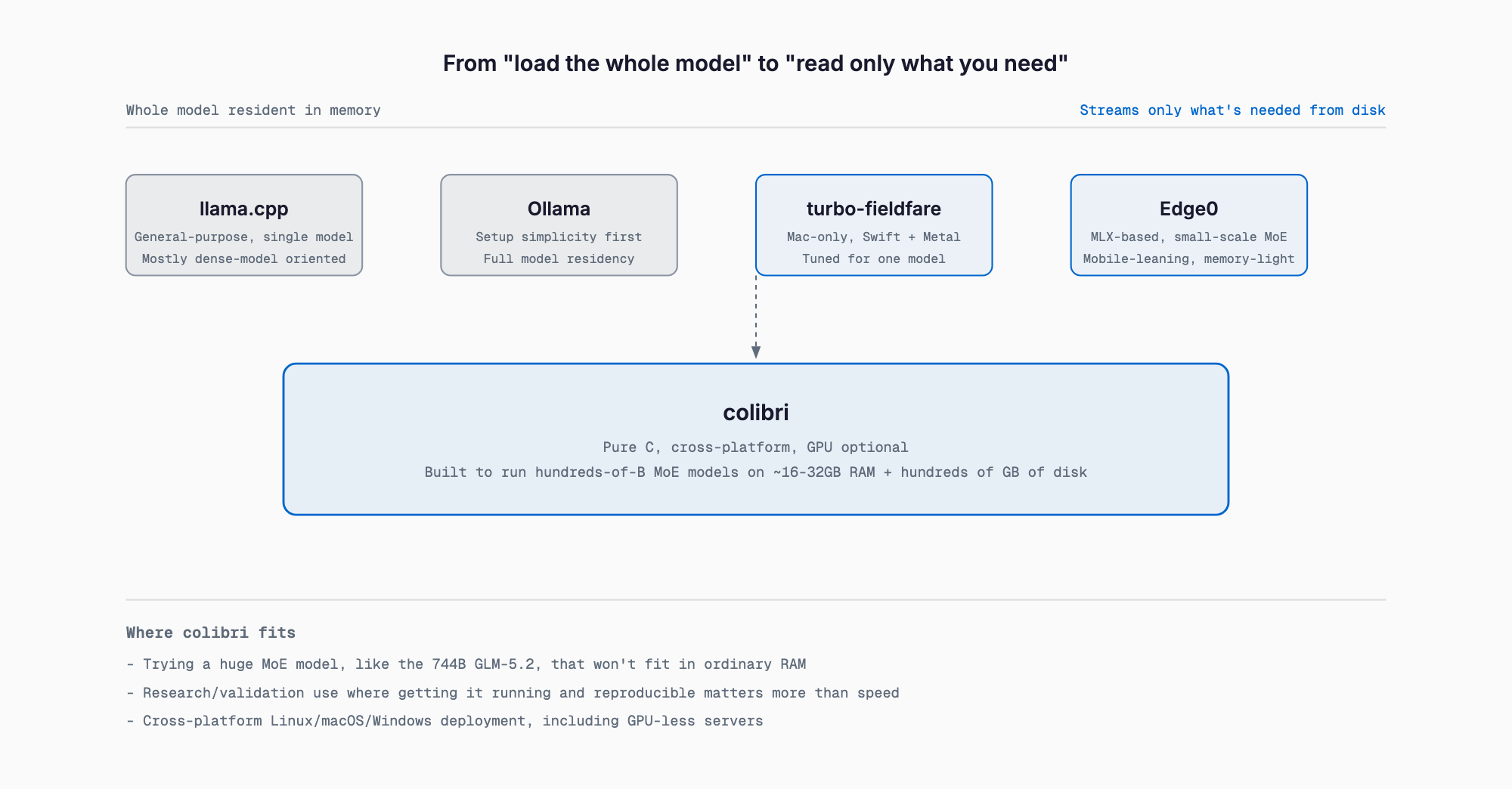
| Tool | Primary goal | Target model scale | Platform | Memory strategy |
|---|---|---|---|---|
| colibri | Run huge MoE models that don't fit in memory | Hundreds of B to 2.8T (MoE) | Linux/macOS/Windows, pure C | RAM + disk hierarchy, GPU optional |
| llama.cpp | General-purpose single-model runtime | Mostly up to tens of B (dense-focused) | Cross-platform | Assumes the model loads into memory/VRAM |
| Ollama | Prioritizes setup simplicity | Mostly up to tens of B | Cross-platform (llama.cpp-based) | Whole model kept resident |
| turbo-fieldfare | Memory-light MoE on a single Mac | Tens-of-B MoE (e.g. Gemma 4 26B-A4B) | macOS (Apple Silicon) only, Swift + Metal | Repacks to a proprietary format, resident core ~1.35GB |
| Edge0 | Mobile/edge memory-light MoE | Few-B to tens-of-B MoE | Mostly MLX (Apple Silicon) | SSD offload + routing prediction, under a few GB |
llama.cpp and Ollama are general-purpose engines built on the assumption that the whole model fits in memory or VRAM — that lets them run a wide range of dense and other models reliably, but they simply fail if a model exceeds available memory. turbo-fieldfare and Edge0 share colibri's core idea of streaming experts from disk, but target comparatively small MoE models like Gemma 4 26B-A4B or Edge0's 35B/8B tiers, optimized specifically for Apple Silicon's MLX/Metal environment. colibri targets an order of magnitude larger — hundreds of billions of parameters up to Kimi K3's 2.8T — and runs on GPU-less Linux/Windows servers as well. Where turbo-fieldfare and Edge0 aim for genuinely usable interactive speeds (tens to thousands of tokens/sec depending on conditions), colibri prioritizes simply making a massive model run at all, with speed a secondary concern.
Things to Keep in Mind
colibri is a young project, only released in July 2026, so supported models and performance figures are likely to keep changing with updates. It's better suited to verifying whether a frontier-scale MoE model can run at all on your hardware, or to research and experimentation, than to running as an always-on production chatbot or API service. If it's too slow, there's room to improve with a smaller model, dual-SSD striping via COLI_MODEL_MIRROR, or adding a GPU tier.
Related Articles
- What Is Edge0-35B-A3B? — How SSD Streaming Runs a 35B MoE Model in Under 3GB of RAM
- Nex-N2.5 Requirements: VRAM, GPU and RAM for Mini, Pro and Max (2026)
- Local LLM Context Length and VRAM: KV Cache Formula Guide
What's the minimum spec needed to run colibri?
It varies a lot by model. The smallest option, OLMoE (7B/1B), needs around 8GB of RAM; GLM-5.2 (744B) needs roughly 16-25GB of RAM plus about 370GB of disk. Disk capacity and NVMe read speed are what determine perceived speed.
Is a GPU required?
No. The CPU-only path is a complete execution route on its own; a GPU, if present, just acts as an additional fast tier via VRAM residency.
Does it replace llama.cpp or Ollama?
They serve different purposes. llama.cpp and Ollama are general-purpose engines for models that fit in memory, suited to everyday use. colibri is a specialized engine for running MoE models that don't fit in memory at all, even at the cost of speed — the two coexist rather than compete.
How is it different from turbo-fieldfare or Edge0?
They share the idea of streaming experts from disk, but target different scales. turbo-fieldfare and Edge0 run small MoE models (up to tens of billions of parameters) on Apple Silicon at usable, memory-light speeds. colibri targets hundreds of billions to trillions of parameters, prioritizing getting the model to run at all over speed.
What throughput can I actually expect?
It ranges widely depending on conditions, from 0.05 tokens/sec up to a few tokens/sec. A 25GB device with a cold disk cache runs at only 0.05-0.1 tokens/sec; even a multi-GPU setup only reaches around 5-7 tokens/sec. It's not suited to use cases that need conversational-speed responses.
Related free tools (no sign-up, instant results)
Feel free to contact us
Contact Us