UTM Firewall Cost for Small Businesses (2026 Guide)
UTM firewalls cost about ¥100K-400K to buy plus yearly licenses, or ¥5K-30K a month leased or rented. Who needs one, costs by company size, and pitfalls.
A UTM (unified threat management) appliance combines several security functions — firewall, IPS/IDS (intrusion detection and prevention), antivirus, web filtering, and spam filtering — into a single device. Typical cost runs roughly $700–$2,800 for the appliance itself if bought outright, plus a few hundred to over a thousand dollars a year in license fees, or roughly $35–$200 per month if leased or rented (these are general 2026 market ranges, not a quote). Many small businesses consider a UTM because a business partner has asked for one, or out of a general sense that "we should have something" for data protection — but whether it's actually needed, and what a fair price looks like, depends heavily on how the company operates. This article covers what a UTM does and doesn't protect against, how to judge whether your business really needs one, typical costs by acquisition method and company size, and common contract pitfalls.
What a UTM protects against — and what it doesn't
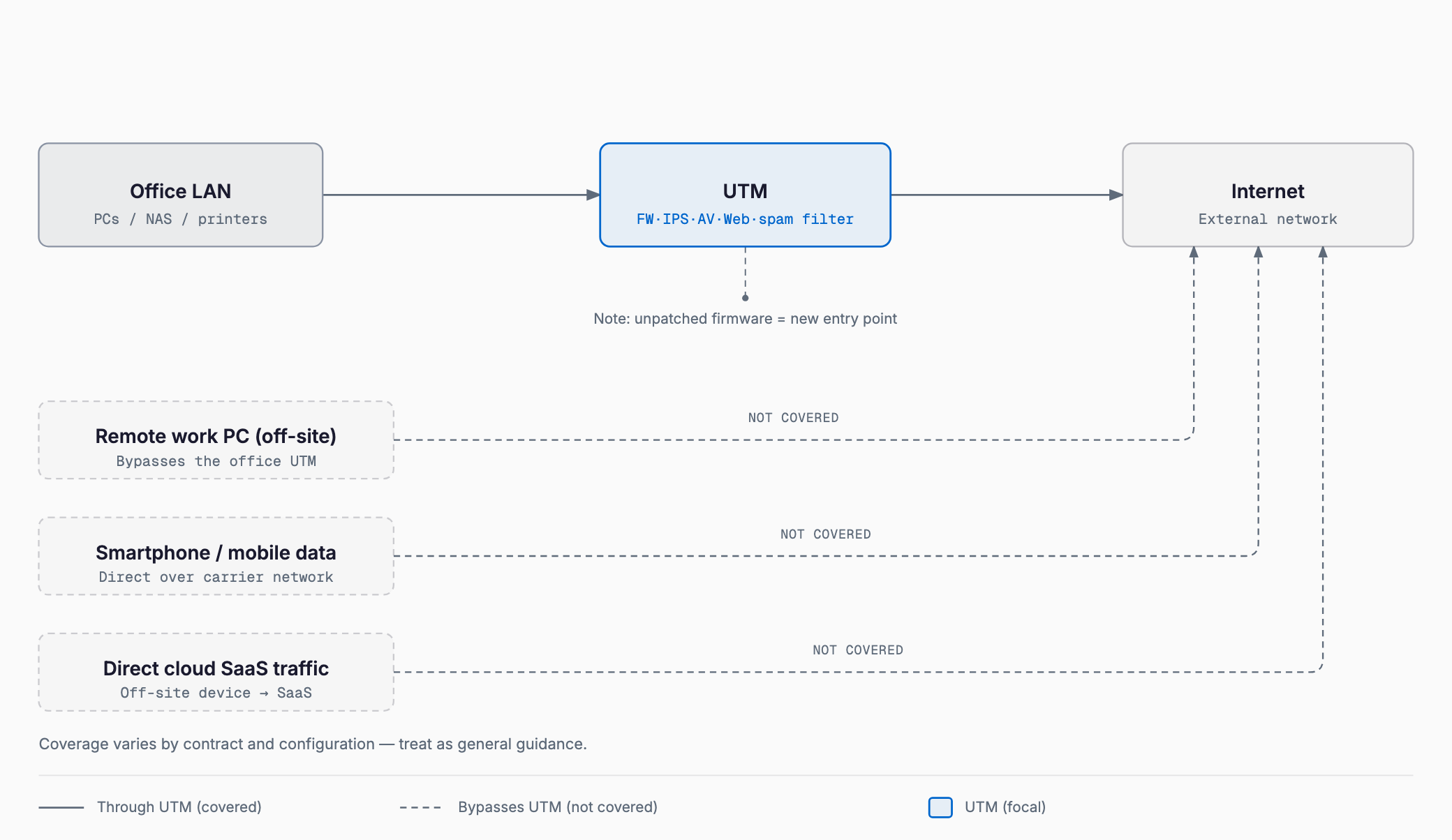
A UTM sits at the boundary between your office network and the internet, inspecting traffic that crosses that boundary. That also defines its limit: it can only inspect traffic that actually passes through it. Understanding that scope up front helps set realistic expectations.
- What it protects against: Blocking unauthorized access attempts from outside, detecting and blocking known attack patterns (signatures), catching malware in file attachments or malicious traffic, restricting access to non-business websites, and a first layer of spam filtering
- What it struggles with: As covered in Ransomware basics for small businesses, ransomware gets in through many routes — email attachments disguised as legitimate correspondence, remote desktop vulnerabilities, and more — and a UTM alone cannot close every one of them
- What it misses off-site: If an employee's remote-work device connects directly to the internet from home or a café without routing through the office UTM, that traffic is never inspected
- What it misses with cloud SaaS: Traffic between a browser and a cloud SaaS tool (accounting software, chat apps, etc.) is often encrypted end-to-end and may bypass the office UTM entirely, or pass through without its contents being inspectable
- What it can't fix: Human error — sending an email to the wrong recipient, entering credentials on a phishing page, or leaving a former employee's account active — falls outside what any UTM can address
In short, a UTM is one piece of a "perimeter defense" strategy, not a complete security solution on its own. The more a company relies on remote work and cloud tools, the smaller the share of total risk a UTM actually covers. For a broader starting point on where to prioritize security spending, see Where to start with security for small businesses before evaluating a UTM in isolation.
Do you actually need one? A decision framework
A UTM isn't simply "the more security the better" — its value depends heavily on how your business operates. Priority is higher if any of the following apply.
- A business partner (especially a larger company or government agency) requires proof of firewall protection or a documented security posture as a condition of doing business
- You run a business system handling personal or confidential client data on an in-house server
- You have on-premise servers where a successful intrusion would directly threaten business continuity
- There's no dedicated IT staff, and relying solely on individual employees' security awareness feels risky
- There has been a past incident, suspicious traffic, or a sign of malware infection
Priority is relatively lower in cases like these.
- Nearly all operations run on cloud SaaS, with no critical servers on-premise
- Employees rarely come into an office and work mainly over personal mobile connections or remote setups
- The company is very small with a tightly constrained budget for network equipment
In these cases, investing first in cloud access controls, identity management, and multi-factor authentication often delivers more security per dollar than a UTM would. One point that's easy to overlook: a UTM is itself software, and vulnerabilities are periodically found that require firmware updates. Deploy one and then leave it unpatched, and the device meant to defend the network can become an entry point instead — so budgeting needs to include ongoing updates and maintenance, not just the purchase.
Cost by acquisition method
UTMs are typically acquired one of four ways, and the balance between upfront and monthly cost varies significantly by method.
| Method | Typical setup cost | Typical monthly equivalent | What's included | Best fit |
|---|---|---|---|---|
| Buy outright | $700–$2,800 for the appliance, plus setup | A few tens to about $70 (license renewal spread monthly) | Appliance and initial license | Companies planning long-term use who prefer owning the asset |
| Lease (typically 5-year term) | $0 (or a few hundred dollars) | $35–$140 (often bundles hardware and maintenance) | Hardware, maintenance, and license often bundled monthly | Companies wanting low upfront cost with a fixed device |
| Monthly rental (with maintenance) | $0–a few hundred dollars | $35–$200 | Rental hardware, maintenance, and replacement on failure | Companies prioritizing flexibility to cancel or switch devices |
| Cloud-based (SASE/SSE) | Usually $0 | A few dollars to tens of dollars per user | Cloud-based access control and threat detection | Remote-first companies without a natural place to install hardware |
Buying outright tends to be cheaper over the long run but carries a larger upfront cost, and you're responsible for deciding when to replace an aging appliance after roughly five years. Leasing and rental lower the upfront cost but can end up costing more in total depending on contract terms and cancellation conditions, so don't compare options on monthly price alone.
Rough guidance by company size
UTM appliances are classed by how much traffic (throughput) they can process at once, and choosing an underpowered model for your size will slow down your connection. The figures below are general guidance only — actual traffic volume and VPN usage will shift what's appropriate.
| Company size | Appliance class | Typical outright cost | Typical monthly (lease/rental) |
|---|---|---|---|
| Up to 10 employees | Entry class, assuming tens of simultaneous connections | $700–$1,400 | $35–$100 |
| 10–30 employees | Mid class, factoring in multi-site VPN and Wi-Fi integration | $1,400–$2,800 | $70–$140 |
| 30–100 employees | Higher class with headroom on throughput and session count | $2,800–$7,000+ | $140+ (quoted individually at this scale) |
There's little point pairing a high-end UTM with a slow internet connection. It's worth reviewing your line contract, in-office LAN, and Wi-Fi setup together — see Office network and Wi-Fi setup costs — before settling on a UTM model, so the investment matches the rest of the infrastructure.
What drives the cost
- Number of simultaneous users: Appliance class is driven by total simultaneous connections, not just headcount — guest Wi-Fi and multiple devices per person count too
- Line speed and throughput: A fast internet contract doesn't help if the UTM's throughput — its capacity to inspect encrypted traffic while processing it — can't keep up
- License renewal fees: Signature updates and web filtering usually require an annual license; letting it lapse disables the detection features entirely
- Setup and configuration: Work to integrate with the existing network, configure VPN, and build initial rule sets
- Maintenance type (on-site vs. send-back): Whether a technician visits on failure or the unit is shipped back for replacement affects both cost and downtime
- Number of VPN users: Many products charge based on the number of simultaneous VPN licenses for remote access
Common mistakes and pitfalls
There are a handful of recurring mistakes around UTM contracts and cost, on both the financial and operational side. Checking for these before signing helps avoid trouble later.
- Long leases with no early-termination option: Signing a 5–7 year lease, often through a door-to-door sales pitch, and then finding that switching devices or canceling mid-contract triggers a steep penalty. Always check the contract term, cancellation terms, and what happens at expiration (auto-renewal vs. buyout)
- Letting the license lapse: Missing a license renewal payment, or assuming "it's still running, so it's fine," while signature updates have actually stopped and the device no longer catches current threats
- Throughput bottlenecks slowing the connection: Choosing an underpowered model that becomes a bottleneck inspecting encrypted traffic, so the internet feels slower after installing the UTM than before
- Nobody reviewing the logs: A UTM generates detection logs and alerts, but if no one is assigned to check them regularly, suspicious activity can go unnoticed even when it's clearly logged
- Skipping competing quotes: Signing with a single door-to-door vendor or reseller without comparing prices for equivalent models and terms, ending up with an overpriced contract
Checklist before signing
- Have you confirmed, using the decision framework above, whether your business genuinely needs a UTM?
- Have you compared buy-outright, lease, monthly rental, and cloud-based options against your cash flow and risk tolerance?
- Have you checked the contract term, cancellation terms, and auto-renewal clause in writing?
- Does the appliance class match your current headcount, simultaneous connections, and VPN user count?
- Is it clear whether license renewal is bundled into the monthly/annual fee, and who owns tracking the renewal?
- Have you confirmed the maintenance type (on-site vs. send-back) and expected recovery time on failure?
- Has someone been assigned to review detection logs on a regular basis?
- Have you gotten competing quotes from more than one vendor?
Does installing a UTM fully protect us against ransomware?
No. A UTM inspects traffic crossing the office network's boundary, but major ransomware entry points — malicious email attachments, remote desktop vulnerabilities, and infections via remote-work devices — often aren't fully addressed by a UTM alone. It needs to be combined with backups, employee training, and other layers of defense.
Which is actually cheaper, buying outright or leasing?
It depends on how long you plan to use the device and your cash flow situation. Over five-plus years, buying outright tends to cost less in total, while leasing or monthly rental suits companies that want lower upfront cost or may want to switch devices later. Long leases in particular often carry steep early-termination penalties, so review the contract terms carefully.
Do we still need a UTM if we mainly use cloud tools?
If you have no critical on-premise servers and run most operations through cloud SaaS, a traditional office-based UTM becomes relatively lower priority. In that case, investing in cloud access controls, identity management, multi-factor authentication, or cloud-based security services (SASE/SSE) is often more effective.
Is a UTM really necessary for a company of around 10 employees?
Headcount alone doesn't determine the answer. If a business partner requires a documented security posture, or you run a business system handling personal data in-house, an entry-class UTM is worth considering even at that size. Without those conditions and with a tight budget, starting with more basic security measures first is also a reasonable choice.
Summary
UTM costs typically run $700–$2,800 for the appliance plus an annual license if bought outright, roughly $35–$200 a month if leased or rented, or usage-based pricing per user for cloud-based options. The key decision isn't picking the cheapest option — it's confirming your business genuinely needs a UTM, then choosing an appropriately sized appliance based on simultaneous connections, line speed, license renewal, maintenance type, and VPN user count. Avoiding the common pitfalls — restrictive long-term leases, a lapsed license going unnoticed, and logs nobody reviews — starts with working through a checklist before signing and comparing quotes from more than one vendor.
Related free tools (no sign-up, instant results)
Feel free to contact us
Contact Us