What Is Worktrunk? A Git Worktree CLI for Running Parallel A
I Agents Without Collisions
Worktrunk is a Rust CLI that manages Git worktrees for parallel AI agent workflows. wt switch creates a worktree and launches an agent in one command, and wt merge handles squash, rebase, merge, and cleanup together.
Worktrunk is a Rust-based CLI that creates, lists, merges, and removes multiple Git worktrees with short commands. It is purpose-built for running AI coding agents such as Claude Code and Codex in parallel within a single repository. It is developed by max-sixty and published at max-sixty/worktrunk on GitHub. As of the time of writing (September 22, 2026), it has 8,320 stars and 290 forks, is dual-licensed under MIT OR Apache-2.0, and its latest release is v0.79.0 (published September 21, 2026).
In short, worktrunk fixes the clunky UX of Git's native worktree feature. Even starting a single new worktree with plain git requires typing the branch name three times: git worktree add -b feat ../repo.feat, then cd ../repo.feat. Worktrunk compresses this into a single wt switch -c feat, and the -x flag can launch an agent in the same step. As AI agents become able to handle longer tasks unsupervised, managing 5-10+ parallel working directories in one repository has become practical, and worktrunk is built specifically to support that workflow.
Basic information
| Item | Detail |
|---|---|
| Developer | max-sixty (individual developer) |
| Repository | github.com/max-sixty/worktrunk |
| Official docs | worktrunk.dev |
| Language | Rust |
| License | MIT OR Apache-2.0 (dual license) |
| Stars | 8,320 (as of September 22, 2026, verified via GitHub API) |
| Forks | 290 (same date) |
| Latest release | v0.79.0 (published September 21, 2026) |
| Repository created | October 17, 2025 (publicly released around early 2026) |
| Supported OS | macOS / Linux / Windows |
The command name is wt, but on Windows it conflicts with Windows Terminal's own wt command, so the Winget install provides it under the alias git-wt instead.
What it does
| Feature | Detail |
|---|---|
wt switch | Creates or switches worktrees by branch name alone; -c creates a new one, -x runs a command after switching (e.g. launching an agent) |
wt list | Lists all worktrees with diff, ahead/behind, and commit info; --full adds CI status and LLM-generated summaries |
wt merge | Squashes, rebases, merges, and cleans up in one command; commit messages are auto-generated from the diff by an LLM |
wt remove | Deletes a worktree and its branch together |
| Hooks | Run arbitrary commands on worktree creation, pre-merge, post-merge, etc.; automates dependency installs and dev server startup |
| Shared build caches | Copy-on-write sharing of target/, node_modules/, etc. across worktrees on APFS, btrfs, and XFS, without rebuilding or copying |
| Interactive picker | Browse worktrees with streaming CI status, diff, log, and PR/comment previews |
| PR checkout | wt switch pr:123 jumps straight to a pull request's branch |
| Per-worktree ports | The hash_port template filter assigns each worktree a unique port, letting dev servers coexist |
| Aliases & per-branch variables | Define custom wt <name> commands and reference branch-scoped state in hook templates |
Installation and pricing
Worktrunk is available via Homebrew, Cargo, Winget, Arch Linux's pacman, and Conda/Pixi. The wt config shell install step after installation sets up shell integration, which is what lets worktrunk's commands change the working directory of the current shell session (without it, directory changes stay confined to a subshell).
# macOS / Linux (Homebrew)
brew install worktrunk && wt config shell install

# Cargo (via the Rust toolchain)
cargo install worktrunk && wt config shell install

# Windows (Winget, installed as git-wt to avoid a naming conflict)
winget install max-sixty.worktrunk
git-wt config shell install

# Arch Linux
sudo pacman -S worktrunk && wt config shell install

# Conda / Pixi (community-maintained feedstock)
conda install -c conda-forge worktrunk && wt config shell install
Worktrunk is free, open-source software; no paid tier is officially offered as of the time of writing.
How to use it
The shortest workflow is to create a worktree for a feature branch, check status with wt list, and merge with wt merge when done.
$ wt switch --create feature-auth
✓ Created branch feature-auth from main and worktree @ ~/repo.feature-auth
$ wt list
Branch Status HEAD± main↕ main…± Remote⇅ Commit Age Message
@ feature-auth + ↑ +27 -8 ↑1 +31 4bc72dc 2h Add authenticatio…
^ main ^⇡ ⇡1 0e631ad 1d Initial commit
○ Showing 2 worktrees, 1 with changes, 1 ahead, hidden: PathOnce work is done, there are two paths: the PR workflow, where you commit, push, and open a PR manually and clean up with wt remove after it merges; or the local merge, where wt merge generates a commit message from the diff and handles rebase, merge, and removing the now-unneeded worktree automatically.
$ wt merge main
◎ Generating commit message and committing changes... (2 files, +53, no squashing needed)
  Add authentication module
✓ Committed changes @ a1b2c3d
◎ Merging 1 commit to main @ a1b2c3d (no rebase needed)
✓ Merged to main (1 commit, 2 files, +53)
◎ Removing feature-auth worktree & branch in background
○ Switched to worktree for main @ ~/repo
To run AI agents in parallel, the -x flag launches an agent right when the worktree is created.
wt switch -x claude -c feature-a -- 'Add user authentication'
wt switch -x claude -c feature-b -- 'Fix the pagination bug'
wt switch -x claude -c feature-c -- 'Write tests for the API'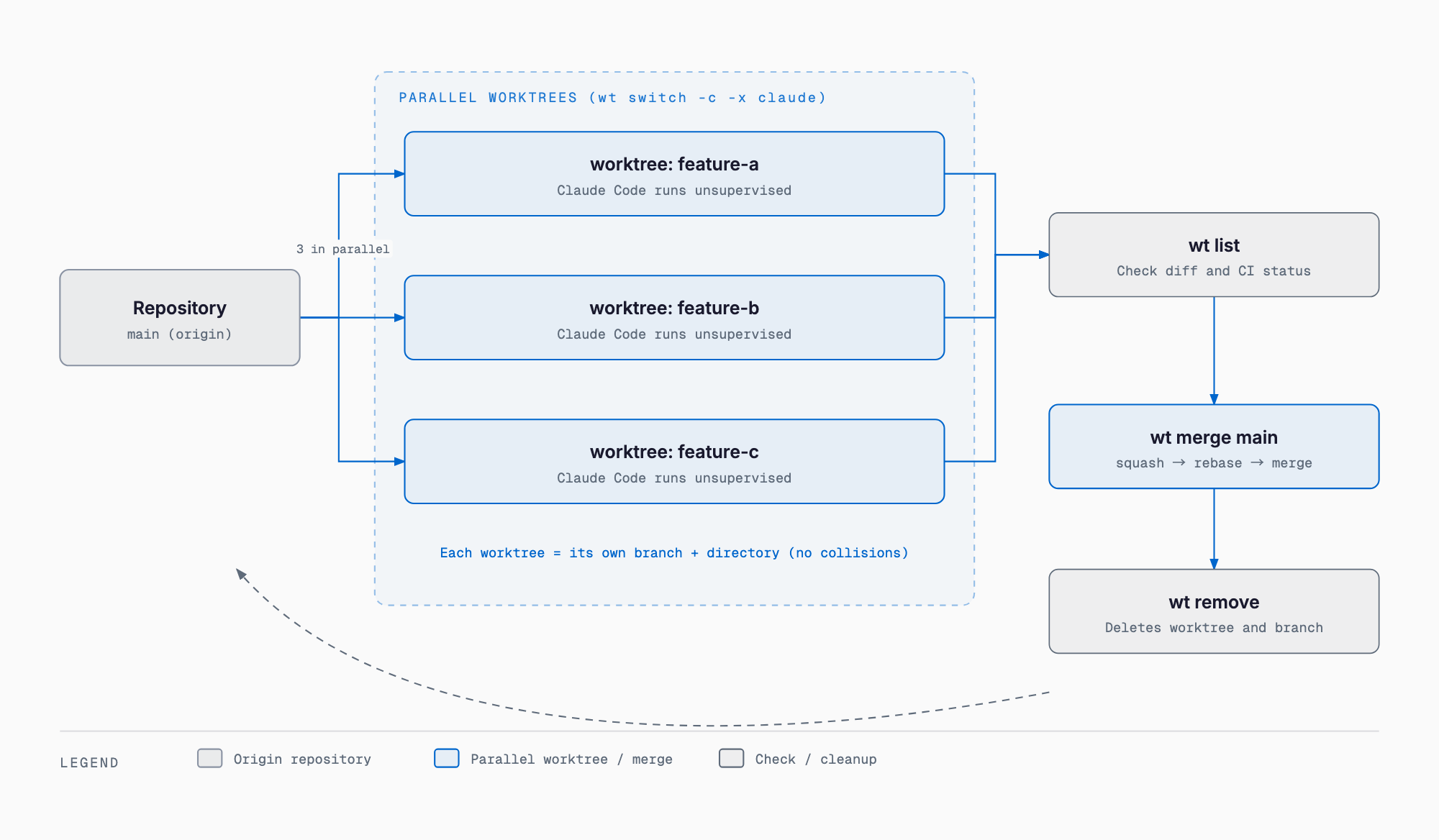
Combined with the -x flag, a post-start hook that installs dependencies or starts a dev server means a single wt switch call leaves an agent ready to work immediately. In the Claude Code integration, a /worktrunk skill assists with configuring things like LLM commit messages, project hooks, worktree path templates, and shell-integration fixes, and agents started with isolation: "worktree" create worktrees following worktrunk's naming conventions, hooks, and lifecycle management. A statusline is also available via wt list statusline --format=claude-code, showing model name and context usage in the editor.
How it compares to existing tools
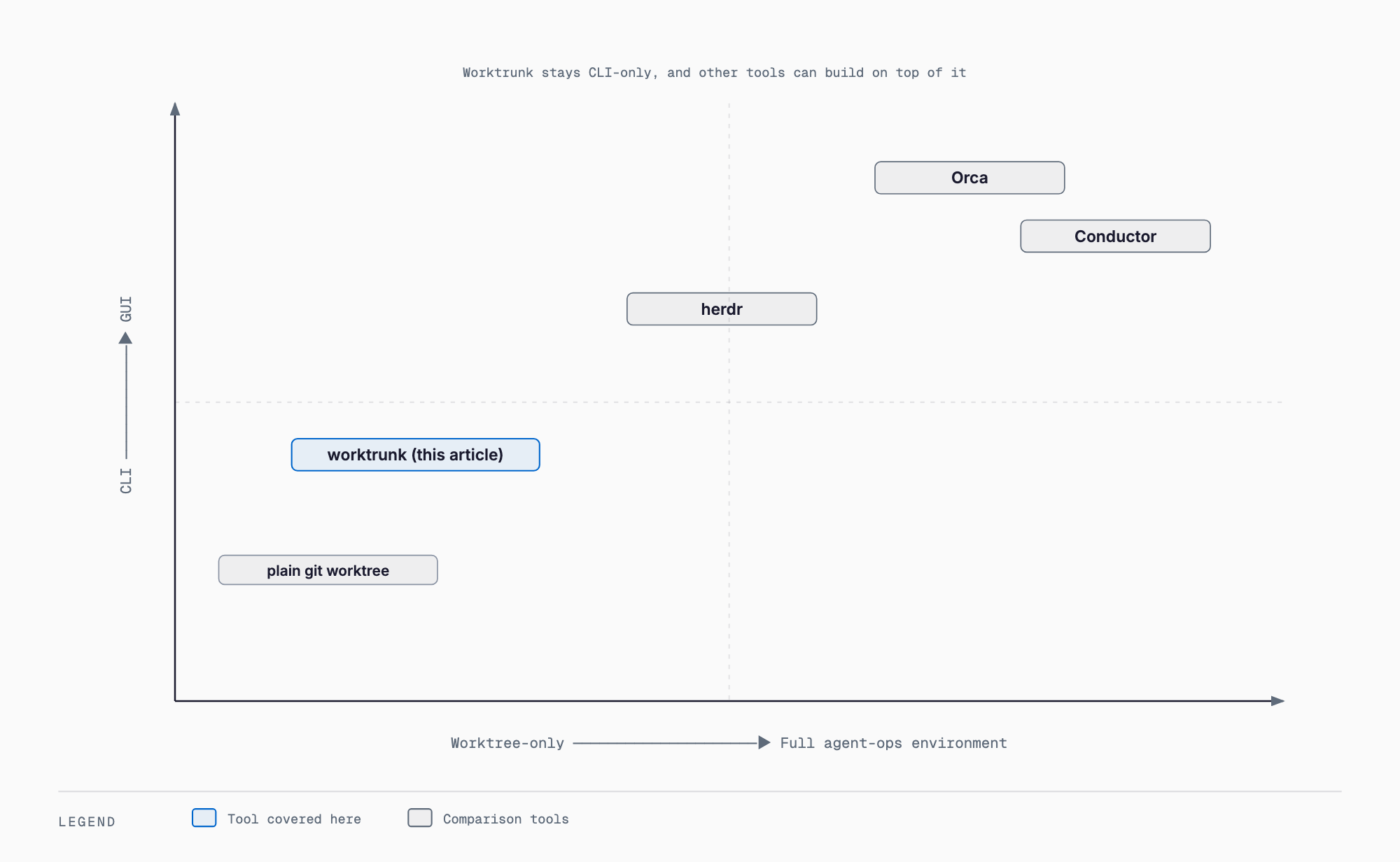
Tools for running parallel AI agents broadly split into CLIs that only manage worktrees and GUIs that manage the whole parallel-agent workflow. Worktrunk is a leading example of the former; a leading example of the latter is Orca, the open-source agent development environment covered in an earlier article on this site.
| Tool | Form factor | Core role | Relation to worktrunk |
|---|---|---|---|
Plain git worktree | Native Git feature | Creating and removing worktrees itself | The target worktrunk wraps to improve UX |
| Worktrunk (this article) | CLI | Specialized worktree lifecycle management | — |
| Orca | Open-source GUI / agent development environment | Bundles worktrees, terminals, and browser tabs into a full parallel-run environment | Both use worktrees, but Orca is a full environment including diff review and PR integration. CLI users pair worktrunk with any terminal; GUI users pick Orca |
| Conductor | Desktop GUI | Manages multiple Claude Code sessions in parallel from one screen | GUI-first; worktree management happens automatically under the hood |
| herdr | Terminal multiplexer (written in Rust) | Runs multiple agents from one terminal like tmux, with persistent sessions over SSH | Worktrunk manages at the worktree level; herdr manages at the session/pane level. The two can be used together |
In short, worktrunk stays narrowly focused on creating, viewing, and cleaning up worktrees, and can serve as a foundation underneath a full environment like Orca or a multiplexer like herdr. The official README itself shows an example pairing worktrunk with Zellij, a terminal multiplexer, across tabs.
Caveats and who it fits
- Best suited to people comfortable working from the command line. If you want to see worktree and agent status visually, Orca or Conductor fit better
- A single lightweight Rust binary with no Electron dependency, making it easy to embed in CI or run over SSH
- Directory changes from wt switch won't apply to the current shell unless wt config shell install has been run
- On Windows, the wt command conflicts with Windows Terminal, so it installs as git-wt; forgetting the alias breaks invocations
- Shared build caches rely on copy-on-write support in APFS, btrfs, or XFS and have no effect on unsupported filesystems
- Auto-generated commit messages and AI summaries in wt merge involve LLM calls, so API costs or rate limits may apply (check official sources for current pricing details)
- As a project maintained by a single independent developer (max-sixty), organizations should apply their normal OSS vetting process before adopting it in a company setting
FAQ
Is worktrunk free to use?
Yes. It is open-source software dual-licensed under MIT OR Apache-2.0, and no paid tier is officially offered as of the time of writing (September 22, 2026).
Isn't plain git worktree enough?
For a small number of manually managed worktrees, plain git is fine. But the overhead of retyping branch names and manually tracking status and cleanup grows with the number of parallel worktrees, so a wrapper like worktrunk pays off once you're running 5-10+ agents in parallel.
Both Orca and worktrunk use Git worktrees — what's the difference?
Orca is a full GUI environment covering terminals, browser tabs, and diff review; worktrunk is a CLI that handles only the worktree lifecycle (create, list, merge, remove). Choose Orca for a visual, all-in-one view, or worktrunk to stay entirely on the command line.
Does it work with agents other than Claude Code?
Yes. The -x flag can launch any command, so it works for launching Codex or other CLI agents as well as Claude Code.
Is any extra setup needed after installing?
Yes. Without running wt config shell install to enable shell integration, directory changes from wt switch won't apply to your current shell session.
Conclusion
Worktrunk simplifies the foundational part of running parallel AI agents on Git worktrees — creating, listing, merging, and removing them — through a focused CLI. For a fully integrated GUI, Orca fits better; for terminal-based multiplexing of many agents, herdr; for heavier diff review, Hunk; and for shared desktop GUI control across people, Mosaic. In practice, a parallel-agent stack is best assembled by picking the right tool for each part of the workflow. We also support software development and AI consulting engagements for teams building out this kind of setup — reach out via contact if that would help.
Related free tools (no sign-up, instant results)
Feel free to contact us
Contact Us