What Is VoiceStudio? The Fully-Local, Open-Source ElevenLabs
Alternative
A guide to debpalash/VoiceStudio (formerly OmniVoice-Studio), which surged on GitHub Trending in September 2026. Covers how it runs voice cloning, voice design, video dubbing, dictation, transcription, and audiobook creation entirely on local hardware, its 16 TTS / 11 ASR engine lineup, installation, local API/MCP support, and how it compares to ElevenLabs and other tools.
What is VoiceStudio? A fully-local ElevenLabs alternative
VoiceStudio (debpalash/VoiceStudio, formerly named OmniVoice-Studio) is an open-source desktop application that runs voice cloning, voice design, video dubbing, dictation, transcription, and audiobook creation entirely on your own machine. It needs no cloud API subscription or account, ships with a 646-language catalogue and 16 TTS engines plus 11 ASR engines, and exposes itself to other apps and AI agents through a local API and an MCP (Model Context Protocol) server. As of September 2026 it has been climbing GitHub Trending rapidly, with stars and forks growing over a short period.
What it can do
- Voice cloning: clone a voice zero-shot from a short audio sample
- Voice design: create a brand-new voice by setting age, accent, and pitch
- Video dubbing: translate, preserve speaker identity, synthesize speech, and export in one pass
- Dictation: system-wide keyboard shortcuts turn speech into text in any app
- Transcription: convert recorded audio into text via the ASR engines
- Audiobook creation: assign multiple voices, ingest EPUB/PDF, and export as m4b
Voice cloning uses the default OmniVoice engine, which conditions a diffusion-based TTS model on the reference audio zero-shot, with no fine-tuning step. The official guidance is to use 5 to 15 seconds of a single speaker recorded close to the microphone without music, noise, or reverb, though clips as short as 3 seconds are reported to work for cloning.
Voice design does not clone an existing speaker at all — it synthesizes a new voice from parameters like age, accent, and pitch, which suits narration or character voices where you do not want to use a real person's voice.
Video dubbing bundles translation, speaker-identity preservation, speech synthesis, and video export into a single workflow. Combined with the 646-language catalogue, it can serve as a base for multilingual content depending on which language pairs the chosen engine supports.
Dictation lets you trigger speech-to-text from anywhere in the OS via a shortcut, using an ASR engine (WhisperX by default) at near-real-time speed. Transcription targets pre-recorded audio files and draws on the same pool of ASR engines.
Technical stack and engine lineup
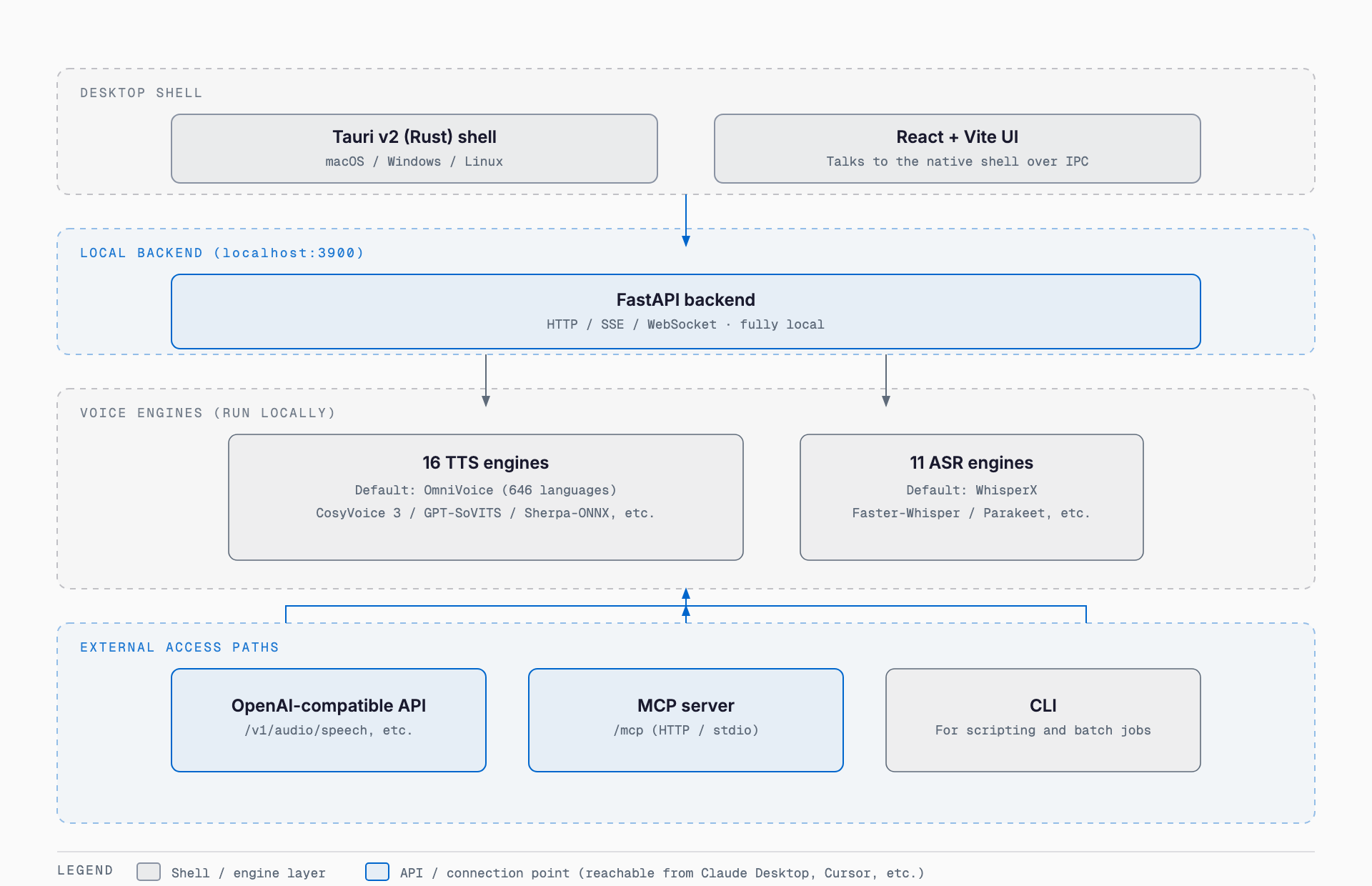
VoiceStudio wraps a React + Vite UI inside a Tauri v2 (Rust) desktop shell, communicating over IPC. The actual voice processing runs in a FastAPI backend on localhost:3900, which talks to the UI and API clients over three channels: HTTP, SSE (Server-Sent Events), and WebSocket. Below the backend sit 16 TTS engines and 11 ASR engines that can be swapped depending on the use case and available hardware (NVIDIA GPU, Apple Silicon, or CPU only).
| TTS engine (16 total) | Notes |
|---|---|
| OmniVoice (default) | 646 languages, diffusion-based zero-shot cloning |
| CosyVoice 3 | High-quality multilingual TTS |
| GPT-SoVITS | Strong voice-quality reproduction from small samples |
| IndexTTS 2.5 | High-accuracy zero-shot TTS |
| VoxCPM2 / MOSS-TTS Nano, v1.5 | Light-to-mid-weight TTS models |
| KittenTTS / PocketTTS | Lightweight engines for constrained hardware |
| MLX-Audio | Optimized for Apple Silicon (MLX) |
| Sherpa-ONNX | Lightweight inference on ONNX Runtime |
| OmniVoice GGUF / OmniVoice subprocess | Alternate runtime forms of OmniVoice |
| Supertonic 3 / dots.tts / Confucius4-TTS | Additional supported engines |
| ASR engine (11 total) | Notes |
|---|---|
| WhisperX (default) | Whisper-based, precise timestamps |
| Faster-Whisper / Faster-Whisper isolated | Fast Whisper inference implementations |
| PyTorch Whisper | The standard OpenAI Whisper implementation |
| MLX Whisper | Optimized for Apple Silicon (MLX) |
| Parakeet TDT / Parakeet TDT v3 MLX | Fast NVIDIA-lineage ASR models |
| Moonshine | Lightweight, streaming-oriented ASR |
| FunASR | Multilingual ASR including Chinese |
| sherpa-onnx | Lightweight inference on ONNX Runtime |
| OpenAI-compatible | Connects to external Whisper-compatible APIs |
Installation and system requirements
| Item | Minimum | Recommended |
|---|---|---|
| RAM | 8GB | 16GB+ |
| Free disk space | 10GB | 20GB+ (SSD recommended) |
| GPU | None required (CPU-only works) | NVIDIA CUDA or Apple Silicon |
| VRAM (with GPU) | 4GB | 8GB+ |
| OS | Windows 10/11 x64, macOS 13.3+ (Apple Silicon), Linux x86_64 (glibc 2.39+) | Current release of each OS |
- Packaged builds: download the macOS DMG, Windows MSI, or Linux AppImage from the latest release (first launch creates a managed Python environment and downloads default models automatically)
- Building from source: requires Node.js 20+ or Bun, Python 3.11+, ffmpeg, and uv (a Python package manager)
- A Docker image is also provided for server-side deployment
git clone https://github.com/debpalash/VoiceStudio.git
cd VoiceStudio
bun install
bun run desktop
Models are downloaded on first launch and the app is reported to work fully offline afterward. It also runs CPU-only, though generation speed can become impractical for larger models without a GPU.
How the workflow looks
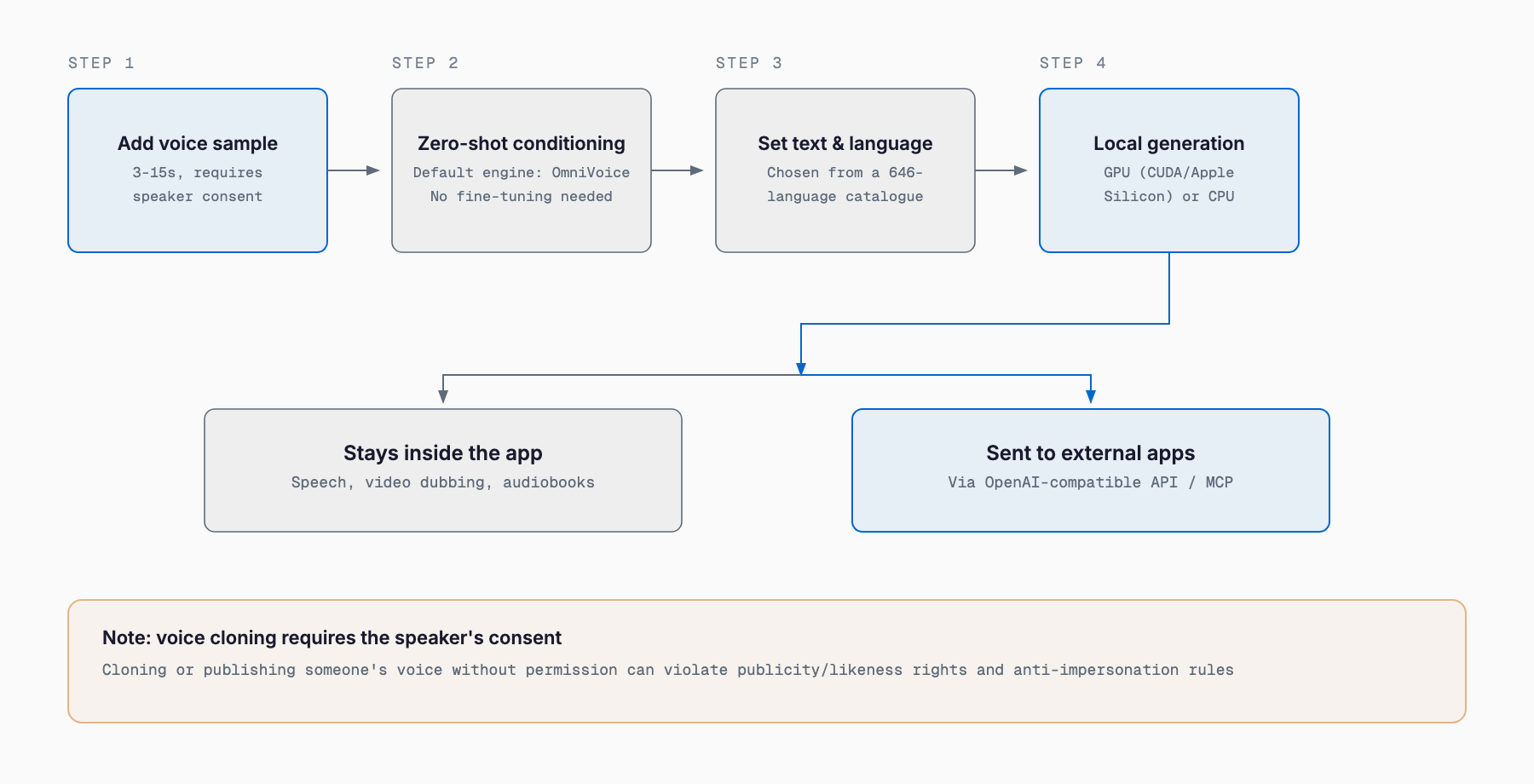
- Step 1: add a voice sample with the speaker's consent (3-15 seconds recommended)
- Step 2: the default OmniVoice engine conditions on it zero-shot
- Step 3: specify the text to generate and the language (from the 646-language catalogue)
- Step 4: generate speech locally on GPU (CUDA/Apple Silicon) or CPU
- Step 5: keep it inside the app (speech, video dub, audiobook) or hand it to an external app via the OpenAI-compatible API or MCP
Local API and MCP support
VoiceStudio doubles as a local speech platform, not just a standalone app. It ships an OpenAI-compatible REST API (base URL http://localhost:3900/v1) with endpoints such as /v1/audio/speech (text-to-speech), /v1/audio/transcriptions (speech-to-text), and /v1/audio/voices (list voice profiles), designed so existing OpenAI Audio API code can be pointed at it with minimal changes.
It also exposes an MCP (Model Context Protocol) server at http://localhost:3900/mcp or over stdio transport, letting MCP-aware clients like Claude Desktop or Cursor call functions such as generate_speech, clone_voice, and transcribe directly. That makes it a candidate for giving AI agents local voice input/output capabilities.
Ethics and consent in voice cloning
Technically, the voice-cloning feature can reproduce any voice from a sample, including someone else's. Cloning or publishing a person's voice without consent can infringe likeness or publicity rights and run afoul of anti-impersonation or deepfake regulations that many jurisdictions are tightening. VoiceStudio's application code is free under AGPL-3.0, but responsibility for how generated audio is used and whether consent was obtained rests with the user. Separately, each downloaded TTS/ASR model carries its own license terms distinct from the app itself, so commercial use requires checking each model's terms individually.
How it compares to existing tools
| VoiceStudio | ElevenLabs | Aqua Voice | |
|---|---|---|---|
| Where it runs | Fully local (your machine) | Cloud (ElevenLabs' servers) | Cloud |
| Pricing | Free app (AGPL-3.0; models individually licensed) | Monthly subscription plus usage-based pricing | Subscription |
| Main use cases | Voice cloning, voice design, video dubbing, dictation, transcription, audiobooks | Voice cloning, TTS, video dubbing, API for voice agents | Focused specifically on AI dictation |
| Language coverage | ~646-language catalogue (engine-dependent) | Several dozen languages | Mostly English-centric |
| API / integration | OpenAI-compatible API plus a local MCP server | Proprietary cloud API | Dedicated app / browser extension |
| Data handling | Audio and outputs never leave the device | Audio passes through the cloud vendor | Audio passes through the cloud vendor |
ElevenLabs leads on voice quality, API maturity, and voice-agent-oriented features, but its cloud dependency means constraints around connectivity, usage-based cost, and audio leaving the device. VoiceStudio sits at the opposite end, built around working offline, keeping data on-device, and being free to try, and it is distinctive for bundling video dubbing and audiobook creation into the same app. In exchange, generation quality and stability vary by which engine/model combination is selected, rather than being unified around a single polished cloud model.
Things to check before adopting it
As of September 2026, VoiceStudio is a project that has only recently surged on GitHub Trending, so its command structure, API surface, and engine lineup may still change. It was also renamed from OmniVoice-Studio, so documentation and repository URLs may shift further. Before adopting it, check the latest README and release notes, and for business use, verify the license terms of each individual model.
Related Articles
Is VoiceStudio free to use?
The application itself is open source under AGPL-3.0 and free. However, the bundled TTS/ASR models each carry their own licenses, so you should check each model's terms before commercial use.
Does it work without an internet connection?
After the first-launch model download, it is reported to run fully offline. Voice cloning, generation, and transcription all happen on-device, and audio is not sent externally.
Do I need a GPU?
No, it also runs on CPU only, though NVIDIA CUDA or Apple Silicon GPUs are officially recommended. Without a GPU, generation can be slow for some models.
How is it different from OmniVoice-Studio?
VoiceStudio is the renamed continuation of OmniVoice-Studio. The feature set and stack are essentially the same, and the repository has moved to debpalash/VoiceStudio.
Can I call it from Claude Desktop or Cursor?
Yes. VoiceStudio exposes an MCP server at http://localhost:3900/mcp, so MCP-aware clients can call functions like generate_speech, clone_voice, and transcribe directly.
Related free tools (no sign-up, instant results)
Feel free to contact us
Contact Us