Nex-N2.5 Requirements
VRAM, GPU and RAM for Mini, Pro and Max (2026)
As of Sep 2026, Nex-AGI's agentic Nex-N2.5 family (Mini 35B, Pro 397B, Max 1.6T), released Sep 8, needs anywhere from roughly 22GB to over a terabyte of VRAM depending on model and quantization. Here is a per-model, per-quantization sizing table plus GPU and Apple Silicon build guidance.
Nex-N2.5 needs about 22GB for Mini at Q4, and roughly 1.6TB for Max at BF16
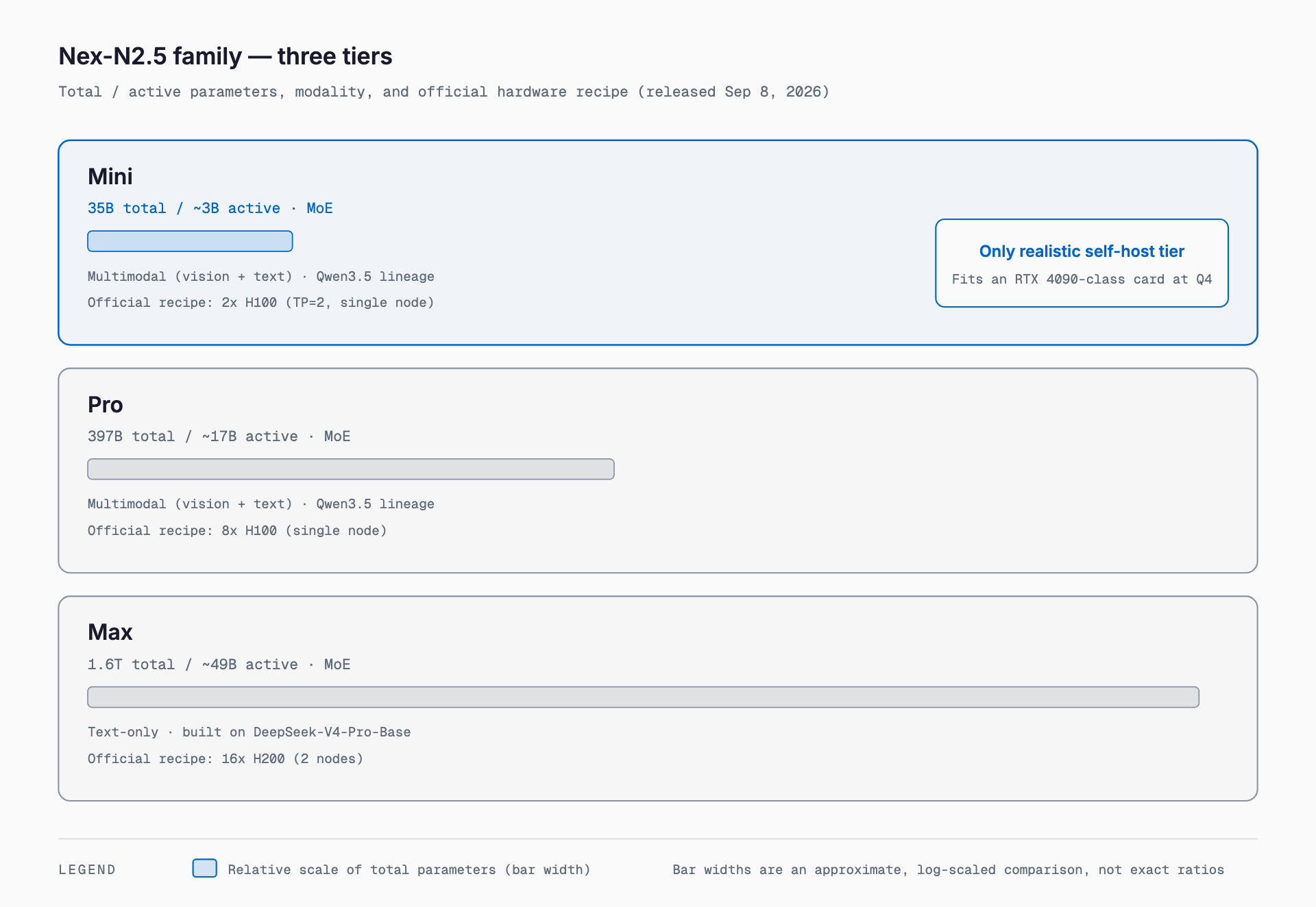
Nex-N2.5 is a family of three open-weight, agentic-focused models released September 8, 2026 by Nex-AGI: Mini (35B), Pro (397B), and Max (1.6T). Required VRAM varies enormously by model and quantization: the smallest Mini fits in roughly 22GB at Q4_K_M quantization, while the largest Max needs on the order of 1.6TB of memory at BF16 precision. Below is a per-model, per-quantization breakdown.
What is Nex-N2.5
Nex-N2.5 is Nex-AGI's model family built around long-horizon agentic work: operating computers and browsers, and writing and testing code over many steps. Mini and Pro carry forward the multimodal foundation of the previous Nex-N2 generation, with added strength in acting continuously and self-correcting from visual feedback. Max takes a different route: it's a text-only, 1.6-trillion-parameter MoE foundation model built on DeepSeek-V4-Pro-Base, aimed at complex reasoning, coding, and agent workflows. All three models' weights are released under Apache 2.0 and are available from the nex-agi organization on Hugging Face and on ModelScope, alongside hosted access via OpenRouter.
| Model | Total parameters | Active parameters | Modality | Lineage | Context length |
|---|---|---|---|---|---|
| Nex-N2.5-Mini | 35B | ~3B | Multimodal (vision + text) | Qwen3.5 lineage | ~262K |
| Nex-N2.5-Pro | 397B | ~17B | Multimodal (vision + text) | Qwen3.5 lineage | ~262K |
| Nex-N2.5-Max | 1.6T | ~49B | Text-only | DeepSeek-V4-Pro-Base lineage | 262,144 |
Requirements sizing table (model x quantization)
| Model | Q4_K_M (~4.5-bit) | Q8_0 (8-bit) | BF16 (16-bit) |
|---|---|---|---|
| Nex-N2.5-Mini (35B) | ~22.3GB (measured GGUF) | ~36.9GB (measured GGUF) | ~69.4GB (measured GGUF) |
| Nex-N2.5-Pro (397B) | ~241GB (est.) | ~422GB (est.) | ~794GB (est.) |
| Nex-N2.5-Max (1.6T) | ~970GB (est.) | ~1,700GB (est.) | ~3,200GB (est.) |
If you want a quick answer for your own GPU or Mac, our free VRAM calculator (no signup required) estimates required VRAM once you pick a model, quantization, and context length. All three Nex-N2.5 models are selectable from the model list there too.
How the VRAM math works — MoE is still sized on total parameters
The table above is estimated as "total parameters (B) x bits per weight / 8." Every Nex-N2.5 model is MoE-based, but sizing is based on total parameters, not active parameters. The reason is straightforward: in an MoE model, which experts get called changes token by token, so every expert's weights have to sit resident in memory even though only a subset fires on any given token. So "Mini has ~3B active" describes compute cost (i.e., inference speed roughly matching a 3B model), while VRAM consumption still has to be budgeted against the 35B total. Pro (397B total / 17B active) and Max (1.6T total / 49B active) follow the same pattern, and the gap between "light on compute" and "heavy on memory" only widens as the models get bigger.
Measured sizes by quantization (Mini, 35B)
| Quantization | Measured size (GGUF) |
|---|---|
| IQ3_M | ~19.0GB |
| IQ4_XS | ~19.9GB |
| Q4_K_M | ~22.3GB |
| Q5_K_M | ~27.0GB |
| Q6_K | ~29.4GB |
| Q8_0 | ~36.9GB |
| BF16 | ~69.4GB |
Because community GGUF quantized builds exist for Mini (e.g., from bartowski), the figures above are measured values rather than formula-based estimates. Pro and Max, on the other hand, did not have widely used GGUF quantized builds as of September 14, 2026 — partly due to sheer size — so the sizing-table figures for those two are formula-based estimates.
Running Mini on Apple Silicon and NVIDIA GPUs
- Apple Silicon (unified memory): Q4_K_M (~22.3GB) is comfortable starting around an M3 Max with 36GB, with 64GB+ giving headroom for a longer context. To target BF16 (~69.4GB), look at an M3/M4 Max with 96GB or more, or an M2/M3 Ultra with 128GB+
- RTX 4060 / 4070 (8-12GB): Too small even for Mini. Aggressive IQ2-IQ3 quantization technically fits but with heavy quality loss; a practical floor is closer to the high-teens in GB
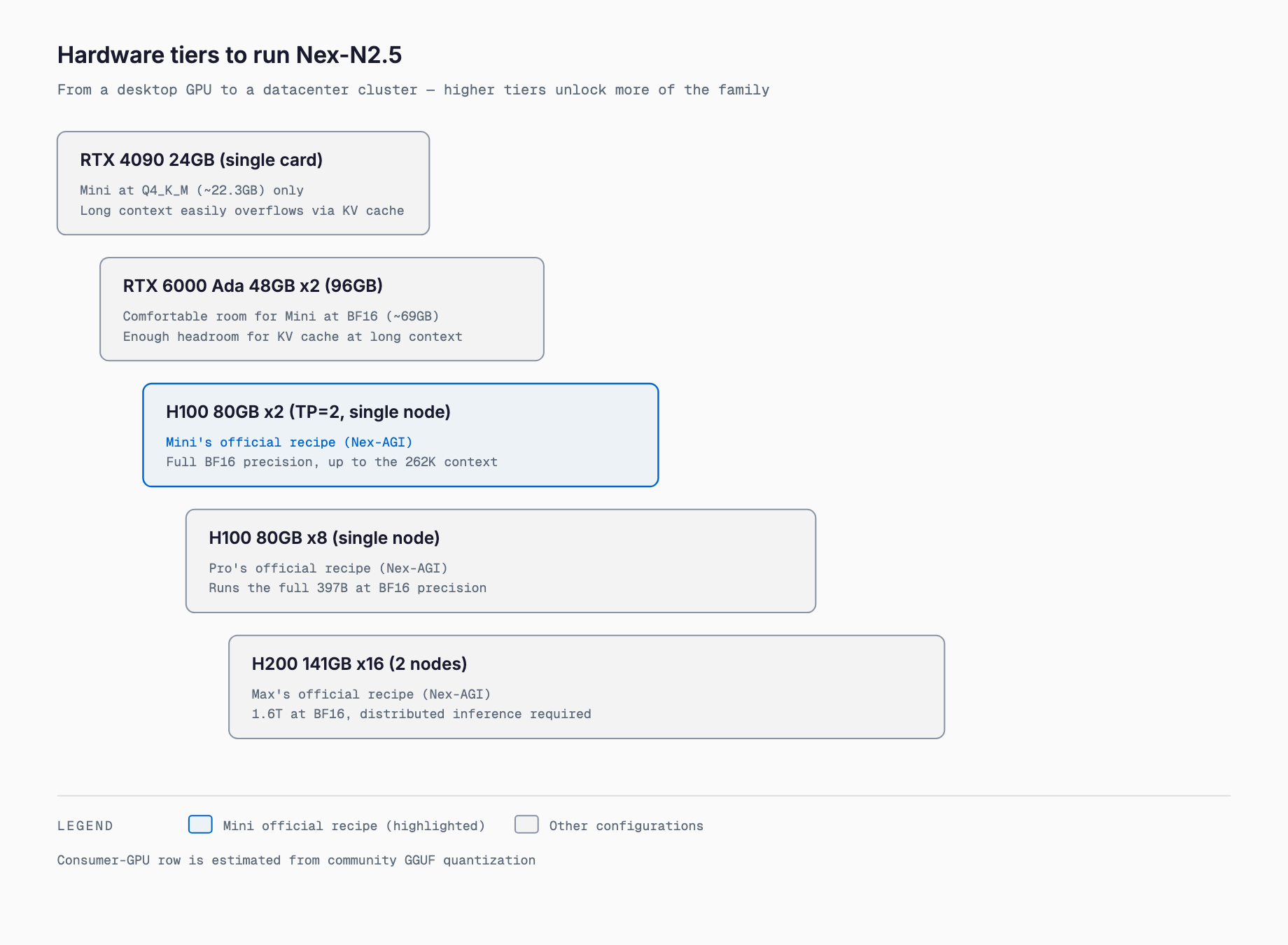
- RTX 4090 (24GB): Q4_K_M (~22.3GB) just about fits. A long context easily pushes past 24GB via KV cache, so this build isn't well suited to the full 262K context
- RTX 6000 Ada / A100 (48-80GB): Comfortable room for Q8_0 (~36.9GB) or even BF16 (~69.4GB), with headroom for a longer context
- 2x H100 80GB (Nex-AGI's official recipe): A verified configuration at full BF16 precision with TP=2, capable of handling the full 262K context
Pro and Max hardware requirements — essentially datacenter-only
Self-hosting Pro or Max on consumer GPUs is barely realistic given their scale. Nex-AGI's published official recipes assume a single node of 8x H100 80GB for Pro (397B) and two nodes of 16x H200 141GB for Max (1.6T). At full BF16 precision that works out to roughly 794GB for Pro and roughly 3,200GB for Max, and even heavier quantization doesn't avoid the need for multi-GPU, multi-node distributed inference. For hands-on testing and everyday use, Mini is the practical choice; to try Pro or Max, a hosting service such as OpenRouter or a cloud API is the more realistic path.
Recommended builds by budget
- Around ~$2,500: An RTX 4090 24GB build runs Mini at Q4_K_M with a modest context, suitable for coding assistance and agentic-task experimentation
- Around ~$8,000: An RTX 6000 Ada 48GB build handles Mini comfortably at Q8_0 through BF16, with room for a longer context
- $20,000+ (multiple H100s): Nex-AGI's official 2x H100 recipe runs Mini at full BF16 precision with the full 262K context. Trying Pro requires scaling up to roughly 8x H100
- Cloud API as an alternative: If you just want to try Pro or Max at full precision, using a cloud API through a provider such as OpenRouter is cheaper upfront than buying hardware
Comparison with other open-weight models
| Model | Total / active parameters | Modality | Practical self-host tier | Details |
|---|---|---|---|---|
| Nex-N2.5-Mini | 35B / 3B | Multimodal | RTX 4090-class (Q4) | This article |
| Nex-N2.5-Pro | 397B / 17B | Multimodal | ~8x H100 (official recipe) | This article |
| Nex-N2.5-Max | 1.6T / 49B | Text-only | 2 nodes of 16x H200 (official recipe) | This article |
| K2-Horizon-375B-A23B | 375B / 23B | Text-only | Multi-GPU required | Requirements article available |
| GLM-5.3-Flash | 320B / 18B | Text-focused | Multi-GPU required | Requirements article available |
| Solar Open2 250B-A15B | 250B / 15B | Text-focused | Multi-GPU required | Requirements article available |
What stands out about Nex-N2.5 is that Mini and Pro are multimodal, agentic-focused models built on the Qwen3.5 lineage, while Max is split off as a separate, text-only model on a different lineage (DeepSeek-V4-Pro-Base). In other words, the three sizes sharing the "Nex-N2.5" name aren't just scaled versions of one recipe — it's really two model lineages under one family name: a Mini/Pro recipe and a separate Max recipe. On benchmarks, Max's Terminal-Bench 2.1 score of 86.1 sits close to Claude Opus 5's 89.1, and it reportedly trails Claude Opus 5 by just 0.1 points on AutomationBench v1.0.6 — a strong claim for an open-weight agentic model.
Licensing and current availability
All three Nex-N2.5 models release their weights under Apache 2.0, which is permissive enough for commercial use. All three are available from the nex-agi organization on Hugging Face, as well as on ModelScope. As of September 14, 2026, widely used community GGUF quantized builds exist only for Mini; given the sheer scale of Pro and Max, standard quantized builds for those two are still limited in circulation. For local runtime options, see our comparison of local inference engines and overview of the local LLM landscape.
Related Articles
- What Is Edge0-35B-A3B? — How SSD Streaming Runs a 35B MoE Model in Under 3GB of RAM
- What Is colibri? — The Pure-C Engine That Runs a 744B MoE Model on 25GB RAM
- MiniCPM5-2B Requirements: RAM, VRAM and GPU for Phones, Raspberry Pi and Laptops (2026)
FAQ
Does Nex-N2.5-Mini fit on an RTX 4090 (24GB)?
Yes, at Q4_K_M quantization (measured at roughly 22.3GB in GGUF builds) it fits on a 24GB card. A longer context, however, easily pushes VRAM use past 24GB via KV cache, so running the full 262K context needs multiple GPUs or a larger card.
Why does Nex-N2.5-Mini need VRAM close to 35B if only ~3B parameters are active?
In a mixture-of-experts model, which experts get called changes token by token, so every expert has to sit in memory even though only a subset fires on any given token. Compute cost (speed) tracks the ~3B active count, but memory capacity has to be sized against the 35B total parameter count. The same logic applies to Pro (397B total / 17B active) and Max (1.6T total / 49B active).
Can Nex-N2.5-Pro or Max run on a personal PC?
Essentially no. Nex-AGI's official recipes assume a single node of 8x H100 80GB for Pro (397B) and two nodes of 16x H200 141GB for Max (1.6T), which works out to roughly 794GB and roughly 3,200GB of memory respectively at BF16. To experiment with the family on personal hardware, Mini is the realistic option, while Pro and Max are better accessed through a hosting service such as OpenRouter.
What's the difference between Mini, Pro, and Max?
Mini and Pro are multimodal (vision + text) models built on the Qwen3.5 lineage, tuned for agentic tasks with a visual component such as operating a computer or browser. Max is a text-only model built on DeepSeek-V4-Pro-Base, focused on complex reasoning, coding, and agent workflows. Despite sharing the family name, they reflect two distinct design lineages rather than one model simply scaled to three sizes.
How much extra VRAM does the full 262K context add?
The sizing-table figures cover the model weights only, not KV cache. Using the full 262K context can add tens of gigabytes of extra VRAM depending on model size, so for real deployments it's worth running the numbers with the VRAM calculator at a specific context length.
Related free tools (no sign-up, instant results)
Feel free to contact us
Contact Us