Vulnerability & Penetration Test Cost Guide 2026
Vulnerability scans and penetration tests vary widely in price. This guide covers cost ranges by type, key cost drivers, and a checklist for SMB owners.
Many small business owners hesitate to request a quote for a vulnerability assessment or penetration test simply because they have no idea what it should cost. Here is the short answer: an automated tool-based scan of a web application typically runs about JPY 100,000-300,000, while a manual assessment by a specialist runs about JPY 500,000-2,000,000. Go a step further into penetration testing, where a tester actually attempts to break in like a real attacker, and the range widens to roughly JPY 1,000,000-5,000,000. The wide spread comes from factors that interact with each other: the scale of the target (number of screens or APIs), the method used (automated or manual), how detailed the report is, and whether a retest is included. Below, we break down the differences by type and the points worth checking before you commit to a quote.
How the type of assessment changes the price
The term "vulnerability assessment" covers several different services, and both the name and the price depend on the target and method used. The main types break down as follows.
| Assessment type | Main target | Typical cost | Best fit |
|---|---|---|---|
| Automated tool scan | Web application | JPY 100,000-300,000 | Small sites on a tight budget, routine checks |
| Manual assessment (web app) | Web application | JPY 500,000-2,000,000 | Sites with login, payment, or other sensitive functions |
| Platform (network) assessment | Servers, network devices | JPY 300,000-1,500,000 | Reviewing your own servers or cloud environment by IP/port |
| Penetration testing | Whole system | JPY 1,000,000-5,000,000 | Testing resilience against real attack scenarios, IPO or enterprise client requirements |
| Source code review | Application source code | JPY 500,000-3,000,000 | Building security in from the design stage of in-house development |
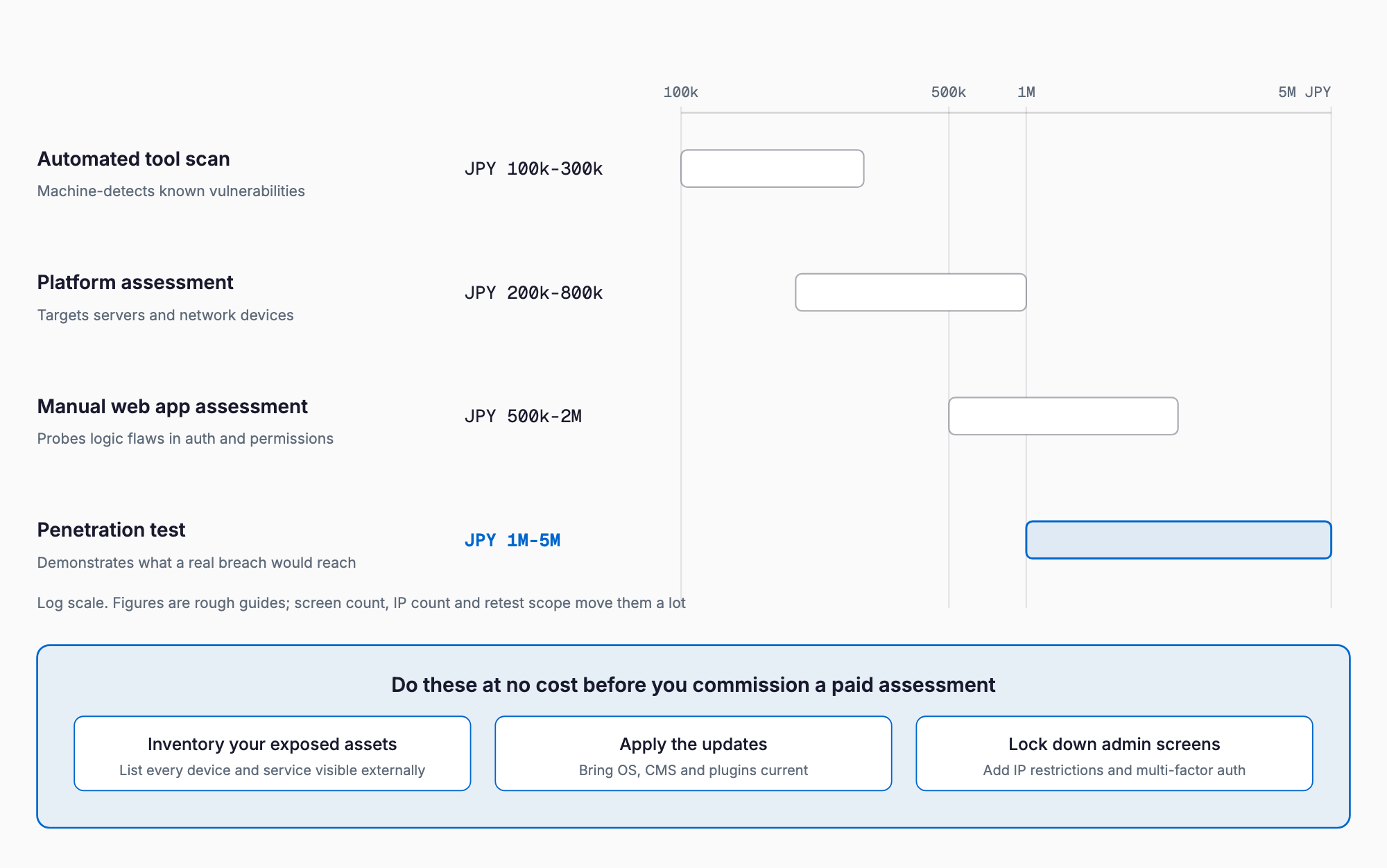
Five factors that drive the price
Two quotes both labeled "vulnerability assessment" can differ by several times over. The main drivers are these five.
- Number of screens and input forms: more target URLs and features mean more work, and cost scales with that
- Number of IP addresses/servers: for network assessments, the quote scales with the number of target IPs
- Method used (automated vs. manual): manual work costs more because it requires a specialist's time
- Whether a retest is included: the total changes depending on whether a follow-up check after fixes is bundled in
- Report detail and debrief sessions: an executive summary or a verbal briefing session often adds to the price
What to check in the quote
When comparing quotes, aligning the underlying assumptions matters as much as the headline price. In particular, whether the scope is counted by "screen" or by "function" can swing the quoted amount significantly even for the same site. It also helps to check whether the severity of each finding is scored using something like CVSS (Common Vulnerability Scoring System), and whether the report includes a summary that a non-engineer can actually read, not just technical jargon. As the SMB IT risk guide also notes, security spending works best as an ongoing part of your operations rather than a one-off purchase. If you are also considering Privacy Mark or ISMS certification, the Privacy Mark and ISMS cost guide is worth checking alongside this, since it makes overlaps and priorities with audit requirements easier to see.
What SMBs should do first (a priority checklist)
- Start by using a free or low-cost tool to get a basic picture of your own site's vulnerabilities
- Keep your OS, CMS, and plugins updated so known vulnerabilities are not left unpatched
- If any screens handle personal data or payments, prioritize those for manual assessment first
- If you have had a past security incident or signs of unauthorized access, consider a penetration test
- Decide who will fix issues and by when before you even place the order, not after the report arrives
- Review basic defenses in parallel too, such as ransomware protection
Penetration testing vs. vulnerability assessment: how to choose
If a vulnerability assessment is a "health checkup" that comprehensively lists known weaknesses, a penetration test is closer to a "field exercise" that actually attempts to break in and see how far the damage could spread. Its scope is narrower, but it can confirm attack scenarios that chain multiple vulnerabilities together. If you are starting business with a large enterprise client, preparing for an IPO where you need to demonstrate your security posture, or launching a new system that handles important customer data, it is worth considering a penetration test in addition to a vulnerability assessment. Since no amount of assessment or hardening fully eliminates the risk of an incident, it is also worth keeping cyber insurance basics in mind as a way to cover the damage that occurs after the fact.
Frequently asked questions
How often should we get a vulnerability assessment?
A common rule of thumb is once a year, or whenever the system undergoes a major change. If you add or modify a page that handles payments or personal data, it is worth considering a fresh assessment each time.
Is a free vulnerability scanning tool enough on its own?
Free tools are useful for a broad, shallow check of known weaknesses, but they often miss business-logic flaws that automated scanners cannot recognize. For systems handling important functions, it is best to combine a free tool as a first pass with a manual assessment by a specialist.
Does the quote include the cost of fixing the vulnerabilities found?
In most cases, remediation work itself is not included in the assessment fee and requires a separate engagement. Whether a follow-up retest to confirm the fixes worked is included in the quote is something you should always confirm before signing.
Does a small corporate site really need an assessment?
A corporate site with no inquiry form or member functions carries comparatively lower risk, but the possibility of defacement and the reputational damage it causes is never zero. If budget is tight, starting with a low-cost automated tool-based scan is a realistic first step.
Related free tools (no sign-up, instant results)
Feel free to contact us
Contact Us