Warehouse Management System (WMS) Cost and Selection Guide
A cost guide to warehouse management systems (WMS): cloud vs package pricing, how WMS differs from inventory software, hidden costs, and rollout mistakes.
"We introduced inventory software, but mis-shipments and staff wasting time searching for stock haven't gone down." This is a common complaint among wholesalers, manufacturers, and e-commerce operators. The root cause is often that what they installed manages inventory *quantities*, not warehouse *operations*. A Warehouse Management System (WMS) is built specifically to run the physical work inside a warehouse — location management, receiving inspection, picking, shipping inspection, and cycle counting — which is a different purpose from a typical inventory system that only tracks how many units of a product exist. This article outlines the typical cost range for WMS, how to choose one, and what to check before implementation. If your priority is simply tracking quantities, see our guide on inventory management system development costs as well.
How Inventory Software Differs From a WMS
Inventory management software mainly records and aggregates "which product" and "how many are in stock." A WMS goes further, managing where that stock physically sits in the warehouse, who handles it, and in what sequence work should happen. The system issues instructions for each step from receiving through shipping, and handheld terminals with barcode scanning capture the actual work as data — that is the key difference. The two are not competing tools; many companies run a WMS for warehouse operations alongside inventory software or a sales management system that handles the business-side records.
| Comparison point | Inventory management system | WMS (warehouse management system) |
|---|---|---|
| Primary focus | Stock quantities and value | Warehouse operations (receiving, picking, shipping, counting) |
| Location management | Often product-level only, without bin-level detail | Bin/zone-level location tracking is standard |
| Typical use | Mostly office-based PC entry | Mostly floor-based entry via handheld terminals and barcodes |
| Best fit | Fewer SKUs, small teams | High SKU count and shipment volume, multiple workers |
| Main benefit | Stock visibility, fewer stockouts/overstock | Fewer mis-shipments, faster picking, efficient counting |
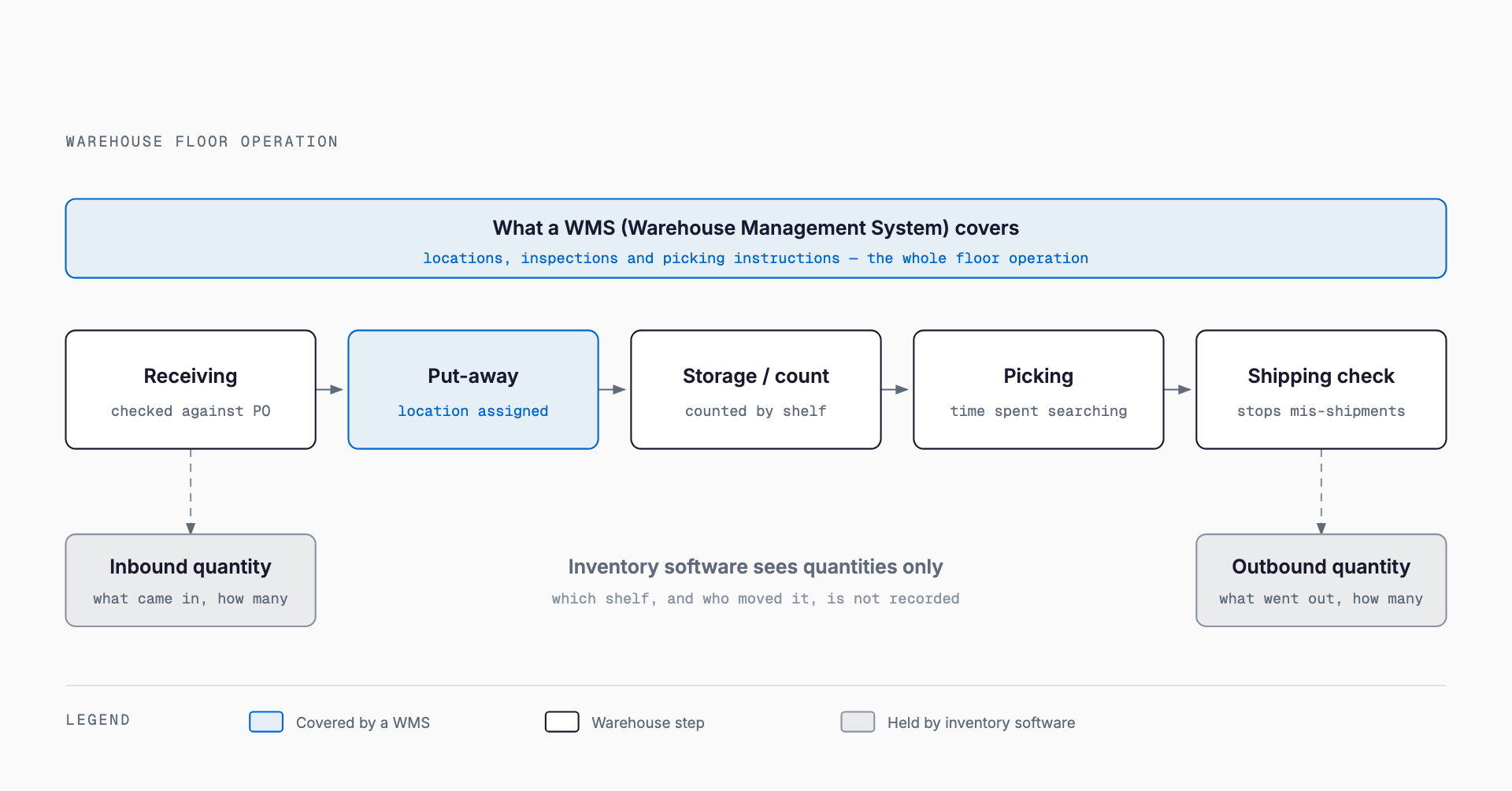
Warehouse Floor Problems a WMS Solves
As a warehouse grows in SKU count and shipment volume, paper forms, spreadsheets, or a quantity-only inventory system struggle to keep work quality consistent. A WMS is particularly effective against the following issues.
- Mis-shipments and mis-receiving: barcode matching mechanically checks product and quantity, reducing human error
- Time spent searching for stock: location management shows exactly which bin holds an item on the handheld screen
- Reliance on veteran staff: storage locations and work steps that once existed only in one experienced worker's head get systemized so anyone can follow them
- Downtime during stocktaking: handheld-based counting speeds up the count and shortens the time operations must pause
- Training during peak season: since work steps are displayed on-screen, even short-term temporary staff can work with consistent accuracy
Typical Cost Ranges
WMS costs vary significantly by delivery model. The figures below are rough guidelines only — actual costs move up or down depending on warehouse size, the number of systems it must integrate with, and the extent of customization.
| Delivery model | Typical initial cost | Typical monthly cost | Best fit |
|---|---|---|---|
| Cloud WMS | Roughly ¥200K–¥1M | Roughly ¥30K–¥150K | Small to mid-size warehouses wanting to start small |
| Mid-tier package | Roughly ¥3M–¥10M | Maintenance fees usually apply separately | Multi-site operations with complex shipping rules |
| Fully custom build | From roughly ¥8M | Maintenance and operations quoted separately | Unique logistics flows that off-the-shelf products cannot handle |
Costs Beyond the Software Itself
A cost commonly overlooked in WMS projects is everything outside the software license itself. Handheld barcode terminals typically run roughly ¥30K–¥100K per unit, and you'll need enough units for your team. Label printers, printing and affixing shipping/bin labels, building out Wi-Fi coverage across the warehouse floor so handheld terminals can connect, and the work of physically setting up bin locations from scratch for the first time all sit outside the core system cost. Wi-Fi construction and warehouse-wide location setup in particular can add costs in the hundreds of thousands of yen along with substantial labor time, so confirm these non-software costs are included when comparing quotes.
Pre-Implementation Checklist
Before entering vendor selection, organizing the following facts about your own operation makes vendor conversations smoother and helps avoid overpaying for features you don't need.
- Roughly how many shipments do you process per day, at peak and off-peak?
- Roughly how many SKUs (product variations) do you handle?
- Does your warehouse already have bin locations assigned, or would this need to be built from scratch?
- Does the system need to integrate with an existing sales management system or order management system?
- Is this an e-commerce fulfillment warehouse or a wholesale/manufacturing warehouse (shipping speed and packing requirements differ)?
- How large are seasonal or sale-driven swings in shipment volume?
- Does historical data need to migrate into the new system (see our guide on data migration costs and process)?
Common Implementation Mistakes
Certain patterns of failure recur in WMS projects, and knowing them ahead of time helps avoid repeating them. First, installing the software without first building out bin locations: a WMS only delivers value once location data exists, so postponing that design work means the floor won't actually change even after go-live. Second, going live before staff can actually use the system: underinvesting in training and documentation for handheld terminal operation often leads to a prolonged dual-running period where paper forms stay in use alongside the new system. Third, deferring integration with an order management system for wholesalers, or an order platform for e-commerce sellers, which ends up forcing manual, repeated data entry between systems. Fourth, timing go-live to coincide with peak season (year-end or a major sale), which sharply raises the operational burden if anything goes wrong.
Implementation Steps and Rough Timeline
A typical WMS rollout allocates 2–4 weeks for requirements gathering (current shipment volume, SKU count, and pain points), 2–6 weeks for location design and bin setup, 2–4 weeks for vendor selection and contracting, and 4–8 weeks for integration testing and a floor trial run. A cloud WMS can often go live within 2–4 months overall, while a mid-tier package or fully custom build is safer to plan for over six months to a year. Compressing the location setup and floor trial periods too aggressively is one of the surest ways to trigger the failure patterns described above, so it's worth building slack into the schedule.
Frequently Asked Questions
If we already have inventory software, do we still need a WMS?
For a small operation with few SKUs and low shipment volume, inventory software alone may be enough. But once shipment volume or headcount grows and mis-shipments or time spent searching for stock become real problems, a WMS that manages the physical work is worth considering.
Can a small warehouse still adopt a WMS?
Yes. Cloud WMS options have grown more common, with some starting from roughly ¥200K in initial cost. A practical path is to start small with a cloud service and expand functionality as needed.
Are handheld terminals always required?
Generally yes, if you plan to do barcode-based verification. That said, some services let you substitute a smartphone running a barcode-scanning app, so it's worth asking vendors if you want to keep initial costs down.
How long does implementation typically take?
For a cloud WMS, roughly 2–4 months from requirements gathering through a floor trial is a reasonable estimate. This shifts depending on how much location setup is needed and how many systems must integrate, so it's best to align on a schedule with the vendor early.
Related free tools (no sign-up, instant results)
Feel free to contact us
Contact Us