What Is BetterWispr? Free Open-Source Dictation for Mac
Setup, Japanese Support, vs Wispr Flow
BetterWispr is a free Apache 2.0 Mac dictation app: hold Option+Space to type by voice. Local Parakeet/Whisper, requirements, Japanese, vs Wispr Flow.
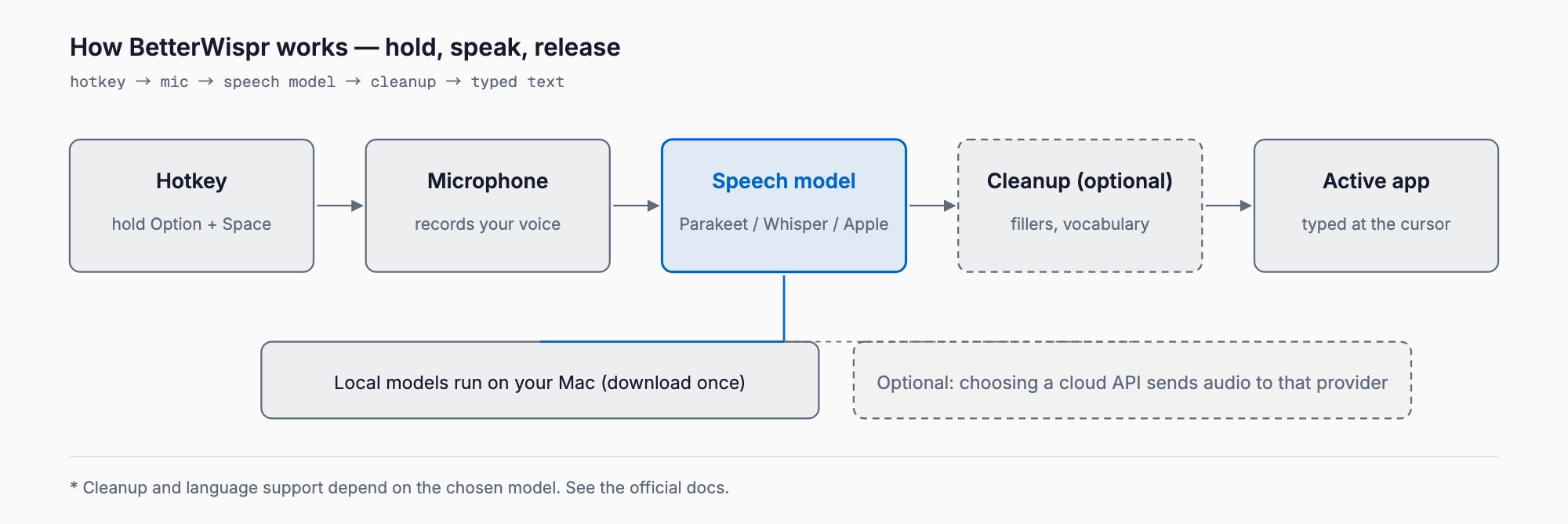
BetterWispr is a free, open-source (Apache 2.0) dictation app for Mac. Hold Option + Space, speak, release, and the text is typed at the cursor in whatever app you are using. It was posted as a Show HN on Hacker News on October 12, 2026. It is written in Swift and published on GitHub (opennookorg/betterwispr).
It is positioned as an alternative to the subscription app Wispr Flow, and speech recognition can run on local models on your Mac. This article summarizes what could be confirmed from the official site, the GitHub repo, and the HN discussion: features, setup, Japanese support, and how it compares with other tools.
What BetterWispr can do
- Push to talk: hold Option + Space, speak, release. Works in any app
- Choose a local speech model: Apple on-device speech, Parakeet v3 (25 European languages), Parakeet v2 (English), Whisper large-v3 turbo, and more. Parakeet and Whisper run offline after a one-time download
- Text cleanup: removes fillers, repeats, and false starts. The strength is None, Light (default), or Medium, according to the site
- Custom vocabulary and learned corrections
- Voice commands: punctuation, new paragraph, "scratch that"
- Meeting notes (Notetaker): transcribes your mic and, on macOS 14.2+, other apps' audio, then produces summaries and action items using Apple Intelligence or a local Ollama model
- History: stores raw and cleaned text with a "Use Original" option; history can be turned off
The site describes filler removal, writing styles, and voice commands as English-only features, so do not assume the same cleanup quality in Japanese.
Install and requirements
- OS: macOS 14 or later; Apple Silicon recommended. The site offers DMGs for both Apple Silicon and Intel
- How to get it: download the DMG from GitHub Releases (Homebrew distribution was not confirmed)
- Permissions: Microphone, Accessibility (to type into other apps), and Speech Recognition if you use Apple speech
- Size: the author said on HN that the app is a roughly 14 MB binary; models are downloaded separately and need disk space
- Account: not required, per the site
Quickest way to start
1. Download the DMG from GitHub Releases, move the app to Applications, and launch it
2. Grant Microphone and Accessibility access
3. Pick a speech model in settings and download it if needed
4. Click where you want text, hold Option + Space, speak, and release
5. If nothing is typed, automatic paste was blocked; the text is copied to the clipboard, so paste it manually
How to change the hotkey and the finer settings were not covered in the sources we could confirm. Check them in the app.
Does it work in Japanese?
The information is inconsistent, so be careful. Parakeet v3 covers 25 European languages and Japanese is not listed. The site's model list, however, includes a model named "Parakeet Japanese", and the Whisper variants are described as broadly multilingual. On HN, the author said Whisper is needed for languages such as Chinese.
- For Japanese, try a Whisper model or Parakeet Japanese first
- We have not tested Japanese accuracy or how well cleanup works in Japanese
- Test with your own speech, including names and jargon, before relying on it for work
Privacy: is it local?
- Local models keep audio on your Mac: the site says "Speech stays on your Mac" and that built-in models use the network only to download models
- Cloud is optional: you can add Sarvam AI, Smallest AI, or an OpenAI-compatible endpoint. Choosing one sends audio or transcripts to that provider; keys are stored in the macOS Keychain
- Data kept locally: settings and history are stored unencrypted in ~/Library/Application Support/BetterWispr/; temporary audio files are deleted after each recording
- History can be turned off
For sensitive content, confirm that no cloud provider is configured and check your history setting.
How it differs from other tools
The table is a rough guide based on what was confirmed from official pages and HN, plus the general positioning of each product. Pricing and features change often, so check each official site for current details.
| Tool | Price | Processing | Japanese | Open source | Notes |
|---|---|---|---|---|---|
| BetterWispr | Free | Mostly local (cloud API optional) | Depends on model (verify Whisper / Parakeet Japanese) | Yes (Apache 2.0) | Push to talk, vocabulary learning, meeting notes |
| Wispr Flow | Free tier + paid plans (verify) | Reportedly cloud-based (verify) | Reportedly supported (verify) | No | Polished cleanup; some HN users report recent quality decline |
| superwhisper | Free tier + paid plans (verify) | Reportedly local or cloud | Reportedly supported (verify) | No | Own models and custom modes |
| MacWhisper | Free + paid (verify) | Local (Whisper-based) | Reportedly supported (verify) | No | Mainly for transcribing audio files |
| macOS built-in dictation | Free | On-device or Apple servers, depending on settings | Supported | No | Nothing to install; HN noted startup latency and errors |
BetterWispr's strengths are that it is free, the source is open, and it can be fully local. Cleanup quality and Japanese usability may not match cloud-based tools such as Wispr Flow.
For more on local speech recognition, see Whistle: a 16.9 MB speech-to-text model from Cactus, TypeWhisper, and Qwen Scribe for Apple Silicon. On the Mac settings side, see removemacai: disabling Apple Intelligence on macOS 27.
HN reception and caveats
- Praised: small size (about 14 MB), Parakeet v3 speed, a tester reporting good accuracy across several apps. A Bluetooth mic lag report was answered with a fix by the author
- Author's claims: Handy is 150-200 MB and missed words for his accent; Wispr Flow degraded in accuracy and features (the author's own view)
- Compared with: Handy, VoiceInk, FluidVoice, superwhisper. The difference from VoiceInk was not settled in the thread
- Languages: Parakeet is mostly European; Whisper is needed for Chinese and similar
- Name: a discussion about whether "Wispr" could cause trademark issues; the author said it is not trademarked
- Early stage: effectively a single developer and a young project, so behavior may change
At the time of writing the HN post had roughly 190 points and 100+ comments (numbers change).
FAQ
Is BetterWispr free?
Yes. It is Apache 2.0 open source with no subscription or word limit, according to the project. Model files use disk space. If you add a cloud API yourself, that provider may charge you.
Does it work offline?
Parakeet and Whisper run offline once the model is downloaded. Behavior of Apple's built-in speech recognition depends on your settings and device, so verify it.
Can I use it for Japanese dictation?
The site lists Whisper variants and a Parakeet Japanese model, but Parakeet v3 covers European languages. We have not tested Japanese accuracy, and filler removal is described as English-only. Try it with your own speech first.
Does it run on Intel Macs?
The site offers an Intel DMG for macOS 14 or later, but Apple Silicon is recommended and large models may be slow on Intel.
Should I switch from Wispr Flow?
If cost and privacy matter and you mostly dictate English, it is worth trying. If Japanese quality and natural cleanup matter most, compare both within free limits first.
Summary
BetterWispr is a free, open-source Mac dictation app you trigger by holding Option + Space. It can run entirely on local speech models (Parakeet, Whisper, Apple), with cloud APIs optional. It is young, Japanese support is inconsistently documented, and cleanup is English-oriented. For Japanese, test Whisper or Parakeet Japanese with your own voice and compare with other dictation apps before choosing.
Related free tools (no sign-up, instant results)
Feel free to contact us
Contact Us