Docker Agent (cagent): Build Multi-Agent Teams in YAML
Docker Agent (ex-cagent) explained, Oct 2026: install, a YAML multi-agent setup, MCP and local models, OCI sharing, vs Claude Code, and Hacker News views.
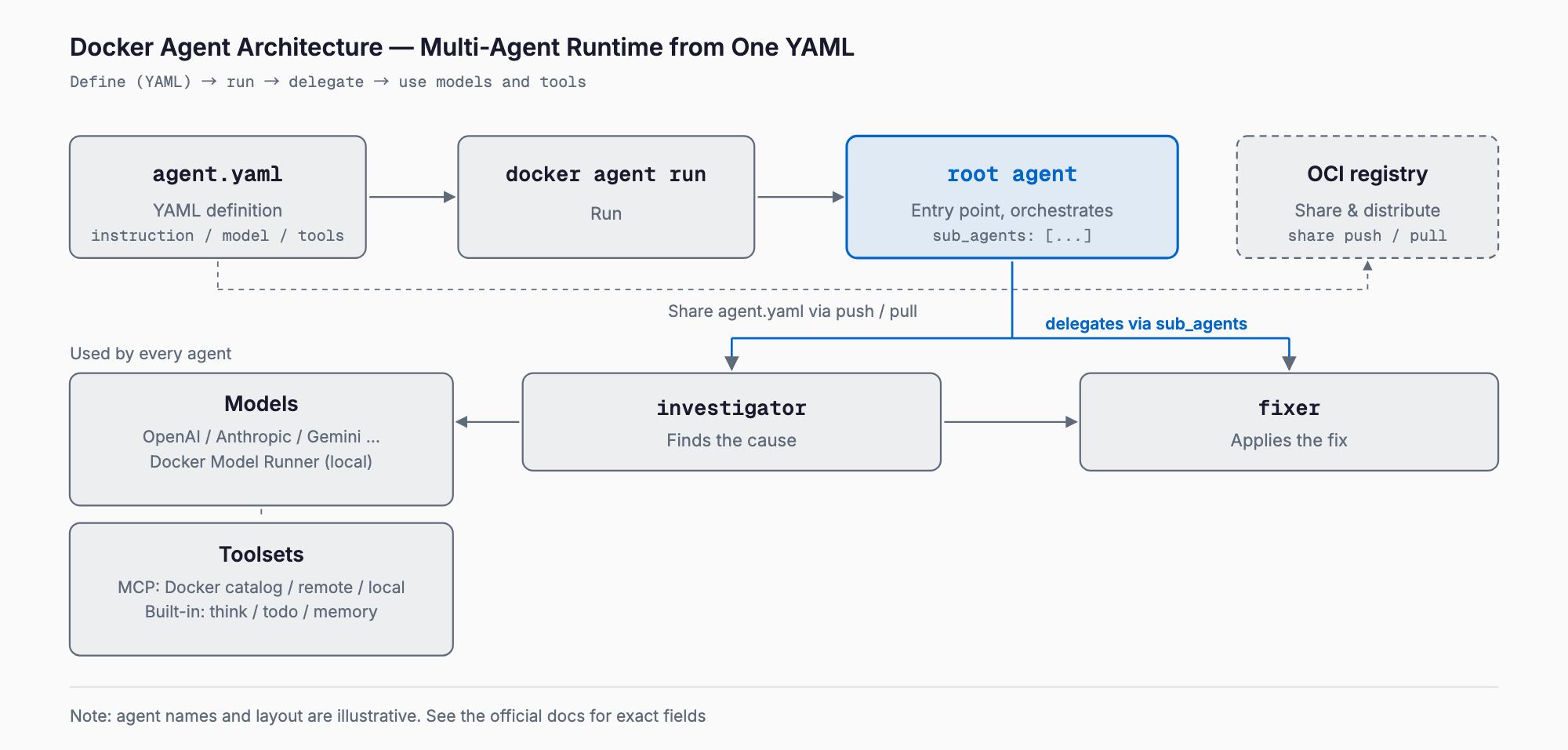
Docker Agent (formerly cagent) is an open-source tool from Docker that lets you define AI agents in YAML and run them from the terminal. It runs as a Docker CLI plugin (docker agent), and its signature feature is building multi-agent teams, where agents delegate work to one another, in a few dozen lines of YAML. It is licensed under Apache-2.0.
In short, it is a runtime for quickly trying your own agent teams, combining multiple LLMs and MCP servers, mostly through configuration files. It is a general-purpose agent runtime, not a coding-specific product. It drew about 300 points on Hacker News in October 2026, along with some pushback such as dislike of YAML and doubts about the "no code required" pitch. This article covers how it works and the shortest path to using it, based on the official docs and repository.
What Docker Agent can do
- Multi-agent teams: a root agent delegates to specialists listed under sub_agents
- Many providers: OpenAI, Anthropic, Gemini, AWS Bedrock, Mistral, xAI, Docker Model Runner (local models), and more
- MCP servers: local, remote or Docker-based (catalog references such as docker:duckduckgo work too)
- Built-in tools: think, todo, memory and task delegation
- RAG: BM25, embeddings, hybrid search and reranking
- Sharing via OCI registries: push agent definitions to Docker Hub or similar and pull them elsewhere
- Go SDK: usable from Go code instead of YAML
It is a different product from Gordon (docker ai), Docker's built-in AI assistant. The official docs explicitly note this to avoid confusion.
Installation
Docker Desktop 4.63 and later ships with it preinstalled, so docker agent works out of the box (versions 4.49 to 4.62 called it cagent). On Docker Engine-only setups, install it with one of the following.
# Homebrew
brew install docker-agent

# Windows (winget)
winget install Docker.Agent

# Binary: download from GitHub Releases and place it as a CLI plugin
ln -s /path/to/docker-agent ~/.docker/cli-plugins/docker-agent
You can also skip the plugin setup and run the standalone docker-agent binary directly. To use an LLM, set an API key for at least one provider (not needed if you only use local models through Docker Model Runner).
export OPENAI_API_KEY=<your_key>      # OpenAI models
export ANTHROPIC_API_KEY=<your_key>   # Claude models
export GOOGLE_API_KEY=<your_key>      # Gemini models
The shortest path: one YAML file
Start with a single agent. This is the sample from the official README: a general assistant with the DuckDuckGo search MCP server. Save it as agent.yaml.
agents:
  root:
    model: openai/gpt-5-mini
    description: A helpful AI assistant
    instruction: |
      You are a knowledgeable assistant that helps users with various tasks.
    toolsets:
      - type: mcp
        ref: docker:duckduckgo
Run it as follows. docker agent new generates a starter config interactively, and a bare docker agent run launches the default agent.
docker agent run agent.yaml

# Generate a new agent interactively
docker agent new
Each agent requires model, description and instruction; toolsets, sub_agents, fallback, max_iterations and others are optional. model takes the form provider/model-name.
A multi-agent example (delegating with sub_agents)
This is the "bug investigator team" from the official docs. The root agent analyzes the cause and delegates the fix to fixer. Because each agent can use a different model, you can pair, for example, a cheaper model for investigation with another vendor's model for implementation.
agents:
  root:
    model: openai/gpt-5-mini
    description: Bug investigator
    instruction: |
      Analyze error messages, stack traces, and code to find bug root causes.
      Explain what's wrong and why it's happening.
      Delegate fix implementation to the fixer agent.
    sub_agents: [fixer]
    toolsets:
      - type: filesystem
      - type: mcp
        ref: docker:duckduckgo

  fixer:
    model: anthropic/claude-sonnet-4-5
    description: Fix implementer
    instruction: |
      Write fixes for bugs diagnosed by the investigator.
      Make minimal, targeted changes and add tests to prevent regression.
    toolsets:
      - type: filesystem
      - type: shell
- The root agent is the user's point of contact; the first agent defined (or the one named root) is the default
- To start from another agent, use docker agent run config.yaml -a agent_name
- Sub-agents can have their own sub-agents for deeper hierarchies
- Each agent has its own model and context; knowledge is not shared between agents
- Delegation decisions rely on each agent's description, so write it so the role is clear
The repository's examples/ directory contains many multi-agent samples, such as dev-team.yaml (product manager, designer, engineer), blog.yaml (research, writing, review) and coder.yaml (planning, implementation, research). Browsing them is the fastest way to start before writing your own.
MCP servers and local models (Docker Model Runner)
You connect MCP by adding type: mcp to toolsets. Servers in Docker's catalog can be referenced with ref: docker:name, and your own local or remote servers can be specified as well. For the MCP concepts themselves, see our Claude Code MCP integration guide. For the idea of making existing CLI tools easier for agents to use, CLI-Anything is also a useful read.
To run locally without API keys, set Docker Model Runner (DMR) as the model provider: define a model with provider: dmr in the models section and reference it by name from the agent's model. The minimal setup below is based on the repository's examples/dmr.yaml (DMR's default endpoint is http://localhost:12434/engines/llama.cpp/v1).
agents:
  root:
    model: qwen
    description: Local assistant
    instruction: You are a helpful assistant.

models:
  qwen:
    provider: dmr
    model: ai/qwen3
Note that models hosted on DMR are not auto-detected as multimodal, so the sample's comments indicate that you must declare image support explicitly in the config.
Sharing agents through an OCI registry
Agents can be distributed through a registry like container images. Docker Hub or any OCI-compatible registry works, and pushing creates the repository if it does not exist.
# Push to share
docker agent share push ./debugger.yaml myusername/debugger

# Pull on another machine
docker agent share pull myusername/debugger

# Run an agent directly from a registry
docker agent run myusername/debugger:latest
This is handy for reusing the same agent definition across a team. Since the artifact contains prompts and tool settings, be careful never to put secrets such as API keys into anything you publish.
How it differs from other tools
The comparison below is only a rough positioning. These products evolve quickly, so check official sources for current details.
| Tool | Main form | Primary way to build | Best suited for |
|---|---|---|---|
| Docker Agent | CLI runtime (Docker CLI plugin) | YAML (Go SDK also available) | Trying general multi-agent setups through config |
| Claude Code | Coding-focused agent CLI | Interactive use; settings, MCP, subagent definitions | Day-to-day work on real codebases |
| OpenAI Agents SDK | Library (built in code) | Code such as Python | Embedding agents in your own app |
| LangGraph | Library (workflows as graphs) | Code such as Python | Complex flow control with state |
| CrewAI | Library (role-based teams) | Python code plus config | Quickly building role-based teams |
| Goose | Locally running agent | Config plus extensions (MCP) | Automating work on your own machine |
The key point is that Docker Agent is a runtime that reads config files, not a library. That lets you try setups without writing code, but if you need intricate control logic, the Go SDK or another framework may fit better.
Reception on Hacker News and cautions
The HN thread (about 300 points, 145 comments) had both praise and criticism. Commenters who appear to be Docker employees explained that cagent started as a "compose for agents" idea and predates Docker Sandboxes, pointed to the Go SDK as an alternative to YAML, and said they were considering ACP support.
- Criticism: a vague description and doubts about the "no code required" pitch, mixed feelings about YAML configuration, and confusing Docker branding
- Bug reports: some said sessions were brittle when using it to control Codex; the Docker side asked for details and said they would look into improving it
- Security: a complaint that documentation on how sandboxing works and its attack vectors is hard to find
- Praise: the Go implementation, and the maintainers' responsiveness to feedback
One caution: if you give an agent shell or filesystem toolsets, the LLM can actually execute commands. Before trying it near production systems or directories with sensitive data, run it in an isolated environment such as a VM or container. Also, per the official README, anonymous usage data is collected (see the official telemetry page for details).
FAQ
Are Docker Agent and cagent the same thing?
Yes. cagent was renamed Docker Agent. In Docker Desktop, versions 4.49 to 4.62 ship it as cagent and 4.63 and later ship it as Docker Agent.
Can I use it without Docker Desktop?
Yes. You can install it with Homebrew, winget or a binary from GitHub Releases, and run it either as a Docker CLI plugin or as a standalone binary.
Can it run on local models only?
According to the README, you can use Docker Model Runner for local models instead of API keys. Keep in mind that model quality and tool-calling accuracy can differ from large cloud models.
Can I use it without writing YAML?
docker agent new generates a starter config interactively, and the Go SDK lets you embed it from code without YAML. HN commenters did question the "no code required" framing, though.
Does it replace Claude Code?
They serve different purposes. Claude Code is a coding-focused agent, while Docker Agent is a general multi-agent runtime. It is less a replacement and more a matter of choosing by purpose.
Related free tools (no sign-up, instant results)
Feel free to contact us
Contact Us