SSL Certificate 47-Day Validity: SMB Response Guide
SSL/TLS certificate validity drops to 200 days (2026), 100 (2027) and 47 (2029); manual renewal fails. Risks, inventory checklist, costs and a plan to 2027.
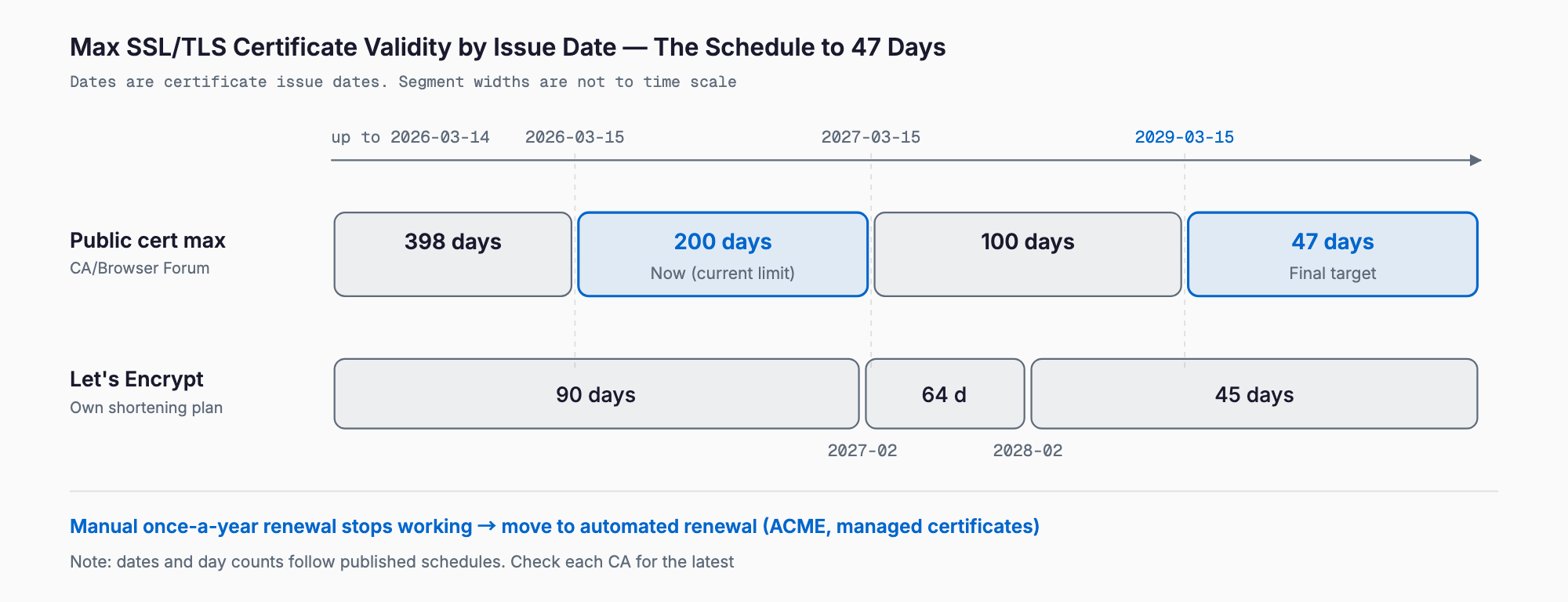
Shorter SSL/TLS certificate validity means that the expiration period of the certificates that prove your website is secure is being reduced step by step under new industry rules. Until recently the maximum was 398 days (about 13 months). Certificates issued on or after March 15, 2026 are capped at 200 days, the cap falls to 100 days in March 2027, and to 47 days in March 2029.
The bottom line: renewing certificates by hand once a year will stop working. The core response is to make sure renewal is automatic. If you use the free SSL included with a rental server or a managed certificate from a CDN, you usually only need to confirm the settings. If you renew paid certificates manually, or have certificates on internal devices or custom systems, you should take inventory and switch over before March 2027.
What is changing: the validity timeline
The change comes from a rule approved in April 2025 (ballot SC-081) by the CA/Browser Forum, an international industry body of browser vendors and certificate authorities (the organizations that issue certificates). The maximum validity of publicly trusted SSL/TLS certificates shrinks in stages as follows.
| Issue date | Maximum certificate validity | Domain validation reuse period (approx.) |
|---|---|---|
| Until March 14, 2026 | 398 days (about 13 months) | 398 days |
| From March 15, 2026 | 200 days | 200 days |
| From March 15, 2027 | 100 days | 100 days |
| From March 15, 2029 | 47 days | 10 days |
As of today (October 2026), the 200-day rule is already in effect. The next milestone is March 15, 2027, when the cap drops to 100 days. In practice, one renewal a year becomes three or four a year, and later many more. Domain validation (proof that you really control the domain) must also be repeated on a short cycle, which makes manual handling even heavier.
Let's Encrypt, a free certificate authority, already issues 90-day certificates and has announced that its default certificates will shrink to 64 days in February 2027 and 45 days in February 2028. It also stopped sending expiry-reminder emails in 2025. Any routine that depends on being reminded before expiry will work less and less well. Exact dates and conditions can differ by provider, so also check the notices from the company you actually use.
Why validity is being shortened
There are two main reasons. The first is better security. If a private key leaks or a certificate is issued improperly, a longer validity means a longer window for abuse. Shorter validity limits how long damage can continue. The second is making automation the norm. When renewals are frequent, manual work stops being worthwhile and automation becomes standard. The industry is moving toward the assumption that certificates are replaced automatically.
Who is affected
Many people assume it does not concern them because they only have a website, but certificates are used in more places than you might expect. Use the list below to find what applies to your company.
- Your company website: The most common case. Often renewed automatically by a rental server feature
- E-commerce sites and booking systems: An outage hits sales and reservations directly, and payments and external integrations also rely on certificates
- Management screens of internal devices: NAS units, UTM security appliances, wireless LAN gear and multifunction printers may have their own certificates
- Mail servers: If you run your own, certificates encrypt sending and receiving
- Custom and business systems: Partner APIs, internal web systems, VPNs and similar
- Companies using paid OV/EV certificates: If you apply and renew manually, you are affected the most
Pay special attention to certificates nobody remembers installing. It is common for a previous employee or outside vendor to have set one up with no renewal procedure left behind. As validity gets shorter, these forgotten certificates are more likely to expire and suddenly cause trouble.
What happens if you miss a renewal
An expired certificate has a wider impact than most people expect. It is not just a cosmetic warning; business can stop.
- Browser warnings: A full-screen message such as "Your connection is not private" appears and customers cannot view the site
- Effective outage: Visitors who see the warning leave, so e-commerce and booking opportunities are lost, and trust suffers
- Form submission failures: Contact and booking forms stop working and inquiries are lost without anyone noticing
- API integration stops: Partner systems, payments and inventory sync fail with connection errors, and nights and holidays delay discovery
- Internal impact: Management screens become unreachable and mail sending or receiving errors appear
The tricky part is that expiry tends to happen suddenly, often on a weekend or at night. The more often renewal occurs, the more chances there are to slip. That is why the fix should be a system, not human attention.
First, take inventory: a checklist
The first step is to list the certificates your company uses. You do not need specialist knowledge; working through the items below will give you the full picture.
- List your domains: Write down every domain you hold (corporate site, e-commerce, booking site, subdomains). Contracts and invoices help avoid omissions
- Check the type of each certificate: Free (such as Let's Encrypt) or paid, and which company issues it
- Check how it is renewed: Automatic or manual. If manual, who renews it, when and how
- Record the expiry date: You can see it by opening the certificate details from the padlock icon in the browser. Put it in a table
- Check internal devices and mail servers: Do not forget non-website devices such as NAS, UTM, printers and mail servers
- Confirm the contract contact and cost: Where it is purchased and how much it costs. If a web agency or maintenance vendor handles it, confirm the scope
- Decide who is responsible and who gets notified: Make sure alerts do not go to a former employee or an unused mailbox
With this inventory table you can see at a glance what is automatic and what is manual. Automating the manual ones first is the most realistic order of work.
Response options compared, with cost estimates
There are several ways to automate renewal. Choose according to your environment and who is available to maintain it. The costs in the table are rough guides only and vary greatly depending on the service, setup and vendor.
| Option | Best suited for | Cost estimate (annual / work fee) | Watch out for |
|---|---|---|---|
| Free SSL auto-renewal on a rental server | Typical corporate websites | From about 0 yen per year (included in server fee) / setup work about 0 to 10,000 yen | Confirm auto-renewal is on and set for each domain |
| Managed certificates from a CDN or cloud (Cloudflare, AWS ACM, etc.) | E-commerce or companies already on the cloud | Certificate itself is often free / initial setup about tens of thousands to 100,000 yen | Valid only inside that service; DNS changes may be needed |
| ACME automation (install an auto-renewal tool on the server) | Companies running their own servers or custom systems | Tool is free / build and testing about tens of thousands to 200,000 yen | Needs someone to configure and monitor; failure alerts are key |
| Outsource to a web agency or maintenance contract | Companies without in-house IT | 0 yen extra if included, otherwise roughly a few thousand to tens of thousands of yen per month | Check in the contract that certificate renewal is in scope |
| Keep renewing manually | Only devices or special certificates that cannot be automated | Paid certificates from a few thousand to several hundred thousand yen a year (by type) plus labor | Renewals rise to 3 to 4 a year and more later; keep to a minimum |
The basic policy is to automate everything that can be automated, and keep manual items to a minimum. Where you can switch to automatic renewal on a rental server or CDN, it is usually better in both cost and effort than renewing a paid certificate by hand. For differences between certificate types and how to choose, see the SSL certificate selection and operations guide.
If you want to review your server and domain contracts at the same time, domain and server costs and contracts is a useful reference. Switching to automatic renewal can reduce renewal fees, and reviewing operations may lower your overall cost.
What to do with devices that cannot be automated
NAS units, UTM appliances, printers and older business systems may not support automatic renewal. Consider the following options.
- Put a reverse proxy or CDN in front of the device: Let a component that can auto-renew take over the externally visible certificate
- If internal-only, switch to an internal mechanism: For admin screens not exposed to the internet, you can manage them with an internal certificate authority and operating rules rather than public certificates
- Build a renewal calendar and renew manually: If there are only a few, register renewal dates in a calendar and assign a primary and backup owner
- Make auto-renewal support a purchase criterion: For future purchases, add certificate auto-renewal support to your selection criteria
The right approach depends on the device type and whether it is exposed outside the company. If unsure, the quickest route is to ask the manufacturer or maintenance vendor whether this device's certificate can be renewed automatically.
Questions to ask your web agency or maintenance vendor
If you outsource website or system operations, send the questions below as they are and keep the answers in writing. How to read contract terms is also covered in maintenance contract checkpoints.
- Is our certificate set to renew automatically? If manual, who renews it and when
- Can you keep the same arrangement when validity drops to 200, 100 and 47 days
- Is certificate renewal within the scope of the maintenance contract? If extra, how much
- Where do alerts go when renewal fails? Do we also get notified
- Can you share a list of certificates and expiry dates (and help us build the inventory table)
- If we use paid OV/EV certificates, are there any that can be switched to automatic renewal
- Is there a handover system so nothing breaks when the person in charge leaves or changes
For typical maintenance pricing and what is usually included, the article on website maintenance costs is a good guide. Do not assume that certificate renewal is included in maintenance; always confirm.
Schedule through March 2027, step by step
About five months remain until the next milestone, March 15, 2027. Here is a month-by-month guide so you can proceed without rushing.
- Step 1 (October 2026): Inventory - Build a list of domains and certificates and record the renewal method (automatic or manual) and expiry date
- Step 2 (November 2026): Assess and prioritize - Identify manual items, items with no known owner and items whose failure hurts most (e-commerce, booking, API integration), then rank them
- Step 3 (November to December 2026): Check with vendors - Ask your web agency, maintenance company and server provider the questions above and get answers
- Step 4 (December 2026 to January 2027): Switch to automatic renewal - Starting with manual items, move to automatic mechanisms. After switching, confirm renewal really runs
- Step 5 (February 2027): Set up alerts and handover - Point failure alerts to a current owner, name a backup, and put the procedure on a single page
- Step 6 (March 2027): Final check - Before March 15, confirm everything works fine under the shorter validity
Because the year-end holidays fall in between, start Step 4 by early December. That way an expiry during the holidays will not go unnoticed.
Common mistakes and cautions
- Assuming it is automatic: The setting may be off, or a newly added domain may have been left out. Check the actual expiry date with your own eyes
- Outdated alert recipients: Alerts go to a former employee or unused mailbox and nobody notices
- Forgotten subdomains: Certificates for booking systems or campaign sites added later get overlooked
- Postponing internal devices: The website is automated, but only the management screen or printer certificate expires
- Buying long-term paid certificates: With shorter validity, multi-year contracts are worth less than before. Check the terms before buying
Frequently asked questions
Will shorter validity make certificates more expensive?
Not necessarily. If you use free automatic renewal (rental server or CDN), costs barely change. If you renew paid certificates manually, more renewals mean more labor. Some paid certificates support automation, and switching to free automatic renewal is also possible, so we recommend comparing after taking inventory.
What happens to certificates I already bought (for example 398 days)?
The new rules apply to newly issued certificates. Certificates already issued can generally be used until their expiry date. However, the next renewal (reissue) falls under the new maximum, so it is practical to switch to automation at that point. Check the notices from your certificate authority or reseller for details.
We have no servers of our own and leave everything to a web agency. What should we do?
First ask your agency or maintenance company whether certificates renew automatically, whether renewal is included in the maintenance contract, and where failure alerts go. Keep the answers in writing or email so they survive staff changes. You can leave the technical work to them, but as the client you need to know who is responsible for renewal.
Will manual renewal become impossible at 47 days?
In theory it is not impossible, but around eight renewals a year are needed and domain validation would be repeated about every 10 days, so manual operation becomes practically unrealistic. It is safer to move to automation now rather than wait for 2029. For devices that truly cannot be automated, keep the number minimal and manage renewals strictly by calendar.
Related free tools (no sign-up, instant results)
Feel free to contact us
Contact Us