Manus Studio (Desktop App) Explained
My Computer for Local Files, Remote Control from Your Phone, Supported OS, Pricing, and Cautions [Manus 2.0]
Manus Studio, the Manus 2.0 desktop app, works with local files and apps and takes commands from your phone. Apple Silicon Mac and Windows, from $20 a month.
Manus Studio is the desktop app that Manus rebuilt and renamed from "Manus Desktop" with Manus 2.0, announced on September 28, 2026 (local time). It lets Manus work with local files, folders, tools, and apps on your PC ("My Computer"), run Computer Use in a dedicated workspace, and take voice or text commands from your phone (Remote Control). It supports macOS (Apple Silicon) and Windows; Intel Macs and Linux are not supported.
This article is based on the official page, official blogs, official help, and the pricing page as of October 12, 2026. Where the official sources are silent, we write "not stated officially." Figures such as the Cascade reductions are Manus's own measurements, not third-party verification, so read them with that in mind.
What Is Manus Studio? The Desktop App Rebuilt for Manus 2.0
The official desktop app page positions Manus Studio as a place where you and AI create together: a workspace to build, edit, and publish websites, videos, and games integrated with your own files and tools. According to the official blog "Introducing Manus 2.0", Studio is a shared workspace for people and AI that brings in only what the project needs, keeping Manus's context focused on the work at hand. The basic facts are as follows.
| Item | Details |
|---|---|
| Name | Manus Studio (the "Manus Desktop" app, rebuilt and renamed with Manus 2.0) |
| Role | Manus's desktop app; a workspace that works with local files, tools, and apps |
| Announced | 2026-09-28 (local time) with Manus 2.0. The Japanese updates page dates it September 29 |
| Developer | Manus (the operating company is Butterfly Effect, based in Singapore, per press reports) |
| Supported OS | macOS (Apple Silicon) and Windows. Intel Mac and Linux are not supported |
| Distribution | macOS: DMG (Manus-Setup-2.0.4.dmg). Windows: Microsoft Store (listed as "Manus Studio", free download) |
| Version | The DMG is 2.0.4: about 315MB (315,061,735 bytes), last modified 2026-10-05 (checked via HTTP headers on 2026-10-12) |
| Price range | Manus monthly plans start at $20. No separate Studio surcharge is stated officially |
| What it does | Reads, analyzes, and edits local files; launches and operates local apps; takes remote commands from your phone; runs Computer Use in a dedicated workspace |
The official page presents Studio through four features (quoted from the Japanese original, with our notes).
- "Control by voice": away from your desk, tell Manus what you need from your phone and it works on your desktop. This refers to Remote Control from a phone
- "Build from your files": Manus works directly with local files, folders, and tools, so every project starts from work you have already done. It carries over the idea behind My Computer, which launched in March
- "An agent across devices": take your agent with you in Cue and pick up where you left off on the desktop. Cue here is a separate app, covered below
- "A second pair of hands": with Computer Use, Manus works in a dedicated workspace on your computer while you stay in your own. A way to separate your work from Manus's work on screen
How It Works: What Happens When Manus Runs on Your PC
According to the official blog "Introducing My Computer", Manus used to run entirely in the cloud; My Computer lets it work with local files, tools, and apps. In practice, Manus in the cloud operates your machine through Studio installed on the PC. With My Computer, Manus runs command-line (CLI) instructions in your PC's terminal. The blog gives development examples using Python, Node.js, Swift, and Xcode, including a Mac app built with terminal commands alone, without opening Xcode. Computer Use, per the official blog, runs only inside a connected and authorized session, in Manus's own visible workspace, using only the files, browser, and apps you have approved. The approval model is summarized below.
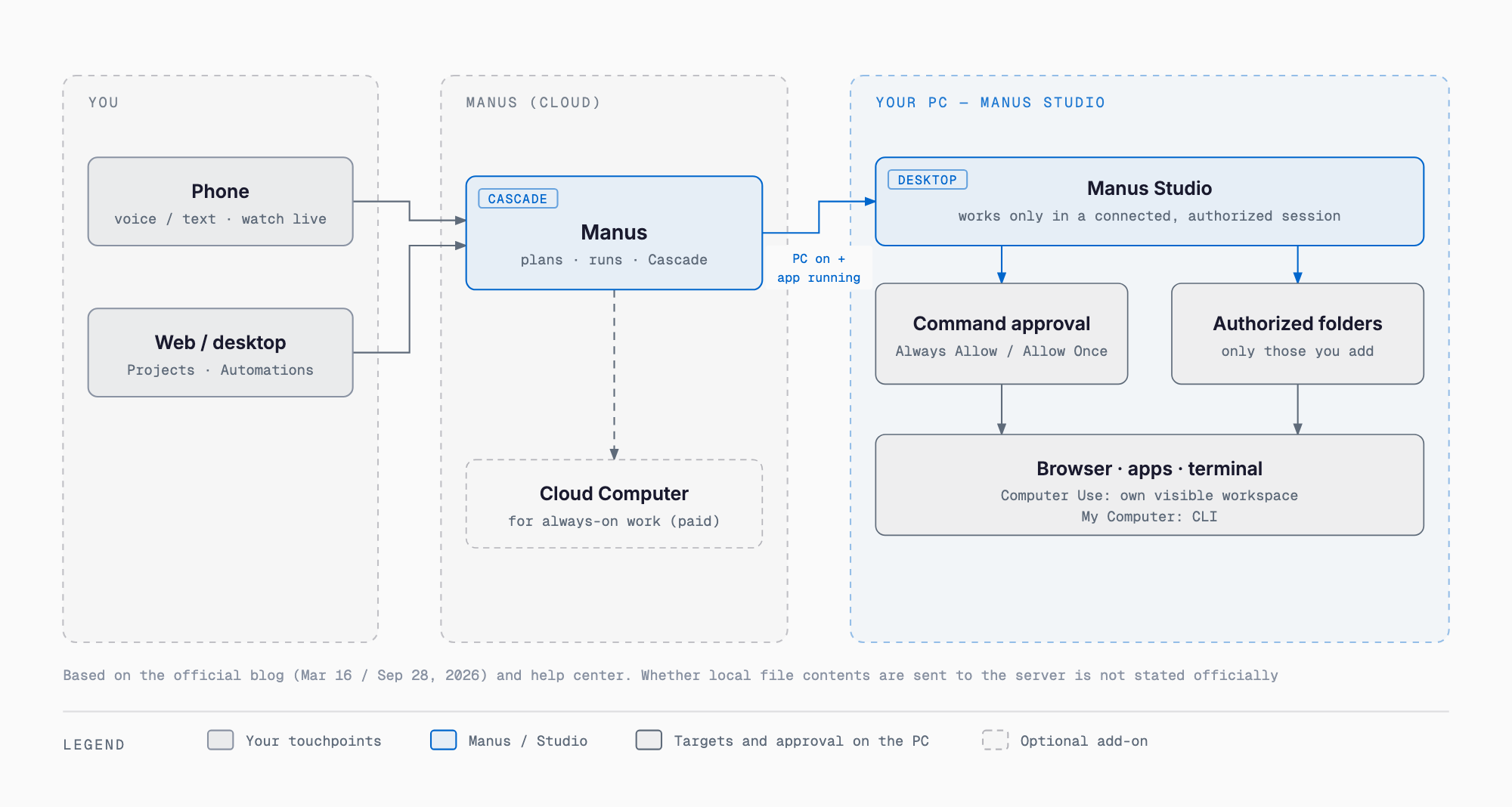
| Scenario | How it works |
|---|---|
| Folder authorization | During setup you choose and authorize specific local folders for Manus to access. Only authorized folders are in scope |
| Command approval | Every terminal command requires your explicit approval before it runs. The options are "Always allow" (for trusted tasks) and "Allow once" (confirm each time) |
| Computer Use scope | Within a connected and authorized session, in a dedicated visible workspace, using only the files, browser, and apps you have approved |
| Remote command conditions | Commands from other devices run only while the PC is powered on and the Manus desktop app is running |
| Role of Cloud Computer | A dedicated cloud environment (purchase-based) for things like game servers and always-on automations that live outside your PC. Price not stated officially |
One point to note: whether the contents of local files are sent to Manus's servers, and how much is processed locally, is not stated officially. The Manus core runs in the cloud, and the official description goes only as far as "uses only the files, browser, and apps you approve." When handling sensitive data, judge with this premise in mind.
What It Can Do: Official Use Cases
The official blog "Introducing My Computer" gives the following six examples. All come from the March My Computer announcement, and Studio builds on the same foundation.
- Sort a florist's photo folder into categories based on image content
- An accountant renames hundreds of invoices into a standard format
- Build a Mac app with real-time meeting translation and captions in Swift in about 20 minutes
- Use a local GPU for machine learning or LLM inference
- Turn an idle Mac mini into a 24-hour assistant
- Pull a contract file from your home PC and send it by Gmail
According to the official blog, My Computer is integrated with Projects, Agents, and Scheduled Tasks, enabling recurring local jobs such as tidying the Downloads folder or generating a weekly report from local data. In Manus 2.0, Scheduled Tasks were extended to event triggers as Automations; example triggers include new email, changes in ad performance, calendar events, Slack messages, and Notion updates. At the March announcement it was offered to "all macOS / Windows users," and any plan restrictions are not stated officially.
Remote Control: Operating Your PC from Your Phone
Remote Control lets you give voice or text instructions from Manus on your phone and have the desktop do the work. The official blog's heading reads "Remote Control and Computer Use: your computer, one voice command away." The steps in the official help "What is new in Manus 2.0?" are these three.
- Open Manus on your phone
- Turn on voice commands
- Give your instruction
According to the official blog, you can change instructions while a task is running and watch the desktop live. An example instruction is "find the latest deck in the launch folder and send it," and you can also specify an output format such as PDF. As noted above, though, remote instructions run only while the PC is on and the Manus desktop app is running.
What Changed in Manus 2.0: Studio, Cascade, Cloud Computer, and Cue
According to the official blog and official help, the main changes in Manus 2.0 are as follows. Mado no Mori's September 29, 2026 report quotes the official explanation as "not a version upgrade, but a new architecture, a new product, and new features."
| Item | Details |
|---|---|
| Cascade | Manus's own new agent harness, which loads specialized capabilities only when needed. In one test configuration: 23.2% fewer tokens, 28.2% shorter task completion time, and 32% lower running cost than before. The official help notes these are not overall averages; self-measured |
| Cloud Computer | A dedicated cloud environment (purchase-based) for game servers and always-on automations. Price not stated officially |
| Automations | Scheduled Tasks extended to event triggers: new email, ad performance changes, calendar events, Slack messages, Notion updates, and more |
| Studio add-on: Video Editor | Timeline editing, with clips, images, text, motion graphics, and audio as separate parts. Aimed at 30-60 second product ads, AI UGC, data motion graphics, tutorials, and vlogs. In "Alchemy" mode, Manus handles creative direction from an idea |
| Studio add-on: Game Dev | Start from a playable template, edit assets, code, motion, art, and scenes in the Edit panel, and publish as a website. Multiplayer: Configure → Multiplayer → Select Cloud Computer → Buy one |
| Remote Control / Computer Use | Voice or text instructions from your phone with live view. Computer Use runs in a dedicated workspace using only approved files, browsers, and apps |
| Cue | A standalone app for personal agents on the same infrastructure as Manus (phone, desktop, and web) |
| Manus Flex | Started 2026-09-30. Connect your own API key from a supported provider and use it in Manus |
Cue is a separate app from Studio. According to the official help, each agent has its own email, phone number, wallet, and computer; it pays within a budget you set, takes calls, and leaves summaries. Multiple agents divide work in a group chat. It is in early access and free with an invite code; iOS follows after App Store review. You reach it from the Agents (Cue!) tab in the Manus sidebar. The "agent across devices" on the desktop page refers to this Cue.
Supported OS and Requirements: No Intel Mac or Linux
| Environment | Support |
|---|---|
| macOS (Apple Silicon) | Supported (M1 / M2 / M3 / M4 series) |
| Intel Mac | Not supported |
| macOS Tahoe | Compatibility issues may occur (per the official help) |
| Windows 10 / 11 | Supported |
| Windows 7 / 8 | Not supported |
| Linux | Not supported |
| Web version (manus.im) | My Computer / Computer Use are unavailable (desktop app only) |
These requirements come from the official help "Troubleshooting the My Computer feature" (updated 2026-03-30). Whether that help page has been updated for Studio 2.0 is not stated officially. The minimum macOS version and required memory are also not stated officially. On an unsupported environment you see "Application not supported on this Mac"; there is no workaround, and the official help points to the web version as the alternative. Per the official help, after installing you sign in, click "My computer," and add the local folders Manus may access.
Pricing: $20, $40, and $200 per Month, No Stated Studio Surcharge
The official pricing page showed the following three tiers as of October 12, 2026, with monthly-billing amounts.
| Display name | Monthly price | Monthly credits | Common conditions |
|---|---|---|---|
| Standard monthly usage | $20/month | 4,000 | 300 refresh credits (added daily), 20 concurrent tasks, 20 scheduled tasks, early access to beta features |
| Customizable monthly usage | From $40/month | 8,000 (selectable) | Same as above |
| Extra usage for productivity | $200/month | 40,000 | Same as above |
Annual billing is shown as a 17% saving. The pricing page does not show plan names (such as Standard), and no free plan appears (not stated officially). The plan required to use Manus Studio or Computer Use is not stated officially, and neither is the price of Cloud Computer. Team plans ("Team" and "Startup") are on a separate page. With Manus Flex, started on September 30, 2026, you can connect your own API key from a supported provider.
Manus in 2026: From Desktop App to Independence
The Studio story should be read alongside changes in how Manus is run. Here are the official updates page, official blog, and press reports in chronological order.
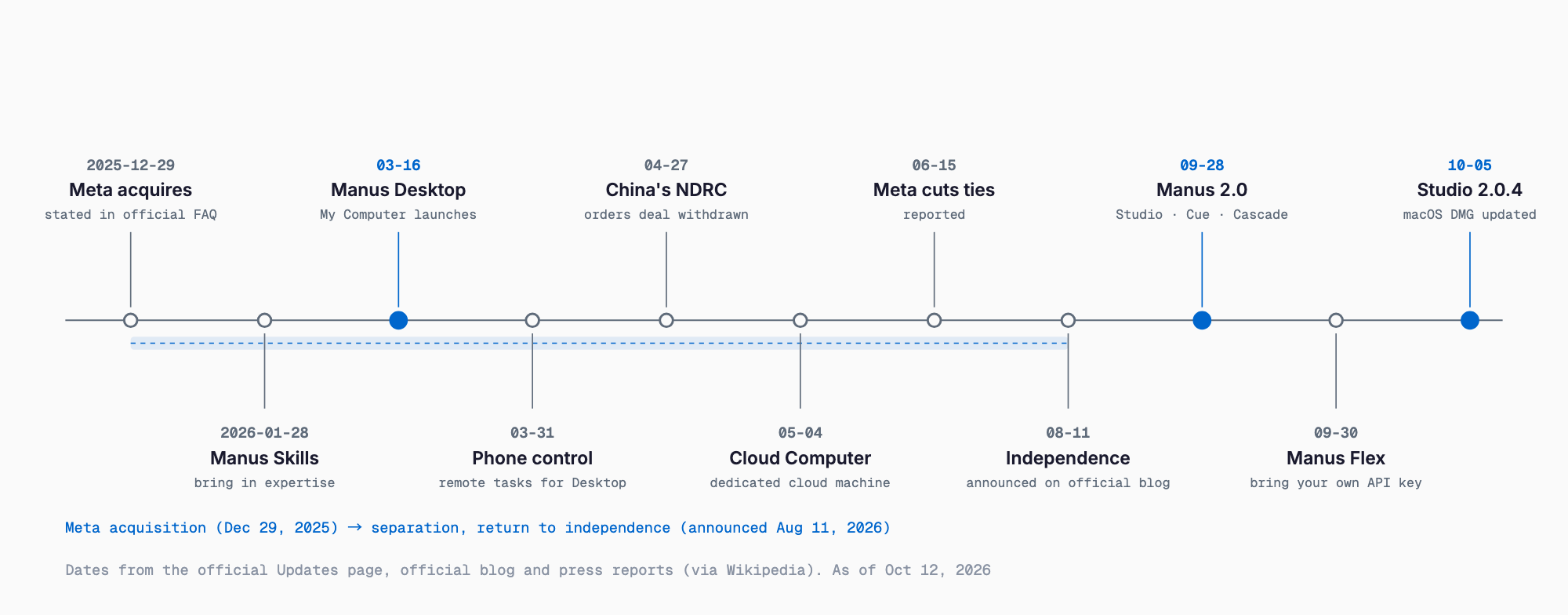
| Date | Event |
|---|---|
| 2025-12-29 | Meta acquires Manus (stated in the official blog FAQ; press reports put it at $2-3 billion, terms undisclosed) |
| 2026-01-28 | Manus Skills released (official updates page) |
| 2026-03-16 / 17 | "Bringing Manus to the desktop": Manus Desktop and "My Computer" announced (official blog on 3/16, Mado no Mori report on 3/17) |
| 2026-03-31 | Operating Manus Desktop from a phone released |
| 2026-04-27 | China's National Development and Reform Commission (NDRC) orders the deal unwound (BBC report, via Wikipedia) |
| 2026-05-04 | Cloud Computer released |
| 2026-06-15 | Meta announces it is ending its relationship with Manus (Bloomberg report, via Wikipedia) |
| 2026-08-11 | Official blog "A note to our users" announces a return to operating as an independent company |
| 2026-09-28 / 29 | Manus 2.0 and Manus Studio announced (9/28 local; 9/29 on the Japanese updates page) |
| 2026-09-30 | Manus Flex launched |
| 2026-10-05 | Studio 2.0.4 DMG (Manus-Setup-2.0.4.dmg) last modified |
The official blog "A note to our users" (2026-08-11) says Manus will soon return to operating as an independent company, as part of its separation from Meta. Data is stored in the United States and Singapore, and for affected users the data from 2025-12-29 onward was deleted on August 23-24 (SGT) and made restorable from August 25. Mado no Mori's September 29 article describes it as under Meta in the US, but based on the official blog and an October 2 report, it is in the middle of separation as of the 2.0 announcement. This article treats it as "separating from Meta." Changes in the operating entity and data location are items to check when using it for business.
Where It Sits Among Other Desktop Agents
Several vendors offer AI agents that run on your PC. Anthropic's desktop agent is covered in the Claude Cowork beginner guide, OpenAI's Mac Computer Use in the Codex Computer Use and memory article, a self-hosted open-source agent in What Is OpenClaw, and always-on cloud agents in the OpenAI dots and Meta Muse articles. This article does not state other vendors' specifications or prices. When comparing, check the following points in each article and on each official page.
| Aspect | Manus Studio | What to check |
|---|---|---|
| Where it runs | The Manus core runs in the cloud. Local actions go through Studio (terminal CLI commands) | Whether processing is local or cloud, and whether file contents are sent |
| Approval model | Every terminal command needs approval (Always allow / Allow once). Authorized folders only | The unit and granularity of approval, and whether permanent allow exists |
| Pricing | Credit-based monthly plans at $20 / from $40 / $200. No Studio surcharge stated officially | Which plan is required and whether there are extra charges |
| Supported OS | macOS (Apple Silicon) and Windows 10 / 11. No Intel Mac or Linux | Whether it runs on your own PC fleet |
| Remote control | Voice or text instructions from a phone. Requires the PC to be on with the app running | Whether the PC must stay powered on |
Cautions for Small and Mid-Size Businesses
When putting an AI agent on a work PC, decide how much it may touch before enjoying the convenience. Here are six cautions for trying Manus Studio.
- Keep authorized folders minimal: authorize only the folders the work needs during setup. Do not authorize your entire home folder
- Use "Always allow" carefully: every command is approval-based, but choosing "Always allow" skips the confirmation. Reserve it for trusted tasks, and start with "Allow once" to see how it behaves
- Do not place sensitive files in scope: whether local file contents are sent to Manus's servers is not stated officially. Do not authorize folders containing personal data or client confidential information
- Remote commands assume an always-on PC: instructions from your phone run only while the PC is powered on and the app is running. Consider the electricity cost and the physical security of an unattended PC
- Check the operating entity and data location: separation from Meta is in progress, and data is stored in the United States and Singapore. For business use, check the terms and storage location
- It does not work on Intel Macs: PCs that are Intel Macs or Linux are out of scope, and My Computer is unavailable in the web version
For concrete measures when letting an agent touch your PC, see OpenClaw security best practices; for rollout steps in business operations, see the guide to starting AI automation at small and mid-size businesses.
FAQ
How is it different from Manus Desktop?
According to the official blog, Manus Studio is the rebuilt and renamed version of the former Manus Desktop, announced with Manus 2.0 (2026-09-28). The official explanation is "not a version upgrade, but a new architecture, a new product, and new features" (as reported by Mado no Mori). It carries over the foundation of My Computer and Remote Control and adds Computer Use and add-ons such as Video Editor and Game Dev.
Is it free to use?
Downloading the app is free (the Microsoft Store listing is a free download). Using it requires credits, though. The official pricing page shows three tiers: $20/month (4,000 credits), from $40 (8,000), and $200 (40,000). No free plan appears on the pricing page, and the plan required for Studio or Computer Use is not stated officially.
Does it run on an Intel Mac?
No. According to the official help, macOS support is limited to Apple Silicon (M1 / M2 / M3 / M4 series); Intel Macs are not supported. On an unsupported environment you see "Application not supported on this Mac," there is no workaround, and the web version is suggested as the alternative. My Computer and Computer Use are not available in the web version, however.
Does it work on Linux?
No. The official help states that Linux is not supported. Supported platforms are macOS (Apple Silicon) and Windows 10 / 11.
Are my local files sent externally?
Not stated officially. The Manus core runs in the cloud, and the official description goes only as far as "uses only the files, browser, and apps you approve." Because we cannot confirm whether local file contents are sent to Manus's servers, the safer practice is to keep sensitive data out of authorized folders.
Does it work while my PC is turned off?
No. According to the official blog, remote instructions from other devices run only while the PC is powered on and the Manus desktop app is running. For uses that need to run while your PC is off, Cloud Computer, a dedicated cloud environment, is available (price not stated officially).
How is it different from Cue?
Cue is a separate standalone app from Studio. It runs on phone, desktop, and web, and each agent has its own email, phone number, wallet, and computer. It is in early access and free with an invite code. The "agent across devices" on the desktop page refers to this Cue.
Sources
- Manus desktop app official page
- Official blog "Introducing Manus 2.0"
- Official blog "Introducing My Computer"
- Official help "What is new in Manus 2.0?"
- Official help "Troubleshooting the My Computer feature" (requirements, updated 2026-03-30)
- Manus official updates
- Manus official pricing
- Official blog "A note to our users" (2026-08-11)
- Mado no Mori, "Manus 2.0 announced" (2026-09-29)
- Mado no Mori, "My Computer" (2026-03-17)
- Wikipedia, "Manus (AI agent)")
Feel free to contact us
Contact Us