IT Onboarding Checklist for New Hires — SMB Guide and Costs
IT onboarding means getting a new hire's PC, accounts and permissions ready before day one. Timeline checklist, per-person costs, roles and common mistakes.
IT onboarding is the set of steps that gets a new employee's PC, accounts, access rights and security rules ready so they can start work safely on day one. In short, work backward from two weeks before the start date and make everything "ready to hand over" by the day before. For a small business, the initial cost per person is roughly 150,000 to 250,000 yen including the PC, with running costs of a few thousand yen per month. Companies without a dedicated IT person tend to improvise each time, but once the steps are written down as a checklist, general affairs staff or a part-time IT owner can run the process without gaps. It is the counterpart of the offboarding IT checklist: the records you create at onboarding are what make it possible to recover equipment and remove access cleanly when someone leaves.
Why IT preparation for new hires gets postponed
In small companies, HR, general affairs and the hiring manager are each busy with their own tasks between the offer and the start date, so IT setup often begins on the morning of day one. Companies that hire only a few people a year tend to rely on one person's memory, and nobody recalls how it was done last time. The typical results look like this.
- The PC is not ready on day one: the new hire sits idle for several days
- Shared or borrowed accounts: the new hire starts work using a colleague's ID or a shared login
- Over-broad permissions: access to every folder and system is granted "just in case"
- Skipped security briefing: rules are mentioned verbally, with no signed pledge or record
- No asset register: nobody knows what was lent to whom, so items go uncollected at exit
None of these require advanced technology. They are problems of sequence and record keeping. Below we cover the timeline, cost estimates, role assignments, common mistakes and how to turn the process into a template.
The fundamentals of accounts, passwords and MFA are covered in account, password and MFA management for small businesses. This article focuses on how to apply those basics at the moment someone joins.
Timeline checklist: from two weeks before to one month after
Plan backward from the start date. PC procurement and account issuance take the longest because of delivery times and approvals, so begin them as soon as the hire is confirmed.
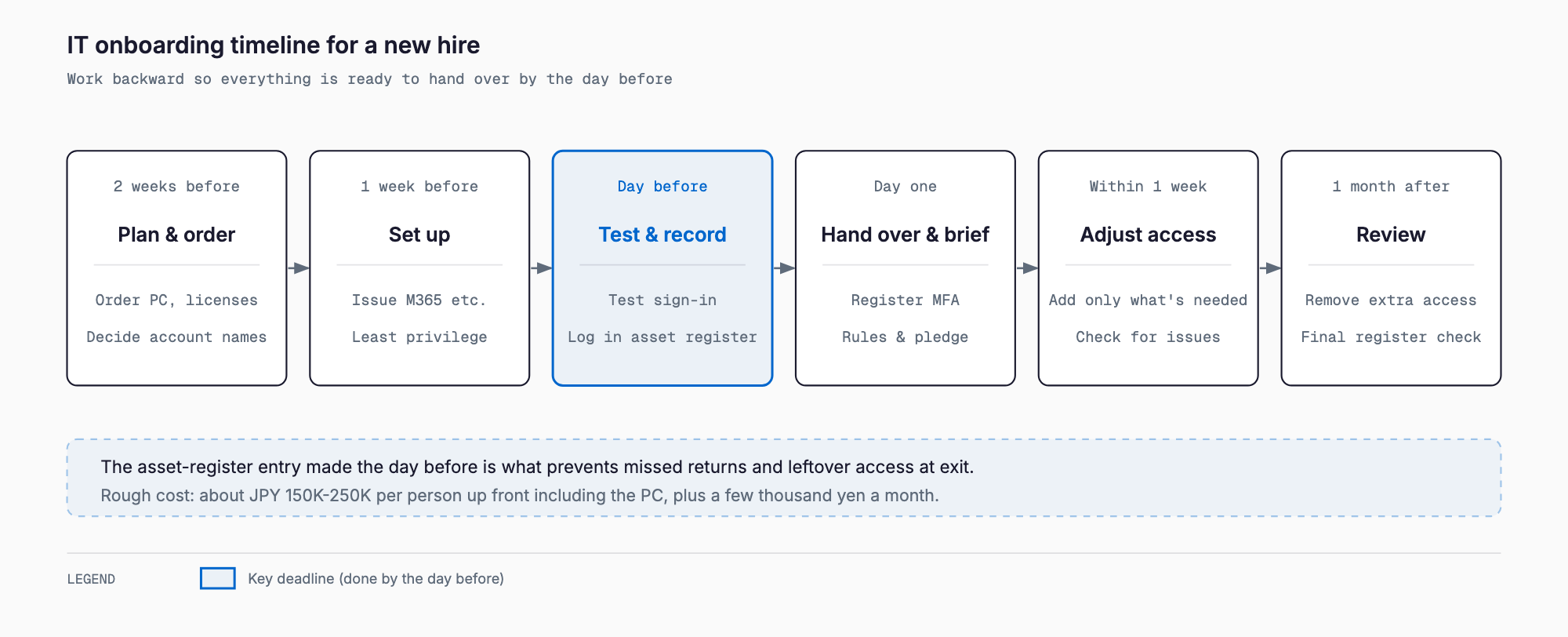
| When | Main tasks | Typical owner |
|---|---|---|
| 2 weeks before | List needed devices, software and SaaS / order the PC (new or reused) / add licenses / decide the account name and email address | General affairs, manager, IT |
| 1 week before | Start PC setup (kitting) / create Microsoft 365 or Google Workspace account / prepare MFA / draft folder and SaaS permissions | IT, external vendor |
| Day before | Test sign-in, email, Teams and so on / record items in the loan register / prepare the day-one guide and temporary password | IT, general affairs |
| Day one | Hand over the PC / register MFA / explain password management / brief on security rules and collect the pledge / change the initial password | IT, manager |
| Within 1 week | Add or confirm the permissions actually needed / ask about problems / recheck for unnecessary access | Manager, IT |
| 1 month later | Review permissions / follow up on security training / final check of the register and account list | IT, general affairs |
Two weeks before: list what is needed and place orders
Start by listing the environment the person's job requires. An office administrator, a salesperson and a designer need different PC specifications and software. Resist the urge to simply copy the predecessor's setup. Deciding by job role is the first step toward avoiding excessive permissions later.
Typical purchase and setup costs are covered in PC kitting cost guide for small businesses. Even with only a few units, it helps to compare outsourcing fees with the internal hours required.
One week before: kitting and account creation
Once the device arrives, apply the settings you want standardized, known as kitting. The main work includes OS updates, disk encryption, antivirus installation, required software, and network and printer settings. At the same time, create the email and Microsoft 365 or Google Workspace accounts.
- One account per person: never let anyone use shared or borrowed IDs
- Treat the initial password as disposable: force a change at first sign-in
- Require MFA from the start: it sticks better than adding it later
- Do not grant admin rights: set up regular users as standard users
- Encrypt the drive: enable BitLocker or an equivalent on Windows
- Draft the permissions: list which folders and SaaS the person will use at this point
When creating accounts, also decide which device will be used for MFA, such as the person's own smartphone, before day one. If personal phones are used for authentication, confirm the person's consent and document the rule.
Grant folder and SaaS permissions on a least-privilege basis
The most common mistake is "we do not know what they need yet, so give them everything." Adding permissions later is easy, but removing excess permissions is hard, because nobody complains and they stay forever.
| Principle | Example | Reason |
|---|---|---|
| Manage by department group | Give the Sales group access to sales folders | On transfer or exit, just remove the person from the group |
| Avoid granting to individuals directly | Do not attach personal names to individual folders | Otherwise you lose track of who can see what |
| Separate view from edit | View-only for reference materials | Reduces accidental deletion and leakage risk |
| Keep sensitive areas separate | Payroll, HR and executive documents limited to specific people | Avoids company-wide access |
| Grant for a limited period | Start with a narrower scope during probation | Add more once the person is settled |
Least privilege does not mean restricting so much that work stops on day one. Start with what the job directly requires, then check at one week and one month for what is missing and what is unused. Build these review points into the checklist.
Company smartphones and MDM
When issuing a company smartphone to sales or field staff, enroll it in mobile device management (MDM) before handing it over. This enables remote lock and wipe on loss, enforced passcodes and app restrictions. How MDM works and how to choose is summarized in the MDM guide for smartphones and tablets.
The day before: testing and recording
The day before is for confirming that the setup works as soon as it is handed over. Sign in with the new hire's own account and try sending email, joining chat, opening shared folders and printing. Testing with an administrator account hides missing or excessive permissions, so always test under the same conditions as the new hire.
At minimum, the register should record the device type, serial number, asset tag, loan date, borrower and account name. If it is recorded at onboarding, you do not need to research what to collect at exit. For how to build and run a register, see getting started with IT asset management.
Day one: handover and security briefing
Day one is not only about handing over a PC. It is the first chance to help the person understand how to use it safely. Skipping the briefing leads to "nobody told me" later. About 30 minutes is enough if you focus on the essentials.
- First sign-in and initial password change: do it with the person, and tell them never to share the new password
- MFA registration: set up the authenticator app together on the spot
- Password management: no reuse, and use the method the company approves, such as a password manager
- Spotting suspicious email and links: show real phishing examples and ask them to consult before opening anything doubtful
- Data handling: no moving company data to personal USB drives, cloud storage or email
- Loss or theft: explain whom to contact and make clear that reporting promptly will not be punished
- Security pledge: have the person read the rules, sign, and keep the document on file
A security pledge is not absolutely binding in a legal sense, but it serves as evidence that the person understood the rules and raises awareness. A simple format is fine. What matters is recording the date and content of the briefing.
Within one week and one month: review permissions and confirm adoption
Onboarding does not end on day one. Once real work begins, both missing permissions and unused ones become visible. Make it a habit to review with the manager once within a week and again after a month.
These review records become the starting point for offboarding. If you record everything from joining to leaving as one flow, the exit process becomes a matter of reading the register, collecting items and disabling accounts. See the offboarding IT checklist for the details.
Cost estimate per person
The PC accounts for most of the cost of IT onboarding. The figures below are rough estimates based on typical market prices as of 2026 and vary by model, contract and timing. Confirm actual prices with each vendor.
| Item | Estimated cost | Notes |
|---|---|---|
| PC (laptop) | 100,000 to 200,000 yen | Varies widely between office use and development or design use |
| Outsourced kitting | 5,000 to 20,000 yen per unit | Small volumes may be pricier due to travel fees |
| Microsoft 365 Business Standard | About 1,800 to 2,200 yen per user per month | Varies with annual contract and exchange rate; Google Workspace starts in the 800 yen range |
| MDM (phones and PCs) | 300 to 800 yen per device per month | Depends on features and volume |
| Antivirus or EDR | 300 to 1,500 yen per device per month | Differs between standard antivirus and EDR |
| Peripherals (monitor, mouse and so on) | 10,000 to 40,000 yen | More if home-office equipment is included |
| Setup effort (in-house) | About 3 to 6 hours per person | Shorter with a written procedure |
As a guide, buying a new PC puts the initial cost, including kitting and peripherals, at roughly 150,000 to 250,000 yen. Monthly running costs for email and office software, MDM and antivirus together come to a few thousand yen up to about 10,000 yen. Reusing a returned PC after a wipe lowers the upfront cost considerably. Check support expiry and performance on older machines, and always wipe them first so that a predecessor's data is not handed over.
Who does what: a responsibility table
The biggest cause of delay is the assumption that someone else is handling it. Decide owners in advance and put a name next to each checklist item. In companies without IT staff, it is realistic for general affairs to be the contact point and outsource only the technical work.
| Role | Main responsibility | Typical tasks |
|---|---|---|
| General affairs | Overall coordination and paperwork | Notify the start date, update the loan register, collect and file pledges, approve license purchases |
| Manager | Deciding the environment the job needs | Specify software, SaaS and folders, attend the day-one briefing, join the one-week and one-month reviews |
| IT owner (including part-time) | Setup and operation | Account creation, MFA, permissions, testing, security briefing |
| External vendor | Technical work on behalf of the company | PC kitting, MDM enrollment, network setup, troubleshooting |
If one person handles IT on the side, carving out the work that can be outsourced reduces the burden. PC kitting in particular is routine even for a few units, so compare the vendor's price with your own hours.
Common failure patterns
The mistakes that actually happen at onboarding are fairly predictable. Knowing them in advance prevents most of them.
| Failure pattern | What happens | Countermeasure |
|---|---|---|
| Reusing shared accounts | Actions cannot be traced, and passwords must be changed at exit | One account per person; shared logins managed by an administrator |
| Handing over the predecessor's PC as is | Old data and credentials remain and can leak | Always wipe and set up again before handing over |
| Granting broad permissions | Access to unneeded information, and forgotten removal at exit | Manage by department group and start from least privilege |
| No register | Uncollected items at exit: devices, SIMs, licenses | Record every loaned item at onboarding |
| Skipping the day-one briefing | Rules are not followed and responsibility is unclear | Make the briefing and signed pledge mandatory |
| Starting at the last minute | Device unusable on day one, leaving a poor impression | Start the checklist when the hire is confirmed |
All of these can be prevented by onboarding records and minimal permissions. A register and tidy permissions in particular cut exit-time risk substantially without adding much daily workload.
Turn it into a procedure and a template
The fewer people you hire per year, the more a written procedure is worth. Companies that hire often learn the steps naturally, but a task performed once or twice a year is forgotten by the next time. A written procedure also makes handover easy when the person in charge changes.
- Put the checklist on one page: rewrite the timeline above for your own company
- Create templates by role: base templates of software and permissions for office, sales and technical staff
- Record on-screen steps: keep screenshots of account creation and permission setup
- Update it at every hire: reflect any stumbling points right away
- Record completion dates and owners: so it can be used for audits and exit checks
- Decide where it is stored: a shared location anyone can open when the owner is absent
The benefit is not only faster preparation. Doing it the same way every time keeps the security level the same for every new hire. Ad hoc handling makes permissions and the depth of security briefings vary with the experience or mood of whoever is in charge.
Summary: onboarding records make offboarding safe
IT onboarding is the work of creating a smooth first day for a new employee and, at the same time, the starting point for protecting company information. Order devices and create accounts from two weeks before, finish testing and register entries by the day before, give the security briefing and collect the pledge on day one, and review permissions after one week and one month. With this flow as a template, even a company without dedicated IT staff can keep it going. The loan register and account list in particular make the exit process far easier. A good first step is to rewrite the checklist in this article for your own company.
Frequently asked questions
What should we prioritize if there is only one week between the offer and the start date?
Prioritize in this order: securing a PC, creating the account and setting up MFA, granting minimal permissions, and recording the loan in the register. If a new PC will not arrive in time, wipe and reuse a returned machine or consider rental. Do not substitute shared accounts or someone else's ID. Detailed kitting settings can be completed after day one.
Is it acceptable for a new hire to use a personal smartphone for MFA?
Installing an authenticator app on a personal phone is common, but it needs the person's consent and a company rule. Prepare for lost or replaced phones by defining a re-registration procedure and a contact point. For people who prefer not to use a personal device, a company-issued device or a physical security key is an alternative.
Should employees on probation get the same permissions as permanent staff?
It is safer to start with the minimum range the job directly requires. Highly sensitive areas such as payroll, HR or full customer data can be added after confirmation or once the business need is clear. Reviewing and expanding permissions when probation ends is a realistic approach.
Do we need a written procedure or MDM if we hire only one or two people a year?
A written procedure is needed, but it need not be elaborate: a one or two page checklist is enough. MDM is most valuable when people take company phones or PCs outside the office. With few devices, compare cost against benefit and consider starting with disk encryption and enforced passcodes.
Related free tools (no sign-up, instant results)
Feel free to contact us
Contact Us