Reflection Beam Requirements
VRAM & GPU for the 501B MoE (FP8 ~501GB, 8x H100+)
Reflection Beam (501B MoE, 23B active) needs an estimated ~501GB at FP8, ~250-290GB at 4-bit. GPU, Mac and CPU-offload fits as of October 2026; weights not out.
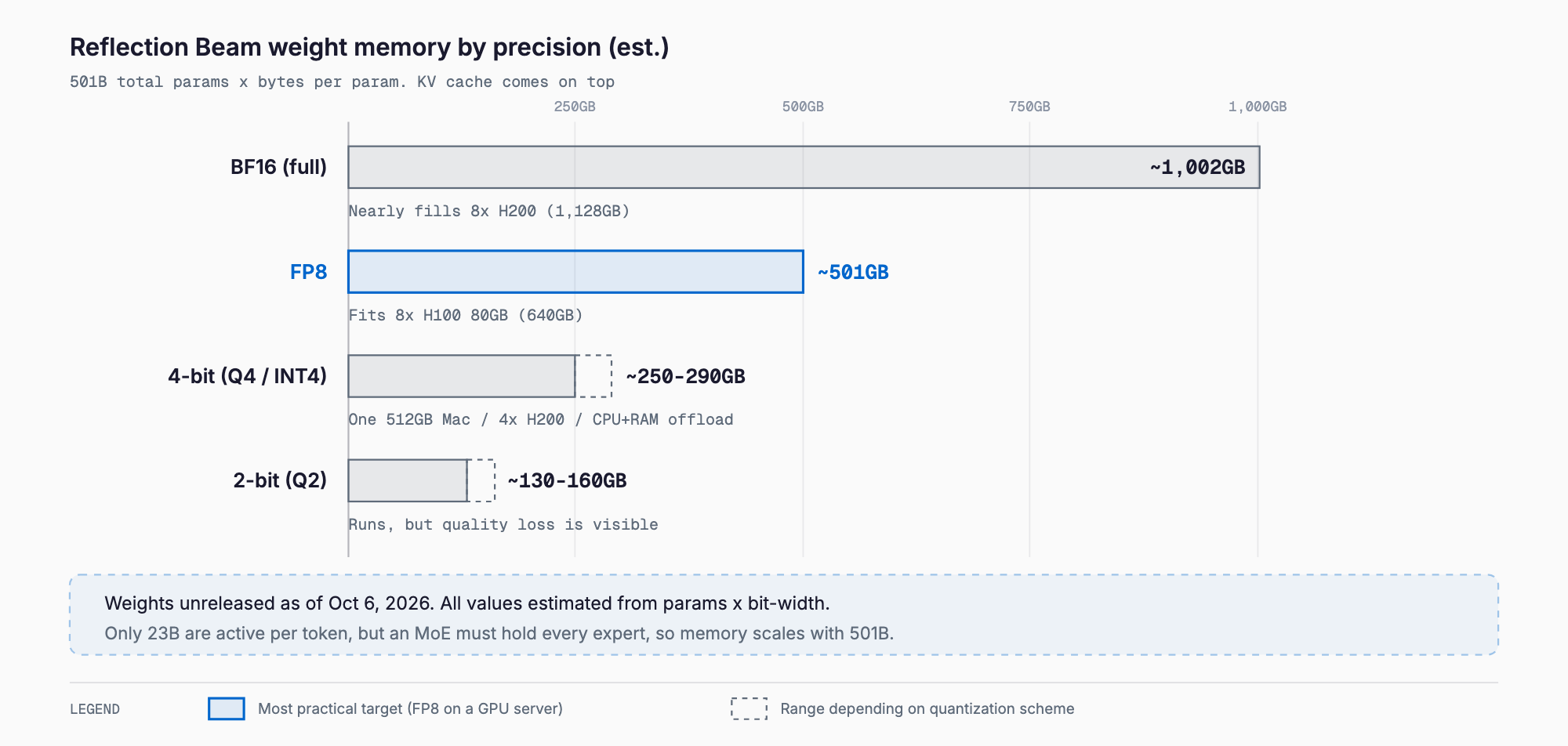
Running Reflection AI's Beam locally should take roughly 1,002GB for BF16, 501GB for FP8, 250-290GB for 4-bit-class quantization, and 130-160GB for 2-bit-class for the weights alone (all estimates). It is a 501B-parameter MoE with 23B active parameters under the Apache 2.0 license. As of October 6, 2026, however, the weights, technical report, and model card are not yet released, and neither a Hugging Face repository name nor official VRAM figures have been published. This article is a pre-release estimate computed from the official blog's disclosed facts, and it will be updated with measured numbers once the weights are out.
Beam was announced on October 5, 2026. According to the official blog, the model is in final red-teaming, early-access signup is open, and the weights, technical report, and model card are slated for release later this month. To avoid mixing up sources, this article separates facts stated in the official blog from our own estimates.
Requirements at a glance (estimates)
Weight size is computed as 501B parameters times bytes per parameter, then padded by roughly 15% for KV cache and activations at a short context (around 8K), the same convention we use in our other requirements articles. Beam's layer count and KV-head configuration are not disclosed, so KV cache cannot be calculated individually yet.
| Precision | Weights only (est.) | Practical target (est., short context) | Quality loss |
|---|---|---|---|
| BF16 (full precision) | ~1,002GB | ~1,150GB | None |
| FP8 | ~501GB | ~580GB | Negligible |
| 4-bit class (Q4 / INT4) | ~250-290GB | ~290-330GB | Small (practical) |
| 2-bit class (Q2 / 1.58-bit class) | ~130-160GB | ~150-185GB | Noticeable |
To check quickly whether your own GPU or Mac can run it, our VRAM calculator (free, no sign-up) estimates required memory from the model, quantization and context length. Reflection Beam is in the model list (estimates until the weights are released).
The 4-bit range is wide because block scale metadata raises the effective bit-width to roughly 4.0-4.6 bits depending on the quantization scheme; 2-bit varies similarly. If you push the context toward 1M tokens, KV cache adds substantially on top of this table. KV cache grows roughly in proportion to context length, so the longer your prompts, the further real memory use drifts from these numbers. We explain the mechanism in our KV cache and context length VRAM guide.
What Beam is: facts from the official blog
Beam is an open-weights-to-be LLM from Reflection AI: a sparse MoE with 501B total and 23B active parameters per token. It uses fine-grained routed experts and interleaved local and global attention. Context length was extended from 256K during RL training to 1M tokens in mid-training.
| Item | Detail | Source / status |
|---|---|---|
| Total parameters | 501B | Official blog |
| Active parameters | 23B | Official blog |
| Architecture | Sparse MoE (fine-grained routed experts, interleaved local/global attention) | Official blog |
| Context length | 1M tokens (256K during RL) | Official blog |
| License | Apache 2.0 | Official blog |
| Pretraining | 23.8T tokens on 6,144 NVIDIA GB300 GPUs in under 4 weeks | Official blog |
| Reinforcement learning | About 10.5K NVIDIA GB300 GPUs | Official blog |
| Weights, tech report, model card | Planned for later in October 2026 | Not yet released |
| Hugging Face repo name | Not announced (will be added on release) | Not announced |
| API pricing | Not announced (will be added on release) | Not announced |
| Official VRAM figures | Not announced (will be added on release) | Not announced |
| Supported frameworks | Not announced (will be added on release) | Not announced |
The blog also claims 3-4x less inference compute than GLM-5.2 on reasoning tasks. That is the developer's own claim and we found no independent verification. Note that this mainly affects per-token compute, not the memory you need, as explained below.
Benchmarks (all developer-reported)
The figures below come from the official blog. They are self-reported by the developer and we found no independent third-party verification. Rankings and gaps may shift once outside evaluations appear after the weights are released.
| Benchmark | Score | Area |
|---|---|---|
| AIME 2026 | 97.8 | Math and reasoning |
| GPQA Diamond | 90.5 | Graduate-level science QA |
| SWE-bench Verified | 80.9 | Software engineering |
| Terminal-Bench v2.1 | 80.1 | Terminal and agentic tasks |
| DeepSearchQA | 80.1 | Research / search QA |
Why memory is sized by the 501B total, not the 23B active
An MoE uses only some experts per token, but which experts are chosen next depends on the input. In practice all expert weights must stay in memory, so required capacity is set by the total parameter count (501B). The 23B active parameters affect speed. At 4-bit class, each token reads about 12GB of weights in theory (23B x 0.5 byte), so on hardware with enough memory bandwidth Beam should run far faster than a dense 501B model. That property is what makes expert offload to CPU plus large RAM realistic, as discussed below.
Quantization: which bit-width to choose
Quantization compresses weights by using fewer bits each. Going from BF16 (16-bit) to 8-bit halves memory, and to 4-bit cuts it to about a quarter. Accuracy drops somewhat in exchange: 8-bit is nearly lossless and 4-bit class is generally practical, while 2-bit and 1.58-bit class visibly degrade output, so treat them as options for smoke tests and light use. MoEs contain many small experts, and how quantization affects quality varies by model, so Beam's quality at low bit-widths cannot be judged until real quantized releases exist.
As a rule of thumb: FP8 if you can afford quality, 4-bit class as the realistic local choice, and 2-bit class as a last resort when memory is short. BF16 needs about 1,002GB for weights alone and is hard to justify unless you are doing research or training.
GPU configurations (estimates)
This table is a pre-release estimate based on whether the weights fit, with headroom for KV cache and overhead noted. Whether a setup actually works depends on the framework's parallelism (tensor or expert parallel) and on context length.
| GPU setup | Total VRAM | BF16 | FP8 | 4-bit class | 2-bit class |
|---|---|---|---|---|---|
| H100 80GB x 4 | 320GB | No | No | Barely (short context only) | Comfortable |
| H100 80GB x 8 | 640GB | No | Fits, little headroom (long context is hard) | Comfortable | Comfortable |
| H200 141GB x 4 | 564GB | No | Weights barely fit | Comfortable | Comfortable |
| H200 141GB x 8 | 1,128GB | Weights fit, almost no headroom | Comfortable (long context in reach) | Comfortable (suits long context) | Overkill |
| B200 192GB x 8 | 1,536GB | Comfortable | Comfortable | Overkill | Overkill |
In short: 8x H200 for comfortable FP8, 8x H100 for FP8 on a tighter budget (keep context modest), and 4x H200 or 8x H100 for 4-bit class. BF16 on 8x H200 leaves only about 126GB beyond the roughly 1,002GB of weights, so once KV cache is added there is almost no margin.
Running on Apple Silicon
Apple Silicon lets the GPU use unified memory, making it a realistic way to try large MoEs at your desk. A 512GB configuration (such as a Mac Studio with M3 Ultra) can hold the roughly 250-290GB of 4-bit-class weights. After subtracting OS and app usage and KV cache, though, headroom is small even at 4-bit once you lengthen the context. Dropping to 3-bit or 2-bit class widens the margin at the cost of quality.
FP8 at about 501GB does not fit in a 512GB machine. Clustering two Macs to pool memory has been demonstrated in research, but stable operation is a high bar. Whether Apple Silicon runtimes such as llama.cpp (Metal) or MLX support Beam's architecture is unconfirmed and must be checked after the weights are released. For the same line of reasoning applied to a comparable model, see our GLM-5.2 requirements article.
MoE offload to CPU and large RAM
Because only 23B parameters are active, you can place expert weights in large system RAM and keep only attention and shared layers on the GPU. A server with 384-512GB of DDR5 can hold the roughly 250-290GB of 4-bit-class weights in RAM, and adding one or two GPUs for the hot layers improves speed.
Memory bandwidth gives a rough speed bound. If each token reads about 12GB at 4-bit class, a server with around 300GB/s of bandwidth has a theoretical ceiling of a few dozen tokens per second. In practice, transfer and parallelism overhead typically leaves a fraction of that (also an estimate). It works for chat but not for heavy batch or long agent loops. Desktop RAM (128-256GB) cannot hold 4-bit-class weights, leaving only 2-bit class as a tight option.
Configurations by budget (estimates)
| Budget | Example setup | Realistic precision | Best for |
|---|---|---|---|
| Low (CPU offload) | 384-512GB DDR5 server + 1 GPU | 4-bit class (slow) | Personal testing, occasional use |
| Mid | Mac Studio 512GB class | 3-4-bit class (short context) | Developer evaluation |
| High | 8x H100 80GB | FP8 (short-mid context) / 4-bit class | Team-level self-hosting |
| Higher | 8x H200 141GB | FP8 (long context in reach) | Production, long context |
| Pay-as-you-go | Rented cloud GPUs | Any | Short evaluations (compare total cost with API) |
Costs vary widely, so treat these as rough tiers. Unless you plan sustained use, evaluating on hourly cloud GPUs, or on an API once one exists, is the safer way to avoid a bad investment. Beam's official API pricing is not announced (will be added on release).
Comparison with other large open MoEs
The table uses figures we can confirm from our existing articles. The smaller the ratio of active to total parameters, the more an MoE trades large memory for light per-token compute.
| Model | Total | Active | Context | License | 4-bit memory guide |
|---|---|---|---|---|---|
| Reflection Beam | 501B | 23B | 1M | Apache 2.0 | ~250-290GB (est., weights only) |
| GLM-5.2 | 753B | ~40B | 1M | MIT | ~430GB |
| DeepSeek V4-Pro | 1.6T | 49B | 1M | MIT | ~920GB |
| DeepSeek V4-Flash | 284B | 13B | 1M | MIT | ~160GB |
| K-EXAONE 2.0 | 750B | 37B | 262,144 | Apache 2.0 | ~375-420GB |
| Atria Dawn Preview | 744B | Not officially disclosed | 256K | MIT | ~400GB (est.) |
Beam has fewer total parameters than GLM-5.2 or K-EXAONE 2.0 and a lighter 23B active set; at the same 4-bit class its memory needs come to roughly two thirds of theirs. It is still larger than DeepSeek V4-Flash (284B) and not a size you casually run on a personal PC. We do not rank benchmark results here because they are each vendor's self-reported numbers.
What you can do now (before the weights are out)
- Read the official blog and check the early-access signup status (API availability and terms are not announced)
- Free up disk space in advance (about 501GB for FP8, 250-290GB for 4-bit class, 1,002GB for BF16)
- Use the tables above to judge whether your hardware can reach 4-bit class
- Validate your inference stack (vLLM, SGLang, llama.cpp, etc.) on an existing model of similar scale first
- If you plan to use long contexts, budget KV cache memory separately
- Note what to check on release day: repo name, official quantized builds, supported frameworks, minimum configuration
The Hugging Face repository name, API pricing, supported frameworks, and official VRAM figures are all not announced (will be added on release). Once the weights are out we will replace the estimates in this article with measured values.
Troubleshooting out-of-memory errors
- OOM at startup: the weights do not fit. Drop one precision step (FP8 to 4-bit class) or add GPUs
- OOM partway through: likely KV cache. Lower the max context length, reduce concurrent requests, or consider KV cache quantization
- Only long prompts fail: a 1M-token setting needs a very large KV cache. Verify at 32K-128K first
- Offload setup is slow: memory bandwidth is the bottleneck. Check DDR5 channel count and revisit expert placement and which layers go on the GPU
- GPUs have free memory but the model will not load: parallelism constraints can prevent using every GB if the GPU count does not divide evenly. Check GPU count and parallel settings
- Output quality is terrible: 2-bit class degrades heavily. Try 3-bit or higher
Summary
Reflection Beam is a 501B-total, 23B-active Apache 2.0 MoE. For local use expect roughly 250-290GB at 4-bit class, 501GB at FP8, and 1,002GB at BF16 (weights-only estimates). 8x H200 runs FP8 comfortably, 4x H200 or 8x H100 handles 4-bit class, and a 512GB Mac or a large-RAM server puts 4-bit class and below within reach. The light 23B active set makes MoE offload realistic, but required memory is still set by the total parameter count. We will update this article with measured values after the weights and technical report are published. For comparisons among large MoEs, see our GLM-5.2, DeepSeek V4, and Atria Dawn Preview articles.
FAQ
How much VRAM does Reflection Beam need?
Estimated from 501B total parameters, weights alone take about 1,002GB at BF16, 501GB at FP8, 250-290GB at 4-bit class, and 130-160GB at 2-bit class. KV cache and overhead come on top and grow with context, up to the 1M-token window. Official VRAM figures are not announced and will be added on release.
Are Beam's weights available yet?
Not as of October 6, 2026. The official blog says the model is in final red-teaming and the weights, technical report, and model card are planned for later this month. The Hugging Face repository name has not been announced either.
With 23B active parameters, can it run in 23B-class VRAM?
No. An MoE cannot know in advance which experts will be chosen, so all expert weights generally have to stay in memory. Required capacity is set by the 501B total, while the 23B active parameters mainly affect generation speed. An offload setup that keeps experts in CPU RAM can reduce VRAM needs, though.
Can a 512GB Mac Studio run Beam?
The roughly 250-290GB of 4-bit-class weights should fit, but after OS use and KV cache the margin is small and long contexts will be tight. FP8 at about 501GB does not fit. Whether llama.cpp or MLX supports Beam's architecture is unconfirmed and needs checking after the weights are released.
Is Beam lighter to run than GLM-5.2?
On weight memory, yes by our math: GLM-5.2 (753B) is about 430GB at 4-bit versus an estimated 250-290GB for Beam. The official blog also claims 3-4x less inference compute on reasoning tasks, but that is the developer's claim and we found no independent verification.
Related free tools (no sign-up, instant results)
Feel free to contact us
Contact Us