RemoveMacAI: Disable Apple Intelligence on macOS 27, Reclaim
12GB
RemoveMacAI is an MIT-licensed CLI that turns off Apple Intelligence on macOS 27 and deletes about 12GB of models. Install, commands, caveats, MDM comparison.
RemoveMacAI is an open-source CLI (MIT License, github.com/omlahore/RemoveMacAI) that turns off Apple Intelligence features on macOS 27 and deletes the on-device model files to reclaim disk space. The short version: macOS 27 has no single Apple Intelligence switch, and models stay on disk even after you disable features one by one, so this tool is a practical option if you want both the features off and the storage back. It reached the Hacker News front page (about 576 points) on October 5, 2026.
This article covers why the tool is needed, what it disables and deletes, how to install and use it, how it works, what you lose, and how it compares with alternatives. For background on the technology behind Apple Intelligence, see our article on Apple Foundation Models.
Why RemoveMacAI is needed
macOS 27 provides no one-click way to disable Apple Intelligence. Siri, Writing Tools, Genmoji, Image Playground and per-app summaries are scattered across separate settings, and you have to find and switch off each one by hand. Even then, the on-device models behind those features remain on disk.
Storage matters too. According to Tom's Guide, Apple Intelligence can use up to roughly 30GB of storage on macOS 27. The models RemoveMacAI removes total about 12GB, which is a noticeable amount on a Mac with a 256GB or 512GB SSD.
Motivations vary: people who simply do not use Apple Intelligence, teams that want AI features off for policy reasons, and people who want free space for running local LLMs on their Mac. For the last group, the reclaimed space could hold models for a local inference setup such as oMLX, an LLM inference server for Apple Silicon.
What gets disabled and what gets deleted
RemoveMacAI does two things: it disables features and it deletes models. The features it turns off are:
- Siri (including Hey Siri)
- Writing Tools
- Genmoji
- Image Playground
- ChatGPT extension
- Summaries in Mail, Messages, Safari, Notes and notifications
- Mail smart replies
- Inline text predictions
- Spatial Photos
- Photos Clean Up
- Xcode predictive code completion
The models it deletes are the Apple Intelligence foundation models, image generation models, and the models for Genmoji, Spatial Photos, Photos Clean Up and Xcode code completion. In total, about 12GB is reclaimed.
Installation and requirements
The requirements are straightforward: an Apple silicon Mac running macOS 27. It has been tested on macOS 27.0; for macOS 27.0.1 you need v0.2.3 or later. macOS 26 and earlier are not supported.
There are two ways to install. The first is the official install script, which downloads the latest release, verifies its SHA-256 checksum, and runs from temporary storage. Nothing is permanently installed.
curl -fsSL https://raw.githubusercontent.com/omlahore/RemoveMacAI/main/install.sh | bashThe second is Homebrew, which avoids the security concerns of piping a script into a shell, discussed below.
brew install omlahore/tap/removemacai
removemacai
Usage in the shortest steps
In the simplest case, run removemacai. It shows the current state and turns Apple Intelligence off. The main commands are:
# Show current state and turn Apple Intelligence off
removemacai

# Show each feature and model disk usage
removemacai status

# Preview without applying
removemacai off --dry-run

# Turn off everything except the listed features
removemacai off --keep <features>

# List feature names usable with --keep
removemacai features

# Undo everything
removemacai revert
If this is your first time, start with removemacai status, then run removemacai off --dry-run to see what would happen before applying anything. If you want to keep, say, Siri, check the names with removemacai features and pass them to --keep.
To undo, use removemacai revert. If you used the install script, you can also pass revert through it:
curl -fsSL https://raw.githubusercontent.com/omlahore/RemoveMacAI/main/install.sh | bash -s revertHow it works and how safe it is
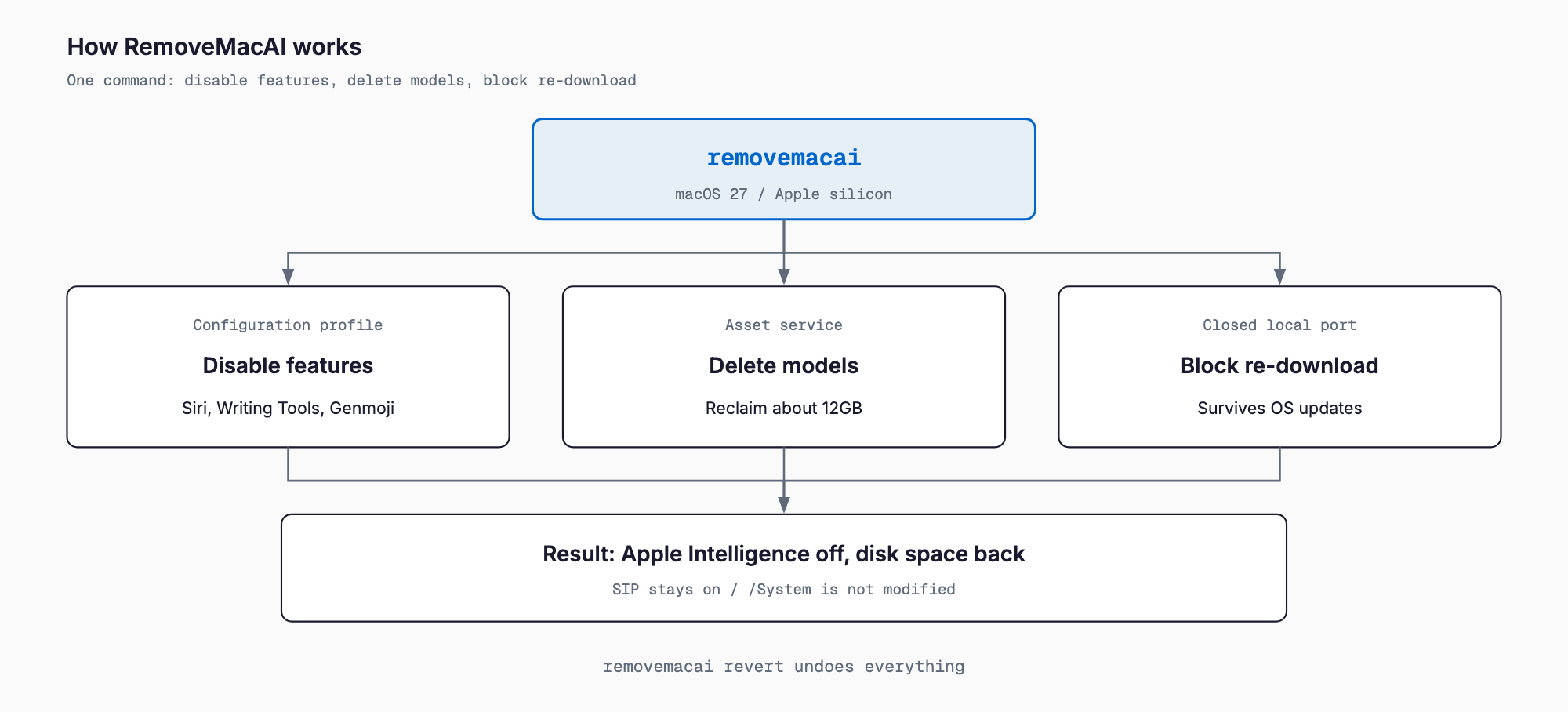
RemoveMacAI applies a configuration profile that uses Apple's own restriction keys. For settings that have no restriction key, it forces the setting values instead. The profile persists through OS updates and is removed by revert.
Models are removed through Apple's asset service. To keep them from coming back, the tool redirects model downloads to a closed local port, which stops macOS from fetching them again.
On the safety side, System Integrity Protection (SIP) stays enabled and the tool does not modify /System directly. It makes no network requests and collects no data. It is built on pared by 4evy.
The following is general best-practice advice. Piping curl into bash runs remote code, so read install.sh first or prefer Homebrew. Try --dry-run before applying changes. On a company-managed Mac, a configuration profile will be installed, which may conflict with MDM profiles; check with your IT or MDM administrator first. Managed organizations can alternatively use MDM restriction keys directly.
What you lose
Turning these features off has trade-offs. Know these before you run it.
- Dictation keeps working, because it uses separate speech models
- Storage settings may still list Apple Intelligence until macOS deletes the files itself
- In macOS 27, the Spotlight window runs as a process named Siri
- Apps using the Foundation Models framework, and the Shortcuts Model action, are affected
- Visual Intelligence and natural-language Calendar editing become unavailable
In particular, third-party apps that rely on the Foundation Models framework may lose their on-device AI features. Check whether the apps you use depend on Apple's on-device models before you run the tool.
Comparison with alternatives
RemoveMacAI is not the only way to turn Apple Intelligence off. Here is how the options compare.
| Method | Features off | Model deletion / space reclaimed | Prevents re-download | Reversible | Best for |
|---|---|---|---|---|---|
| RemoveMacAI | Yes, in one step | Yes, about 12GB | Yes, redirects downloads | Yes, via revert | Individuals who want both features off and space back |
| Manual toggles in System Settings | Partial, one by one (no single switch) | No, models remain | No | Yes, via settings | People who only want to stop a few features |
| MDM restriction profile | Yes | Not guaranteed | Depends on setup | Yes, remove profile | Organization administrators |
| Leave it on | No | No | n/a | n/a | People who use Apple Intelligence |
Manual toggles are easy but return no space. MDM suits uniform policy across an organization, though model deletion is not guaranteed. For a personal Mac where you want features off and storage back at once, RemoveMacAI takes the fewest steps.
FAQ
Is RemoveMacAI safe?
It keeps SIP enabled, does not modify /System directly, and works through a configuration profile built on Apple's restriction keys. It makes no network requests and collects no data. Running a remote script still carries risk, so read install.sh or install via Homebrew, and try --dry-run first.
How do I undo it?
Run removemacai revert to undo everything. If you used the install script, curl ... | bash -s revert does the same. The profile is removed by revert.
Does it work on Intel Macs or macOS 26?
No. It targets Apple silicon Macs running macOS 27. It has been tested on macOS 27.0; for macOS 27.0.1 use v0.2.3 or later. macOS 26 and earlier are not supported.
Will macOS updates download the models again?
The applied configuration profile persists through OS updates, and the tool redirects model downloads to a closed local port to prevent re-downloading.
Does dictation still work?
Yes. Dictation uses speech models separate from Apple Intelligence. Siri and Hey Siri, however, are turned off.
In short, RemoveMacAI fills a gap in macOS 27 by letting you turn Apple Intelligence off in one step and reclaim the storage, in a way that can be reversed. On a personal Mac, try --dry-run first; on a company Mac, talk to your IT team before using it.
Related free tools (no sign-up, instant results)
Feel free to contact us
Contact Us