Ghostty 1.4 Explained
Scrollback Compression, Full Kitty Graphics Support, ghostty +ssh, Breaking Changes, and How It Compares to iTerm2, WezTerm, Kitty, Alacritty and Warp (2026)
Ghostty 1.4 guide: scrollback compression, 5.7x faster parsing, ghostty +ssh, copy-on-select changes, Ubuntu 24.04 limits, iTerm2 vs WezTerm. Updated Oct 2026
Ghostty is an open-source (MIT) GPU-accelerated terminal emulator led by Mitchell Hashimoto. The short verdict on Ghostty 1.4, released on October 27, 2026: it covers 100% of the public Kitty graphics specification, adds scrollback compression and sizable speed and memory gains, but changes some defaults such as copy-on-select, so review your config before upgrading.
According to the official release notes, the release slipped about a month and 1.5 is planned for March 2027. It reached the top of Hacker News with over 1,000 points. This article is based on the official release notes (ghostty.org/docs/install/release-notes/1-4-0) and the official install page, and covers new features, performance numbers, breaking changes, requirements, usage, and how Ghostty differs from other terminals (as of October 2026).
What is Ghostty
Ghostty aims for speed, rich features, and platform-native UI at the same time. The core is written in Zig, and the UI is native to each OS: Swift/AppKit on macOS and GTK on Linux. Configuration lives in a single text file; there is no GUI settings screen.
| Item | Details |
|---|---|
| Author | Mitchell Hashimoto (known as a HashiCorp co-founder) |
| License | MIT (free, open source) |
| Implementation | Zig core; macOS = Swift/AppKit, Linux = GTK |
| Platforms | macOS, Linux, FreeBSD (Windows GUI dropped from the roadmap) |
| Config | Text file (~/.config/ghostty/config) |
| Latest | 1.4.0 (Oct 27, 2026); 1.5 planned for March 2027 |
| Library | libghostty, the terminal core split out as a component; products such as cmux build on Ghostty |
Because the terminal engine is available as libghostty, other tools build on it, such as the Ghostty-based agent terminal cmux and tools like Corgi. Improvements to the terminal itself spill over to that ecosystem.
Main new features in 1.4
The headline items below all come from the official release notes.
| Area | Details |
|---|---|
| macOS 27 support | Fixes for titlebar tab placement and tab bar background |
| Kitty graphics | Animation and relative placement; 100% of the public spec covered |
| Scrollback compression | macOS and 64-bit Linux; default limit raised from 10MB to 50MB |
| New GTK renderer | New OpenGL/EGL renderer with triple buffering and true fractional scaling |
| Kitty clipboard | OSC 5522 protocol support (macOS and GTK) |
| Split drag and drop | Now available on GTK too |
ghostty +ssh | Drop-in ssh wrapper that installs terminfo automatically and forwards environment variables |
The most practical additions are scrollback compression and ghostty +ssh. The former changes the feel for developers who stream large logs; the latter avoids the classic garbled-display problem on servers that lack your terminfo, without manual steps.
New settings and terminal features
| Kind | Item | Description |
|---|---|---|
| Setting | scrollback-compression | Toggle scrollback compression |
| Setting | scrollback-limit-lines | Limit scrollback by line count |
| Setting | middle-click-action | Middle-click behavior |
| Setting | drag-handle | Drag handle visibility (auto / always / never) |
| Setting | link-osc8 | OSC 8 hyperlink handling |
| Setting | clipboard-write-limit-bytes | Clipboard write limit (default 64MiB) |
| Setting | vt-window-resize-allowed / vt-xt-checksum-report / vt-xt-checksum-extension | VT-related permissions and reports |
| Setting (GTK) | gtk-horizontal-tab-scroll / gtk-tabs-inverted | Horizontal tab scrolling and inversion |
| Extended | copy-on-select | Accepts none / primary / clipboard / both |
| Extended | window-padding-balance | Now accepts equal |
| CLI | +explain-config / +new-tab / +toggle-quick-terminal | See below |
| Binding | move_tab_to_new_window | Move a tab to a new window |
Terminal features added include DECSTR, DECBKM (mode 67), mode 2033 visibility reports, and CSI 19 t. Four localizations were added: Basque, Belarusian, Danish, and Serbian. GTK gains window renaming and global keybindings through the vicinae-hotkey-v1 protocol. macOS gains fuzzy search in the command palette, a Review Windows flow on quit, and the pid, tty, and name override AppleScript properties.
Performance improvements (official numbers)
All numbers below are from the official release notes, with the test environment noted where given. Real-world results vary.
| Item | Improvement | Note |
|---|---|---|
| pty I/O throughput | 25-55% higher | macOS (M4 Max) |
| ASCII parsing | 128MB/s to 725MB/s (about 5.7x) | |
| cat of 150MB text | 1.5s to 566ms | macOS |
| Scrollback physical memory | 70-90% lower | via compression |
| Memory per new terminal | 128KiB to about 16KiB | macOS |
| GPU memory, 20 hidden tabs | about 385MiB to 18MiB | macOS |
| Kitty image transfer parsing | about 16x | 64MiB, x86_64 Linux |
| Resize with large scrollback | about 6x | |
| Parsing large OSC sequences | about 30x | |
| Launch to window shown | about 15% faster | macOS |
| First frame | about 27% sooner | macOS |
If you keep many tabs open, the drop in GPU memory for hidden tabs matters. If you run several agents that produce long output, the 70-90% reduction in scrollback memory is the one to watch. Keep in mind these are the project's own measurements, not third-party reproductions.
Breaking changes and migration notes
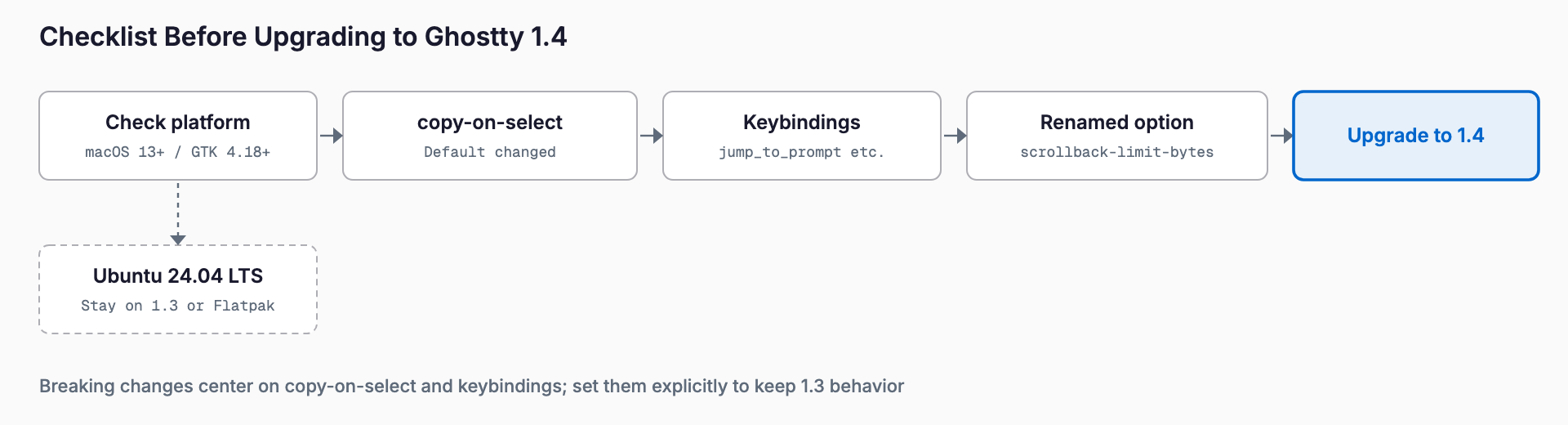
This is the section to check before upgrading. Defaults changed, so updating without touching your config alters behavior.
| Change | Details | What to do |
|---|---|---|
copy-on-select = clipboard | Now copies to the system clipboard only (old behavior is both) | Use both for the old behavior |
macOS copy-on-select default | Now none | Set primary to restore 1.3 behavior |
macOS cmd+arrow_up/down | Bound to jump_to_prompt again | Check for conflicts with your own bindings |
GTK ctrl+shift+page_up/page_down | Now move_tab | jump_to_prompt moved to ctrl+shift+arrow_up/down |
+ssh-cache | Takes the destination as a positional argument | New --prune=30d flag |
scrollback-limit | Renamed scrollback-limit-bytes | Old name is deprecated but still works |
A config like the following keeps 1.3-era behavior while moving to the new names. Adjust values to taste.
# ~/.config/ghostty/config

# Restore the pre-1.4 macOS select-to-copy behavior
copy-on-select = primary

# To fill both primary and system clipboards
# copy-on-select = both

# scrollback-limit is deprecated; use the new name (bytes)
scrollback-limit-bytes = 52428800

# Scrollback compression (macOS / 64-bit Linux)
scrollback-compression = true

# Example binding to move a tab to a new window
keybind = cmd+shift+n=move_tab_to_new_window
The old scrollback-limit still works, so there is no rush, but moving to the new name is the safer choice for the future.
System requirements
| Environment | Requirement | Note |
|---|---|---|
| macOS | macOS 13 Ventura or later | 13 will be dropped in a future release; macOS 27 is supported |
| Linux / FreeBSD (GTK) | GTK 4.18, libadwaita 1.7 | Previously 4.14 / 1.5; a big jump |
| GPU | OpenGL 4.3 or later (via EGL) | Needed by the new GTK renderer |
| Windows | No GUI | GUI roadmap withdrawn; libghostty-vt builds and is CI-tested with MSVC/GNU |
The biggest trap is the Linux requirement. The release notes state that Ubuntu 24.04 LTS does not meet the GTK 4.18 / libadwaita 1.7 requirement, so it has to stay on an older version. On Windows, note that the GUI is no longer on the roadmap.
Installing and upgrading
Ghostty is free and open source. The official install page (ghostty.org/docs/install/binary) lists the following.
| OS | Method | Command or steps |
|---|---|---|
| macOS | Official .dmg | Download the .dmg from the download page, open it, drag to Applications |
| macOS | Homebrew cask (community-maintained) | brew install --cask ghostty |
| macOS | Nix | Package name ghostty-bin |
| Arch Linux | extra repo | pacman -S ghostty |
| Ubuntu | Official repo from 26.04 | apt install ghostty |
| Fedora | COPR or Terra | dnf copr enable scottames/ghostty, then dnf install ghostty |
| Snap | Classic | snap install ghostty --classic |
| Others | Alpine, Gentoo, NixOS, Solus, Void, etc. | Distro packages (see the official page) |
Linux distro packages are maintained by the distros, not the Ghostty project. For community binaries such as the Debian/Ubuntu .deb and AppImage, the official page warns of security and compatibility risks. Read any curl | bash script before running it.
To upgrade on macOS, use brew upgrade --cask ghostty with Homebrew, or replace the app with the new .dmg. On Linux, follow your package manager. On environments that miss the requirements, such as Ubuntu 24.04, wait until a 1.4 package is available or move to an environment that meets GTK 4.18. The 1.4 release notes suggest staying on an older version or using the Flatpak package as workarounds for Ubuntu 24.04 LTS. The install page does not document Flatpak steps, so check the distributor’s instructions if you go that route.
Usage: new CLI actions and config examples
Ghostty has no settings GUI; you work with the config file and CLI actions of the form ghostty +action. The main CLI items added or changed in 1.4 are below.
| Command | Role |
|---|---|
ghostty +ssh | Drop-in ssh wrapper that installs terminfo and forwards environment variables |
ghostty +ssh-cache | Manage the ssh cache; takes a destination positionally, --prune=30d cleans old entries |
ghostty +explain-config | Look up what config options mean |
ghostty +new-tab | Open a new tab in a running Ghostty |
ghostty +toggle-quick-terminal | Toggle the quick terminal |
# Connect without display glitches even if the remote lacks terminfo
ghostty +ssh user@example.com

# Remove ssh cache entries older than 30 days
ghostty +ssh-cache --prune=30d

# Check what config options mean
ghostty +explain-config

# Add a tab to the running Ghostty
ghostty +new-tab

# Toggle the quick terminal from a script or shortcut
ghostty +toggle-quick-terminal
Arguments can change between versions, so check the actual syntax with something like ghostty +ssh --help. +toggle-quick-terminal and +new-tab suit calls from OS shortcuts or other tools.
A minimal everyday config looks like this. Comments are our own notes.
# ~/.config/ghostty/config

font-size = 14
window-padding-balance = equal
middle-click-action = paste
clipboard-write-limit-bytes = 67108864

# For heavy output
scrollback-limit-bytes = 104857600
scrollback-compression = true
Check the official docs for the values middle-click-action accepts; the value above is only an example.
How it differs from other terminals
Here is a comparison within the range of commonly known facts. Features change quickly, so read the cells as hedged and check each project's current docs.
| Terminal | Platforms | Rendering | Config | Multiplexing | Price / License | Notes |
|---|---|---|---|---|---|---|
| Ghostty | macOS / Linux | GPU | Text config file | Built-in tabs and splits (not tmux-class) | Free, MIT | Native UI, 100% of Kitty graphics spec |
| iTerm2 | macOS only | GPU (Metal) | Mainly GUI preferences | Built-in tabs and splits, tmux integration | Free, GPL | Very feature-rich with a long history |
| WezTerm | macOS / Linux / Windows | GPU | Lua scripting | Built in | Free, MIT | Highly configurable, cross-platform |
| Kitty | macOS / Linux | GPU | Text config file | Built-in windows and layouts | Free, GPL | Originator of the Kitty graphics and keyboard protocols |
| Alacritty | macOS / Linux / Windows | GPU | TOML | None (pair with tmux etc.) | Free, Apache 2.0 | Minimal and light; no tabs or splits |
| Warp | macOS / Linux / Windows | GPU | Mostly in-app GUI | Its own block-based UI | Free plan; paid plans reportedly exist | Distinct UI with AI features; account reportedly required |
| Windows Terminal | Windows only | GPU | JSON / GUI | Tabs and panes | Free, MIT | Made by Microsoft, the default choice on Windows |
Ghostty's position is native-feeling UI per OS, text-file configuration, and speed. If you rely on terminal apps that use Kitty graphics, full coverage of the spec in 1.4 is a plus.
Which terminal fits whom
- Moving from iTerm2: If you use its detailed GUI settings, triggers, and tmux integration heavily, there is no need to move. If you want lighter settings, faster startup, or dotfiles-managed config, it is worth a try.
- Versus WezTerm: Choose WezTerm for flexible Lua customization and Windows support. Choose Ghostty if you skip Windows and prefer native look and simple config.
- Versus Kitty: Both handle Kitty graphics. The official notes say Ghostty now covers 100% of the public spec; Kitty offers the breadth of the original.
- Versus Alacritty: Alacritty has neither tabs nor splits and assumes tmux or similar. Ghostty has tabs and splits built in.
- Versus Warp: Warp centers on its own experience such as AI features and a block-based UI. Ghostty makes the conventional terminal fast and polished.
- Versus Windows Terminal: Ghostty has no Windows GUI, so it is not a candidate there.
If you need long-lived sessions and detaching like tmux, pair the terminal with a multiplexer such as herdr, Corgi, or tmux.
Who should upgrade now, and who should wait
| Group | Who | Why |
|---|---|---|
| Upgrade now | People handling large logs or agent output | Scrollback compression and pty throughput gains |
| Upgrade now | People who keep many tabs open | Hidden-tab GPU memory about 385MiB to 18MiB |
| Upgrade now | macOS 27 users | Includes titlebar and tab bar fixes |
| Upgrade now | People who SSH into old servers | ghostty +ssh avoids the terminfo problem |
| Wait | Ubuntu 24.04 LTS users | Does not meet GTK 4.18 / libadwaita 1.7 |
| Wait | macOS 12 or earlier | macOS 13 or later required |
| Wait | Heavy customizers of copy-on-select or keybinds | Defaults and bindings changed; check first |
| Not applicable | Anyone wanting a Windows GUI | GUI roadmap withdrawn |
If you used copy-on-select on macOS, you will likely notice that selecting no longer copies right after updating. Adding copy-on-select = primary from the example above first is the safe move.
Notes for packagers and builders
- Zig 0.17 is required
- GTK builds use the system EGL (pkg-config egl)
- New build option -Dinstalled-exe-path
- Because GTK 4.18 / libadwaita 1.7 are required, packages for older distros may stay on older versions
If you build from source, matching the Zig version is the first hurdle.
Related articles
See also cmux, an agent terminal built on Ghostty, herdr for managing agents side by side, and Corgi from the same lineage. Thinking about the terminal and the management tools on top of it together makes the choices easier to sort.
FAQ
What is the biggest change in Ghostty 1.4?
Scrollback compression (macOS and 64-bit Linux, default limit raised from 10MB to 50MB), 100% coverage of the Kitty graphics spec, a new OpenGL/EGL renderer for GTK, and ghostty +ssh. Some defaults such as copy-on-select also changed.
Is Ghostty free, and does it run on Windows?
It is free and open source (MIT). It targets macOS and Linux/FreeBSD, and the Windows GUI was withdrawn from the roadmap. libghostty-vt is built and CI-tested on Windows with MSVC and GNU.
Selecting text no longer copies after upgrading to 1.4.
On macOS the default of copy-on-select became none. Set copy-on-select = primary to restore the 1.3 behavior. The clipboard value now copies to the system clipboard only; the old behavior is both.
Can I use Ghostty 1.4 on Ubuntu 24.04 LTS?
According to the release notes, no. It needs GTK 4.18 and libadwaita 1.7, which 24.04 does not provide. Stay on an older version or move to a supported environment. The official page says Ubuntu 26.04 and later can install it with apt.
Should I switch from iTerm2 or WezTerm?
Not necessarily. If you rely on iTerm2's GUI settings and tmux integration, or on WezTerm's Lua customization and Windows support, stay. Ghostty suits people who value speed, native look, and text-file configuration.
Related free tools (no sign-up, instant results)
Feel free to contact us
Contact Us