JetBrains ThinkRail Explained
An Open-Source Agentic IDE Built Around pi, and How It Differs from Cursor, Zed and Junie (2026)
ThinkRail is JetBrains' open-source (Apache-2.0) agentic IDE that wraps the pi coding agent: worktree isolation, SPEC.md specs, MCP, early stage. Compared with Cursor, Zed and Junie. Updated Oct 2026.
ThinkRail is an open-source (Apache-2.0) agentic IDE published by JetBrains on GitHub. It puts a desktop and browser GUI around the pi coding agent, splits work into isolated git-worktree workspaces, and keeps project intent in SPEC.md files. Our verdict: it suits people who already use pi and want a screen for running several tasks in parallel and reviewing diffs, but as of October 2026 it is clearly early stage (a JetBrains incubator project on 0.x versions).
The repository was created in July 2026 and, as of October 26, 2026, has roughly 1.8k stars and appeared on GitHub's daily trending list. Nightly builds ship every few days, so development is active, but the README shows a lot of surface area still maturing. Treat it as something to try on the side rather than a primary tool for production work.
What is ThinkRail?
According to the README, ThinkRail builds a rich interface around pi, isolates work into workspaces, and gives the agent durable project knowledge through living specs and reusable skills. The roadmap mentions full extension support so ThinkRail can create the tools it needs from how you actually work. Note that it is a standalone app, not a plugin for IntelliJ IDEA or other JetBrains IDEs.
| Item | Details (from the README and GitHub) |
|---|---|
| Publisher | JetBrains (carries the JetBrains incubator project badge) |
| License | Apache-2.0 |
| Language | TypeScript (Bun-based host, React 19 UI) |
| Supported agent | pi only (@earendil-works/pi-coding-agent) |
| Form | Desktop app, or the thinkrail CLI that opens the same app in a browser |
| Platforms | macOS Apple Silicon (no Intel desktop build), Windows x64, Linux x64/ARM64 |
| Models and auth | Sign in with JetBrains AI, or connect any provider through pi's auth. ThinkRail has no accounts of its own |
| Price | The software is free and open source; model costs depend on the provider (JetBrains AI pricing not verified here) |
| Links | thinkrail.ai, GitHub |
pi is the open coding-agent harness from Earendil. It owns models, skills, compaction, cost and session state. We cover pi itself in the pi coding agent guide.
What it can do
| Feature | What the README says |
|---|---|
| Isolated workspaces | Cuts git worktrees from a repo, each with its own branch and directory. You can attach existing worktrees or work in the project folder directly |
| PR workflow | Branch status, opening PRs, CI checks and review decision, and merging from the UI (GitHub, via your own gh) |
| IDE features | Monaco editor tabs, a file tree with git change marks, terminals, and review comments on files and diffs |
| Chats | Several concurrent pi sessions per workspace, each with its own model, live token and cost readout, steering, subagents and a shared plan |
| Specs | A graph of SPEC.md files beside the code, read and maintained by the agent through spec_* tools and shown as a tree |
| Skills and workflows | Reads Agent Skills you keep for other agents in place; bundled workflows for setup, design brainstorming and shipping a PR |
| MCP | Uses servers from pi's mcp.json; asks in chat before calls not marked read-only |
| Languages | English and Simplified Chinese built in; custom locale files supported (no Japanese out of the box) |
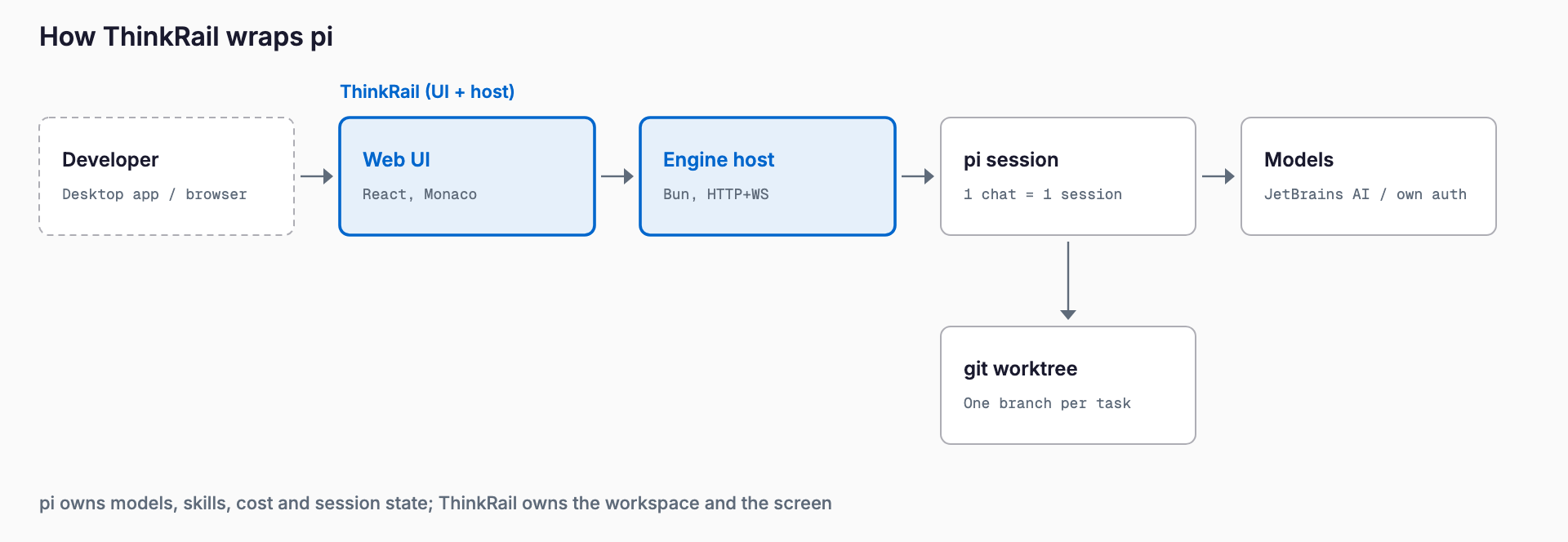
Per the README's "Under the hood" section, ThinkRail is a thin host that runs pi in-process and bridges it to a web UI. pi owns models, skills, cost and session state; the app owns the workspace, the editor and the wire, and says it never assembles prompts behind your back.
Install and pricing
There are two forms, a desktop installer and a CLI, both published with SHA256SUMS on the releases page. The CLI installs with the commands below and needs git on your PATH.
# macOS / Linux (also Windows under Git Bash)
curl -fsSL https://raw.githubusercontent.com/JetBrains/thinkrail/main/install.sh | bash

# Windows (works from cmd and PowerShell)
powershell -c "irm https://raw.githubusercontent.com/JetBrains/thinkrail/main/install.ps1 | iex"
Choose nightly or pinned builds with --channel nightly or --version 0.1.2; update with thinkrail update and remove with thinkrail uninstall. Desktop builds are a DMG on Apple Silicon, a signed setup on Windows, and a setup tarball on Linux (Ubuntu 24.04 or newer, with GTK and WebKitGTK). The README notes the macOS CLI is signed but not notarized and Linux artifacts are unsigned. ThinkRail itself is free; LLM costs depend on the provider you connect, including JetBrains AI.
Quick start
- Install the CLI with the command above (or download the desktop app)
- Sign in with JetBrains AI in the app, or connect your own provider through pi's auth
- Launch it with a repository path so it opens as a project
- Cut a workspace (a worktree), start a chat and give pi a task
- Review the diff, and steer with comments or by editing the plan
- Open a PR for the branch worth keeping and delete the rest
thinkrail ~/code/my-repo
thinkrail --help       # list flags
thinkrail --version    # print the build
How it differs from existing tools
| Tool | Positioning | Agent | Cost model | Difference from ThinkRail |
|---|---|---|---|---|
| ThinkRail | pi-only agentic IDE (OSS) | pi only | Free app, separate model costs | Centered on worktree isolation and SPEC.md; agent is fixed |
| Cursor | VS Code-based AI editor (commercial) | Its own built-in agent | Paid plans (check the official site) | More polished, deep model integration; ThinkRail is OSS built around pi |
| Zed | Fast Rust editor (OSS), multiplayer-minded | Agent panel / external agents | Editor is free; AI cost depends on setup | Editor experience first. See Zed Delta |
| JetBrains IDEs + AI Assistant / Junie | AI and JetBrains' Junie agent inside IntelliJ-family IDEs | AI Assistant, Junie | JetBrains AI subscription | Strong language-aware code analysis; ThinkRail is a separate app focused on workspace management |
| VS Code + Claude Code (or the pi CLI alone) | Existing editor plus a CLI agent | Claude Code / pi | Editor free, model costs separate | Flexible, but you assemble worktree, PR and review views yourself; ThinkRail packages them in one GUI |
A rough rule: if you already use pi and want parallel worktrees with GUI diff review, ThinkRail is worth a try. If you want to switch between Claude Code, Codex and others, an agent-agnostic environment fits better, and Orca takes a similar approach. Choose the JetBrains AI Assistant or Junie to keep a JetBrains IDE's code analysis, Zed for a light editor with collaboration, and Cursor for a polished commercial experience. Features and pricing change quickly, so check official sources before committing.
Caveats and poor fits
- Early stage: an incubator project, with 0.1.2 as the README's version example and 0.3.0 nightlies in October 2026. Behavior and safety may change
- pi only: not for plugging in Claude Code or Codex directly
- macOS is Apple Silicon only; Intel Macs need a source build
- Linux builds are unsigned and the macOS CLI is not notarized; older DMGs or local builds may be blocked by Gatekeeper
- It sends telemetry: basic usage events and error reports tied to a random installation ID (no prompts or code). Extra sharing is opt-in, and thinkrail --no-analytics turns it off
- No Japanese UI out of the box; only English and Simplified Chinese
- Vet MCP servers and any curl | bash install the usual way (checksums, permissions, approval settings)
For related thinking on running agents in parallel, see Orca and Zed Delta; pi itself is covered in the pi coding agent guide.
FAQ
Is ThinkRail free?
The software is open source under Apache-2.0 and free. LLM usage is billed separately: by your JetBrains AI plan if you sign in that way, or by your own provider. We did not verify JetBrains AI pricing for this article.
Is it an IntelliJ IDEA plugin?
No. According to the README it is a standalone desktop app, or the thinkrail CLI that opens the app in a browser. You can open a workspace in your installed IDE from it.
Can I use Claude Code or Codex with it?
The README only describes wrapping pi and does not mention other agents. If you need multiple agents, look at other tools.
Which models are supported?
The README does not list specific models. You sign in with JetBrains AI or connect any provider through pi's auth, and each chat session can use its own model.
Is it a replacement for Cursor or Junie?
Depends on the use. ThinkRail is pi-only and early stage, so for work that needs polish and stability, Cursor or JetBrains' AI Assistant and Junie are often the safer choice. ThinkRail is for people who want to try pi-centered parallel worktrees.
Are my prompts and code sent to JetBrains?
Per the README, usage events never include prompts, code, files or credentials, and error reports contain only the error type and code and where it happened in ThinkRail's code. Your model requests, of course, go to the provider you connect.
Related free tools (no sign-up, instant results)
Feel free to contact us
Contact Us