Google AI Edge Gallery for Mac: Run Gemma 4 12B Locally
Requirements, Setup, Real Benchmarks
Google AI Edge Gallery runs Gemma 4 12B (6.9GB) offline on a 16GB Apple Silicon Mac. Setup and benchmarks: 15 tok/s on a MacBook Air M4. Updated Sept 2026.
The short answer: install the Mac version of Google AI Edge Gallery and you can run Gemma 4 12B (about 6.9GB) fully offline on any Apple Silicon Mac with 16GB of memory. Google's own benchmark reports a decode speed of 15 tok/s on a MacBook Air M4 with 16GB, with a time-to-first-token of about 9.13 seconds.
The distributed DMG has been updated since its June 3, 2026 debut as v0.1.0, most recently to v0.3.0 on September 16, 2026 (file size grew from roughly 42MB to about 51MB). The model's own technical details are covered in Gemma 4 12B Explained; this guide focuses on getting the Mac app running.
Hardware Requirements at a Glance — What It Takes to Run Gemma 4 12B on a Mac
For the full Gemma 4 family hardware picture, see Gemma 4 Hardware Requirements Cheat Sheet. Here we narrow the focus to the Mac Gallery app running Gemma 4 12B specifically.
| Item | Detail |
|---|---|
| Memory | 16GB or more (Google says it runs on "a typical laptop with 16GB of RAM"; AppleInsider notes 8GB MacBooks are excluded) |
| Storage | About 6.9GB for the model (gemma-4-12B-it.litertlm) plus about 51MB for the app |
| Chip | Apple Silicon (all official benchmarks were run on Apple Silicon; Intel Mac support is not documented) |
| macOS version | Not documented officially |
| Network | Required only for the initial model download; runs fully offline afterward |
| Cost | Free (Gemma 4 is released under Apache 2.0) |
If you want a quick check on whether your own GPU or Mac can handle it, the VRAM calculator (free, no sign-up) estimates required VRAM just by picking a model, quantization, and context length — Gemma 4 12B is in the model list.
What Is Google AI Edge Gallery — Where the Mac App Fits
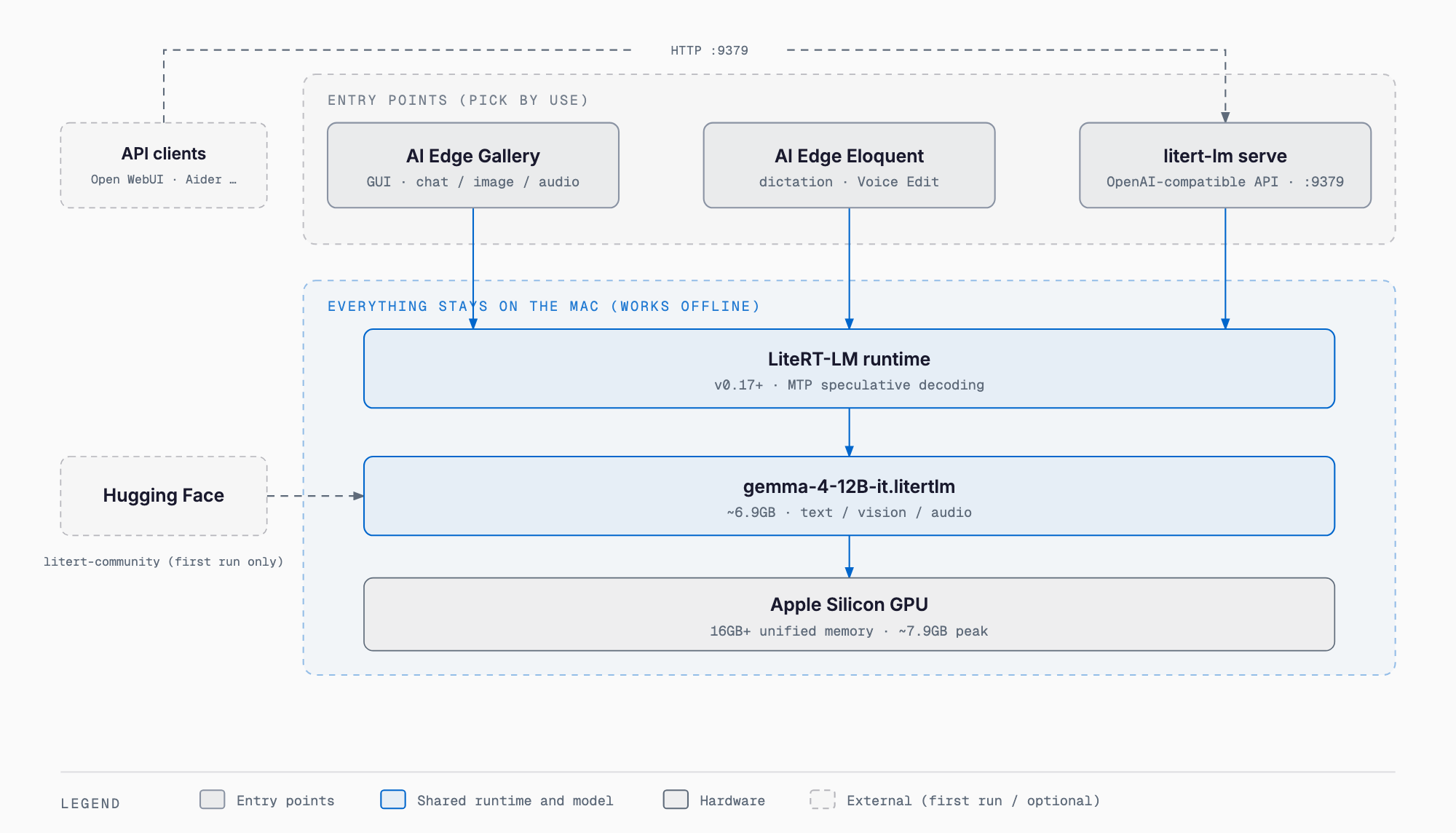
Google AI Edge Gallery is Google's showcase app for running open models on-device, with the official page tagline "Discover private, offline models on device." Google states that "all model inferences happen directly on your device hardware," meaning inference never touches an external server once the model is downloaded. The Mac app itself, the dictation app AI Edge Eloquent, and the developer-facing litert-lm serve command are three separate entry points that share the same LiteRT-LM runtime and run on the same Apple Silicon GPU underneath.
| OS | Distribution | Requirement |
|---|---|---|
| Android | Google Play | Android 12 or later |
| iOS | App Store | iOS 17 or later |
| macOS | Direct DMG download from the official page (not distributed via the Mac App Store) | Not documented |
| Version | Released | Summary | File Size |
|---|---|---|---|
| v0.1.0 | June 3, 2026 | Initial Mac Gallery release, alongside AI Edge Eloquent for macOS and the litert-lm serve command | ~42MB |
| v0.2.0 | August 20, 2026 | Update observed on the distribution server | ~45MB |
| v0.3.0 | September 16, 2026 | Current version. Release notes have not been published officially, so the changes are unknown | ~51MB |
Installation Walkthrough — From the DMG to Your First Gemma 4 12B Download
1. Open the official page (developers.google.com/edge/gallery) and choose Download for macOS to get the DMG
2. Open the downloaded DMG and drag the app into Applications
3. Launch the app, pick Gemma-4-12B-it from the model list, and download it (about 6.9GB — Wi-Fi recommended)
4. Open AI Chat and try a prompt to see it respond
5. Turn off Wi-Fi and confirm chat still works fully offline
The exact installer UI may change between versions. Since Gallery for macOS is distributed directly from the official page rather than through the Mac App Store, always get it from the official link above.
Real-World Speed — 15 tok/s on an M4 Air, 29 tok/s on an M4 Pro
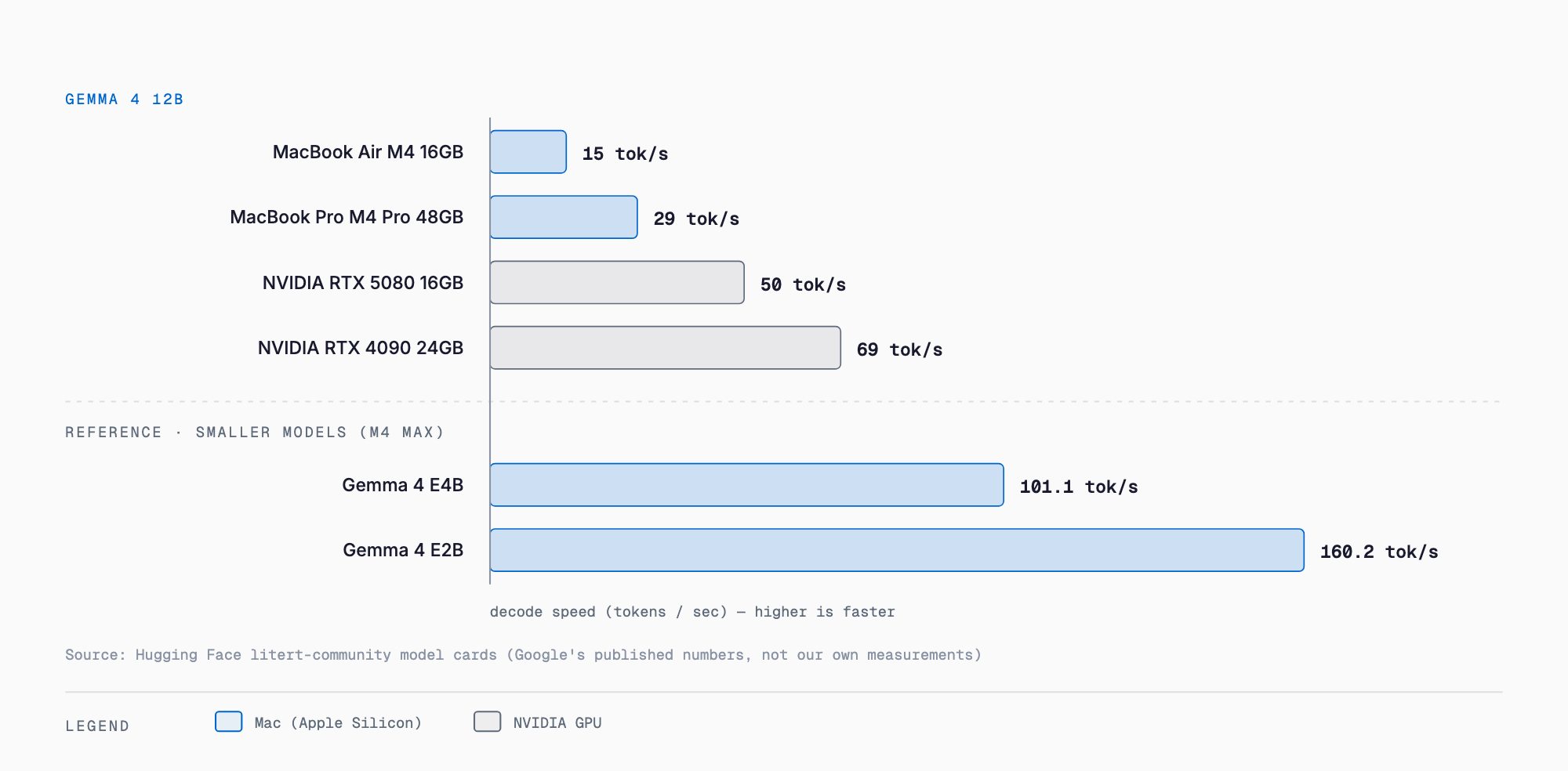
The numbers below come from the official benchmark published on the Gemma 4 12B model card on Hugging Face, measured on the GPU backend. Looking at decode speed (tokens generated per second), the MacBook Air M4 16GB hits 15 tok/s while the MacBook Pro M4 Pro 48GB nearly doubles that at 29 tok/s as memory and chip class scale up.
| Device | Prefill (tok/s) | Decode (tok/s) | TTFT (sec) | Peak GPU Memory |
|---|---|---|---|---|
| MacBook Air M4 16GB | 114 | 15 | 9.13 | ~7,900MB |
| MacBook Pro M4 Pro 48GB | 297 | 29 | 3.48 | ~7,870MB |
| NVIDIA RTX 5080 16GB | 391 | 50 | 2.5 | ~7,300MB |
| NVIDIA RTX 4090 24GB | 3,548 | 69 | 0.3 | ~7,790MB |
A 16GB MacBook Air can run the 12B model, but at 15 tok/s decode and roughly 9 seconds to first token it's noticeably slow, and peak GPU memory of about 7.9GB leaves little room for other apps on a 16GB machine. For reference, on a MacBook Pro M4 Max (GPU) E4B reaches prefill 2,560 / decode 101.1 tok/s / TTFT 0.4s / peak 3,217MB, and E2B reaches prefill 7,835 / decode 160.2 tok/s / TTFT 0.1s / peak 1,623MB — both far faster. If speed matters more than capability, a smaller model is the better pick; see Gemma 4 E4B Complete Guide for details. Note that all of these figures are Google's own published benchmarks, not independent measurements.
What You Can Do on the Mac App — Python Execution, Images, Audio, Agent Skills
Google's official blog describes an example where simply describing what you want analyzed in natural language causes the model to generate and run Python code locally. For instance, asking it to "build a chart comparing the top 10 popular names in 2024 versus 2025" reportedly has the model specify dependencies, generate code, output a PNG chart, and even self-correct errors in a single turn.
| Feature | Description |
|---|---|
| AI Chat | Chat with the model while viewing its reasoning in Thinking Mode |
| Ask Image | Ask questions about an image |
| Audio Scribe | Transcribe and translate audio |
| Prompt Lab | Experiment with and compare prompts |
| Agent Skills | Extensions like Wikipedia lookup and maps; community-shared skills supported |
| Model management & benchmark | Manage model downloads and measure performance |
Mobile Actions and Tiny Garden (which use FunctionGemma 270m) are mobile-only features, and whether every feature above works identically on the Mac app is not documented officially — trying it yourself is the reliable way to confirm.
For Developers — Standing Up an OpenAI-Compatible API with litert-lm serve
Google released the LiteRT-LM CLI alongside Gallery for macOS, letting you run Gemma 4 12B from the command line or stand up a local OpenAI-compatible API server.
pip install -U litert-lm

# One-off run
litert-lm run --from-huggingface-repo=litert-community/gemma-4-12B-it-litert-lm --prompt="Write me a poem"
# Import the model and name the server
litert-lm import --from-huggingface-repo=litert-community/gemma-4-12B-it-litert-lm gemma-4-12B-it.litertlm gemma4-12b
# Start the OpenAI-compatible server
litert-lm serveThe serve command exposes an OpenAI-compatible endpoint on port 9379 at the path /v1/chat/completions. The official blog lists compatible tools including Open WebUI, Continue, Aider, OpenClaw, Hermes, OpenCode, and Pi.
# Example of a typical OpenAI-compatible call format
curl http://localhost:9379/v1/chat/completions \
  -H "Content-Type: application/json" \
  -d '{"model":"gemma4-12b","messages":[{"role":"user","content":"Hello"}]}'
AI Edge Eloquent — Write by Voice, Edit by Voice
AI Edge Eloquent is an on-device dictation and editing app. It lets you dictate into any app via a customizable hotkey, refine dictated text, transcribe audio and video files locally, and register custom vocabulary. Its new Voice Edit feature uses Gemma 4 12B to edit text by voice, and Google says it improves overall quality by more than 60%. At launch it was English-only.
How It Compares to Ollama and LM Studio
Ollama and LM Studio are also widely used for running LLMs locally. For a full comparison, see Ollama vs LM Studio: A Complete Comparison; here's a quick summary of how AI Edge Gallery differs.
| Item | AI Edge Gallery | Ollama | LM Studio |
|---|---|---|---|
| Model selection | Google models only (Gemma 4 / 3n families) | Wide range of open models | Wide range of open models |
| Format | .litertlm | GGUF and others | GGUF and others |
| GUI | Yes (shared mobile/Mac design) | Mostly CLI (paired with separate GUI tools) | Yes |
| API server | litert-lm serve (OpenAI-compatible) | Yes (OpenAI-compatible) | Yes (OpenAI-compatible) |
| Multimodal | Text, image, audio (model-dependent) | Depends on the model | Depends on the model |
| Best for | Trying Google's own models easily on Mac/mobile | Managing many models via CLI | Trying many models with a GUI |
Frequently Asked Questions
Does it work on an 8GB Mac?
Running the 12B model isn't realistic on 8GB. AppleInsider notes that 8GB MacBooks are excluded, so consider a smaller model like E2B or E4B if you have under 16GB.
Does it work on Intel Macs?
Neither the official page nor the blog post documents Intel Mac support. All official benchmarks were measured on Apple Silicon machines.
Is it fully offline?
An internet connection is needed for the initial model download, but inference runs fully offline afterward (officially: all inference happens on-device).
Is there a cost?
Both the app and the model are free. Gemma 4 is released under the Apache 2.0 license.
Is there a Windows version?
As of September 2026, Gallery's official distribution covers only Android, iOS, and macOS. That said, LiteRT-LM's benchmarks include NVIDIA GPUs (RTX 5080/4090), so the CLI itself may run on platforms like Windows.
Does it support Japanese?
Gemma 4 itself is a multilingual model, but Japanese support in the Gallery app's UI or in AI Edge Eloquent is not documented officially. Eloquent was English-only at launch.
Summary
Google AI Edge Gallery for Mac lets you drop Gemma 4 12B onto any 16GB Apple Silicon Mac fully offline, just by downloading the DMG from the official page. Official benchmarks show decode speeds of 15 tok/s on a MacBook Air M4 and 29 tok/s on a MacBook Pro M4 Pro, and if speed matters more, smaller models like E4B or E2B are worth considering.
Developers also get an OpenAI-compatible API server via litert-lm serve, which plugs easily into existing tools like Open WebUI and Continue. Just remember it's not distributed through the Mac App Store — always get it from the official page.
References (primary sources)
Related free tools (no sign-up, instant results)
Feel free to contact us
Contact Us