What Is CUDA Rust? Writing GPU Kernels in Rust via cuda-oxid
e and cutile-rs
A guide to CUDA Rust, NVIDIA toolchain (2026-09-08) for GPU kernels in Rust: SIMT cuda-oxide and tile cutile-rs, requirements, install, usage, comparisons.
What Is CUDA Rust?
CUDA Rust is an official toolchain from NVIDIA, announced on 2026-09-08 in an NVIDIA Technical Blog post titled "Introducing CUDA Rust: Two Tracks for Writing GPU Kernels," for writing GPU kernels directly in Rust. Unlike a wrapper that calls into kernels written in CUDA C++, CUDA Rust compiles Rust source code natively for execution on the GPU. The announcement became a discussion topic on Hacker News in mid-September.
CUDA Rust is organized into two tracks with different philosophies: cuda-oxide, which follows the SIMT (Single Instruction, Multiple Threads) model close to CUDA C++ style, and cutile-rs, which operates on tiles (sub-tensors) rather than individual threads. Both are currently in alpha, and NVIDIA has stated it plans interoperability between CUDA Rust, CUDA C++, and CUDA Python going forward.
What This Makes Possible
Previously, writing GPU code from Rust typically meant either using FFI bindings that call into CUDA kernels written in C++ (such as cudarc, discussed below), or relying on community-built compiler infrastructure such as Rust-CUDA or rust-gpu. What's new with CUDA Rust is that NVIDIA itself now provides an official path for compiling Rust code directly for the GPU. Kernel logic itself can be written in Rust, and Rust's ownership system is cited as preventing buffer aliasing (unintended multiple references to the same memory region) at compile time — a safety benefit.
The Two Tracks: cuda-oxide and cutile-rs
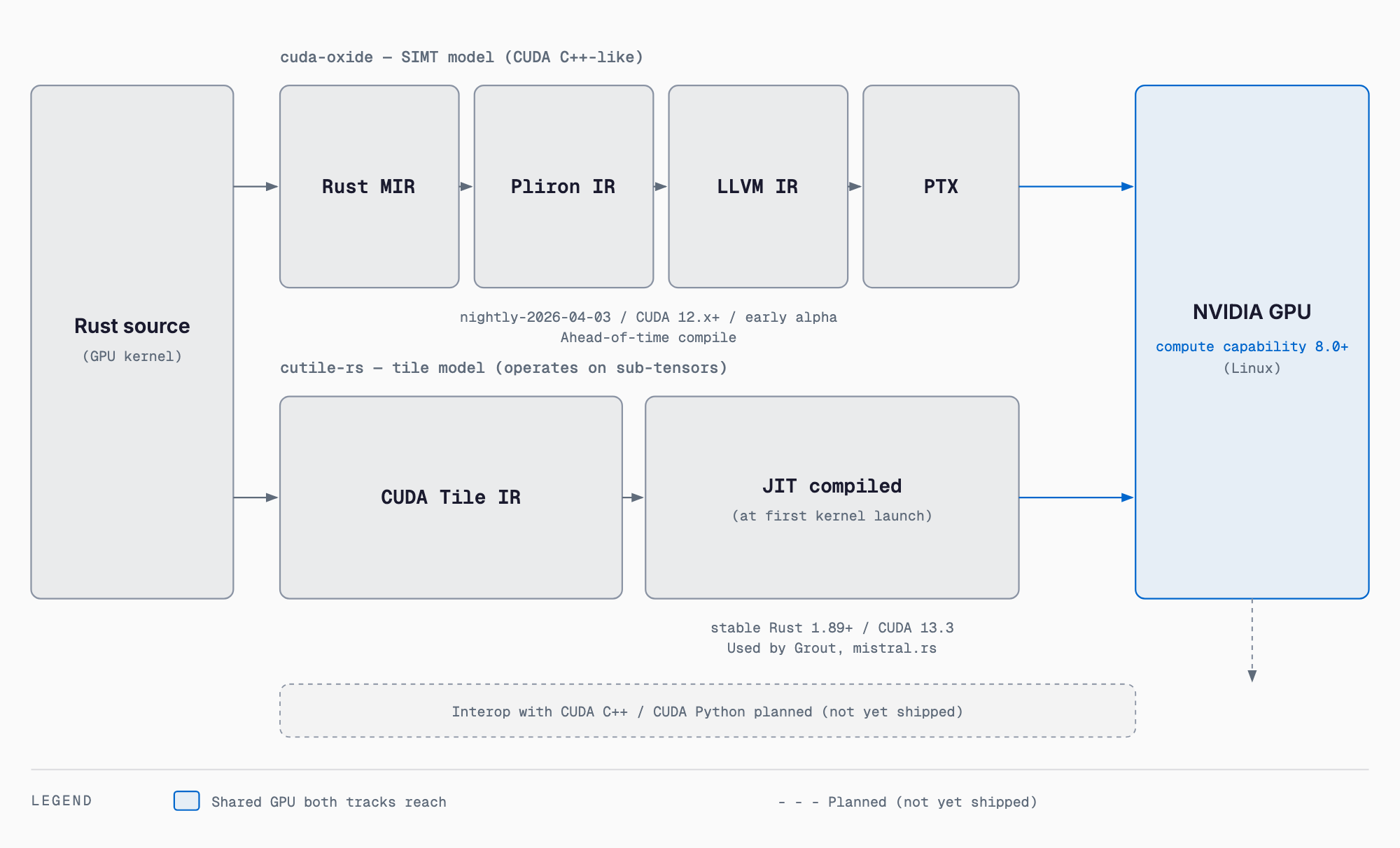
The first track, cuda-oxide (github.com/NVlabs/cuda-oxide), follows the same SIMT model as CUDA C++, working with individual threads directly — a design aimed at developers migrating existing SIMT-style kernels. Internally it uses a custom rustc codegen backend that lowers Rust's mid-level intermediate representation (MIR) into Pliron IR, then LLVM IR, and finally into PTX (the GPU instruction set's intermediate form). NVIDIA positions this track as early alpha and not production-ready.
The second track, cutile-rs (github.com/NVlabs/cutile-rs, published as the cutile crate on crates.io), adopts a tile programming model that operates on tiles (sub-tensors) rather than individual threads, abstracting away thread management so developers can focus on writing tile-level operations. Its compilation model also differs: kernels are JIT-compiled via CUDA Tile IR at the time of first kernel launch. Also alpha, but further along in development — it is reportedly already used in Hugging Face's Grout inference engine and in mistral.rs.
Requirements
Both tracks share a common GPU requirement of Compute Capability 8.0 or higher (Ampere generation or newer, e.g. RTX 30 series or A100 and later). The Rust toolchain and installation approach differ by track.
| Item | cuda-oxide | cutile-rs |
|---|---|---|
| Programming model | SIMT (per-thread, close to CUDA C++) | Tile-based (sub-tensor, abstracts thread management) |
| Compilation path | Custom rustc backend: MIR → Pliron IR → LLVM IR → PTX | JIT-compiled via CUDA Tile IR at first kernel launch |
| Rust toolchain | Pinned nightly (nightly-2026-04-03) | Stable Rust 1.89+ |
| Required CUDA toolkit | CUDA 12.x or newer | CUDA 13.3 |
| Supported OS | Linux | Linux |
| Other requirements | clang/libclang required | Not specified as of the official announcement |
| Maturity | Early alpha, not production-ready | Alpha, but further along with real-world adopters |
Installation and Basic Usage
cuda-oxide is set up via a pinned nightly Rust toolchain and a cargo subcommand called cargo-oxide for creating and running a project.
# cuda-oxide: install cargo-oxide with the pinned nightly toolchain
cargo +nightly-2026-04-03 install --git https://github.com/NVlabs/cuda-oxide.git cargo-oxide

# environment diagnostics
cargo oxide doctor

# create a new project
cargo oxide new vecadd_demo

# build and run
cargo oxide run
cutile-rs, on the other hand, only requires adding the cutile crate to a regular cargo project on stable Rust, making it feel much closer to a typical Rust crate.
# cutile-rs: add the cutile crate to a normal cargo project
cargo new vecadd_demo
cd vecadd_demo
cargo add cutile
cargo run
For either track, the exact API surface for writing kernels — attribute macro syntax, tile operation notation, and so on — is not documented beyond what the official announcement covers as of this writing. Actually writing kernels requires consulting the sample code and documentation in each GitHub repository. In parallel with GPU programming, Rust's footprint in other domains continues to grow, as seen in Tauri v2 Rust backend development.
How It Compares to Existing Options
Ways to work with GPUs from Rust existed before CUDA Rust. Here's how they line up conceptually.
| Approach | Kernel language | Positioning |
|---|---|---|
| CUDA C++ | C++ | NVIDIA's standard GPU kernel language, with the richest ecosystem and documentation |
| CUDA Python / Triton-style | Python | Kernels written in a Python DSL and compiled; common in research and prototyping |
| CUDA Rust (cuda-oxide/cutile-rs) | Rust | NVIDIA's official toolchain, compiling Rust code natively; the subject of this article |
| Rust-CUDA / rust-gpu (community) | Rust | Community-driven compiler infrastructure for compiling Rust for the GPU; a separate lineage from CUDA Rust |
| Bindings such as cudarc | Rust (caller side only) | The kernel itself is written in CUDA C++ or similar and safely wrapped for calling from Rust |
Bindings like cudarc let you call existing CUDA kernels from Rust, but the kernel body itself is still written in C++. CUDA Rust is fundamentally different in that the kernel logic itself is written in Rust and compiled natively. Community projects such as Rust-CUDA and rust-gpu similarly aim to write GPU code in Rust, but they are not NVIDIA's official toolchain and follow a separate development track and roadmap. Note also that approaches like running CUDA on AMD GPUs via ZLUDA address a different problem — running existing CUDA binaries/apps on a different vendor's GPU — rather than writing new GPU kernels in Rust for NVIDIA GPUs, which is what CUDA Rust is about.
Which Track Should You Choose
Both tracks are alpha software and neither is intended for production use today. Still, some general guidance can be drawn based on use case.
- Comfortable with CUDA C++'s per-thread thinking and want to port existing SIMT kernels to Rust → cuda-oxide
- Want to stay entirely on the stable Rust toolchain and prefer a familiar cargo-based workflow → cutile-rs
- Want to write matrix/tensor operations at the tile level without managing threads directly → cutile-rs
- Value real-world adoption track record (Grout, mistral.rs) → cutile-rs currently has more of it
- Want to avoid the overhead of a pinned nightly toolchain and clang/libclang setup → cutile-rs has a lighter setup
Caveats and Limitations
CUDA Rust currently has several limitations worth noting. It targets Linux only; Windows and macOS are not listed as supported in the official announcement. Whether it works under WSL2 (Windows Subsystem for Linux) is not officially stated either, so that should be treated cautiously. On the GPU side, Compute Capability 8.0 or higher (Ampere generation or newer) is required, ruling out older GPU generations. Items not specified as of the official announcement — such as licensing terms or benchmark figures — are not speculated on or filled in with unverified figures in this article. Anyone considering real use should check each repository's README and license terms directly.
FAQ
Is CUDA Rust a way to call CUDA C++ kernels from Rust?
No. Existing bindings such as cudarc are wrappers that call into kernels written in C++. CUDA Rust instead compiles Rust source code itself natively for the GPU: cuda-oxide lowers Rust MIR through Pliron IR and LLVM IR into PTX, while cutile-rs is JIT-compiled via CUDA Tile IR.
Should I use cuda-oxide or cutile-rs?
If you're used to CUDA C++'s per-thread SIMT style, cuda-oxide is the closer fit. If you want to write tile-level operations without managing threads, or prefer staying on stable Rust, cutile-rs is a better fit. cutile-rs is also further along in development, with adopters like Hugging Face's Grout and mistral.rs.
Does CUDA Rust work on Windows or macOS?
As of the official announcement, only Linux is supported; Windows and macOS are not. Whether it works under WSL2 is not stated in the official announcement either.
Is CUDA Rust the same as Rust-CUDA or rust-gpu?
No, they are separate projects. Rust-CUDA and rust-gpu are community-driven efforts to compile Rust for the GPU. CUDA Rust is NVIDIA's own official toolchain, made up of the cuda-oxide and cutile-rs tracks.
Related free tools (no sign-up, instant results)
Feel free to contact us
Contact Us