GPT-6.1 Terra Explained: $1/$5 Pricing, Half of Sol
GPT-6.1 Terra: $1 input, $5 output per 1M tokens, 1.05M context. Half of Sol, made for computer use at scale. Specs, pricing, benchmarks. Updated Oct 27, 2026
GPT-6.1 Terra is an OpenAI model released on October 26, 2026 (US time), with the API model id gpt-6.1-terra. It costs $1 per 1M input tokens and $5 per 1M output tokens, with a 1.05M-token context window. OpenAI positions it as fast, capable computer use at scale, aimed at work such as form filling, invoice processing, and reading technical drawings. It is not the coding flagship: OpenAI itself says GPT-6.1 Sol and GPT-6 Astra remain better for the most complex coding. This article reflects information as of October 27, 2026, and all benchmarks are vendor-reported, with no independent verification yet.
In short, Terra is the model for running computer-use and high-volume workloads at half the price of Sol. Compared with its predecessor GPT-5.6 Terra, input is 50% cheaper and output about 58% cheaper, while agent benchmarks improve substantially. Related reading: our GPT-6.1 Sol guide, GPT-6 Astra, Claude Opus 5.5, and the GPT-5.6 price cut.
GPT-6.1 Terra specs
| Item | Details |
|---|---|
| API model id | gpt-6.1-terra |
| Input | Text, image |
| Output | Text |
| Not supported | Audio, video, fine-tuning |
| Context window | 1,050,000 tokens |
| Max input | 922,000 tokens |
| Max output | 128,000 tokens |
| Knowledge cutoff | June 1, 2026 |
| reasoning.effort | none / low / medium (default) / high / xhigh / max |
| Tool calling | Responses API only (computer use, MCP, skills, hosted shell, apply patch, tool search) |
| Availability | ChatGPT Plus / Pro / Enterprise / Edu (ChatGPT Work), Codex, API |
| Rate limits (Build tier) | 5,000 RPM / 1,000,000 TPM |
The key knob is reasoning.effort, which has six levels. The default is medium. Routine work can run at low or none, and high or above is worth reserving for hard judgment calls, so tuning effort is the center of cost control. Because tool calling works only through the Responses API, systems built on Chat Completions need rework when migrating.
GPT-6.1 Terra pricing
| Tier | Input | Cache read | Output |
|---|---|---|---|
| Standard (per 1M tokens) | $1.00 | $0.05 | $5.00 |
| Long context (over 272K input) | $2.00 | $0.10 | $7.50 |
| Batch / Flex (50% off) | $0.50 | $0.025 | $2.50 |
| Fast mode (2x) | $2.00 | $0.10 | $10.00 |
| Regional processing (+10%) | $1.10 | $0.055 | $5.50 |
Cache writes cost $1.25 per 1M tokens with 30-minute retention and $2.50 with 12-hour retention. The long-context surcharge applies when a single request exceeds 272K input tokens: the whole request is billed at 2x for input and cache and 1.5x for output. Even slightly over 272K re-prices everything. The surcharge, Batch, Flex, Fast, and regional rows above are standard prices multiplied by the stated factor, shown for reference.
Price comparison with other models
| Model | Input | Cache read | Output |
|---|---|---|---|
| GPT-6.1 Terra | $1 | $0.05 | $5 |
| GPT-6.1 Sol | $2 | $0.10 | $10 |
| GPT-6 Astra | $10 | $1 | $50 |
| GPT-6 Luna | $0.10 | $0.01 | $0.50 |
| Claude Opus 5.5 | $4 | $0.20 | $20 |
| Claude Sonnet 5.5 | $2 | — | $10 |
| GPT-5.6 Terra (predecessor) | $2 | $0.20 | $12 |
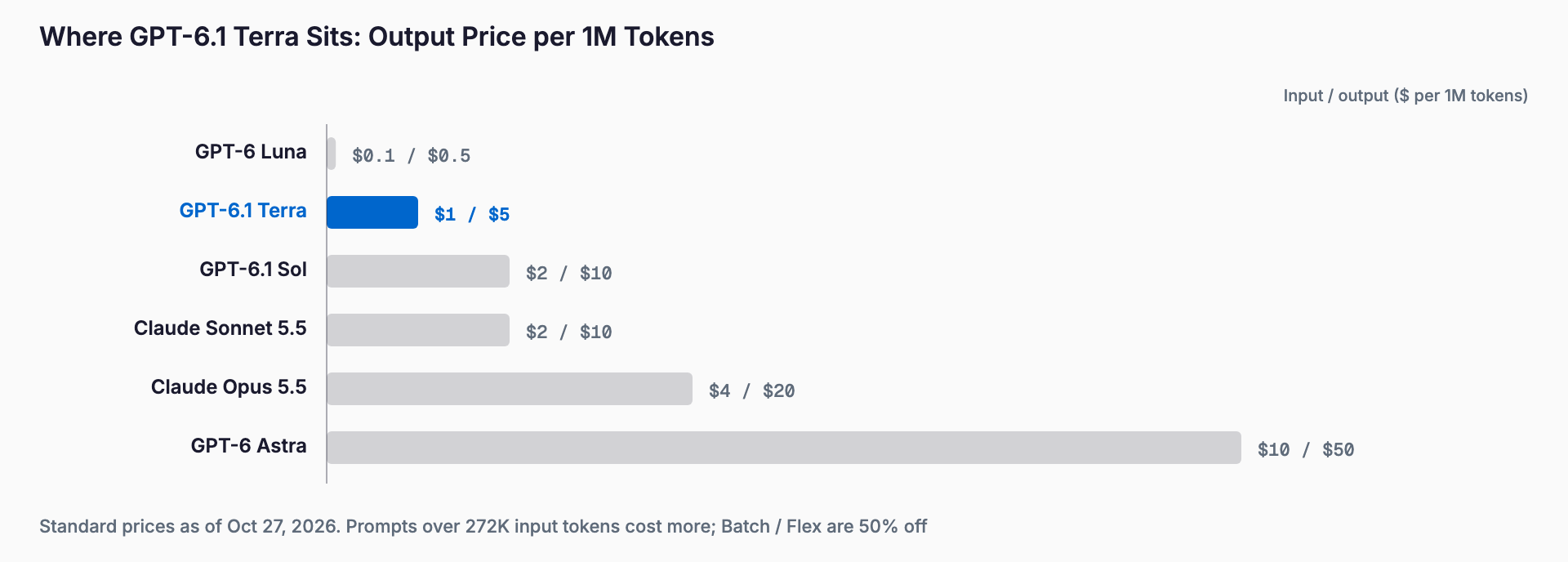
All figures are standard prices per 1M tokens. Terra is exactly half of Sol, one tenth of Astra, and one quarter of Opus 5.5. Versus GPT-5.6 Terra, input drops 50% and output about 58%. Luna is a tenth of Terra's price, but it sits in a different capability class, so price alone does not make it a drop-in replacement.
Cost per task
Assume a task with 1M input tokens (900K of them cache reads) and 60K output tokens. The formula is uncached input x input price + cached input x cache price + output x output price. For Terra: 100K x $1 + 900K x $0.05 + 60K x $5 = $0.10 + $0.045 + $0.30 = $0.445. Yen figures use 150 yen per dollar.
| Model | Cost per task (USD) | In yen (150 yen/$) |
|---|---|---|
| GPT-6.1 Terra | $0.445 | about 67 yen |
| GPT-6.1 Sol | $0.890 | about 134 yen |
| Claude Opus 5.5 | $1.780 | about 267 yen |
| GPT-6 Luna | $0.049 | about 7 yen |
With long cached contexts, the cache-read price dominates rather than the input price. Terra's $0.05 read rate favors agent workloads that reference the same material repeatedly. For output-heavy tasks, though, the output price difference passes straight through, so run the numbers with your own token mix before comparing.
Benchmarks and performance
| Metric | Result (reported by OpenAI) |
|---|---|
| Terminal-Bench 4.0 (max effort) | Terra 50.3% vs GPT-5.6 Terra 21.5% |
| Agents' Last Exam (medium effort) | +15 points over GPT-5.6 Terra at about 1/3 the cost |
| Agents' Last Exam (vs Astra) | On par with Astra at 1/10 the per-token price |
| Error-inducing prompts | 16.7% at low effort (down from 53.6%); 4.3% at max effort (down 18 points) |
| Speed | Over 3x faster than Astra and Sol on the same tasks |
| Versus Opus 5.5 (max effort) | Over 3x more token efficient, 1/4 per-token price, about 9x lower cost per task in OpenAI's chart |
Every number here is published by OpenAI, and the comparison conditions were chosen by OpenAI. The roughly 9x cost-per-task claim against Opus 5.5, for example, comes from OpenAI's own chart. A third-party blog also cites Anthropic's 66.4% for Opus 5.5 on Terminal-Bench 4.0, which means Opus 5.5 still scores higher than Terra (50.3%) on that benchmark. As of October 27, 2026 there is no independent verification, so test on your own data before committing.
Terra vs GPT-6.1 Sol vs GPT-5.6 Terra
| Model | Best for |
|---|---|
| GPT-6.1 Terra | Computer use such as form filling, invoice processing, and drawing reading; high-volume and parallel agent work; speed- and cost-sensitive operations |
| GPT-6.1 Sol | The most complex coding, hard reasoning, quality-first development support |
| GPT-6 Astra | Cases that need top-tier capability (10x Terra's price) |
| GPT-5.6 Terra | Keeping existing systems running; for new work, 6.1 Terra wins on price and performance |
A simple rule: use Terra for high-volume screen operation and document handling, and Sol or Astra when you need complex code written. If you already use GPT-5.6 Terra, the lower price and higher performance make migration worth considering. For Sol details, see our GPT-6.1 Sol guide.
How to use it (shortest API path)
- Use the Responses API and set model to gpt-6.1-terra
- Pass reasoning such as {effort: "medium"} (default is medium; try low or none for routine work)
- For tools, specify computer use, MCP, skills, and so on in tools (not available on Chat Completions)
- Use caching for long shared prompts and design requests to stay under 272K input tokens
The minimal setup is a Responses API call with model: "gpt-6.1-terra", reasoning: {effort: "medium"}, and your input. Check quality at medium first, move up to high or above if it falls short, and step down to low if it is more than enough. Terra is also available in ChatGPT Plus / Pro / Enterprise / Edu and Codex.
Migration notes
- The 272K token trap: once input exceeds 272K, the whole request is billed 2x for input and cache and 1.5x for output. Filling the full 1.05M window changes costs sharply
- Responses API is required: tool calling works only there, so Chat Completions implementations need rewriting
- Tune effort: the default medium may be more than you need. Test each task from none to max and find the quality-cost balance
- Security prompts: Terra is rated at the Critical cybersecurity threshold under OpenAI's Preparedness Framework and keeps GPT-6 Astra safeguards, so expect more refusals and monitoring on vulnerability research and similar prompts
- Cache retention cost: cache writes cost $1.25 for 30 minutes and $2.50 for 12 hours, so choose retention based on how often the cache is reused
- Unsupported features: no audio or video input/output and no fine-tuning
FAQ
How much does GPT-6.1 Terra cost?
Standard pricing is $1 per 1M input tokens, $0.05 for cache reads, and $5 for output. Batch and Flex are 50% off, Fast mode is 2x, and regional processing adds 10%. Requests over 272K input tokens are billed 2x for input and cache and 1.5x for output.
What is the difference between GPT-6.1 Terra and Sol?
Terra costs half as much as Sol ($1 vs $2 input, $5 vs $10 output) and suits speed and high-volume computer-use work. OpenAI says Sol and Astra remain better for the most complex coding.
Is GPT-6.1 Terra good for coding?
It improves greatly over GPT-5.6 Terra on Terminal-Bench 4.0, but OpenAI does not position it as the top coding model. Use Sol or Astra for complex development and Terra for routine operations and volume work.
Can I use it in ChatGPT?
Yes. It is available in ChatGPT Plus, Pro, Enterprise, and Edu (ChatGPT Work), as well as Codex and the API. On the API, Build-tier rate limits are 5,000 RPM and 1,000,000 TPM.
Can I trust the benchmark numbers?
All figures here are published by OpenAI and there is no independent verification as of October 27, 2026. On Terminal-Bench 4.0, Opus 5.5 reportedly scores 66.4%, higher than Terra's 50.3%, so compare on your own tasks.
Feel free to contact us
Contact Us