OpenLogi: A Rust-Based, Local-First Alternative to Logi Opti
ons+
OpenLogi is an open-source, Rust-based tool for managing Logitech mice, keyboards, and webcams without an account or cloud sync. Here's how it differs from the official Logi Options+, as of August 2026.
OpenLogi is an open-source tool, written in Rust, for managing Logitech mice, keyboards, and webcams. Built on the native GPUI framework, it requires no account and no cloud sync — every setting lives in a single local TOML file. Where the official Logi Options+ assumes a cloud account and sync from the start, OpenLogi is explicit about doing everything locally instead. That's the decisive difference, and for engineers or IT admins it's also a much easier tool to justify installing on a work machine.
What It Can Do
OpenLogi manages HID++ devices (mice and keyboards) and UVC devices (webcams) side by side. Its features break down into four areas: device management, mouse, keyboard, and camera.
Device Management
- Lists battery level and charging status for each paired device
- Remaps every button via an OS-level input hook
- Automatically switches per-application profiles (macOS/Windows; on Linux, X11/XWayland only)
Mouse
- Remaps the middle button, mode-shift button, and thumb wheel
- Assigns gestures, with live-capture support
- Actions Ring — an eight-slot overlay menu centered on the cursor
- Sets and cycles through DPI presets
- Switches SmartShift wheel mode and adjusts its sensitivity
- Reverses scroll direction per device
Keyboard
- Global F-key remapping, including assigning typed text or key combos (macOS/Windows)
- Static RGB lighting control
Camera (UVC Devices)
- Live preview
- Hardware-level image controls: zoom, focus, exposure, brightness, contrast, saturation, sharpness, white balance, hue, anti-flicker, and low-light compensation
- Default / Streaming / Video call presets, plus custom snapshots
Supported OSes, Devices, and Connection Types
| Item | Details |
|---|---|
| Supported OS | macOS 13.0+ / Linux (first-class support) / Windows (verified on Windows 11) |
| Distribution | macOS: signed and notarized .dmg, brew install --cask openlogi / Linux: .deb, .rpm, .pkg.tar.zst (x86_64, ARM64), a NixOS module, bundled udev rules, systemd service to auto-start the agent / Windows: signed .msi and a portable .zip (x86_64, ARM64), runs in the system tray |
| Connection types | Logi Bolt receiver / Unifying receiver / Bluetooth / wired |
| Protocols | Mouse/keyboard: HID++ (DPI=0x2201, SmartShift=0x2111, scroll reversal=0x2121, RGB=0x8070/0x8080) / webcam: UVC |
| Verified devices | MX Master 4 / MX Master 3S / MX Master 3 / MX Anywhere 3 / Signature M650 / ERGO M575 |
Installation
OpenLogi ships packages for each OS. On every platform, you need to quit the official Logi Options+ before installing. HID++ communication requires exclusive access to the device, and leaving Logi Options+ running causes an access conflict that keeps OpenLogi from controlling it.
# macOS (Homebrew)
# Quit Logi Options+ first
brew install --cask openlogi

# Linux (Debian/Ubuntu family)
# Download and install the .deb package
sudo dpkg -i openlogi_<version>_amd64.deb
# udev rules and a systemd service are bundled,
# so the agent auto-starts after installation

# Windows
# Run the signed .msi installer, or extract the portable .zip
# Quit Logi Options+ from the system tray before installing
The TOML Config File Philosophy
OpenLogi keeps its entire configuration in a single TOML file at ~/.config/openlogi/, not in the cloud. There's no account, no cloud sync, and no telemetry (update checks are off by default too). The README frames this not as a temporary limitation but as a philosophical stance. Being a plain text file has real practical value: you can read it, edit it, diff it, and version it in git, or carry it between machines through a dotfiles repo. Reviewing button assignments becomes a matter of reading a diff instead of clicking through a GUI.
How It Works — HID++ and UVC
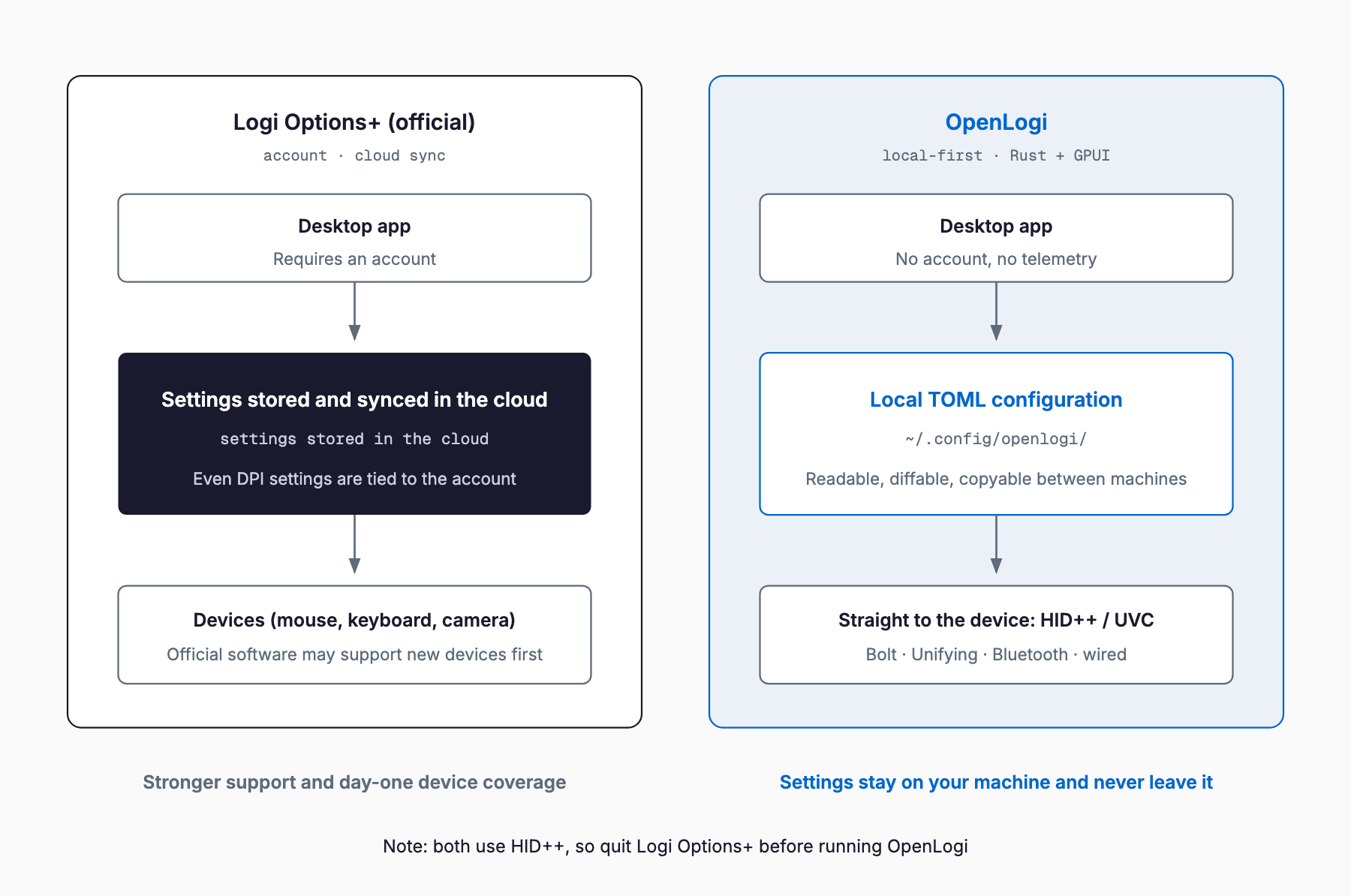
At its core, OpenLogi talks directly to the HID++ protocol that Logitech devices implement. DPI changes use feature 0x2201, SmartShift control uses 0x2111, scroll reversal uses 0x2121, and RGB lighting uses features 0x8070/0x8080. Webcams are controlled through the standard UVC (USB Video Class) interface. Where the official Logi Options+ stores and syncs settings through a cloud account, OpenLogi has a local process speaking HID++/UVC directly to the device. Without a cloud layer in between, applying a setting doesn't require any external network call.
How It Differs from Logi Options+, Karabiner-Elements, and Solaar
To place OpenLogi properly, it helps to compare it not just to the official Logi Options+, but also to Karabiner-Elements, the standard key-remapping tool on macOS, and Solaar, the standard HID++ device manager on Linux. Another Rust-written developer tool that drew attention in August 2026 is Rust Glancer, which targets a hundredth of rust-analyzer's RAM.
| Aspect | Logi Options+ (official) | OpenLogi | Karabiner-Elements | Solaar |
|---|---|---|---|---|
| Account required | Yes | No | No | No |
| Settings storage | Cloud sync | A single local TOML file | Local JSON config | Local config |
| Telemetry | Yes (official Logitech) | None | None | None |
| Supported OS | macOS / Windows | macOS / Linux / Windows | macOS only | Mainly Linux |
| Camera control | Supported on some models | Supported for any UVC device | Not supported | Not supported |
| Per-app profiles | Supported | Supported on macOS/Windows and X11/XWayland | Supported (key-remapping focused) | Not supported |
| Device coverage | Broadly guaranteed across Logitech's lineup | HID++ devices only; new products may lag | Device-agnostic (works at the OS input layer) | HID++ devices only |
| Stability/support | Vendor-backed | Actively developed, README states it is "not yet stable" | Mature, long production track record | Mature, long production track record |
| License | Proprietary | Apache-2.0 / MIT dual license (brand assets reserved) | MIT | GPL-2.0 |
In short, OpenLogi is an alternative for people who want to avoid Logi Options+'s cloud dependency and telemetry, while Karabiner-Elements and Solaar cover different ground. Karabiner-Elements is strong at device-agnostic key remapping at the OS input layer, and Solaar overlaps with OpenLogi in managing HID++ devices on Linux, but neither offers camera control or an Actions Ring-style feature.
What to Check Before Adopting It
A few things are worth settling before this goes onto a work machine. On licensing, the application itself is dual-licensed under Apache-2.0 and MIT, but the brand assets — logo and icon — remain fully reserved by the author, so a fork needs permission to use the OpenLogi name or branding. For how open-source licence terms play out in practice, see our piece on Mojo going fully open source.
- Not yet stable: the README states that "features and config may still change," so updates could shift button assignments or config options
- Brand assets are licensed separately: the code itself is dual-licensed Apache-2.0/MIT, but the logo and icons remain fully copyrighted by AprilNEA, and forks need permission to use the OpenLogi name or brand
- No app-profile support on Wayland: automatic per-application profile switching on Linux only works on X11/XWayland; Wayland support is incomplete
- Gesture limits: gestures only work on buttons the device exposes over HID++
- New-device support may lag: OpenLogi has no guarantee of the day-one support for new products, or the official support channel, that Logi Options+ provides
- HID++ access conflict: on every OS, you must quit Logi Options+ first, or OpenLogi cannot control the device
Frequently Asked Questions
Can OpenLogi fully replace Logi Options+?
It covers the main mouse, keyboard, and webcam settings, but the README itself states it is 'not yet stable,' and it lacks the official day-one support for new products and support channel that the vendor tool provides. It's worth trialing on a personal machine or test environment first.
Do I need to create an account?
No. There's no cloud sync or telemetry — everything lives in a local TOML file.
Does it work the same way on Windows and Linux?
Packages exist for macOS, Windows, and Linux, but automatic per-application profile switching only works on macOS/Windows and, on Linux, X11/XWayland — Wayland is not yet supported.
Which devices are supported?
Any Logitech mouse or keyboard that implements the HID++ protocol, plus UVC-compatible webcams. Verified examples include the MX Master 4, MX Master 3S, MX Master 3, MX Anywhere 3, Signature M650, and ERGO M575.
Can I publish a fork under the OpenLogi name?
The code is freely usable under the Apache-2.0/MIT dual license, but the logo and icons remain fully copyrighted by AprilNEA, so using the OpenLogi name or branding requires permission.
Summary
OpenLogi is a Rust-based, local-first alternative for managing Logitech devices, one that removes the cloud account and telemetry from the equation. Keeping the entire configuration in a single TOML file makes it easy to version and carry between machines. At the same time, development is active but not yet stable, and there are clear points to check before deploying it on work machines: the separate license on brand assets, the lack of Wayland support, and the limits on gestures. The realistic approach is to weigh the vendor tool's stability and support against the practical benefits of going local-first.
Related free tools (no sign-up, instant results)
Feel free to contact us
Contact Us