Rust Glancer
The Experimental Rust LSP That Cuts RAM Use to 1/100th of rust-analyzer
Rust Glancer is an experimental Rust LSP released on August 19, 2026, claiming roughly 1/100th the RAM of rust-analyzer. This article explains its frozen-workspace architecture, supported features, and trade-offs.
Rust Glancer is an experimental Language Server Protocol (LSP) implementation for Rust, released on August 19, 2026 by developer @popzxc. The project describes itself as "an experimental LSP implementation optimized for low memory usage and near-instant editor restarts," and it does not aim to fully replace rust-analyzer, the de facto standard. Instead, its stated goal is to cover roughly 90% of day-to-day usage. The headline claim is that RAM usage comes in at about 1/100th of rust-analyzer's — two orders of magnitude lower — making it aimed at developers on less powerful machines, or anyone willing to accept some functional trade-offs in exchange for lower memory use.
What It Can Do
Rust Glancer supports a solid set of the core LSP features used in everyday coding.
- Goto definition
- Hover information
- Inlay hints
- Code completion
- Type inference
- Trait resolution
- Basic macro expansion
What It Doesn't Support
To prioritize memory efficiency and restart speed, the project intentionally excludes certain capabilities.
- Running build scripts (build.rs)
- Executing procedural macros to expand them
- Advanced nightly Rust support (deferred)
- Migration to the new trait solver (deferred)
Benchmarks — Indexing Speed and Memory Usage
The official blog published measured indexing speeds comparing Rust Glancer and rust-analyzer on two different machines.
| Machine | LSP | Base Index | Full Index |
|---|---|---|---|
| MacBook Pro M4 Max / 36GB | Rust Glancer | 5s | 8s |
| MacBook Pro M4 Max / 36GB | rust-analyzer | 6s | 13s |
| MacBook Pro M1 / 8GB | Rust Glancer | 6s | 9s |
| MacBook Pro M1 / 8GB | rust-analyzer | 7s | 14s |
On the memory side, the project's stated goal is to stay under 100MB for realistically sized projects, and it holds to that level throughout the official demo. This is the core evidence behind the claim of roughly 1/100th the RAM usage of rust-analyzer.
Installation and Setup
There are two main ways to use it: installing the VS Code extension from the marketplace, or building it from source from the GitHub repository. Detailed steps are available in the official documentation.
# Official site
https://rust-glancer.github.io/

# Repository
https://github.com/rust-glancer/rust-glancer

# Install instructions (VS Code extension / build from source)
https://rust-glancer.github.io/docs/usage/INSTALL.html
Architecture — Why RAM Usage Drops to 1/100th
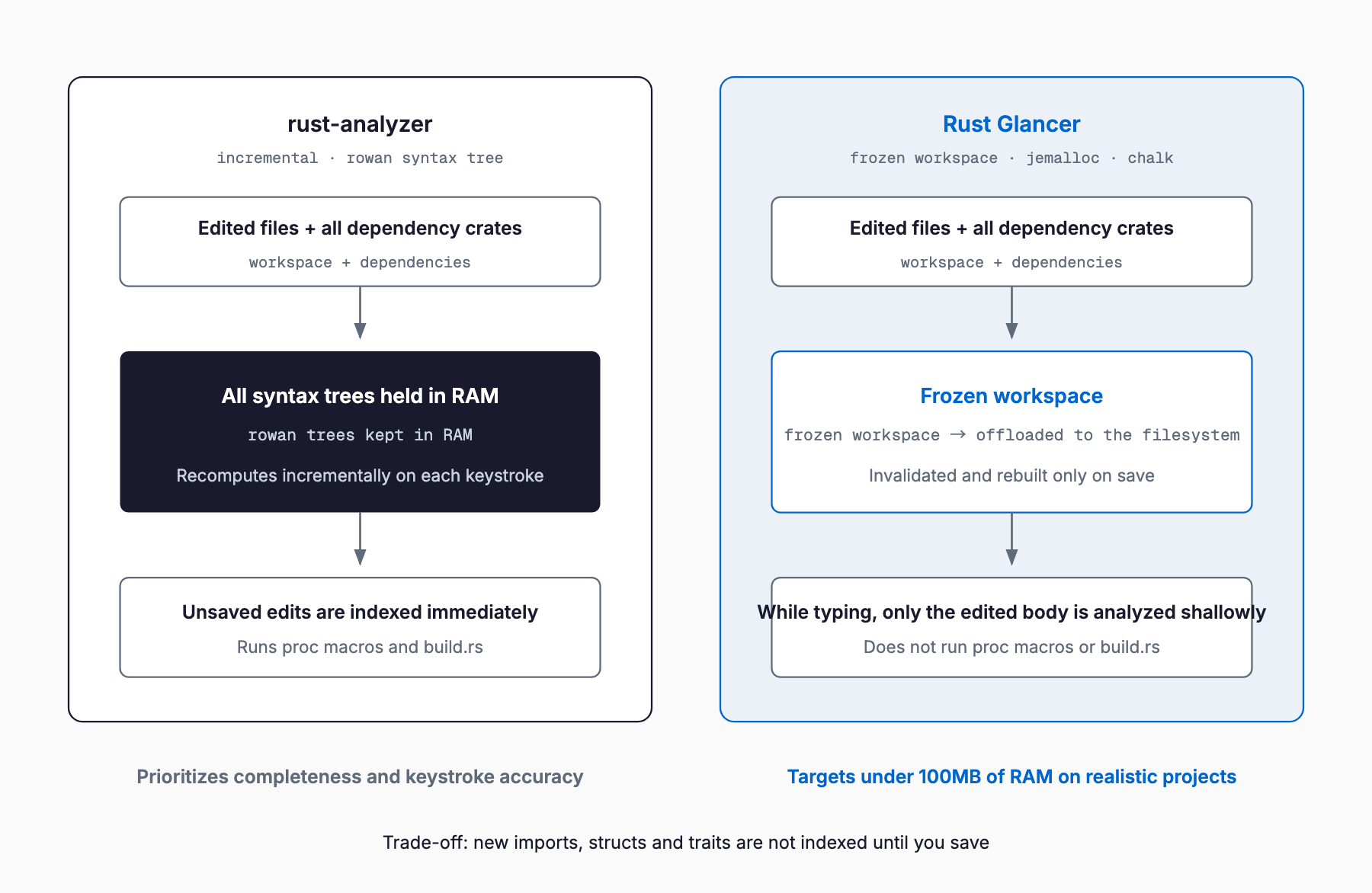
rust-analyzer keeps a full syntax tree (built with rowan) in memory at all times and computes an incremental diff on every edit. This enables highly accurate real-time analysis, but memory usage grows with project size. Rust Glancer instead adopts a "frozen workspace" approach that lets analysis results be evicted to the filesystem, keeping resident memory low. Concretely, saving a file invalidates the index once and then rebuilds it; while typing, only the body currently being edited is shallowly analyzed, and completions and hover information are served by reusing the last complete index. The choice of jemalloc as the allocator and chalk for type checking, both aimed at memory efficiency, fits this same design philosophy. In terms of optimizing the editor restart experience, this shares some of the same problem framing as editor-side efforts like Zed Delta, covered previously.
Trade-offs
This design comes with trade-offs. The one with the biggest practical impact is that new imports, structs, and traits are not indexed until the file is saved. Because the editor reuses the last complete index while typing, unsaved changes are not reflected in completions or goto-definition. The server also doesn't execute build scripts (build.rs) or procedural macros, so in projects that lean heavily on proc-macro-driven crates — such as serde's derive macros — completion, type inference, and goto-definition accuracy for macro-generated code is limited. Basic macro expansion is supported, but the actual output of proc macro execution isn't reproduced, so users expecting a fully-featured IDE experience in every scenario may find it lacking.
How It Differs From rust-analyzer
Rust Glancer is most often searched alongside rust-analyzer, Rust's widely used official LSP implementation, which is designed around completeness and keystroke-level accuracy. Here's how the two compare.
| Aspect | Rust Glancer | rust-analyzer | IntelliJ Rust / RustRover |
|---|---|---|---|
| Memory usage | Targets under 100MB for realistic projects | Can reach several GB on large projects | Relatively heavy, its own analysis engine |
| Indexing approach | Frozen workspace (invalidate on save, then rebuild) | Full rowan syntax tree kept in memory, diffed incrementally | Its own index (IntelliJ platform) |
| Reflecting unsaved changes | Not reflected until saved (new imports etc. require a save) | Reflected in real time | Reflected in real time |
| proc macro / build.rs | Not executed | Executed, expands and supports generated code | Executed and supported |
| Feature coverage | Core features only (targets ~90%) | Broad, the de facto standard | Broad, commercial IDE feature set |
| Maturity | Experimental, just released | Mature, widely deployed | Mature, commercial product |
| Editor support | Mainly a VS Code extension | Wide editor support: VS Code, Vim, Emacs, and more | IntelliJ IDEA / RustRover only |
| License | Dual Apache-2.0 / MIT | Dual Apache-2.0 / MIT | Commercial (RustRover has a free tier) |
IntelliJ Rust (RustRover) isn't an LSP at all — it's a commercially oriented IDE with its own analysis engine, so it operates on different assumptions than either Rust Glancer or rust-analyzer. As the comparison table shows, Rust Glancer's advantage is primarily in memory usage and restart speed, while rust-analyzer still leads on accuracy, feature coverage, and maturity. The author frames it this way too: for projects that prioritize completeness and keystroke-level accuracy, rust-analyzer remains the default choice, while Rust Glancer is meant for people on underpowered machines, or anyone willing to accept trade-offs in exchange for lower RAM usage.
Which Should You Choose
The choice largely comes down to machine specs and project characteristics. If you have plenty of RAM and work on large projects that depend on proc macros or build.rs, rust-analyzer's track record and broader coverage still make it the safer choice. On the other hand, if you're working on a RAM-constrained machine, if editor restarts or IDE sluggishness are a real pain point, or if the core feature set covers 90% of your daily needs, Rust Glancer is worth trying. Notably, the author has been open about leaning heavily on LLMs during development, while stating that they personally take ownership of the code and its quality. As of August 2026, its GitHub star count is still modest at around 364, but it made the Hacker News front page with 417 points, generating real buzz — how far its feature set expands from here will determine how viable an alternative it becomes.
Frequently Asked Questions
Can I use Rust Glancer alongside rust-analyzer?
Technically, you can install both and switch the active LSP in your editor depending on what you're working on. The design isn't meant for running both simultaneously in a double-active setup, so switching per project or per scenario is the practical approach.
Isn't it inconvenient that changes aren't reflected until you save?
Because the editor reuses the last complete index while typing, you need to save before completions pick up new imports, structs, or traits you've just added. This has little impact if you save frequently, but it's a noticeable trade-off if you tend to go long stretches without saving.
Does it work with crates that depend heavily on proc macros, like serde?
It doesn't execute proc macros to expand them, so completion, type inference, and goto-definition accuracy for code generated by derive macros is limited. It's still usable, but you'll notice a difference in projects that lean heavily on such crates.
If memory is still tight, are there other options besides Rust Glancer?
You can also reduce rust-analyzer's memory footprint by narrowing its indexing scope, disabling unused feature flags, or splitting up your workspace. If adding more RAM isn't feasible, it's worth weighing these approaches against a lightweight LSP like Rust Glancer.
Which editors can I use it with?
Right now it's primarily available as a VS Code extension, with an option to build from source via the GitHub repository. Detailed install instructions are in the official documentation at https://rust-glancer.github.io/docs/usage/INSTALL.html.
Summary
Rust Glancer isn't a full replacement for rust-analyzer — it's an experimental LSP aimed at developers working under memory constraints or prioritizing fast editor restarts, with a goal of covering roughly 90% of everyday usage. Its frozen-workspace approach, which evicts analysis results to the filesystem, is the key to cutting RAM usage by roughly 100x, but the trade-offs are directly relevant to daily work: new definitions aren't indexed until you save, and it doesn't execute proc macros or build.rs. Given that this is a freshly released, experimental project, it's worth weighing it against rust-analyzer in light of your own development environment and the nature of your projects. As part of the broader trend of open-source toolchain innovation, this sits alongside moves like Mojo's full open-source release in expanding the range of options available to developers.
Related free tools (no sign-up, instant results)
Feel free to contact us
Contact Us