Cursor Origin Explained Cursor's Native Git Hosting, GitHub
Alternative
Cursor Origin is Cursor's own git hosting service, launched in early beta on August 17, 2026. Its core features are repositories, PRs, code browsing, and two-way GitHub sync, available on Pro/Teams/Enterprise plans. It's not a drop-in GitHub replacement yet — pricing and SLA remain unpublished as of August 2026.
Cursor Origin is Cursor's own native git hosting service, released in early beta on August 17, 2026. It integrates repositories, pull requests, review, merging, branch protection, and a CLI directly into Cursor, and is positioned as a "git forge for the agentic era" that treats coding agents as first-class participants alongside humans. It is available only to paid Pro, Teams, and Enterprise plan subscribers — free-plan users are not eligible. The short answer: this is not something to switch to from GitHub right away. Operationally important details — storage limits, rate limits, SLA, and post-beta pricing — remain unpublished, which makes a full migration away from GitHub risky at this stage. It's best understood as a trial add-on for teams that already treat Cursor as their primary workspace, not a replacement.
What Origin can do (four core beta features)
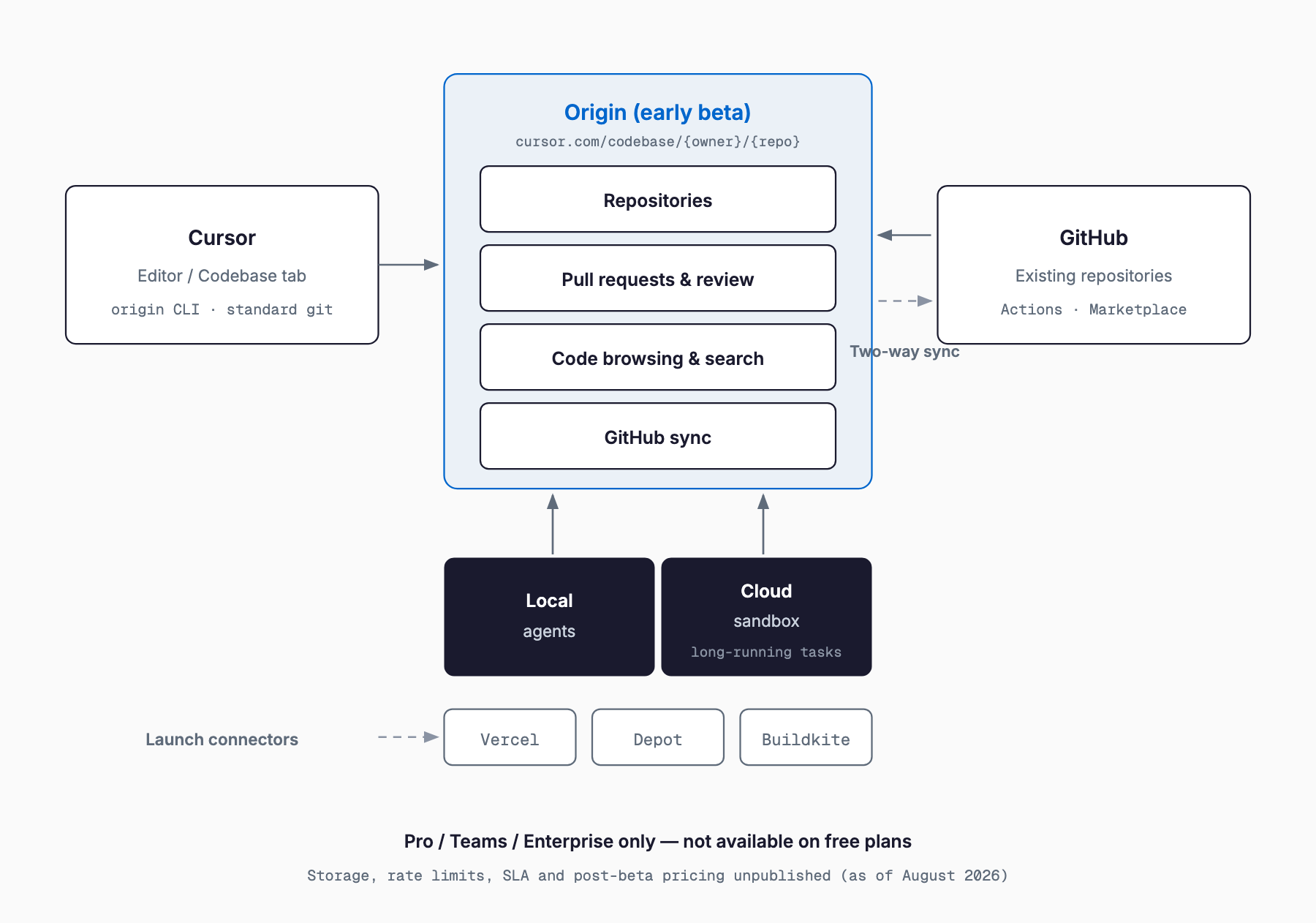
The Origin beta ships with four core features. First, "repositories" — you can create and manage git repositories directly inside Cursor. Second, "pull requests" — the full PR workflow, including review, comments, merging, and branch protection, runs entirely within Cursor. Third, "code browsing (search)" — you can search and browse code across a repository using Cursor's search capabilities. Fourth, "GitHub sync" — you can import an existing GitHub repository into Origin and keep it synced in both directions. All four are beta features and subject to change. Standard git clone/push/pull commands work as expected, and a dedicated Origin CLI is also available for terminal use.
Pricing and eligibility
Origin is available on the Pro, Teams, and Enterprise paid plans; free-plan users cannot access it. Rollout is staged, so even eligible plan holders may not have immediate access. As of the beta, Cursor has not published whether Origin carries additional charges, nor has it disclosed storage limits, bandwidth, API rate limits, an uptime SLA, or the pricing that will apply once the beta ends. The table below summarizes what is and isn't known.
| Item | Status (as of August 2026) |
|---|---|
| Eligible plans | Pro / Teams / Enterprise only (free plan excluded) |
| Rollout | Staged; eligible plans may not have immediate access |
| Additional cost | Not disclosed |
| Storage / bandwidth | Not disclosed |
| API rate limits | Not disclosed |
| SLA / uptime guarantee | Not disclosed |
| Post-beta pricing | Not disclosed |
How to get started
To start using Origin, someone on your team first needs to claim a namespace (an owner name) at cursor.com/codebase. The namespace becomes part of the URL structure (cursor.com/codebase/{owner}/{repo}), and importantly, a claimed namespace cannot be changed during the beta period. Once claimed, you can either create a new repository or import an existing GitHub repository. Importing takes just a few clicks, and from then on, updates on the GitHub side sync into Origin. Once the repository exists, you can clone it locally with standard git and push/pull as usual.
# Clone a repository hosted on Origin
git clone https://cursor.com/codebase/{owner}/{repo}.git

# Commit and push as usual
git add .
git commit -m "feat: initial commit"
git push origin main

# The Origin CLI can also be used from the terminal
# See official docs: https://cursor.com/docs/origin
How GitHub two-way sync works, and what to watch for
One of Origin's headline features is two-way sync with GitHub. You can copy an existing GitHub project into Origin in a few clicks, and subsequent changes on the GitHub side propagate to Origin. The reverse also works — changes made in Origin can be reflected back to GitHub — achieved through a mirroring-style import. However, detailed official documentation on conflict-resolution behavior, sync latency, and how GitHub-specific features like Actions are handled is currently limited. It's worth testing thoroughly against your own team's workflow before relying on it in production.
Agent integration
The core of Origin's "git forge for the agentic era" pitch is its agent integration. Beyond agents running locally on the desktop, Origin also offers agents built for long-running tasks that execute in cloud sandboxes, allowing work to continue even when a developer's machine goes offline. Repositories can be linked to automations and cloud agents, enabling agents to participate directly in creating and reviewing PRs. In a related move, Cursor has also rolled out a mobile coding agent, part of a broader trend of extending agent execution environments beyond the editor itself. On the third-party integration side, Vercel, Depot, and Buildkite are supported at launch, with more integrations promised. Some observers have also noted potential ties to Grok Build from SpaceX — Cursor's parent company — though this has not been officially confirmed.
How it differs from GitHub, GitLab, and Gitea
When evaluating Origin, it helps to lay out how it differs from established options like GitHub, GitLab, and self-hosted Gitea. The biggest difference is that Origin unifies the editor and git hosting into one product, designed from the ground up around coding agents. On the other hand, GitHub and GitLab still have a clear edge in CI/CD ecosystem maturity, established OSS community conventions, and proven SLAs.
| Aspect | Cursor Origin | GitHub | GitLab | Gitea (self-hosted) |
|---|---|---|---|---|
| Hosting model | Cursor's cloud | GitHub's cloud (Enterprise Server also available) | Cloud or self-hosted | Self-hosted |
| PR / review | Built into Cursor, agent-first | Standard, extensive track record | Standard, extensive track record | Standard (lightweight) |
| CI/CD | External integrations (Vercel/Depot/Buildkite, etc.) | Actions (built-in, large ecosystem) | GitLab CI (built-in) | Often requires external CI |
| Agent integration | First-class, local + cloud sandbox | Bolted on via Copilot etc. | Bolted on via Duo etc. | Not natively supported |
| Ecosystem | Early stage, limited track record | Most mature (Marketplace, OSS conventions) | Mature, strong enterprise track record | Lightweight, self-managed |
| Portability | Standard git clone/push works | Standard git | Standard git | Standard git |
| Pricing clarity | Undisclosed (beta) | Clear, published plans | Clear, published plans | Free (infrastructure cost only) |
| Maturity / SLA | Beta, SLA undisclosed | High, published SLA | High, published SLA | Self-managed responsibility |
Viewed this way, Origin currently reads more as a complement to GitHub than a replacement for it. For teams that lean heavily on agents and treat Cursor as their primary development workspace, it's an appealing option to try. But for teams that prioritize CI/CD ecosystem maturity, OSS track record, or SLA transparency, sticking with GitHub or GitLab as the primary platform remains the sensible call for now. Other integration trends worth tracking in this space include Zed Delta, a multiplayer agent coding environment, and OpenRouter's acquisition by Stripe — both part of the broader convergence of development workflows and AI agents.
What to check before migrating
Before considering a move to Origin, there are several points worth confirming. First, storage limits, bandwidth, API rate limits, SLA, and post-beta pricing remain undisclosed — since these directly affect a team's ongoing development operations, it's safer to wait for official announcements before committing to a full migration. Second, namespaces cannot be renamed once claimed during the beta, so naming decisions need care upfront. Third, Cursor was acquired by SpaceX in June 2026, meaning your code would effectively be entrusted to a company under SpaceX — worth a compliance review for some organizations. Finally, privacy follows the Privacy Mode setting of the namespace owner (an individual or a team), so teams handling sensitive code should confirm their own settings before adopting it. Notably, a major GitHub outage coincided with Origin's launch day, though Cursor has stated the timing was not intentional.
Frequently Asked Questions
Is Cursor Origin free to use?
No. It is available only to paid Pro, Teams, and Enterprise plan subscribers; free-plan users cannot use it.
Can I move a GitHub repository directly into Origin?
Yes, you can copy a project from GitHub into Origin in a few clicks, and it stays synced in both directions afterward. However, this is a mirroring-style import, and details like conflict resolution should be verified against your own team's workflow.
Is Origin a full replacement for GitHub?
Not as of August 2026. Storage limits, SLA, and post-beta pricing remain undisclosed, and GitHub still leads in CI/CD ecosystem maturity and OSS conventions. Right now, Origin is best treated as a complement for teams based in Cursor.
Can I change my namespace later?
No. Once claimed during the beta, a namespace (owner name) cannot be changed, so naming should be chosen carefully.
Can I use standard git commands?
Yes. Standard git clone/push/pull all work, and a dedicated Origin CLI is also available for terminal use.
Summary
Cursor Origin is Cursor's native git hosting service, released in early beta on August 17, 2026, with repositories, pull requests, code browsing, and two-way GitHub sync as its core features — all designed around treating coding agents as first-class participants. It's available on the Pro, Teams, and Enterprise paid plans, but key details like storage limits, SLA, and post-beta pricing remain undisclosed, and namespaces cannot be changed once claimed. For now, it's not a drop-in replacement for GitHub, but rather a complementary option worth trialing for teams that already center their development work in Cursor. Keep an eye on official announcements and feature expansions before making a broader migration decision.
Related free tools (no sign-up, instant results)
Feel free to contact us
Contact Us