Shadow IT and BYOD Policy for SMBs — Rules and Costs
Shadow IT is work done on tools or devices the company does not know about. Examples, risks, ban vs allow vs company phones, MDM costs, a policy checklist.
Shadow IT means IT tools, services or devices that employees use for work without the company knowing about them or approving them. Examples include talking to clients on a personal LINE account, forwarding files to a personal Gmail, sending large files through a free file-transfer site, pasting internal documents into a personally subscribed generative AI, and reading work email on a personal smartphone. It is rarely malicious. It usually comes from a good-faith wish to get work done faster, which is exactly what makes it hard to catch. In short, simply announcing a ban does not stop it. The practical approach is to take inventory, set rules, provide alternative tools, add technical safeguards and review regularly, in that order. As a rough guide, MDM (mobile device management) costs about 300 to 800 yen per device per month, and a company-issued smartphone costs about 2,000 to 4,000 yen per month plus the handset. This article walks through the thinking, the options, the costs and the items to put in an internal policy, for owners of small and mid-sized businesses without a dedicated IT person.
What is shadow IT? Everyday examples
Shadow IT means IT used out of the company's sight. It is not only a problem for large enterprises with IT departments. Companies with no dedicated IT staff are actually more likely to see it spread without anyone noticing. Typical examples are as follows.
- Personal LINE or social media DMs: contacting clients or field staff through personal accounts. The history stays on the individual's phone even after they leave
- Personal Gmail or iCloud: forwarding work files to a personal address in order to work from home
- Free file-transfer services: sending and receiving large data through external services the company does not know about
- Personally subscribed generative AI: pasting customer information or contract text in to be summarized
- Personal smartphones and PCs: opening work email, chat and cloud documents on devices outside company management
- Free cloud storage and note apps: saving work documents in personal accounts, where the company can no longer see them
Using a personal device for work is called BYOD (Bring Your Own Device). BYOD is a legitimate way of operating when the company allows and manages it, but it becomes shadow IT when the company neither allows it nor manages it. The problem is therefore not that the device is personal. It is that the company has no visibility, no rules and no controls. Handling of generative AI is covered separately in company rules for ChatGPT and other generative AI, so please read it alongside this article.
Why does shadow IT happen?
In most cases the cause is not employee carelessness but a company environment that is inconvenient or incomplete. Knowing the reasons makes it easier to choose the right countermeasure.
- Company tools are inconvenient or missing: there is no file sharing or chat system, so people substitute a free service at hand
- Speed takes priority: requests and approvals take time, so people sign up on their own
- No rules, or rules nobody knows: no one has explained what is not allowed, and people do not realize it is a problem
- Convenience: many free services can be used immediately after creating an account
- More remote and mobile work: people work away from the office more often and want to use whatever they have with them
In other words, shadow IT is also a sign that something people need has not been provided. Looking at what employees actually use shows where they are really struggling.
Risks of shadow IT and BYOD
Using IT the company does not know about carries the following risks. In many cases they come to light only after an incident.
- Information leaks: customer data or deal terms can get out through a lost or stolen personal phone, malware, misdirected messages or a family member looking at the screen
- Data taken away at resignation: documents remain in personal email, storage or devices, and cannot be deleted after the person leaves. The company has no way to order deletion or to confirm it
- Accounts the company cannot manage: services an employee signed up for in their own name cannot be shut down by the company at resignation, and the company does not even know who holds what
- License and terms-of-service violations: using consumer plans for business can breach their terms. Installing company-licensed software on a personal PC can also be a licensing problem
- Unclear responsibility: when an incident happens, the company cannot investigate what occurred or explain it to clients and customers
The resignation problem is especially easy to overlook. When business data sits in personal accounts or personal devices, it cannot be collected or deleted during offboarding. We cover the procedure in the IT offboarding checklist, but shadow IT does not even appear on that checklist, because nobody knew it existed.
BYOD ban, conditional BYOD or company-issued phones: comparing three options
There are broadly three policies for personal smartphones. None is always right. The choice depends on company size, job types and how sensitive the information is. Costs are rough estimates.
| Item | BYOD banned | BYOD allowed with conditions | Company-issued smartphones |
|---|---|---|---|
| Initial cost (estimate) | Almost none (just writing the rules) | From tens of thousands of yen (policy work, MDM or app-protection setup) | Handset cost, tens of thousands to around 100,000 yen each |
| Monthly cost (estimate) | 0 yen | From a few hundred yen per device (MDM or app-protection licenses) | About 2,000 to 4,000 yen per device including the line and MDM |
| Manageability | Hard to verify that the ban is followed | Only the work-app portion is managed, so moderate | Whole device is managed, so highest |
| Burden on employees | Two phones, or work limitations | One phone, but consent to the settings is needed | Two phones |
| Best suited for | Very sensitive information, or mostly office-based work | Few employees, tight budget, little time out of the office | Sales and field staff who are out often, and companies that want one communication channel |
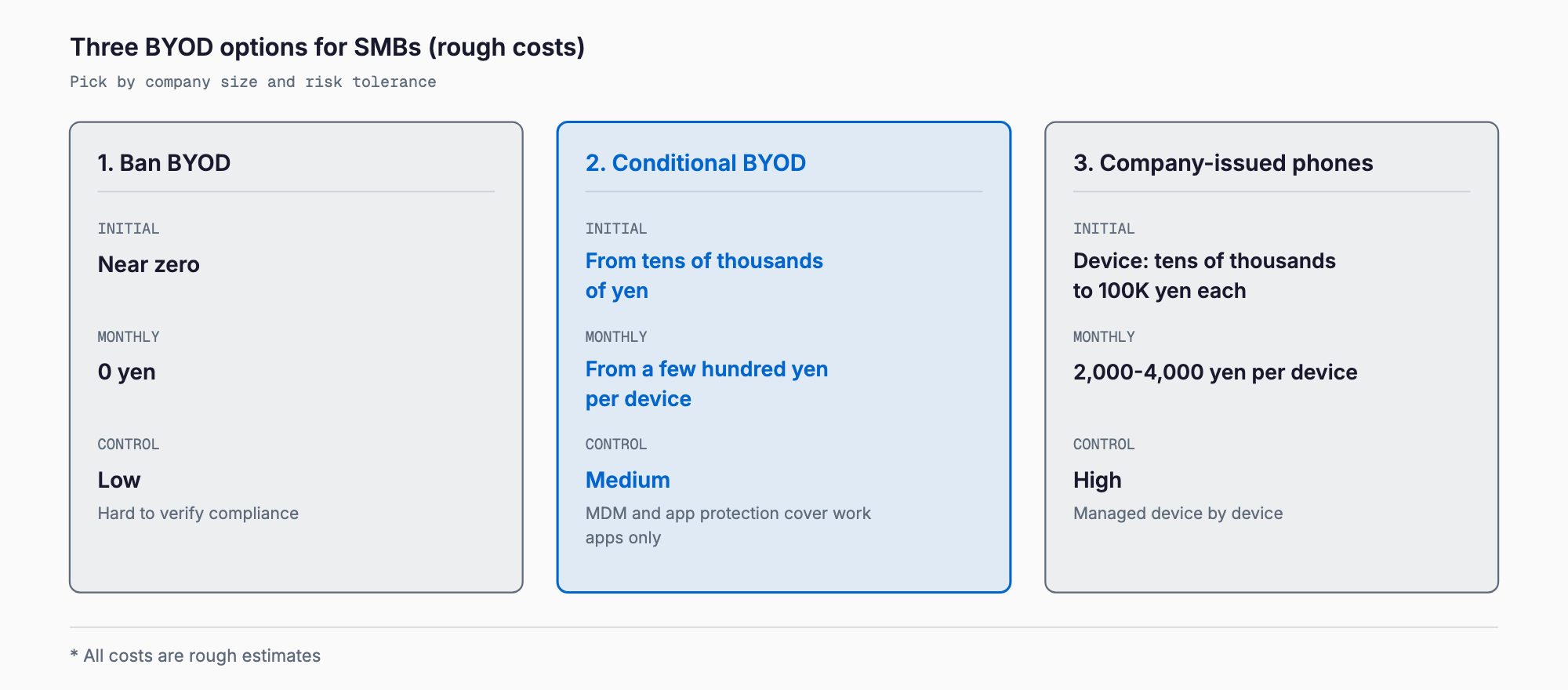
In practice, many companies split by job type rather than apply one rule to everyone. For example, company-issued phones for sales staff who handle customer information daily, conditional BYOD or PC-only for office staff, and company-issued devices only for anyone who touches management-level confidential information.
Cost estimates: MDM, company phones, app protection and policy work
The cost depends heavily on the policy and the number of devices. The figures below are rough estimates and vary by service, contract and quantity. Please confirm with several quotes when you actually introduce anything.
| Measure | Cost (estimate) | Notes |
|---|---|---|
| MDM (device management) | About 300 to 800 yen per device per month | Remote lock and wipe when lost, enforced passcodes, app restrictions. About 3,000 to 8,000 yen per month for 10 devices |
| Company-issued smartphone | About 2,000 to 4,000 yen per device per month for the line and handset installments (handset cost of tens of thousands of yen or more is separate) | Includes calls and data. Adding separate MDM costs a few hundred yen more |
| App protection (Microsoft 365 Business Premium, Intune, etc.) | A few thousand yen per user per month (included in the overall Microsoft 365 license fee) | Protects only the data inside work apps such as email and Teams, even on personal devices. Does not manage the whole device |
| Proper document management or cloud storage | About a few hundred to 1,500 yen per user per month | Gives the company a sanctioned place to share files instead of file-transfer sites or personal storage |
| Outsourcing policy preparation | Roughly 100,000 to 300,000 yen (current-state review, drafting and rollout) | If done in-house with a template, it can take a few days of effort |
| Employee briefing and training | Labor cost only if done in-house. From tens of thousands of yen with an outside trainer | A 30 to 60 minute session plus signed consent |
You do not have to introduce everything at once. Start with the no-cost steps of taking inventory and writing the rules down, then add technical measures according to how sensitive your information is.
A step-by-step approach: from inventory to regular review
Starting with a ban or an MDM rollout tends to cause resistance and confusion. The following order is easier to make stick.
Step 1: Take inventory (find out what is being used)
First, find out what tools and devices are actually in use. Present it as a survey to learn what is hard about their work, not to blame anyone, and use anonymous questionnaires or interviews. Ask about communication tools (LINE, social media), how files are exchanged, use of personal email and storage, use of generative AI, and which personal devices are used for work and for what. At the same time, list the devices and accounts the company itself contracts for. The IT asset management guide helps with building the register.
Step 2: Decide the rules (allowed, conditional, prohibited)
Based on the inventory, sort things into what is allowed, what is allowed with conditions and what is prohibited. The key to adoption is providing a conditional option instead of banning everything. Keep the rules short enough to read, about one or two A4 pages.
Step 3: Provide alternative tools
For everything you prohibit, provide something to use instead. If you ask people to stop using personal LINE, offer a company chat such as Teams, Slack or LINE WORKS. If you ask them to stop free file transfer, let them issue sharing links from company cloud storage. For generative AI, point them to a company-contracted service or a plan that does not use input data for training. Providing alternatives decides whether the whole effort succeeds.
Step 4: Add technical safeguards
Once the rules and alternative tools are in place, strengthen defenses technically. For accounts, requiring MFA (multi-factor authentication) and abolishing shared accounts come first. See account, password and MFA management for details. On top of that, apply MDM or app protection to devices so they can be locked and wiped remotely if lost. When business data is handled on personal devices, a method that protects only the work apps avoids intruding into employees' private space.
Step 5: Review regularly
Rules are not finished once written. Redo the inventory every six months to a year and reflect new services and changes in how people work. Also update the status of devices, accounts and consent forms every time someone joins, leaves or moves. Fast-moving areas such as new generative AI services in particular need regular review.
Checklist: what to include in an internal policy
An internal policy on personal smartphones and shadow IT should include at least the following.
- Purpose and scope: what the rules are for, and whether they apply to employees, part-timers and contractors
- List of permitted devices and services: state clearly the devices and tools the company approves
- Conditions if BYOD is allowed: eligible job types, OS version, passcode and screen lock, consent to MDM or app protection
- Prohibited actions: business communication through personal accounts, forwarding to personal email, entering confidential information into free transfer services or personally subscribed generative AI
- Range of information that may be handled: whether and how far customer data, personal data and confidential information may be handled on personal devices
- Contact and procedure for loss, theft or suspicious activity: who to report to and within how many minutes or hours of noticing
- Handling at resignation or transfer: deleting business data, disabling accounts and removing MDM or app protection
- What the company can see: what is monitored or managed on personal devices and what is not (privacy considerations)
- Cost sharing: who pays for communication fees and handsets, and whether there is an allowance
- Response to violations: the flow of warning and correction, and the approach to disciplinary action
- Review timing and contact point: who to ask, and when the policy is reviewed
Because the actual policy touches work rules and labor matters (cost sharing for personal device use, the extent of company oversight), it is reassuring to have a labor and social security attorney or similar professional check the final version.
Why a ban alone fails
Simply announcing that business use of personal smartphones is banned almost never makes shadow IT disappear. There are three reasons.
- Work stops, so people hide their use: without an alternative, staff keep using these tools out of sight to get things done. A ban often just makes the use invisible
- People stop consulting you: an overly strict ban makes it harder to report problems and incidents. Reports of loss or misdirected messages come late and damage grows
- You cannot verify compliance: without technical backing, the company cannot tell whether the rules are being followed
Conversely, when you provide alternative tools, make clear what is allowed and create an atmosphere where people can ask for help, shadow IT shrinks naturally. It also matters to explain that the rules exist not to restrict employees but to protect both employees and the company.
Frequently asked questions
Is it illegal to let employees use personal smartphones for work?
BYOD itself is not illegal. However, the company remains responsible for the safe management of personal and confidential information, so controls for loss and leaks (passcodes, remote wipe, rules) are expected. Leaving it unmanaged makes the company more likely to be held responsible when an incident occurs. For labor-related arrangements such as cost sharing and the scope of monitoring, it is reassuring to confirm with a professional.
Does a small company with 5 to 10 employees need MDM?
It depends on the information involved. If customers' personal data is handled on the devices, remote lock and wipe for around 3,000 to 8,000 yen per month for 10 devices (estimate) is well worth considering. If devices are used only to view email and chat with low sensitivity, you can start with mandatory passcodes, MFA and a written policy, then add measures in stages.
Should we stop employees contacting clients on personal LINE right away?
A sudden ban stops work, so it is more realistic to provide an alternative such as a company chat, set a migration deadline and switch over. A situation where the history of client communication exists only on an individual's phone creates serious risk at resignation, so move important conversations to the company system first.
Which is cheaper, company-issued phones or BYOD?
Looking only at monthly running costs, BYOD is cheaper (a few hundred yen for MDM or app protection plus any allowance). Company-issued phones, however, can be managed as whole devices, so management effort and risk are lower. It is common to split by job type: company-issued phones for people who are out often and handle sensitive information, and conditional BYOD for everyone else.
Related free tools (no sign-up, instant results)
Feel free to contact us
Contact Us