What Is HyperFrames? HeyGen's Open-Source HTML-to-Video Fram
ework for AI Agents (Setup, Usage, vs Remotion)
HyperFrames is HeyGen's Apache 2.0 framework that renders HTML into deterministic MP4. Oct 2026: setup, Claude Code skills, Remotion comparison.
HyperFrames (GitHub: heygen-com/hyperframes) is an Apache 2.0 open-source framework that turns HTML, CSS, media and animations into MP4 video. The README's tagline is "Write HTML. Render video. Built for agents." It seeks headless Chrome to each frame time, captures it, and encodes with FFmpeg, so the same input yields the same video. It needs Node.js 22+ and FFmpeg, and has roughly 57,000 GitHub stars as of October 2026.
This guide is based on the official README and docs (introduction, rendering and deterministic-rendering pages) as of October 2026. It covers what HyperFrames does, how it works, setup, how to write HTML compositions, using it from AI agents such as Claude Code, how it differs from Remotion and other options, and the caveats.
What is HyperFrames? An HTML-to-video framework
The docs describe HyperFrames as an open-source framework that turns HTML into video, built on three ideas: agents can build a project from a description, the result stays an editable project folder rather than a fixed output, and rendering is frame-accurate instead of depending on live playback performance.
Video structure is expressed with HTML data attributes: start time, duration and track index go on each element, while motion comes from seekable animations such as GSAP. No build step is needed, and the HTML plays as-is in a browser. The README says HeyGen uses it in production and lists adopters such as tldraw and TanStack.
What it can do
- HTML-native video authoring: set timing and tracks with data-start, data-duration and data-track-index
- Animation support: GSAP, CSS animations, Lottie, Three.js, Anime.js, the Web Animations API, and custom frame adapters
- Deterministic output: same input, same frames, same video
- Local and distributed rendering: on your machine, or in the cloud on AWS Lambda and Google Cloud Run
- Live-reload preview: check in the browser with npx hyperframes preview
- Catalog: add reusable blocks such as shader transitions, social overlays and animated charts
According to the rendering guide, output formats are mp4, mov, webm, gif, png-sequence and hls. Separate guides cover 4K and HDR output.
How it works: seek, capture, encode
Typical screen-recording approaches play the page in real time and film it. If the machine is busy, frames drop and results differ run to run. HyperFrames avoids this by computing each frame's time, moving every animation to that exact moment (a seek), and capturing one frame at a time. The docs describe the time calculation as integer math, time = floor(frame) / fps.
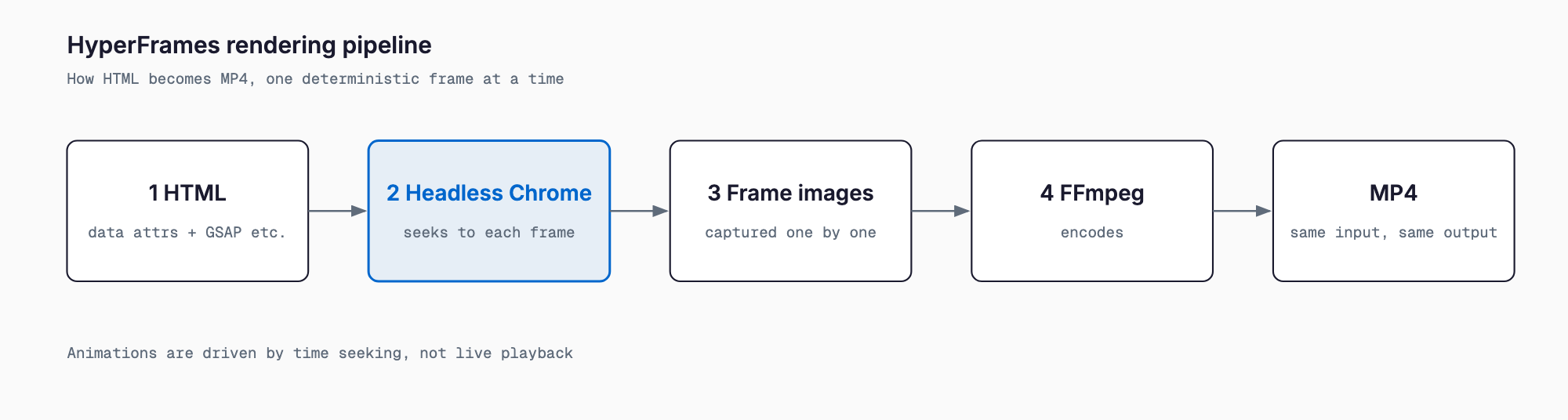
That is why there are authoring rules. The official determinism guide lists these constraints:
- No wall clock: no Date.now(), no requestAnimationFrame, no system timers
- No unseeded randomness: Math.random() gives a different frame every run
- No fetching mid-render: every asset loads before the first frame
- Fixed output size: fps, width and height are locked before frame 0
Fonts and Chrome versions still differ between machines, so for exact reproducibility the docs recommend --docker, which pins Chromium, fonts and FFmpeg.
Installation and requirements
The README lists Node.js 22+ and FFmpeg as requirements. There is nothing to install globally; npx creates a project directly. The shortest path:
npx hyperframes init my-video
cd my-video
npx hyperframes preview      # browser preview with live reload
init scaffolds a template project and preview opens a live-reload preview in the browser. If FFmpeg is missing, install it first with your OS package manager, such as Homebrew on macOS.
Usage: writing HTML and rendering
Here is a minimal composition (the README's example). The root element carries data-composition-id and the canvas size; children carry data-start (start in seconds), data-duration (length in seconds) and data-track-index (the layer track). Video, text and audio all follow the same pattern.
<div id="stage" data-composition-id="launch" data-start="0"
     data-width="1920" data-height="1080">
  <video class="clip" data-start="0" data-duration="6"
         data-track-index="0" src="intro.mp4" muted></video>
  <h1 id="title" class="clip" data-start="1" data-duration="4"
      data-track-index="1">Launch day</h1>
  <audio data-start="0" data-duration="6" data-track-index="2"
         data-volume="0.5" src="music.wav"></audio>
  <script src="https://cdn.jsdelivr.net/npm/gsap@3/dist/gsap.min.js"></script>
  <script>
    const tl = gsap.timeline({ paused: true });
    tl.from("#title", { opacity: 0, y: 40, duration: 0.8 }, 1);
    window.__timelines = window.__timelines || {};
    window.__timelines.launch = tl;
  </script>
</div>
The key part is the script at the bottom. It creates a GSAP timeline with paused: true and registers it under the composition ID in window.__timelines. The renderer then drives that timeline to each frame time; you never start playback yourself.
Before rendering, the guide recommends running lint to check project structure and check to open the project in a browser and look for runtime, layout, motion, media and contrast problems.
npx hyperframes lint
npx hyperframes check
npx hyperframes render --output final.mp4
If you omit --output, files go to the renders/ directory. Main options, per the rendering guide:
| Option | Meaning |
|---|---|
--format | mp4, mov, webm, gif, png-sequence, hls |
--quality | draft, standard (default), high |
--fps | Frame rate (default 30, or the composition's data-fps) |
--composition | Target HTML file (e.g. compositions/intro.html) |
--docker | Render inside Docker to pin the Chrome and FFmpeg environment |
--crf / --video-bitrate | Quality controls (rejected for MOV) |
npx hyperframes render --format webm --quality high --fps 60 --output final.webm
npx hyperframes render --composition compositions/intro.html --docker
You can also pull catalog blocks into your project with one command each, such as transitions or charts.
npx hyperframes add flash-through-white   # shader transition
npx hyperframes add instagram-follow      # social overlay
npx hyperframes add data-chart            # animated chart
Using it from Claude Code and other agents
The "built for agents" part is a set of agent skills published by HeyGen. They install as a plugin in Claude Code, or as standalone skills for other agents.
# Claude Code
claude plugin marketplace add heygen-com/hyperframes
claude plugin install hyperframes@hyperframes

# Standalone skills
npx skills add heygen-com/hyperframes
The README says there are 21 skills: a router (/hyperframes), creation workflows (product launch video, faceless explainer, PR-to-video, embedded captions, motion graphics, slideshow, Remotion migration and more), and domain skills (core, animation, CLI, audio, registry, Figma and others). An agent only has to write HTML and run preview and render, so there is no JSX build environment to prepare.
For choosing and vetting agent skills, see our comparison of i-have-adhd and ponytail and NVIDIA SkillSpector's pre-install scanning. For Claude Code itself, see the Claude Code complete guide; for another skill example, the diagram-design skill.
How it differs from Remotion and other options
The README compares directly with Remotion, a code-driven, React-based video framework. HyperFrames uses plain HTML instead of React. The official comparison:
| Aspect | HyperFrames | Remotion |
|---|---|---|
| Authoring | HTML + CSS + seekable animation | React components |
| Build step | None; plays as-is | Bundler required |
| Agent handoff | Plain HTML files | JSX/React project |
| Animation model | Seekable, frame-accurate | Wall-clock patterns need care |
Motion Canvas and hand-written FFmpeg are not compared in the README. The table below is a general characterization, so check each project's official site for current details.
| Tool | Authoring | Good for | Watch out for |
|---|---|---|---|
| HyperFrames | HTML/CSS/data attributes + GSAP etc. | People fluent in HTML; AI-agent video production | Needs Node.js 22+ and FFmpeg |
| Remotion | React (TypeScript) | Reusing React component assets | Assumes React and a bundler; check license terms on the official site |
| Motion Canvas | TypeScript (generator syntax) | Polished explainer and vector animation | A dedicated code style to learn |
| Hand-written FFmpeg | Commands and filter expressions | Joining, converting, burning subtitles into existing video | Poor fit for building animated layouts from scratch |
As a rule of thumb: Remotion if your team already builds in React, HyperFrames if you want to lay out video with HTML and CSS and hand it to an AI agent, and FFmpeg alone if you only convert existing footage. HyperFrames itself uses FFmpeg for encoding, so the two play different roles rather than competing.
Use cases
- Short social videos: stack captions and animation on a 1080x1920 composition and mass-produce them with the captions skill
- Product demos and launch videos: layer a title and music over screen recordings using workflows like /product-launch-video
- Data videos: turn animated charts, such as the catalog's data-chart block, into video
- Pull-request walkthroughs: use /pr-to-video to explain a PR as a video
- Templated video automation: inject values into an HTML template and render in CI, relying on same-input-same-output
AI video generation models, such as those covered in our LTX-2.5 local requirements article, generate the footage itself. HyperFrames is the opposite: it assembles text and assets precisely into video, which suits cases where numbers, logos and captions must not drift.
Caveats
- Determinism has authoring rules: Date.now(), unseeded Math.random() or fetching during render can make the same input produce different output
- Environment differences remain: fonts and Chrome versions can change appearance; use --docker for exact reproduction
- Requirements: Node.js 22+ and FFmpeg are required, so older Node versions won't work
- External assets: loading GSAP from a CDN, as in the example, needs network at render time; bundling it locally is safer in CI
- Scope of this article: the official intro page is conceptual, with details in the CLI guide and HTML schema reference. Options may change by version, so confirm against the official docs
FAQ
What is HyperFrames?
An Apache 2.0 open-source framework from HeyGen that turns HTML, CSS, media and animations into MP4 and other video formats. It uses headless Chrome and FFmpeg so that the same input gives the same video.
What does it require?
Per the README, Node.js 22+ and FFmpeg. Create a project with npx hyperframes init my-video and render with npx hyperframes render.
How is it different from Remotion?
Remotion builds video from React components and needs a bundler; HyperFrames is written in plain HTML and CSS and plays as-is with no build step. The README highlights that what you hand an agent is plain HTML.
Can I use it from Claude Code?
Yes. Install the plugin with claude plugin marketplace add heygen-com/hyperframes and claude plugin install hyperframes@hyperframes, or add the skills with npx skills add heygen-com/hyperframes.
What about commercial use and fees?
The license is Apache 2.0, and the README states there are no per-render fees or commercial-use thresholds. Check the licenses of libraries you embed, such as GSAP, separately.
Why is the output the same every time?
Because it seeks to each frame's time and captures it rather than playing in real time. Font and Chrome version differences remain, so use --docker when you need exact reproducibility.
Summary
HyperFrames is an Apache 2.0 open-source tool that lets you write video as HTML with data attributes and deterministically convert it to MP4 via headless Chrome seeking and FFmpeg. It needs Node.js 22+ and FFmpeg, and you can try it with a few commands from npx hyperframes init to render. Unlike Remotion it needs neither React nor a build step and treats video as plain HTML, which makes it a good fit for handing video production to agents like Claude Code. Before adopting it, review the determinism rules and how to use --docker to reduce environment drift.
Related free tools (no sign-up, instant results)
Feel free to contact us
Contact Us