Mistral Large 4 Requirements
VRAM & GPU for the 1T MoE (FP8 ~1TB)
Mistral Large 4 (1T MoE, 49B active) needs an estimated ~1TB at FP8, ~500-580GB at 4-bit. GPU, Mac and API cost compared. Updated Oct 2026; weights due soon.
Running Mistral AI's new flagship Mistral Large 4 (nicknamed Le Chonk) locally should take roughly 2,000GB for BF16, 1,000GB for FP8, 500-580GB for 4-bit-class quantization, and 280-320GB for 2-bit-class for the weights alone (all estimates). It is a Mixture-of-Experts model with 1 trillion (1T) total parameters and 49B active, and it is natively multimodal with text and image input. This is not a size that a personal PC or a typical workstation can handle; the realistic options are the API or a server with around eight H200-class GPUs.
Mistral Large 4 was announced on October 6, 2026, and public preview through the Mistral Studio API started the same day. Open weights are planned for the end of October, and reports say general availability is October 27. The license has not been announced, so commercial-use terms must be checked when the weights are released. This article separates announced facts from our own estimates.
Requirements at a glance (estimates)
Weight size is computed as 1T parameters times bytes per parameter. For a practical target we added roughly 15% for KV cache and activations at a short context. The layer count, KV-head configuration, and context length are all undisclosed, so KV cache cannot be calculated individually yet.
| Precision | Weights only (est.) | Practical target (est., short context) | Quality loss |
|---|---|---|---|
| BF16 (full precision) | ~2,000GB | ~2,300GB | None |
| FP8 | ~1,000GB | ~1,150GB | Negligible |
| 4-bit class (Q4 / INT4) | ~500-580GB | ~575-670GB | Small (practical) |
| 2-bit class (Q2 / 1.58-bit) | ~280-320GB | ~320-370GB | Noticeable |
If you want to check quickly whether your own GPU or Mac can run it, our VRAM calculator (free, no signup) estimates the required VRAM from a model, quantization, and context length. Mistral Large 4 is available in its model list.
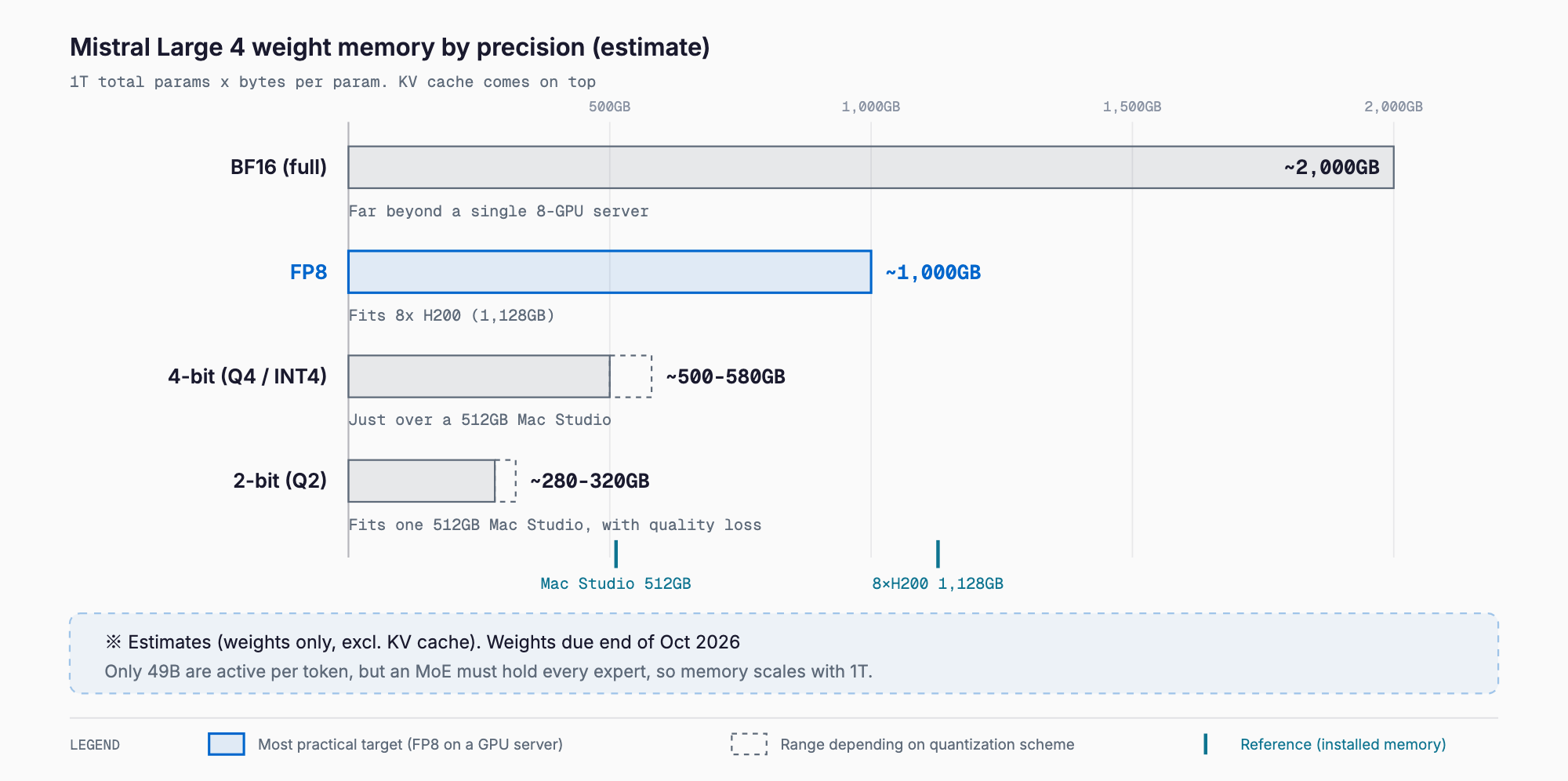
The range at 4-bit exists because quantization methods add metadata such as per-block scale factors, making the effective bit width about 4.0-4.6 bits. The longer the context you use, the more KV cache is added on top of this table, since KV cache grows roughly in proportion to context length. The mechanism is covered in our guide to KV cache and context length VRAM.
What is Mistral Large 4: facts confirmed in the announcement
Mistral Large 4 is a large language model from France's Mistral AI. It is a Mixture-of-Experts (MoE) model with 1 trillion total parameters and 49B active per token, natively multimodal (text plus image input), and described as a hybrid that unifies instruct and reasoning in one model. It supports more than 160 languages, including all official EU languages, and was reportedly trained in Europe on 3,800 NVIDIA Grace Blackwell GPUs.
| Item | Detail | Status |
|---|---|---|
| Total parameters | 1T (one trillion) | Announced |
| Active parameters | 49B | Announced |
| Architecture | MoE, natively multimodal (text + image input), instruct + reasoning hybrid | Announced |
| Languages | 160+ (including all official EU languages) | Announced |
| Training | 3,800 NVIDIA Grace Blackwell GPUs in Europe | Announced |
| API | Public preview on Mistral Studio (from October 6, 2026) | Available |
| API pricing | $1.36 per 1M input tokens, $4.18 per 1M output tokens | Announced |
| Open weights | Planned for end of October 2026 (reports say GA on October 27) | Not yet released |
| License | Not announced (check when weights are released) | Not announced |
| Context length | Not disclosed | Not disclosed |
| Number of experts | Not disclosed | Not disclosed |
Benchmarks (developer-announced figures)
The figures below were presented in the announcement. They are the developer's own claims, and we could not confirm independent third-party verification. Rankings may change once outside evaluations appear after the weights are released.
| Benchmark | Score | Area |
|---|---|---|
| DeepSWE 1.1 | 61.7% | Software engineering |
| Terminal Bench 4.0 | 28.3% | Terminal use / agents |
| AutomationBench | 59.9% | Business automation |
| Cybench | 93% | Security (CTF tasks) |
| Vulnerability reproduction | 82% | Security |
| Dense 200 | 42% | Visual grounding (GPT-6-Astra: 41%) |
It was also announced that the model ranks in the global top 5 on the AA Cyber Index and is the best open model on the Harvey Legal Agent Benchmark. This suggests a focus on legal and multilingual business use, but whether it helps in your use case can only be tested with your own data.
Why memory is estimated from the 1T total parameters
An MoE model uses only some experts to compute each token, but which experts get picked next changes with every input. In principle all expert weights must therefore sit in memory, so required capacity is set by the total parameter count (1T). The 49B active parameters affect speed. At 4-bit, the weights read per token come to roughly 25GB (49B x 0.5 bytes), so on hardware with enough memory bandwidth the model runs far faster than a dense 1T model. Compute per token is close to a 49B-class model, while the memory requirement stays at the 1T level; that is the defining trade-off of the MoE design.
What quantization is and which bit width to choose
Quantization compresses memory by reducing the number of bits used to represent each weight. Going from BF16 (16-bit) to 8-bit halves memory, and 4-bit cuts it to about a quarter. 8-bit is nearly lossless and 4-bit is considered practical for most uses, but dropping to 2-bit visibly degrades output quality. No quantized version of Mistral Large 4 exists yet, so the quality impact cannot be judged. When using reasoning mode, errors can accumulate over long chains of thought, so choosing the highest precision you can afford is the safer approach.
As a rule, choose FP8 if quality comes first, 4-bit class as the realistic local option, and 2-bit class only as a last resort when memory runs short. BF16 needs about 2,000GB for weights alone and has little reason to be chosen outside research.
GPU configurations (estimates)
The table below is a pre-release estimate based on whether the weights fit. Whether it actually runs depends on the framework's parallelism strategy (tensor or expert parallelism) and on context length.
| GPU setup | Total VRAM | BF16 | FP8 | 4-bit class | 2-bit class |
|---|---|---|---|---|---|
| H100 80GB x 8 | 640GB | No | No | Fits, little headroom (short context) | Comfortable |
| H100 80GB x 16 | 1,280GB | No | Fits (little headroom for long context) | Comfortable | Excessive |
| H200 141GB x 4 | 564GB | No | No | Barely (lower bound only) | Comfortable |
| H200 141GB x 5 | 705GB | No | No | Comfortable | Comfortable |
| H200 141GB x 8 | 1,128GB | No | Fits, ~128GB headroom (tight for long context) | Comfortable (long context OK) | Excessive |
| B200 192GB x 4 | 768GB | No | No | Comfortable | Excessive |
| B200 192GB x 8 | 1,536GB | No | Comfortable | Excessive | Excessive |
Our guidance: for FP8, use 8x H200 or 8x B200 (8x H200 leaves only about 128GB after loading the weights, which long contexts will quickly exhaust), and for 4-bit, 4-5x H200, 4x B200, or 8x H100 will fit. BF16 is in the 2TB class and does not even fit in 8x B200 (1,536GB total), so it is outside typical deployments. Note that some frameworks require a power-of-two GPU count for parallelism, so whether a five-GPU setup is usable depends on the framework.
Running on Apple Silicon
Apple Silicon lets the GPU use unified memory, making it an option for running large models on a desk. However, the maximum Mac Studio configuration is 512GB, and Mistral Large 4 at 4-bit (about 500-580GB) does not fit in a single machine. What fits on one machine is 2-bit class (about 280-320GB), which trades away quality.
To target 4-bit, one could connect two 512GB Mac Studios and use distributed inference across 1,024GB in total. The roughly 500-580GB of weights would fit, but inter-machine link speed becomes the bottleneck and stable operation is difficult. FP8 (about 1,000GB) does not fit even across two machines once OS usage is subtracted. Whether llama.cpp's Metal backend or MLX will support Mistral Large 4's architecture is also unconfirmed and must be checked after the weights are released. We discuss 512GB machines in our Reflection Beam requirements article as well.
CPU plus large system RAM offload
Taking advantage of the 49B active parameters, you can keep the experts in large system RAM and put only the shared layers on the GPU. But Mistral Large 4 is about 500-580GB even at 4-bit, so 512GB of RAM is not enough and you effectively need a 1TB-class server. Because roughly 25GB must be read per token, even a server with about 300GB/s of bandwidth has a theoretical ceiling of a little over ten tokens per second, and real-world speed is likely to be a fraction of that (estimate).
Consumer GPUs such as the RTX 5090 (32GB) fall far short on VRAM alone. Extreme CPU offload with more than 512GB of RAM might run it, but the speed would be far from practical. For simply trying things locally, this model is not a realistic choice, and a smaller Mistral model is better suited. For the smaller model, see our Mistral Small 4 article.
Cost: API versus running it yourself
Mistral Large 4's API pricing is $1.36 per 1M input tokens and $4.18 per 1M output tokens. For example, processing 1M input tokens and 300K output tokens a day costs $1.36 for input plus $1.25 for output (0.3 x $4.18), or about $2.6 per day. That is about $78 over 30 days and only about $950 over a year.
| Daily usage | Input | Output | Cost per day | 30 days |
|---|---|---|---|---|
| Small | 1M tokens | 300K tokens | ~$2.6 | ~$78 |
| Medium (10x) | 10M tokens | 3M tokens | ~$26 | ~$780 |
| Large (100x) | 100M tokens | 30M tokens | ~$261 | ~$7,800 |
A server like 8x H200 costs tens of millions of yen to buy, and renting it in the cloud means continuous hourly charges. For this reason, the API is far cheaper for most small and midsize businesses. Self-hosting is realistic only with a clear reason: confidential data cannot leave the company, data residency must be limited to Europe, or daily volume is so large that pay-per-use becomes expensive. Evaluating through the API first and considering self-hosting after the weights are released is the order least likely to lead to a bad investment.
Comparison with other large open MoE models
Here are the figures alongside those confirmed in our existing articles. The higher the ratio of total to active parameters, the more the model has the typical MoE character: heavy on memory, light on compute per token.
| Model | Total params | Active | Context length | License | 4-bit memory estimate |
|---|---|---|---|---|---|
| Mistral Large 4 | 1T | 49B | Not disclosed | Not announced | ~500-580GB (est., weights only) |
| Reflection Beam | 501B | 23B | 1M | Apache 2.0 | ~250-290GB (est., weights only) |
| DeepSeek V4-Pro | 1.6T | 49B | 1M | MIT | ~920GB |
| GLM-5.2 | 753B | ~40B | 1M | MIT | ~430GB |
| Mistral Small 4 | 119B | 6.5B | 256K | Apache 2.0 | ~60GB (Q4) |
| Kolibri-1 | 78B | ~3.46B | 262K (native) | Apache 2.0 | ~39–45GB (est.) |
Mistral Large 4 matches DeepSeek V4-Pro at 49B active, but its total is about two thirds as large, so 4-bit memory comes to a little over half. It needs roughly twice the memory of Reflection Beam. Among European models, the 78B MoE Kolibri-1 runs in far less memory. Benchmark rankings rest on each developer's own figures, so this table does not compare them.
What you can do now (before the weights are out)
- Evaluate quality through the Mistral Studio API using your own business data first
- Reserve free disk space for the weights (about 1TB for FP8, about 500-580GB for 4-bit)
- Use the tables above to see whether your setup reaches 4-bit (if not, plan on the API)
- If you handle confidential data, wait for the license and deployment terms (including on-premises use)
- If you plan to use long contexts, budget KV cache separately until the official context length is published
- Note what to check after release (repository name, official quantized builds, supported frameworks, minimum configuration)
Troubleshooting (out of memory)
- OOM at startup: the weights do not fit. Drop one precision level (FP8 to 4-bit) or add GPUs
- OOM partway through: KV cache is the likely cause. Lower the maximum context length, reduce concurrent requests, or consider KV cache quantization
- Crashes on image input: multimodal use adds image tokens and the vision weights. Reduce image resolution or the number of simultaneous images and retest
- Offload setup is slow: memory bandwidth is the bottleneck. Check the number of DDR5 channels and revisit expert placement
- GPUs are free but the model will not fit: parallelism constraints can leave GPUs unused when the count does not split evenly. Check the GPU count and parallel settings
- Quality is extremely poor: 2-bit degrades heavily. Try 3-bit or higher
Summary
Mistral Large 4 is a multimodal MoE with 1T total and 49B active parameters, and the local-run estimates are about 500-580GB at 4-bit, 1,000GB at FP8, and 2,000GB at BF16 (all weights only). For FP8, 8x H200 or 8x B200 are candidates, and for 4-bit, 4-5x H200 or 4x B200; a single 512GB Mac Studio cannot hold 4-bit and consumer GPUs are not realistic. At a million tokens a day, the API costs about $2.6 per day, which makes it the rational choice for most small and midsize businesses. Because the license and context length are unannounced, we will update this article with measured values once the weights are out.
FAQ
How much VRAM does Mistral Large 4 need?
Estimated from the 1T total parameters, the weights alone are about 2,000GB at BF16, 1,000GB at FP8, 500-580GB at 4-bit, and 280-320GB at 2-bit. KV cache and overhead come on top. Official VRAM figures and the context length are not disclosed, so check them after the weights are released.
Are the weights released yet, and what is the license?
As of October 7, 2026, they are not. Open weights are planned for the end of October, and reports say general availability is October 27. The license has not been announced, so commercial-use terms must be checked at release. Until then the model is available through the Mistral Studio API.
With 49B active parameters, does it run in 49B worth of VRAM?
No. An MoE model cannot know which experts will be selected next, so in principle all expert weights must stay in memory, and required capacity is set by the 1T total. The 49B active parameters mainly affect generation speed.
Can it run on a Mac Studio (512GB) or an RTX 5090?
A single 512GB Mac Studio cannot hold 4-bit (about 500-580GB); only 2-bit (about 280-320GB) fits, with lower quality. Two machines with distributed inference should fit 4-bit, but support is unconfirmed. An RTX 5090 (32GB) is not realistic unless you use extreme CPU offload with more than 512GB of RAM, and the speed would be far from practical.
Is it cheaper to run it locally or use the API?
For most small and midsize businesses the API is far cheaper. Pricing is $1.36 input and $4.18 output per 1M tokens, so 1M input and 300K output tokens a day is about $2.6. Self-hosting needs an 8x H200-class server and is worth considering only when confidential data cannot leave the company or volume stays very high.
Related free tools (no sign-up, instant results)
Feel free to contact us
Contact Us