What Is archify? The Agent Skill That Makes Diagrams Verifia
ble via JSON IR
A guide to archify (tt-a1i/archify), which hit #1 on GitHub Trending JavaScript. Covers how agents emit a JSON intermediate representation that deterministically compiles to HTML/SVG, installation, and how it differs from Mermaid, draw.io, and Excalidraw.
What Is archify?
archify (tt-a1i/archify) is a Node.js tool distributed as an "agent skill" for AI coding agents such as Cursor, Claude Code, Codex CLI, and OpenCode. The agent emits a typed JSON intermediate representation (IR), which archify then compiles deterministically into self-contained HTML architecture, workflow, sequence, data-flow, and lifecycle diagrams.
What It Can Do
archify supports five diagram types: architecture, workflow, sequence, data-flow, and lifecycle. Output is self-contained HTML with dark/light theme support and motion, and can also be exported as PNG (including clipboard copy), SVG, WebM, and 1200×630 share cards.
- Supported diagram types: architecture / workflow / sequence / data-flow / lifecycle
- Output formats: self-contained HTML (dark/light, with motion), PNG, SVG, WebM, 1200×630 share cards
- Supported clients: Cursor / Claude Code / Codex CLI / OpenCode
- Interactions: node search (/), upstream/downstream reach tracing, route probing (R), role comparison (L), guided story playback (P)
Why It Went Viral
archify hit #1 on GitHub Trending's JavaScript category on August 29, 2026. It gained roughly 18,000 stars in a week, and as of this writing (August 31, 2026) has reached roughly 35,000 stars total. It fits naturally with generative AI agents that autonomously read a codebase and are expected to spit out a diagram on the spot, which drove rapid adoption in a short period.
Architecture: Why "JSON IR to Deterministic Compilation"
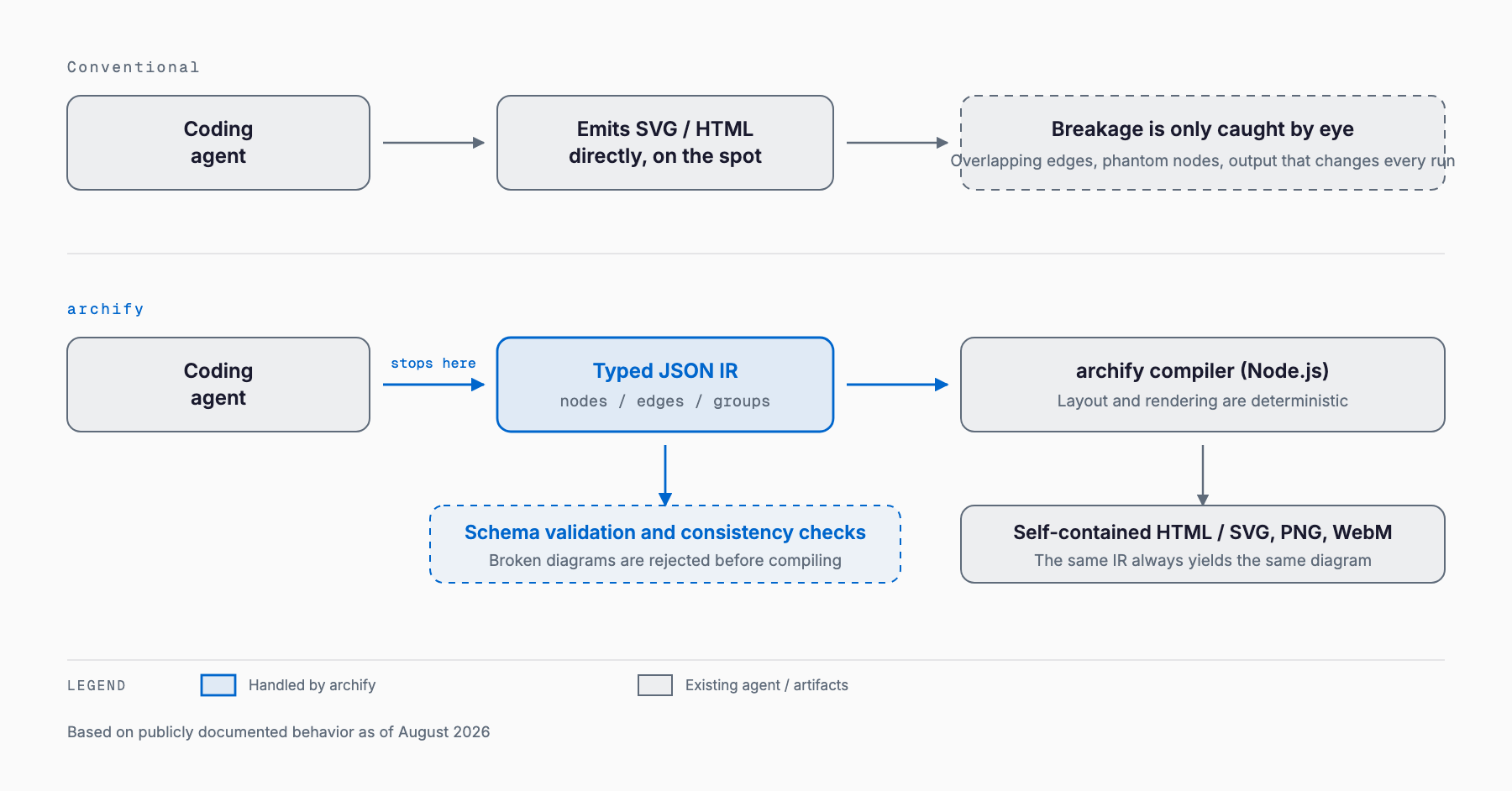
The core design decision behind archify is that it never lets an LLM draw SVG or HTML markup directly. The agent only produces a typed JSON IR — structured data describing nodes, edges, roles, and evidence — and archify itself (a Node.js rendering engine) deterministically compiles that IR into HTML/SVG. When an LLM is asked to write drawing code directly, the same input can produce subtly different layouts and syntax each time, leading to non-reproducible problems like broken SVG, dead links, or overlapping coordinates. By inserting a JSON IR layer, archify fixes a single, deterministic output for a given input, and can mechanically validate schema, layout, HTML/SVG syntax, routes, and clearance (overlaps and spacing between elements).
Installation / Pricing
archify is open-source software under the MIT license, free to use, modify, and redistribute. The README's standard installation is a global install, with a dedicated command for explicit setup on Cursor, plus a one-off trial command that skips installation entirely. As of this writing, the README does not state a baseline Node.js version required for the core package itself; it does note that the community DeepSeek Harness integration requires Node ^22.19.0 || >=24.0.0.
# Global install (recommended)
npx skills add tt-a1i/archify -g

# Explicit setup for Cursor
npx -y skills add tt-a1i/archify --skill archify --agent cursor --global --copy --yes

# Try once without installing (Codex CLI example)
npx skills use tt-a1i/archify@archify --agent codex
How to Use It — the Fastest Path
In Claude Code or Cursor, the fastest path is to install globally and then simply describe your system in chat. No repository needs to be open — you describe the system in plain language, the agent generates the JSON IR, and archify compiles it into HTML. The distribution and execution mechanism itself is the same kind of agent-skill setup used by Claude Code's diagram-design skill.
"Use Archify to draw: Browser -> API -> Redis cache -> PostgreSQL fallback."Distinctive Features
- Source evidence: nodes in architecture diagrams carry a SRC n reference and link to actual files pinned to a public Git commit
- Architecture delta: compares two validated snapshots as Before/Delta/After, presenting additions, removals, changes, moves, and rerouting as machine-readable facts
- Deterministic validation: checks schema, layout, HTML/SVG syntax, routes, and clearance, and outputs machine-readable repair receipts
How It Differs from Existing Tools
Mermaid, draw.io, and Excalidraw are the widely used diagramming tools, and Claude Code's diagram-design skill plugin also produces editorial diagrams. archify's own README positions the tool as "not a general-purpose drawing editor or a Mermaid theme" — its emphasis on verifiability and Git integration is the main thing that sets it apart from the others.
| Tool | Who draws it | Output formats | Validation | Fit with version control | Non-English labels | Learning curve |
|---|---|---|---|---|---|---|
| archify | Agent generates JSON IR; the tool deterministically compiles it | Self-contained HTML/SVG/PNG/WebM/share cards | Yes (schema, layout, syntax, routes, clearance) | High (source-evidence links directly to Git commits) | Not confirmed in the README (needs verification) | Mostly agent-driven; minimal manual commands |
| Mermaid | Human hand-writes text syntax, or a generative AI outputs the syntax | Mostly SVG for embedding in Markdown | None (visual inspection beyond syntax errors) | Low (no automatic tie to commits) | Supported (can break depending on font) | Requires learning the syntax |
| draw.io | Human manually arranges elements in a GUI | Proprietary XML / PNG / SVG | None | Low (tends to diff like a binary) | Supported | Requires GUI familiarity |
| Excalidraw | Human draws in a hand-drawn-style GUI | Proprietary format / PNG / SVG | None | Low | Supported | Intuitive, but doesn't produce structured data |
| diagram-design (Claude skill) | Agent generates it, Claude formats it into an editorial HTML/SVG | HTML/SVG/PNG | Visual review-based (brand and layout focus) | Moderate | Supported | Requires a Claude Code setup |
Good Fit / Poor Fit
archify is a good fit when you want to mechanically validate a codebase or system configuration while producing a diagram from it. It's a poor fit when a designer wants free rein to hand-tweak the layout, or for use as a general-purpose drawing editor — a role archify explicitly disclaims for itself.
- Good fit: having an agent read a codebase and auto-generate an architecture diagram / tying diagram evidence to Git commits / mechanically comparing Before/After configuration changes
- Poor fit: fully free-form, hand-drawn-style layouts / lightweight text-embedded diagrams like Mermaid / workflows that must stay entirely within a GUI without an agent environment
Practical Use Cases
In the context of SME system development, plausible uses include having an agent auto-generate an internal system's architecture diagram to attach to a handover document, or presenting a Before/After configuration diff during requirements-gathering to build agreement among stakeholders. Because source-evidence ties nodes back to actual file commits, it's easier to share with stakeholders exactly where a given diagram's claims come from — something verbal explanation alone often fails to convey.
Caveats and Limitations
archify is a tool whose star count has surged very recently, so breaking changes or a reworked command structure are plausible going forward. Check the latest README before adopting it. Because it's distributed as an agent skill, it's also worth evaluating the safety of the skill you're pulling in from outside — a concern closely related to the kind of skill-distribution security scrutiny covered in NVIDIA SkillSpector (agent skill security). It's also worth tracking developments around skill distribution and execution formats themselves, such as the Agent Plugins 1.0 standard.
FAQ
Is archify free to use?
Yes. It's open-source software under the MIT license, free to use, modify, and redistribute.
Do I need a local copy of a repository to use archify?
Not necessarily. The README's quick-start example shows generating a diagram just by describing your system in chat after a global install.
Which AI agent environments does it support?
According to the README, the supported clients are Cursor, Claude Code, Codex CLI, and OpenCode.
How is it different from Mermaid?
archify's own README describes it as 'not a general-purpose drawing editor or a Mermaid theme.' It differs in that an agent-generated JSON intermediate representation is deterministically compiled, allowing schema and layout to be mechanically validated.
What is source evidence?
A feature where nodes in architecture diagrams carry a SRC n reference and can open the actual file pinned to a public Git commit.
Is there a way to check the diff between configuration changes?
Yes, the architecture-delta feature compares two validated snapshots as Before/Delta/After and presents additions, removals, changes, moves, and rerouting.
Is there anything to watch out for before adopting it?
It's a tool whose star count has surged very recently, so its command structure and specifications may still change. It's recommended to check the latest README before adopting it.
Related free tools (no sign-up, instant results)
Feel free to contact us
Contact Us